
Are you trying to build a website but feeling stuck between choosing HTML or WordPress? You’re not alone.
Many people face this decision, and understanding the key differences can save you time, money, and headaches. Imagine having the power to decide confidently, knowing exactly which platform aligns with your goals. You’ll discover the unique characteristics of HTML and WordPress, how they affect your website’s functionality, and which option suits your needs best.
Stick around to uncover insights that could transform your web-building experience!

Credit: www.accreteit.com
Understanding Html
HTML stands for Hypertext Markup Language. It’s the basic building block of web pages. HTML uses tags to create elements. These elements form the structure of a webpage. They include headings, paragraphs, and links. Every webpage starts with an HTML tag. It ends with a closing HTML tag.
A simple HTML document has a head and a body. The head contains the title and meta information. The body contains the content that users see. HTML elements are nested within each other. This creates a tree-like structure.
HTML is simple and easy to learn. It’s also free to use. HTML files are lightweight. This means they load quickly. HTML is supported by all browsers. It works well with other technologies like CSS and JavaScript.
Exploring WordPress
Discover the difference between HTML and WordPress. HTML builds web pages using code, offering flexibility but requires technical skills. WordPress simplifies site creation with themes and plugins, perfect for users seeking user-friendly platforms.
Core Features
WordPress is a popular tool for creating websites. It offers user-friendly options for beginners. You can make blogs, shops, and more. The dashboard is easy to use. You can see all your website parts in one place. Posts and pages are simple to create. WordPress also has a media library for pictures and videos. You can upload them easily.
Themes And Plugins
Themes change how your site looks. They are like clothes for your website. Choose from many free and paid themes. Plugins add extra features to your site. They are like apps for a phone. Some plugins help with security. Others help with SEO or adding forms. There are thousands of plugins to choose from. This makes WordPress very flexible.
Benefits Of WordPress
WordPress is open-source. This means it is free to use. Many people work to improve it. Support is available through forums and guides. WordPress is also SEO-friendly. This helps your site show up in searches. You can easily update your content. This keeps your site fresh and interesting.
Comparing Html And WordPress
HTML needs coding. You write it yourself. WordPress is different. It uses templates. HTML can be hard for beginners. WordPress is easier. People learn it fast. You do not need coding skills. WordPress is user-friendly. HTML takes time to master.
HTML is flexible. You can change everything. But it takes effort. WordPress has many themes. Plugins too. You can add features easily. It saves time. HTML gives full control. But it needs coding skills. WordPress lets you customize quickly.
HTML can grow big. But it needs careful planning. WordPress scales well. It handles big sites easily. With HTML, changes need coding. WordPress makes it simple. You add features without hassle. Both have strengths. HTML suits developers. WordPress suits beginners.
Performance And Speed
Load times are crucial for websites. HTML sites often load faster. They have fewer elements. This simplicity boosts speed. WordPress sites may load slower. Plugins and themes add weight. This can impact speed. Fast sites improve user experience. Slow sites can frustrate visitors. Fast load times help with SEO considerations. Search engines favor quick pages. HTML sites usually meet this need. WordPress needs optimization. Proper settings improve performance. Use caching plugins for speed. Reduce image sizes for faster loads. Fast sites rank better in search results.
Security Aspects
HTML has fewer vulnerabilities than WordPress. It does not rely on plugins. This makes it less risky. Hackers find fewer openings. HTML sites are simple. They do not have complex parts. This simplicity is a strength. It gives hackers less to target.
WordPress offers many security features. It has plugins for safety. These plugins block threats. Regular updates improve security. WordPress has a strong community. They share security tips. They fix problems fast. Using strong passwords helps too. WordPress is more secure with care.

Credit: twitter.com
Cost Implications
HTML websites often need a developer to create from scratch. This can be expensive. Developers charge per hour. WordPress can be cheaper. It offers many templates. People can build websites without coding. They save money. Many free plugins are available. These add features easily. HTML needs custom coding. This takes time and money. WordPress is user-friendly.
Maintaining an HTML site can be costly. Fixing bugs needs a developer. Developers charge for updates. WordPress is simpler for updates. Users can update plugins themselves. They save money. HTML sites need manual updates. This is time-consuming. WordPress has automatic updates. This reduces maintenance work. Security is easier with WordPress. HTML sites need more security checks. This increases costs.
Use Cases And Suitability
HTML suits static websites needing basic structure and design. WordPress fits dynamic sites requiring regular updates and user-friendly management. Both offer unique benefits for different project needs.
When To Choose Html
HTML is great for simple websites. You don’t need many changes. Use it for static pages. HTML loads fast and is secure. It’s good for small sites. Like portfolios or landing pages. Basic coding knowledge is needed. Customization is easy but takes time. It offers full control over design.
When To Opt For WordPress
WordPress is best for blogs and dynamic sites. It supports frequent updates. No coding is needed to start. Choose WordPress for e-commerce or big blogs. It has many themes and plugins. These help customize sites. WordPress is user-friendly. It allows easy content management. Good for those who want flexibility.
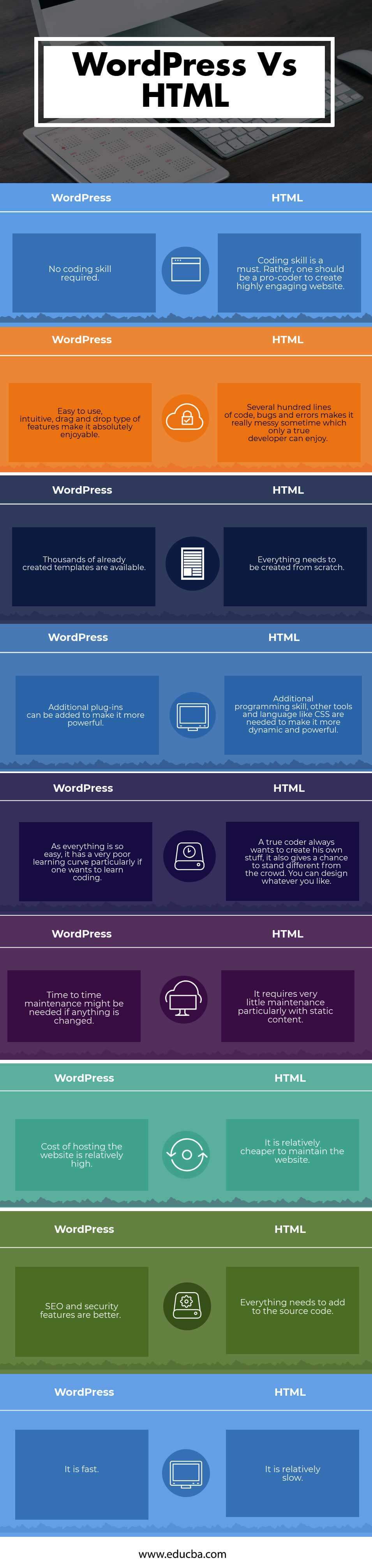
Credit: www.educba.com
Frequently Asked Questions
What Are Html And WordPress Used For?
HTML is used for creating static web pages by coding. WordPress is a content management system for building dynamic websites and blogs.
Is Html Better Than WordPress For Seo?
HTML can be optimized for SEO manually. WordPress offers SEO plugins and tools, making it easier for non-developers.
Can You Use Html With WordPress?
Yes, you can use HTML within WordPress. Custom HTML blocks allow for personalized code integration and design enhancements.
Which Is Easier To Learn, Html Or WordPress?
WordPress is generally easier for beginners. It offers a user-friendly interface with drag-and-drop features, unlike HTML.
Conclusion
Choosing between HTML and WordPress depends on your needs. HTML offers full control. Perfect for custom-built websites. Requires coding skills. WordPress simplifies website creation. Ideal for beginners. Comes with themes and plugins. Choose HTML for unique designs. Choose WordPress for ease and flexibility.
Consider your technical skills and website goals. Both have their strengths. Decide based on your project requirements. Whether you seek customization or simplicity, both can serve you well. Make an informed choice for your web journey.


