
Have you ever stumbled upon the term “Text Domain” while working with WordPress and wondered what it actually means? You’re not alone.
Understanding the concept of Text Domain is crucial, especially if you’re keen on creating multilingual WordPress sites or developing plugins and themes that cater to a global audience. This seemingly technical term is your gateway to making your website more accessible and user-friendly across different languages.
Imagine the impact on your site’s reach and engagement when your content speaks to users in their native language. We’ll demystify Text Domain in WordPress, showing you how it functions, why it’s essential, and how you can leverage it to elevate your website’s user experience. Stick around; this could be the game-changer you’ve been looking for.
Text Domain Basics
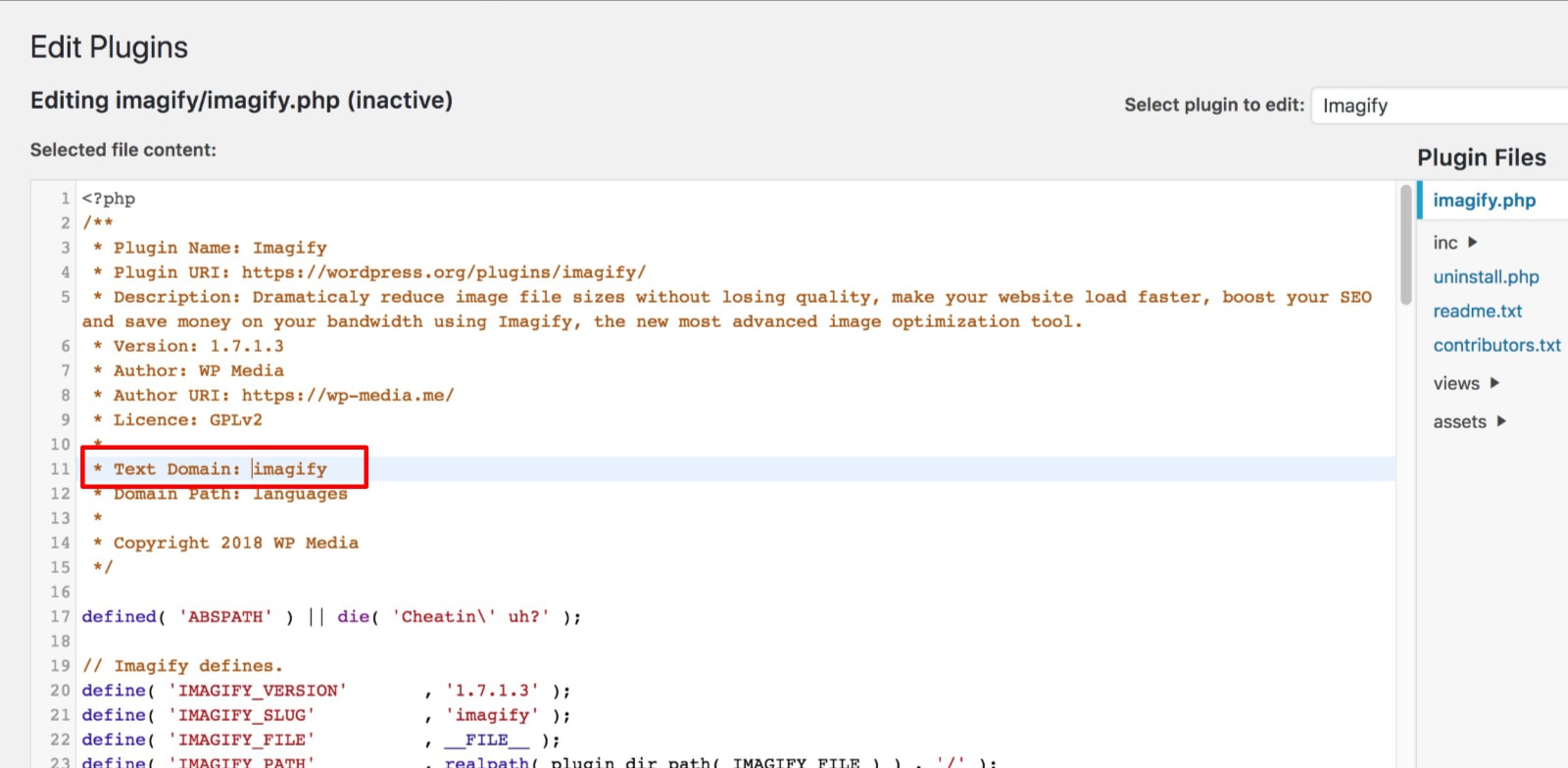
Text Domain is a special name in WordPress. It helps with translations. Each plugin or theme has a unique Text Domain. This makes sure words are translated correctly. Without it, translations might not work well. Developers use it to find the right language file. It’s like a map for languages. Text Domain is written in the code. It’s important for websites in many languages. It keeps words in the right language. This helps users understand better. Text Domain must match the plugin or theme folder name. This is a rule for WordPress. It makes sure everything works smoothly.

Credit: wordpress.com
Role In Localization
Text domain helps in translating WordPress themes and plugins. It makes them multilingual. Developers use it to mark strings for translation. This way, different users can read content in their language. Each theme or plugin has its own text domain. It keeps translations organized and easy to manage. Without it, users might face language problems. Text domain ensures smooth localization. It helps users understand WordPress better.
Setting Up Text Domain
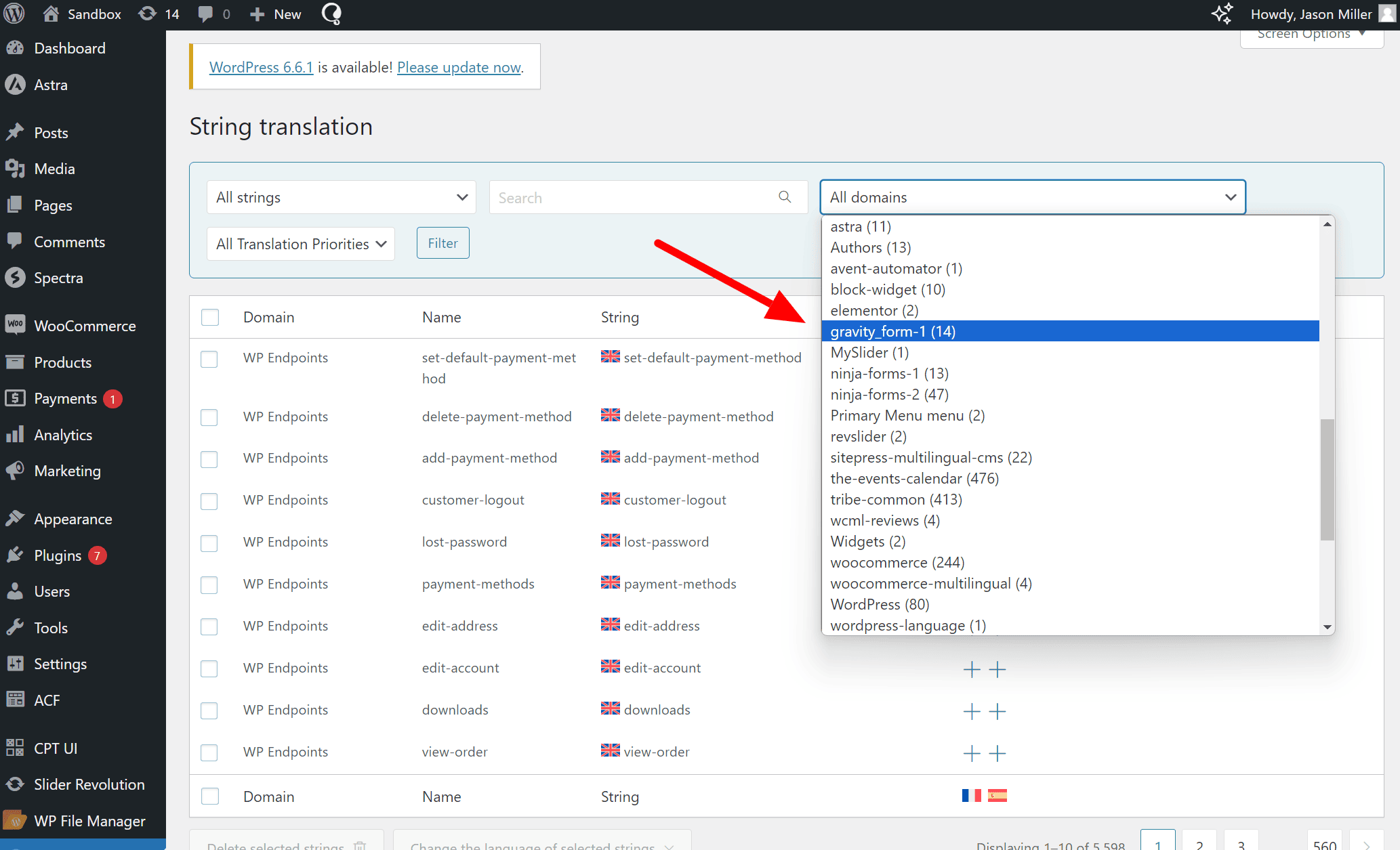
A text domain helps WordPress know which translations to use. It is a unique name. This name should match your plugin or theme name. Keep it simple and clear. Avoid using spaces or special characters. For example, use myplugin or my_theme. This helps WordPress find the right text.
You must register your text domain. Use the load_theme_textdomain() function for themes. For plugins, use load_plugin_textdomain(). Place the code in your main file. This tells WordPress where to look for translations. Make sure your files are in a languages folder. This makes it easy for others to translate.
Credit: wpml.org
Using Text Domain In Code
The load_textdomain function helps in loading translation files. Developers use it to make themes and plugins ready for different languages. They need to call this function in their code. The function takes two parameters. First, the text domain. Second, the path to the translation file. This makes the translation work for users.
Text domains are like keys in a dictionary. They help WordPress find the right translations. The __() and _e() functions use text domains. These functions display the translated text. Always include the correct text domain. This ensures the right translation shows up.
Best Practices
Understanding text domain in WordPress helps manage language translations for plugins and themes. It ensures consistency and accuracy in localization. Developers use text domains to link translation files with the WordPress system, allowing users to experience websites in their preferred language.
Consistent Naming
Use the same name for your text domain everywhere. This helps users and developers understand your plugin. Choose a name that matches your plugin’s folder name. Consistent names avoid confusion. Avoid using numbers or special symbols in names. Simple names are best. This helps with updates and support. It’s easy for others to find your domain.
Avoiding Conflicts
Avoid using common names that might clash. Unique names prevent conflicts with other plugins. Use a name that is specific to your plugin. Check other plugins to ensure your name is unique. Conflicts can cause errors and problems. It’s important for smooth operation. Always test your domain name before using it. This ensures no issues arise later.
Credit: www.kadencewp.com
Common Challenges
Translation issues can be tricky. Sometimes, words don’t translate well. This can confuse users. It’s important to check translations carefully. Finding errors early helps a lot. Use tools to test translations. Make sure everything looks right. Correct mistakes as soon as possible. This keeps your site clear and user-friendly. Always aim for simple and clear language. This helps everyone understand better.
Managing many languages is tough. You need a good plan. Each language needs attention. Organize content for each one. Use the right plugins for help. These tools make tasks easier. Check language settings often. Ensure they work properly. Keep language files updated. This prevents errors. Always test your site in all languages. This ensures a smooth experience for all users.
Tools And Resources
Translation plugins help you change your site’s language. Popular plugins include WPML, Polylang, and Loco Translate. Each plugin offers unique features. WPML supports many languages. Polylang lets you create bilingual sites easily. Loco Translate gives you tools to edit translations directly on your site. Plugins make language management simple. Choose one based on your needs.
Community support is vital for WordPress users. Many forums and groups exist online. WordPress.org forums offer answers to many questions. Facebook groups have active members ready to help. Slack channels provide real-time support. Reddit communities discuss tips and tricks. The community is always ready to assist. They help solve problems fast. Ask questions and learn from others.
Frequently Asked Questions
What Does Text Domain Mean In WordPress?
A text domain in WordPress is a unique identifier for translations. It helps locate translation files for themes or plugins. Using a consistent text domain ensures translations are found and applied correctly. It is crucial for multilingual websites, allowing users to experience content in their preferred language.
How Do I Set A Text Domain?
Setting a text domain involves defining it in your theme or plugin’s code. Use the load_theme_textdomain or load_plugin_textdomain function. Ensure the text domain matches the name in your translation files. Consistency in naming helps WordPress locate and apply translations accurately.
Why Is Text Domain Important For Plugins?
Text domains are essential for plugins to enable translations. They ensure the plugin’s text can be translated into different languages. This enhances accessibility for non-English speakers. A properly defined text domain makes your plugin compatible with multilingual setups, broadening its reach and usability.
Can I Use Any Name For Text Domain?
Yes, but it’s recommended to use a unique and descriptive name. Typically, the text domain should match your theme or plugin’s slug. This helps maintain consistency and avoids conflicts with other text domains. A unique name ensures accurate loading of translation files and better organization.
Conclusion
Understanding text domains in WordPress is essential for plugin development. They help translate strings in your plugins. This ensures clear communication with users worldwide. Choosing a unique text domain is crucial. It prevents conflicts with other plugins. Remember, consistency in naming is important.
It aids in smooth translations. Use text domains effectively for better user experiences. This boosts your plugin’s accessibility and appeal. Always test translations to ensure accuracy. Keep learning and improving your WordPress skills. Text domains are a small part but crucial.
They contribute significantly to your plugin’s success.


