
Are you setting up your WordPress site and come across the term “table prefix”? You’re not alone.
This small yet mighty component can have a big impact on your website’s security and efficiency. Understanding what a table prefix is and how it influences your WordPress installation can save you from potential headaches down the road. But don’t worry, you don’t need to be a tech wizard to grasp this concept.
We’ll break it down into simple, digestible pieces. By the end, you’ll not only know what a table prefix is, but you’ll also be equipped with the knowledge to make your WordPress site more secure and efficient. Keep reading to discover how this seemingly minor detail can make a major difference for your website.
Table Prefix Basics
WordPress uses a database to store data. This data includes posts, users, and settings. Each piece of data goes into a table. Tables have names. These names begin with a table prefix. By default, WordPress uses “wp_” as the prefix. So, a table might be named “wp_posts”.
Changing the table prefix can add security. Hackers often target default settings. A unique prefix makes it harder for them. Imagine using “abc_” instead of “wp_”. Now, your table is “abc_posts”.
Always remember to use a prefix that is easy to remember. But also, make it hard for others to guess. Choose a mix of letters and numbers. This simple step can help keep your site safe.
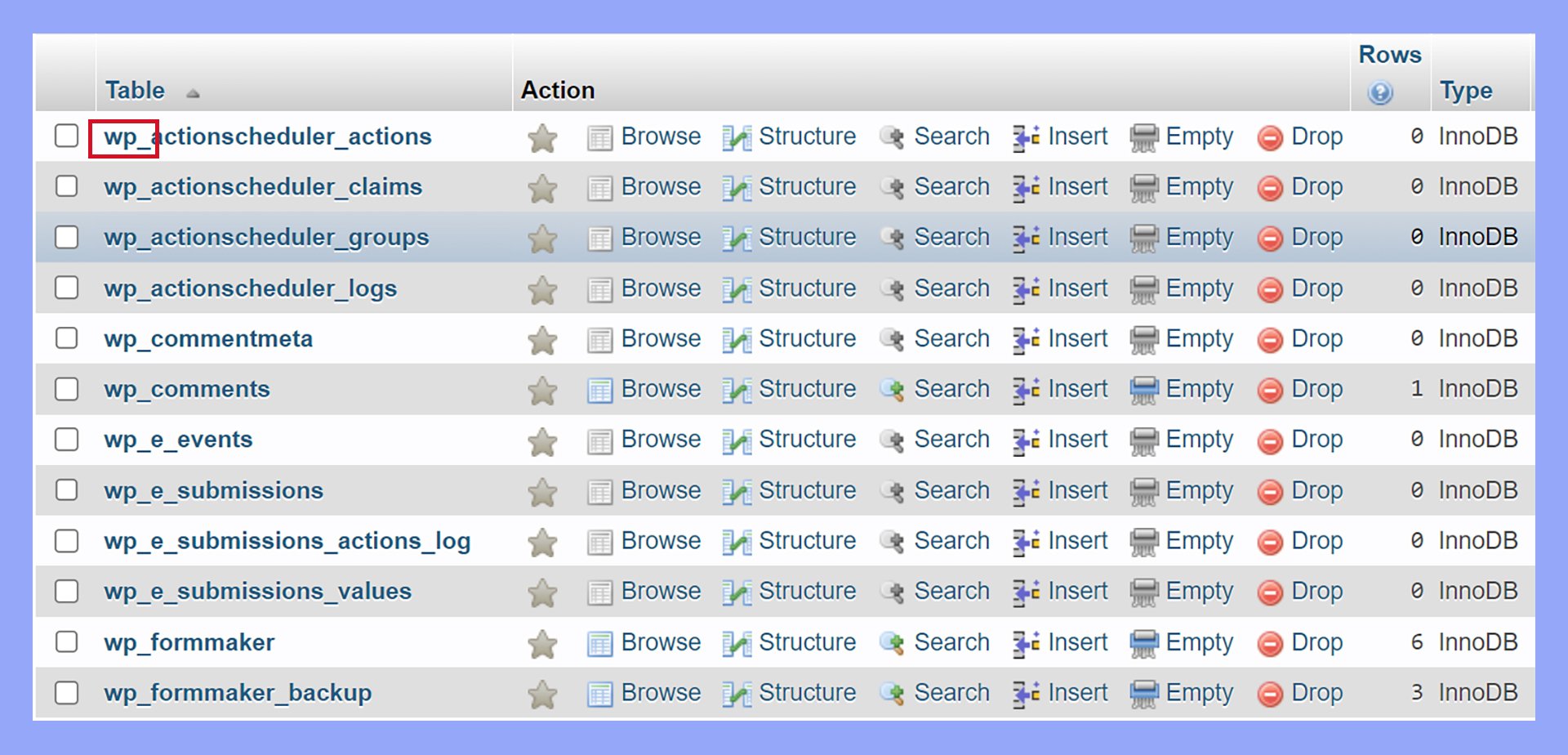
Credit: 10web.io
Importance Of Table Prefix
Table prefixes play a crucial role in WordPress installations. They help in protecting the database. Every WordPress site has its own database. This database stores all the site’s data. A table prefix adds an extra layer of security. It prevents hackers from easily accessing the database. Hackers often target common prefixes. Custom prefixes make it harder for them. Using unique prefixes is important. It keeps your site safe.
Table prefixes also help in organizing data. They make it easy to identify tables. Each table in the database begins with the prefix. This method keeps things tidy. It helps in managing multiple sites on one server. Each site has its own prefix. This prevents mix-ups between different sites. It ensures each site works correctly.
Default Table Prefix In WordPress
WordPress uses a default table prefix called “wp_”. It helps organize database tables. Every site has its own tables in the database. This prefix is a part of each table’s name.
Changing the default prefix can improve security. Hackers might target sites with default prefixes. By using a custom prefix, your site becomes harder to attack. It’s a simple yet effective change.
During installation, WordPress allows you to set a custom prefix. This option appears in advanced settings. A unique prefix helps protect your site’s data. Always choose a prefix that is not easy to guess.
Customizing Table Prefix
Changing the table prefix can boost your website’s security. It makes your site less predictable. First, open your wp-config.php file. Look for the line that starts with $table_prefix. Change the default prefix to something unique. Use letters, numbers, and underscores. For example, $table_prefix = 'abc123_';.
Next, access your database using phpMyAdmin. Locate your WordPress database. Click on the SQL tab. Run the SQL query to rename all tables. Replace the old prefix with your new one. Verify all tables are updated. Remember to also update any hardcoded references in your theme or plugins.
Always backup your database before changes. This prevents data loss. Choose a prefix that is unique and hard to guess. Avoid using common words. Regularly check for updates in your WordPress site. This keeps your site secure and efficient. Use plugins carefully. Some might not support custom prefixes.
Security Benefits
Table prefixes in WordPress help protect your database. They act as a shield against SQL injections. Hackers find it harder to guess the table names. This makes your website safer. It’s like adding an extra lock to your door.
SQL injections are dangerous. They can harm your data. Table prefixes give an extra layer of safety. They make your database more secure. Hackers struggle to break in. It’s like solving a tricky puzzle. Your data stays safe and sound.
Changing the default prefix is smart. It boosts your database security. Hackers target common prefixes. A unique prefix confuses them. This simple change adds protection. Your site becomes a harder target. It’s a clever move for safety.

Credit: wpmarmite.com
Common Mistakes To Avoid
Changing table prefixes without knowledge can break your site. Hackers often target default prefixes. If you don’t change them, your site is at risk. Incorrect changes can lead to database errors. These errors make your site unusable. Always back up your database before any changes. This ensures you can restore if something goes wrong. A small mistake can cause big problems.
Errors can happen during installation. Always double-check your settings. Mistyped prefixes can cause issues. Your site might not connect to the database. Check your wp-config.php file for errors. Make sure all prefixes match. If errors persist, consult WordPress forums. Many users share solutions to common problems. Following their advice can save time. Stay calm and methodical when fixing errors.
Tools And Plugins For Managing Table Prefix
Wordfence Security is a well-known plugin. It helps keep websites safe. This plugin also lets you change the table prefix. iThemes Security is another choice. It offers many features to protect WordPress sites. Changing the table prefix is easy with it.
phpMyAdmin is a tool for managing databases. It is often used with WordPress. Users can change the table prefix with it. First, open phpMyAdmin and select the database. Next, find the table names. Finally, edit the prefix in each table. This can help make your site more secure.

Credit: wpmarmite.com
Frequently Asked Questions
What Is A Table Prefix In WordPress?
A table prefix is a unique identifier added to database table names during WordPress installation. It helps differentiate tables when multiple installations share the same database. Using a custom prefix enhances security by making it harder for hackers to guess table names.
Why Change The Default WordPress Table Prefix?
Changing the default table prefix improves security by preventing SQL injection attacks. Hackers often target default prefixes like “wp_”. A unique prefix makes it harder to predict table names, reducing vulnerabilities. It’s a simple yet effective way to safeguard your WordPress database.
How Do I Customize Table Prefix In WordPress?
To customize the table prefix, edit the `wp-config. php` file before installation. Locate `$table_prefix` and change the default “wp_” to your preferred prefix. Ensure your new prefix uses only letters, numbers, and underscores. Avoid changing it after installation to prevent database errors.
Can Table Prefix Affect WordPress Performance?
Table prefixes have no direct impact on WordPress performance. They are primarily for organizational and security purposes. As long as your database is optimized, the prefix won’t affect speed or functionality. Proper management ensures efficient database operations regardless of the prefix used.
Conclusion
Understanding table prefixes in WordPress is crucial for security. These prefixes help protect against database attacks. Changing the default prefix strengthens your site’s defense. It’s simple yet effective. Customizing table prefixes ensures unique identification. This prevents unauthorized access. Your website remains secure and distinct.
Always prioritize security in installations. Regular checks are important. Keep your site safe and sound. Remember, small steps matter. They build a strong foundation. A secure site boosts trust. Visitors appreciate safe environments. Implement these changes today. Your WordPress site deserves the best protection.
Stay informed and proactive.


