
Have you ever wondered how to make your WordPress site stand out in a sea of online content? The secret often lies in something as simple as your site title.
This seemingly small detail can have a big impact on your website’s visibility and appeal. But what exactly is a site title in WordPress, and why is it so crucial for your online success? Imagine walking into a bookstore where every book is wrapped in plain brown paper.
Without a title, how would you choose what to read? Your WordPress site is no different. The site title acts as your virtual front cover, inviting visitors to explore further. It’s not just about aesthetics; your site title can play a pivotal role in search engine rankings, helping you attract more traffic and engage your audience effectively. Curious to know more? You’ll discover what a site title is, why it matters, and how to create one that captures attention. If you’re ready to unlock the potential of your WordPress site, keep reading to transform your online presence with just a few strategic tweaks.
Importance Of Site Title
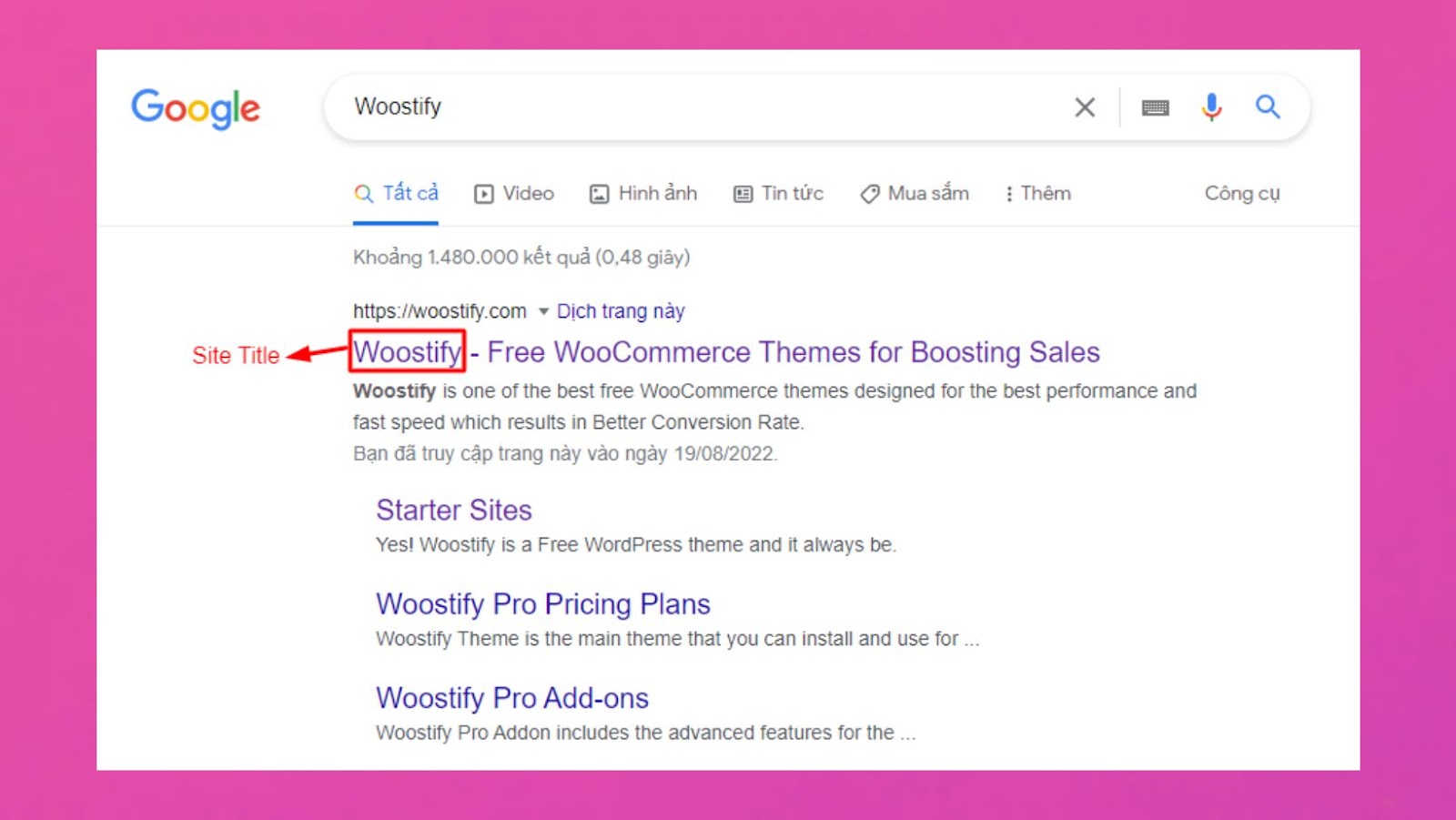
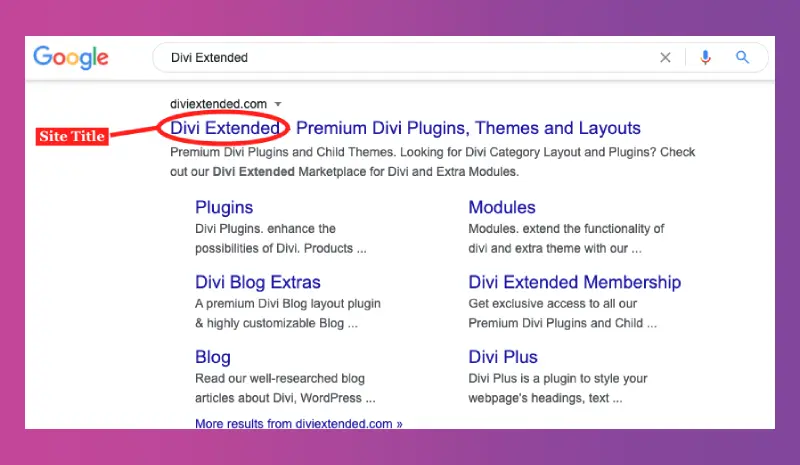
The site title is the name of your website. It helps people know what your site is about. A clear site title makes it easy for visitors to understand your content. It also helps in search engine optimization (SEO). Search engines use the site title to rank your site. A good site title can bring more visitors.
Keep the site title short and clear. Avoid long and confusing words. A short title is easy to remember. It should reflect the main idea of your site. Many people use site titles to decide if they want to visit. Make sure your title is inviting and descriptive. This helps you connect better with your audience.
Credit: woostify.com
Site Title Vs Tagline
The Site Title is the name of your site. It’s like a label. People see it first. It tells what your site is about. The Tagline is a short phrase. It adds more detail. It tells the main idea. Both are important. They help visitors understand your site. They show in search results. They are key for SEO. Keep them simple. Make them clear. Update them if needed. They reflect your site’s identity. Use catchy words. Make them memorable. They grab attention. They help users and search engines.
How To Set The Site Title
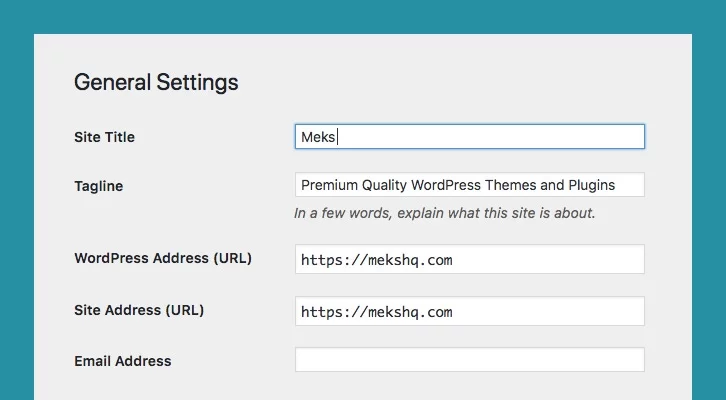
First, log in to your WordPress account. Use your username and password. Once logged in, you will see the dashboard. This is the main screen. Here you can manage your site. The dashboard is easy to use. Just follow the steps.
On the left sidebar, find the Settings option. Click on it. A dropdown menu will appear. Choose General from the list. This opens the General Settings page. At the top, you will see the Site Title field. This is where you can enter your site’s name. Make sure it’s clear and simple. Your visitors will see it often. Click Save Changes when you are done. This will update your site title.
Tips For Crafting A Site Title
A site title should be short. People remember short names better. Aim for around 60 characters. This helps it fit in search results. A concise title makes your site look neat.
Use keywords that describe your site. These help with search engines. Keywords tell people what your site is about. Choose words that are common in your topic.
Your title should be unique. Check if others use the same name. A unique title helps your site stand out. It makes people remember you. Avoid copying popular names.
Impact On Seo And Branding
Site titles are important for WordPress websites. They help with search engines. A good title shows what the site is about. It helps users find your site easily. Search engines use site titles. They rank sites based on relevance. A clear title improves visibility. It attracts more visitors.
Branding is affected too. A catchy title creates a strong impression. It makes the site memorable. People recognize your brand. This builds trust. A strong brand gets more clicks. It grows your audience. Choose words carefully. They shape how people see your site. Make it unique. Make it stand out.
Common Mistakes To Avoid
Choosing a generic site title is a mistake. It makes your site blend in. A title should be unique. It should reflect your content.
Avoid using complex words in the title. Simple words attract more readers. A clear title is easy to understand.
Don’t make your site title too long. A short title is easier to remember. It also looks better on search results.
Make sure your title is related to your content. It helps visitors know what to expect. A misleading title can confuse people.
Use keywords wisely in your title. This helps with search engine ranking. Don’t overuse them.
Changing Site Title: Best Practices
Changing your site title too often can confuse visitors. Keep changes minimal. This keeps your website’s identity strong. Frequent changes can affect SEO. Search engines need time to recognize new titles. Stick to one title for a long period. This helps in building trust with your audience.
Let users know when the site title changes. Clear communication is key. Use newsletters or announcements. Explain why the title changes. This keeps users informed. Transparency builds trust. Your users will appreciate being updated. Always aim for clarity in communication.
Credit: mekshq.com
Credit: diviextended.com
Frequently Asked Questions
What Is A Site Title In WordPress?
The site title in WordPress is your website’s main name. It’s displayed in the browser tab and often in the header. It helps with branding and SEO by informing visitors and search engines about your site’s focus. Customize it in the WordPress dashboard under “Settings” > “General.
“
Why Is The WordPress Site Title Important?
A WordPress site title is crucial for branding and SEO. It appears in search results and browser tabs. A clear, descriptive title helps visitors understand your site’s content. It also enhances search engine visibility, making it easier for users to find your website.
How To Change The Site Title In WordPress?
To change the site title, go to your WordPress dashboard. Navigate to “Settings” and click on “General. ” In the “Site Title” field, enter your new title. Save changes to update. This change will reflect in your site’s header and browser tab.
Can The Site Title Affect Seo?
Yes, the site title affects SEO by influencing search engine visibility. It appears in search results and browser tabs. A well-chosen title improves click-through rates and helps search engines understand your site’s content. Ensure it’s descriptive and includes relevant keywords for better ranking.
Conclusion
Understanding the site title in WordPress is crucial. It helps with branding. It also impacts search engine ranking. A clear and descriptive title attracts visitors. It improves your site’s visibility. Keep it short and relevant. Reflect your site’s purpose. Make it memorable for users.
Regularly review and update it. Ensure it aligns with your content. A well-chosen site title builds trust. It enhances user experience. So, focus on crafting a strong site title. It’s a small step with big benefits.


