
Have you ever wondered about the significance of the ‘Site Name’ in WordPress? You might think it’s just a simple title, but it holds more power than you might imagine.
This little detail can shape your site’s identity and influence how visitors perceive your brand. Understanding its role can help you make smarter decisions about your website’s presentation. Whether you’re a seasoned WordPress user or a curious beginner, this article will unravel the mysteries of the ‘Site Name’ and show you how to leverage it for success.
Get ready to discover why this small feature is a big deal for your website!
Understanding Site Name In WordPress
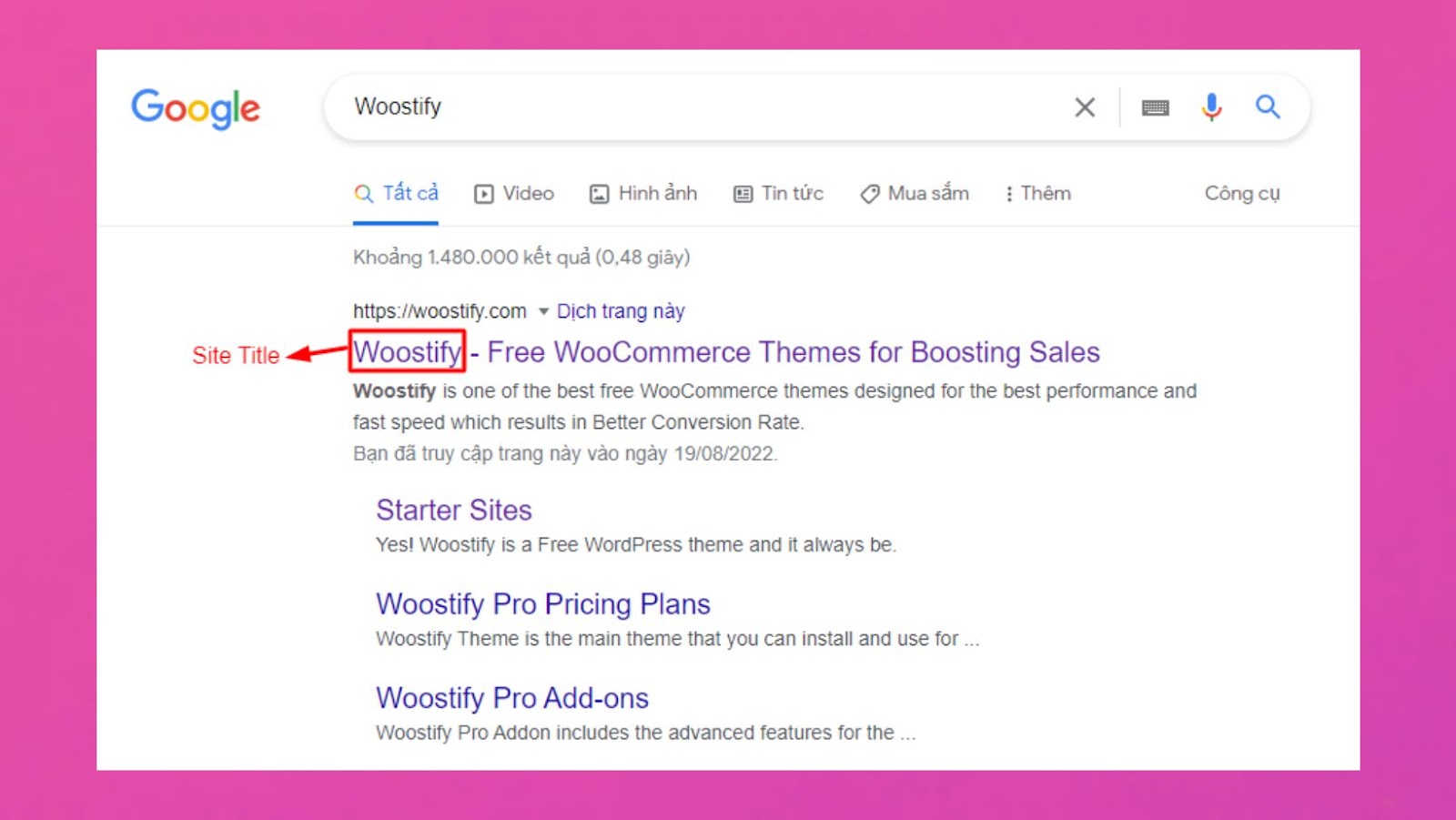
The site name is the title of your website. It’s what people see first. It appears on the browser tab. It shows in search engine results. Choosing the right name is important. It tells what your site is about. Think of it as your website’s identity.
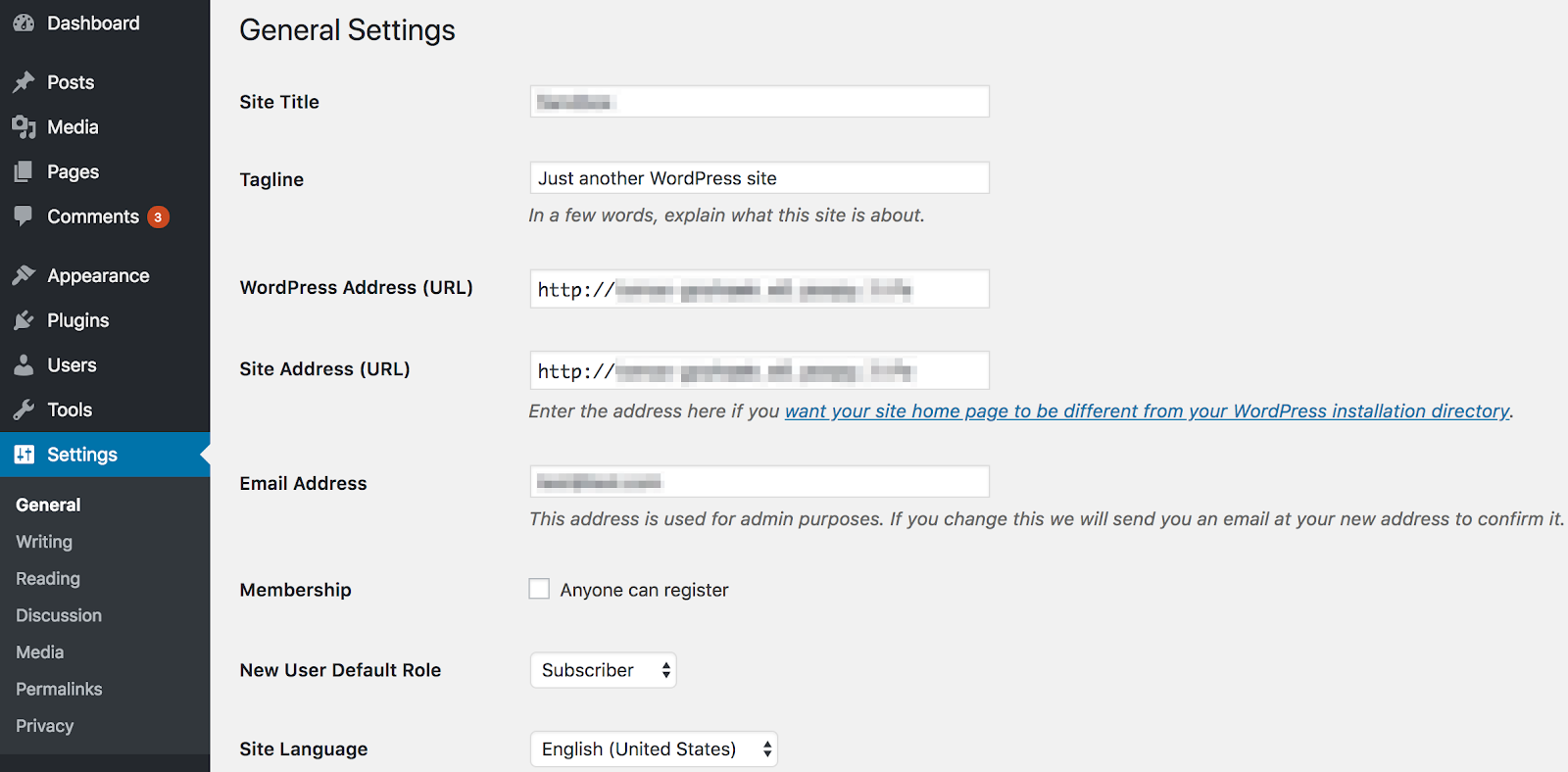
Go to your WordPress dashboard. Find the Settings option. Click on General. Enter your new site name in the Site Title field. Click Save Changes to update. Now your new site name is active.
A good site name helps with SEO. It should include keywords related to your content. This helps search engines find your site. It also makes your site easy to remember. Users can find you easily.

Credit: woostify.com
Importance Of Site Name
A good site name helps in ranking better. It includes important keywords related to your content. Search engines notice these keywords. They help in attracting more visitors. A simple name can improve your site’s visibility.
Your site name represents your brand. It tells users about your business. A unique name makes your brand memorable. People remember it easily. It builds trust with your audience. A strong name can define your brand’s identity.
A clear site name improves user experience. Visitors find it easy to navigate your site. It helps in understanding your site’s purpose. A descriptive name guides users to the right content. A good name leads to a better user experience.
Setting The Site Name
First, open your browser. Then, type your website URL. Add “/wp-admin” to the end. Enter your username and password. Click “Log In”. Now, you are in the WordPress Dashboard.
Look at the left side of the dashboard. Find “Settings”. Click on it. Then, click “General”. This is where you change your site name. It is simple and quick.
In the General Settings, see “Site Title”. This is your site name. Click inside the box. Type your new site name. Make it short and easy to remember. Scroll down and click “Save Changes”. Your site name is now updated.
Credit: wpengine.com
Best Practices For Choosing A Site Name
A short site name is easier to remember. Avoid long names. People forget long names quickly. Choose simple words. Simple words stick in minds. Use names people know. This helps them remember your site. Avoid complex names. Keep it catchy.
Site name should show what you do. Think about your brand. Choose words that match your work. Use names that fit your style. This helps people know your brand. Reflect your business. Choose words that people link to you.
Avoid hard-to-spell names. People misspell them. Stay away from numbers. Numbers confuse people. Choose words without special characters. Special characters are tricky. Avoid similar names. People mix them up.
Impact On Website Performance
Site name in WordPress can affect search rankings. This is because it helps search engines understand your site. A clear site name makes it easier for search engines to categorize content. This boosts your visibility in search results. Better rankings mean more visitors. More visitors can lead to more business. It’s essential to choose a site name wisely. It should be relevant to your content.
Site name also affects credibility. A professional name builds trust with users. Trust can increase engagement. Users prefer sites they trust. A confusing name can push users away. This affects your site’s reputation. Your site name is a key part of your online identity. Make sure it represents your brand well.
Common Issues And Solutions
Changing a site name in WordPress can be tricky. Incorrect settings can cause problems. Sometimes, the name does not update. Other times, the site becomes inaccessible. Check the WordPress General Settings first. Ensure the new name is correctly entered.
If the issue persists, look at the wp-config.php file. This file may hold old site details. Update it with the new name. Always back up your site before making changes. This avoids data loss.
Duplicate site names can confuse users. They may visit the wrong site. To fix this, check your site settings. Ensure each site has a unique name. Avoid naming conflicts in the database. This ensures all sites work well.
If duplicates persist, review your DNS settings. They may point to the same location. Adjust them to separate the sites. This keeps each site distinct and easy to find.
Tools For Site Name Management
Site Name in WordPress is the title of your website displayed in browser tabs and search results. It helps identify your site and appears in various places like emails and page titles. Proper management of the Site Name enhances brand visibility and user experience.
WordPress Plugins
WordPress plugins make managing site names easy. Yoast SEO helps with SEO settings. All in One SEO Pack offers similar features. Jetpack provides security and site stats. WP Meta SEO is useful for meta tags. SEOPress offers advanced options. Plugins are simple to install. They work directly from your dashboard. Choose one based on your needs. Some are free, others are paid. Free ones work well for small sites.
Online Generators
Online generators help create unique site names. NameMesh offers many ideas. Bust a Name combines words for names. Panabee suggests names based on themes. DomainWheel checks domain availability. Lean Domain Search finds available names fast. These tools are free and easy to use. They help save time. Many work with WordPress seamlessly. Just type some keywords and see results.
Credit: woostify.com
Faqs On WordPress Site Name
The site name is the title of your website. It helps users know what your site is about. You can change the site name in WordPress settings. This name shows on the browser tab. It also appears on search engines.
The site name is important for branding. It tells people your site’s purpose. A clear name helps attract visitors. It can make your site easy to find. A good site name improves your site’s visibility.
Go to WordPress dashboard. Click on Settings. Then click on General. Here, you can change the site name. Type a new name and save changes. Your site name will update.
Frequently Asked Questions
What Is The WordPress Site Name?
The WordPress site name is the title of your website. It helps identify your site to visitors. You can set it in the WordPress settings. It’s often displayed in the browser tab and can impact SEO. Choose a name that reflects your site’s purpose.
How To Change Site Name In WordPress?
To change your site name, go to the WordPress dashboard. Navigate to Settings, then General. Here, you can update the site title. Save changes to apply the new name. This change will be reflected across your site instantly.
Does The Site Name Affect Seo?
Yes, the site name can impact SEO. A relevant site name helps search engines understand your content. It should include keywords related to your niche. This can improve your site’s visibility in search results. Ensure it’s clear and descriptive.
Where Is The Site Name Displayed?
The site name appears in several places. It’s shown in the browser tab and search engine results. It can also appear in your site’s header, depending on the theme. This helps users recognize your brand easily.
Conclusion
Site names in WordPress help shape your website’s identity. Choosing a good site name is important for branding. It impacts search engine visibility too. A clear, relevant name aids users in remembering your site. Keep it short and simple for easy recall.
Avoid complicated or confusing names. Consistency across platforms can boost recognition. Always check domain availability first. A unique site name stands out in crowded digital spaces. Focus on creating a memorable online presence. Your site name is the first step in connecting with your audience.
Make it count.


