
Are you looking to boost your WordPress website’s visibility and improve how search engines understand your content? If so, schema markup might be your new best friend.
Imagine giving search engines a clearer picture of what your site is all about, helping them serve up your content to the right audience at the right time. Schema in WordPress can do just that. It’s like adding a layer of context to your pages, making them more appealing not only to search engines but also to potential visitors.
Curious about how it works and how you can use it to your advantage? Stick around to discover the ins and outs of schema in WordPress and why it might just be the secret ingredient your website needs.

Credit: kinsta.com
Schema Basics
Schema is a way to help search engines understand your site. It gives more details about your content. Think of it like a label. It tells search engines what each part of your site means. Adding schema can make your site look better in search results. This is called a rich snippet. It might show stars for reviews or times for events. It’s very useful for getting more clicks.
There are many types of schema markup. Here are some examples:
- Article: For news and blog posts.
- Product: For items you sell.
- Recipe: For cooking instructions.
- Event: For concerts or sports.
- Review: For opinions on items.
Each type helps search engines show info in a better way. Choose the right type for your content. It makes your site more visible.
Credit: fr.wordpress.org
Importance For Seo
Schema in WordPress helps search engines understand your content. It provides extra information about your pages. This can make your website more visible in search results. Search engines like Google use schema to display rich snippets. Rich snippets show detailed information like reviews or event times. People find rich snippets helpful. They can increase traffic to your site.
Enhancing Search Visibility
Schema markup boosts your site’s presence in search results. It gives search engines more details. This helps them show your content better. Better visibility leads to more visitors. More visitors can mean more business. Schema makes your site stand out.
Improving Click-through Rates
Schema markup can improve your site’s click-through rates. It makes your page look more appealing. Users see clear information in search results. They are more likely to click on your link. More clicks mean more engagement. More engagement can lead to success.
Implementing Schema In WordPress
Plugins make schema setup easy. They save time and effort. Schema Pro and Yoast SEO are popular choices. These plugins add schema automatically. No coding skills needed. Just install and activate them. Customize settings for better results. Schema improves search results. It helps search engines understand content. Visitors find what they need faster.
Manual setup offers more control. It requires some coding knowledge. Use Google’s Structured Data Markup Helper. This tool guides you step by step. Add schema manually in HTML. It gives flexibility in customization. You can target specific content. Review your code for errors. Validate with Google’s Rich Results Test. Proper schema boosts visibility. It increases the site’s relevance.

Credit: www.shoutmeloud.com
Common Schema Types For WordPress
Schema helps search engines understand content better. For articles, it shows the headline, author, and date. BlogPost schema highlights the main topic. It can show the blog’s image, date, and author. This helps readers find your posts easily. Readers can see the post summary quickly. Search engines like this extra info. It makes your post more visible.
Product schema shows details about items you sell. It includes the name, price, and brand. Review schema displays ratings and comments from buyers. This helps people trust your product. It shows if people like it or not. Buyers see the stars or scores given. It makes shopping decisions easier.
Event schema is used for concerts, classes, or shows. It shows the event’s name, date, and location. People can find events quickly. Organization schema helps show details of a company. It includes the name, logo, and contact info. This makes it easy for users to find businesses online. Organizations can share their story better.
Troubleshooting Common Issues
Understanding schema in WordPress helps improve website structure for better search engine visibility. Schema markup assists search engines in interpreting your site’s content more effectively, enhancing user experience. Troubleshooting schema issues ensures accurate data representation and prevents display errors.
Validation Errors
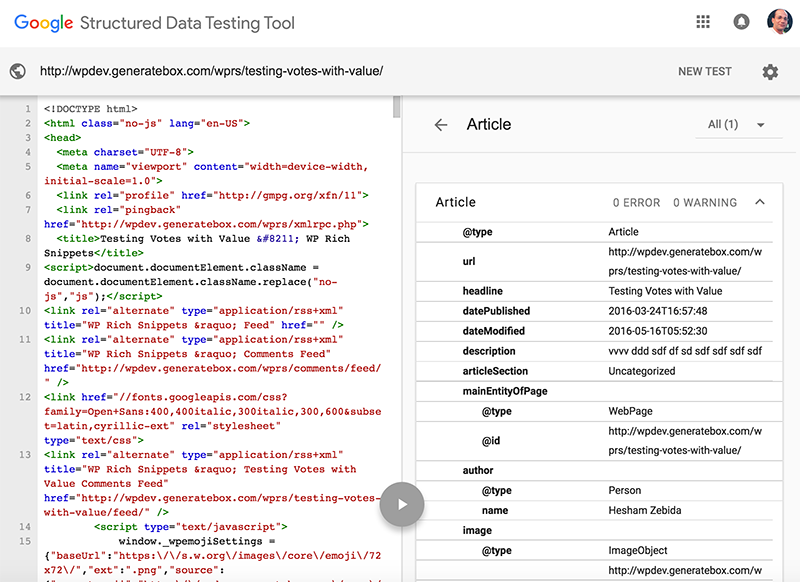
Schema validation errors can confuse many users. These errors happen when the schema markup is not correct. Invalid schema can affect your site’s SEO. Always check for missing tags or wrong values. Use tools like Google’s Structured Data Testing Tool. This helps find errors in the code. Fixing these errors improves your site’s visibility. Correct schema markup helps search engines understand your content better. It also improves the appearance of your site in search results.
Conflicts With Themes
Schema conflicts may arise due to theme incompatibility. Some themes don’t support certain schema types. This can lead to broken schema markup. Themes might override or ignore schema settings. Ensure your theme is updated and compatible. Use plugins to manage schema effectively. Plugins often provide custom solutions for theme conflicts. They help integrate schema without altering the theme. Resolving theme conflicts enhances user experience and SEO performance.
Tools For Testing Schema
Google’s Rich Results Test is a helpful tool. It checks your website’s schema. This tool tells if your schema works. It shows errors and warnings. You can fix them easily. This helps in improving your site’s SEO. Search engines love good schema.
Schema Markup Validator is another useful tool. It checks if your schema is correct. You just paste the URL. It shows errors in your schema. Fixing errors is easy. It makes your website better. Good schema helps search engines understand your site.
Best Practices
Schema in WordPress helps search engines understand your site. Regular updates are important. Outdated schema can lead to errors. Always check for new schema types. Use tools that automatically update schema. This saves time and effort. Manual updates can miss important changes. Stay informed about updates in schema.
Over-optimization can harm your site. Use schema carefully. Do not overload your site with schema tags. Keep it simple and relevant. Focus on quality rather than quantity. Too many tags confuse search engines. This can lower your site’s rank. Balance is key for good optimization.
Frequently Asked Questions
What Is Schema In WordPress?
Schema in WordPress refers to structured data markup that helps search engines understand your site’s content. It enhances SEO by providing rich snippets in search results. Using Schema, you can improve your site’s visibility and attract more visitors. Plugins like Schema Pro or Yoast SEO make implementation easy for users.
How Does Schema Improve Seo?
Schema improves SEO by providing search engines with detailed information about your content. This leads to enhanced search result displays, known as rich snippets. Rich snippets increase click-through rates by making your listings more attractive. Implementing Schema helps search engines better understand your site’s context and relevance.
Which Plugins Add Schema To WordPress?
Several plugins add Schema to WordPress, enhancing SEO and user engagement. Popular options include Schema Pro, Yoast SEO, and All in One Schema Rich Snippets. These plugins simplify the process of adding structured data to your site. They offer user-friendly interfaces and customization options for different content types.
Can Schema Increase Website Traffic?
Yes, implementing Schema can increase website traffic by improving search visibility. Rich snippets generated by Schema make your listings more eye-catching in search results. This attracts more clicks and potential visitors. By providing detailed information, Schema helps search engines rank your content better, leading to higher traffic.
Conclusion
Schema in WordPress simplifies website data for search engines. It helps improve SEO by providing structured information. This makes content more understandable and accessible. Users enjoy better search results. Implementing schema is not complex. With the right plugins, it’s easy.
This effort can enhance website visibility. Think of schema as a tool. It bridges the gap between your content and search engines. Experiment and see the benefits. Your site can stand out in search results. Engage more visitors and boost your online presence.
Embrace schema for a clearer, more connected website.


