
Are you tired of your beautifully crafted code snippets or special formatting getting messed up when you publish them in WordPress? It’s a common frustration, but there’s a simple solution you might not know about yet: preformatted text.
Understanding how to use preformatted text in WordPress can transform the way you share content that requires exact formatting. Whether you’re a blogger, a developer, or someone who just loves precision, knowing how to properly utilize this feature can save you time and enhance your posts’ readability.
Dive into this article to discover how preformatted text can be your secret weapon for maintaining perfect formatting every time.
Credit: www.pair.com
Preformatted Text Basics
Preformatted text keeps the same spaces and line breaks as you type. It shows your text exactly how you write it. This means no changes in the layout. Important for coding and special text. Users can see text in a fixed-width font. This helps in reading code and special text.
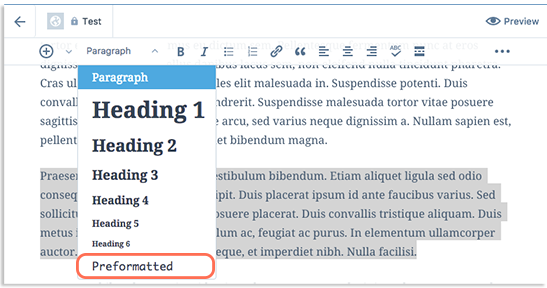
Preformatted text is added using the “pre” tag in HTML. WordPress makes it easy. Click the “Preformatted” option in the editor. This keeps your text neat and clear. It is a simple way to show code or special text.
Importance In Web Design
Preformatted text is essential in web design. It keeps text layout intact. This means spaces, lines, and tabs stay the same. Designers use it for code snippets. This makes code easy to read. It also helps with poetry formatting. Lines stay as written, without changes. This keeps the poem’s style. Preformatted text is very helpful for lists. It shows items clearly. Text alignment is crucial too. Preformatted text ensures this. Good alignment makes websites look neat. It improves user experience. Visitors find information quickly. This saves time and effort.
Using preformatted text is simple in WordPress. It is useful for beginners. They can use it without trouble. It is a basic feature. Yet, it has a big impact. Websites look professional with it. It adds structure to the page. Text remains organized. This makes reading easy. Users appreciate this. They return to sites that are clear. Preformatted text helps achieve this goal.
Creating Preformatted Text
The Block Editor is a useful tool in WordPress. It helps you add text easily. To add preformatted text, select the preformatted block. This keeps your text neat. Your spaces and line breaks stay the same. This is handy for coding snippets.
HTML and CSS can style preformatted text. Use the tag in HTML for this. It respects spaces and lines. Style it with CSS for colors or fonts. You can make text stand out. This method is great for advanced users.
Shortcodes are easy to use in WordPress. They make adding preformatted text simple. Just enter a shortcode in your editor. It saves time and effort. Shortcodes help in many ways. They keep your text formatted. This is a quick method for beginners.
Use Cases
Preformatted text keeps your code snippets neat. It shows them just as you type. This helps readers see the code clearly. Every space and line stays the same. This is great for sharing programming tips. Readers can copy the code easily. They see the exact format you use. No changes happen to the text style. This makes learning coding easier.
Preformatted text also helps with text layouts. It keeps your special text look. Poems, scripts, or lists stay in order. Every space and line is safe. This way, the text looks just like you want. It does not change when you publish. You can share stories or instructions easily. Readers see the original style. It helps them understand better.
Styling Preformatted Text
Changing fonts makes text look different. Use bold fonts for important words. Try italic for emphasis. Choose simple fonts like Arial or Times New Roman. Easy fonts help in reading. Experiment with font size too.
Spacing between lines matters. More space makes reading easy. Less space can feel cramped. Add extra space after paragraphs. Use margins and padding for better layout. Good spacing keeps text clean.
Background colors make text stand out. Light colors are best. Dark text on light background is easy on eyes. Use pale yellow or light gray. Avoid too bright colors. Keep text readable with contrast.

Credit: wordpress.com
Common Mistakes
Using preformatted text can be tricky. Many people forget to keep lines short. This makes text hard to read. Spacing is another issue. It often gets ignored. Alignment is also important. Misaligned text looks messy. People sometimes use the wrong font. This makes text look strange. Color contrast must be clear. Dark text on dark background is hard to read. HTML tags can be forgotten. This breaks the format. Always check preview before publishing. This helps catch mistakes. Copy-pasting without checking can cause errors. Text might lose its format. Consistency in style is key. Different styles confuse readers.
Tips And Best Practices
Use preformatted text to show code or special text styles. This keeps the text in its original form. It won’t change with the theme. Preformatted text is good for sharing code. It keeps spaces and lines just right. This helps readers understand better.
Be sure to check how it looks on mobile devices. Sometimes, text can go off the screen. Keep lines short to avoid this. Add breaks to long lines for easier reading. Always preview your post before sharing it.
Make sure the preformatted text is easy to read. Use simple fonts and colors. Avoid bright colors that hurt the eyes. Stick to basic colors like black or dark gray. This makes reading smoother for everyone.

Credit: flashdba.com
Frequently Asked Questions
What Is Preformatted Text In WordPress?
Preformatted text in WordPress displays content exactly as typed. It preserves spaces and line breaks for code snippets or special formatting needs. This feature is useful for presenting structured data or maintaining specific layout requirements without alteration by WordPress’s automatic formatting.
How Do I Add Preformatted Text In WordPress?
To add preformatted text in WordPress, use the “Preformatted” block. Simply insert this block in the Gutenberg editor, then type or paste your text. WordPress retains the original spaces and line breaks, ensuring your content appears as intended on the front end.
Why Use Preformatted Text In WordPress?
Using preformatted text helps maintain structured formatting. It’s ideal for displaying code, poetry, or any text where spacing matters. It prevents WordPress from altering the format, ensuring your text remains unchanged and visually accurate.
Can Preformatted Text Impact Seo?
Preformatted text itself doesn’t directly impact SEO. However, ensure it enhances user experience and readability. Proper formatting helps search engines understand content better, indirectly supporting SEO by improving content quality and user engagement.
Conclusion
Preformatted text in WordPress is a helpful tool. It keeps your formatting neat. Perfect for code and special text. Easy to use, it enhances readability. No need for complex coding skills. This feature is built-in and user-friendly. A great way to display unique content.
It supports customization and creativity. Bloggers benefit from its simplicity. It offers a clean look for technical text. Readers appreciate the organized layout. Explore and utilize preformatted text today. Enhance your blog with this practical feature. It’s a small step that makes a big difference.
Keep your content clear and well-structured.


