
Are you new to WordPress and feeling a bit lost with all the terms and features? You’re not alone.
Many beginners find themselves asking, “What is a post page in WordPress, and how does it work? ” Understanding this concept is crucial for anyone looking to create a successful website or blog. Imagine having the power to captivate your audience with engaging content, organized neatly and effectively.
By mastering the basics of WordPress, you can transform your ideas into a thriving online presence. Dive into this article, and discover how a post page can become your secret weapon in building a dynamic and interactive site. Your journey to becoming a WordPress pro starts here. Keep reading to unlock the potential of your website!
Credit: wordpress.org
Post Vs Page
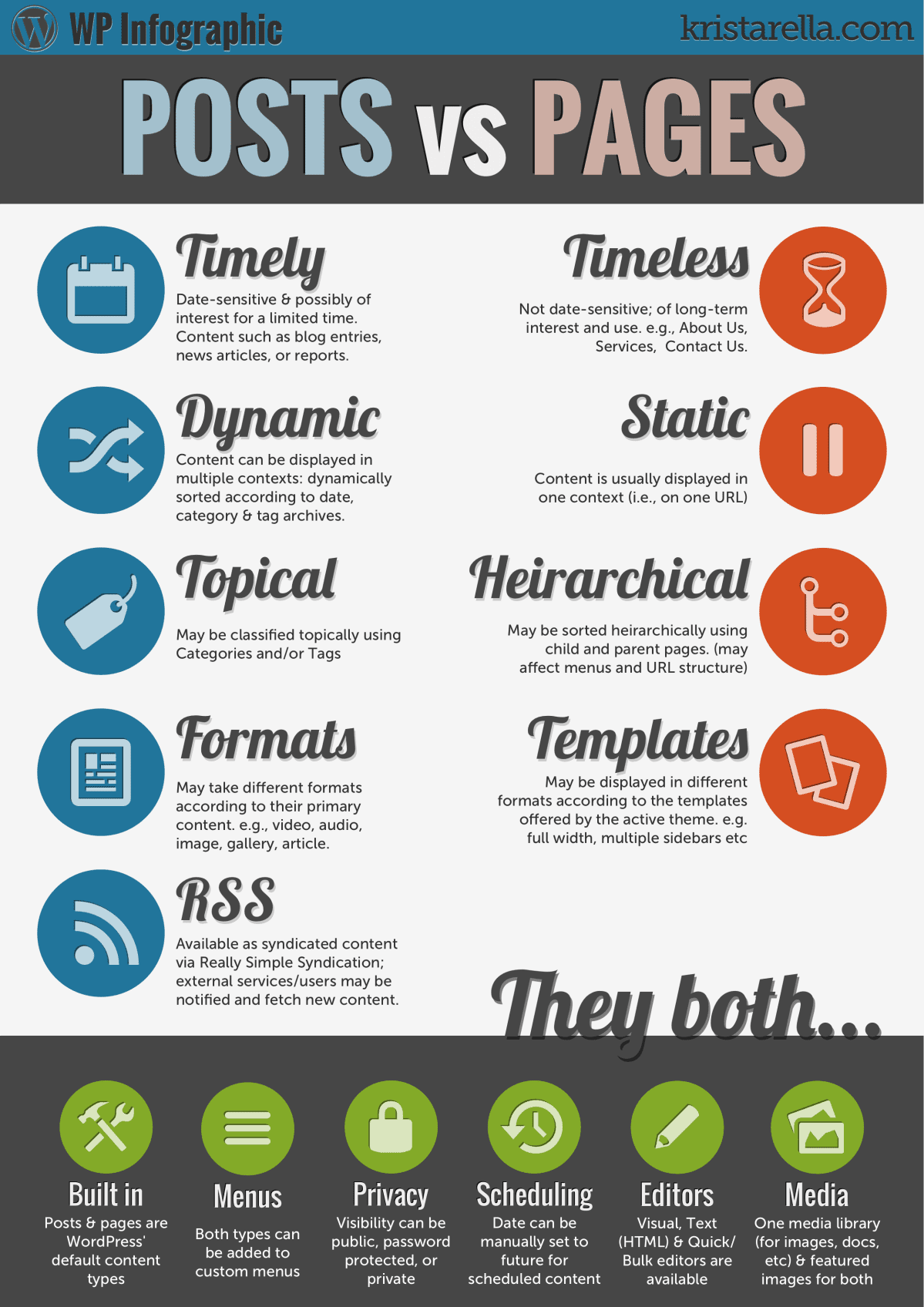
In WordPress, posts and pages are different. Posts are for blogs. They show in order by date. Readers can comment on posts. Pages are for static content. Like about us or contact info. Pages don’t change often.
Posts have tags and categories. They help organize content. Pages don’t have tags or categories. Posts appear in feeds. Pages don’t show in feeds. Posts are for regular updates. Pages hold permanent info.
Posts are part of a blog. Pages are part of a website. Posts are time-sensitive. Pages stay relevant longer. Choose posts for news and updates. Use pages for essential info.
Creating Posts
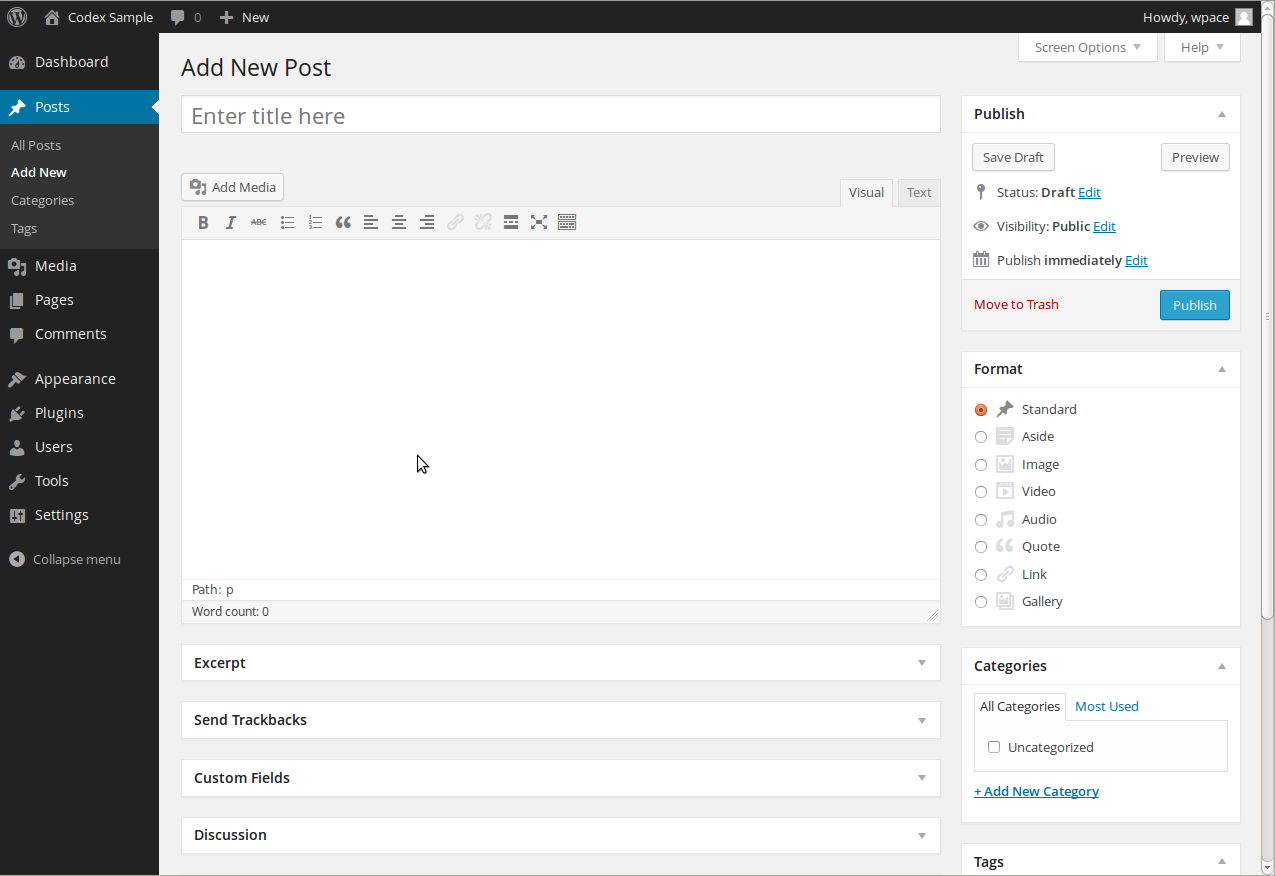
The WordPress editor helps in writing posts. It is easy to use. You can type and add headings. Change text size or color. Use bold or italic text. The editor shows a preview. You can see how the post will look.
Add pictures or videos to posts. Click the “Add Media” button. Choose a picture from your computer. You can also add audio files. Media makes posts more fun. People like to see pictures.
Posts can be set to go live later. Choose a date and time. Use the “Schedule” option. Posts will publish automatically. You do not need to be online. This helps in planning.
Creating Pages
Pages in WordPress are for static content. This means content that doesn’t change often. Examples include “About Us” and “Contact” pages. Unlike posts, pages do not have tags or categories. They are not listed by date. Pages are important for basic site information. They help visitors know more about your site.
WordPress allows the use of page templates. Templates change how a page looks. They offer different designs. You can choose templates when creating a page. Some themes come with many template options. They help to style your page uniquely. This makes your site more attractive.
Pages can be organized using parent and child pages. A parent page is the main page. Child pages are connected to the parent. This helps in organizing the content better. It creates a clear site structure. For example, “Services” can be a parent page. “Web Design” and “SEO” can be child pages. This makes navigation easy for users.

Credit: samomblogs.co.za
Content Organization
Categories and tags help you find content. Categories are like big sections. They group similar posts together. Tags are more specific. They help with details. Use them to add extra info. Both make it easy to search and find posts. They are very useful. Keep your site neat and tidy. Readers like organized sites.
Menus are like maps. They help you move around the site. You can see where to go next. Navigation is the act of moving around. It must be simple. Easy to understand. This helps users enjoy their visit. They find what they need quickly. Happy users come back.
Seo Considerations
Exploring WordPress, a post page showcases individual blog entries, allowing updates and new content. Each post can be categorized and tagged, enhancing search engine visibility. Effective SEO practices ensure these pages rank well, driving traffic to your site.
Optimizing Posts
Posts can be optimized for better search results. Use keywords in titles and content. This helps search engines find them. Add tags and categories. This organizes posts nicely. Don’t forget to use alt text for images. It tells search engines what the image is about. Keep sentences short and clear. This makes posts easy to read.
Optimizing Pages
Pages need good optimization too. Choose keywords wisely. Place them in headings and body text. Good keywords attract more visitors. Use meta descriptions for each page. They tell users what the page is about. Make URLs simple and clear. Simple URLs are easy to remember. Use internal links to connect pages. This helps users find related content easily. Optimized pages improve user experience.
Common Use Cases
Post pages are essential for blogging. Writers share thoughts and ideas. Each post has its own page. Readers can easily find new articles. Comments can be added. Interaction happens here. Posts can be tagged. Tags help in sorting content. Bloggers love this feature.
Businesses use post pages for news updates. New product launches are shared here. Companies post offers and events. Customers stay informed. It builds trust. Information is fresh. Websites appear active. Post pages make this easy.
Artists and creators use post pages for portfolios. Show new projects. Share details and images. Each piece has its own page. Clients view work easily. Updates keep portfolios fresh. Post pages help in showcasing skills.
Best Practices
A post page in WordPress displays blog posts in order, with the newest at the top. It helps organize content, making it easy for readers to find the latest updates. This setup enhances user experience and boosts engagement on your site.
Consistent Formatting
Consistency makes a page look neat. Use the same font and size everywhere. This helps readers focus better. Short paragraphs keep readers engaged. Use headings to break up text. Headings make information easier to find. Lists and bullet points make details clear. They help readers understand quickly. Avoid using many colors. Stick to two or three. Too many colors can confuse readers. Align text to the left. It’s easier to read. Avoid long sentences. Keep them short and simple.
Regular Updates
Fresh content keeps a page relevant. Update old information often. This makes the page useful. Add new images when needed. Images can make a page interesting. Check for broken links. Fix them to keep users happy. Remove outdated content. It keeps the page clean. Add new features if possible. This keeps readers coming back. Encourage feedback. It helps improve the page. Regular updates build trust with readers.
Credit: www.elegantthemes.com
Frequently Asked Questions
What Is A Post Page In WordPress?
A Post Page in WordPress displays blog posts in chronological order. It’s a dynamic page that updates automatically with new posts. This page can be set as the homepage or a separate section. It helps organize and showcase content efficiently, enhancing user engagement and site navigation.
How To Set A Post Page In WordPress?
To set a Post Page, go to Settings > Reading. Choose “Posts page” and select a page to display posts. This separates static pages from dynamic blog content. Customizing this setting helps maintain content structure, improving user experience and site navigation.
Can I Customize My Post Page Layout?
Yes, you can customize the Post Page layout using themes or page builders. Many themes offer layout options for post pages. You can change colors, fonts, and widget placements. Customization enhances your site’s appearance and user experience, making it more engaging.
What Are The Benefits Of Using A Post Page?
Using a Post Page helps organize content chronologically, making navigation easy. It keeps readers engaged with fresh content updates. This page improves SEO by creating structured content flow, enhancing user experience. It also increases site visibility and interaction.
Conclusion
Post pages in WordPress hold great importance for bloggers. They help organize content. Easy navigation improves user experience. Readers find information quickly. Write posts regularly. Engage your audience. Boost your site’s visibility. Use categories wisely. Group similar topics. Simplify your site structure.
Keep content fresh and relevant. Optimize SEO. Include keywords naturally. Enhance your site’s search ranking. Focus on clarity and simplicity. Make your content accessible. Aim for clean and organized layouts. Effective post pages lead to happy readers. This builds trust and increases traffic.
A well-maintained blog attracts more followers. Start enhancing your WordPress site today.


