
Are you navigating the vast world of WordPress and stumbled upon the term “post excerpt”? You’re not alone.
Understanding what a post excerpt is can be the key to enhancing your website’s readability and boosting user engagement. Imagine having the power to capture your audience’s attention with just a few carefully chosen words. This isn’t just about summarizing content; it’s about hooking your readers right from the start.
Intrigued yet? Stick around as we dive into the essentials of post excerpts in WordPress, and discover how mastering this simple tool can transform your blog into a reader’s delight.
Credit: www.acmethemes.com
Post Excerpt Basics
A post excerpt is a short summary of a blog post. It gives a brief idea of the post’s content. Readers can quickly know what the post is about. Excerpts are usually shown on the homepage or archive pages. They help readers decide if they want to read more. This way, readers save time and find content they like.
In WordPress, you can write your own excerpt. Or, let WordPress create one automatically. Manual excerpts let you control what text appears. Automatic excerpts take the first part of your post. Using excerpts improves the look of your blog. It keeps pages neat and organized. Readers enjoy a better experience.
Importance Of Excerpts
Excerpts help readers understand the blog quickly. They give a short summary of the post. Readers decide if they want to read more. This saves time and helps users find what they need. Using excerpts also makes your blog look neat. It helps to keep the page organized. Search engines use excerpts too. They show the summary in search results. This can bring more visitors to your site.
A well-written excerpt attracts readers. It boosts your page views. Excerpts make your site more user-friendly. They improve the overall reader experience. Also, they make your content more shareable. Friends can share a summary easily.
Creating A Post Excerpt
A post excerpt is a short summary of your post. It helps readers understand the main idea quickly. You can create an excerpt manually. To do this, write a brief description. This should be one or two sentences long. Ensure the excerpt is catchy and clear. Use simple words. This makes it easy for everyone to read. Keep the most important part bold. This grabs the reader’s attention. Manual creation gives you full control. You decide what your readers see first.
WordPress can also create excerpts automatically. It takes the first few lines of your post. This is quick and easy. You do not need to write anything extra. But, sometimes the automatic excerpt may not be clear. Important parts might not be shown. This is why many prefer manual excerpts. They ensure key points are not missed. Automatic excerpts are best for simple posts. For complex topics, manual is better.
Customizing Excerpts
WordPress settings allow users to control excerpts. You can choose how many words to show. The default is usually around 55 words. Change this in your theme settings. Some themes may not support excerpt changes. Check your theme documentation. This helps in keeping content concise. Short excerpts improve readability. They give a quick overview of posts. Users can understand the main idea quickly.
Using WordPress Settings
Explore the settings menu for excerpts. Look for the “Reading” section. Here, you can adjust the number of words. Some themes have excerpt options in “Customize”. Use these features to tailor content. Shorter excerpts can attract attention faster. They provide necessary information at a glance. Keep your audience engaged with brief text.
Plugins For Customization
Plugins offer advanced customization. Some plugins allow specific excerpt length. Others let you add custom read more links. Choose plugins that fit your needs. Popular choices include “Advanced Excerpt” and “Excerpt Editor”. These tools enhance your control. They make excerpts more effective. Plugins can be installed through the WordPress dashboard. Always keep plugins updated for best performance.
Seo Benefits
Post excerpts in WordPress help with SEO optimization. They create a summary of your blog. Search engines use these summaries to understand your content. Excerpts improve your site’s visibility on search engines. They make your blog more attractive to readers. Good excerpts can lead to higher engagement. They encourage people to click and read more.
Readers find it easy to scan through excerpts. This can increase traffic to your site. Excerpts also help with keyword ranking. They can highlight important keywords. This makes your content more relevant to searches. Effective use of post excerpts is crucial. It boosts your site’s overall SEO performance.
Credit: kinsta.com
Common Mistakes
Many forget to check excerpt settings in WordPress. This can cause issues. Posts might show full text instead of a short snippet. Always ensure excerpt options are set correctly. It helps in improving site readability. This also affects how posts appear on the home page. Make sure to review these settings often.
Some users create excerpts that are too long. This defeats the purpose. Excerpts should be concise and to the point. They should give a brief idea of the post. Keeping it short makes the site look cleaner. It also helps in faster page loading. Aim for around 55 words for each excerpt. This keeps readers engaged.
Best Practices
Post excerpts need to be short and interesting. They should make readers want to click. Keep them under 55 words. This helps the reader understand quickly. Use simple language that everyone gets. Keywords should be included, but naturally. Make sure they fit with the content. Short sentences are best for clarity.
Avoid complex words. Use everyday words. Focus on the main idea. This keeps it clear and engaging. The reader should know what the post is about instantly. Think about what makes your post special. Show that in the excerpt. Grab their attention. Make them want to read more.
Credit: 10web.io
Frequently Asked Questions
What Is A Post Excerpt In WordPress?
A post excerpt in WordPress is a brief summary of your blog post. It’s typically displayed on your homepage, archives, and RSS feeds. Excerpts help readers decide if they want to read the full article. You can manually add an excerpt or let WordPress generate one automatically.
How Do I Add An Excerpt In WordPress?
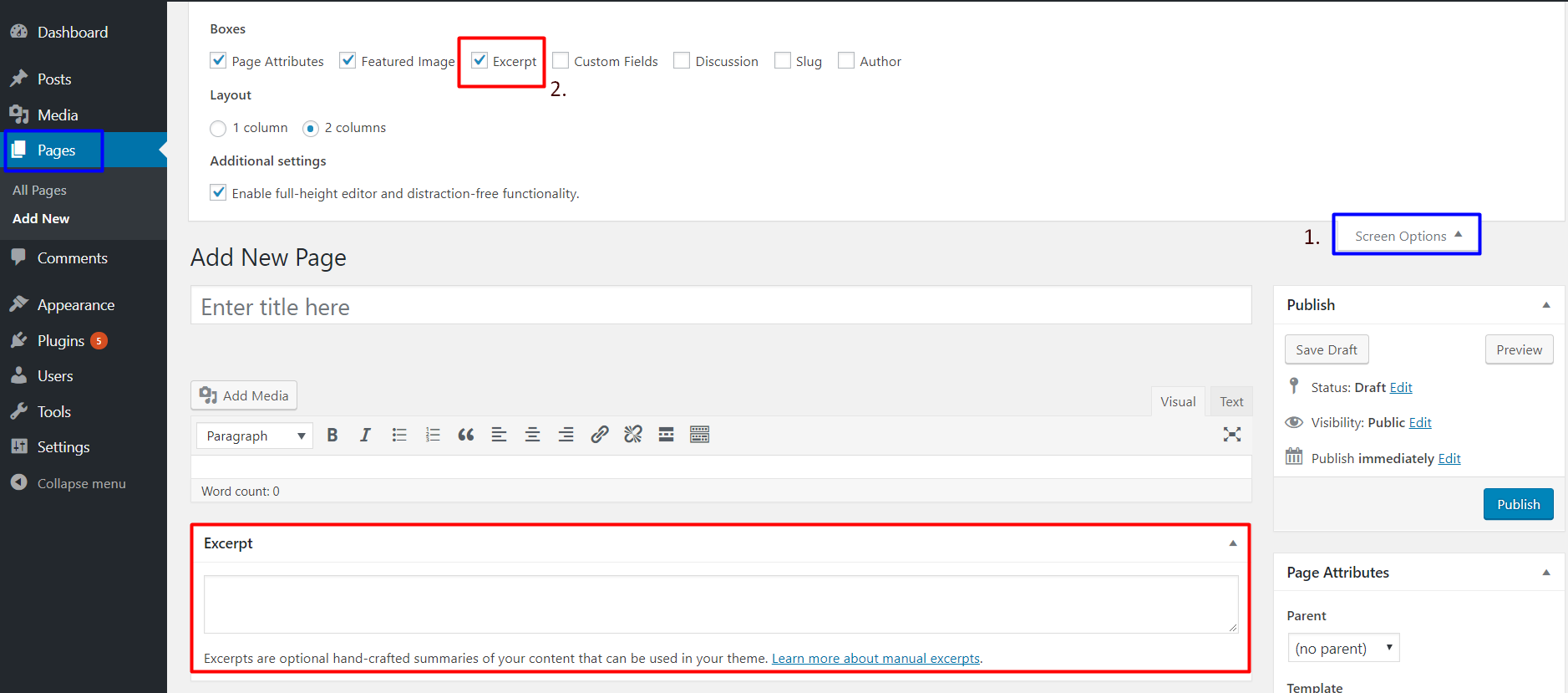
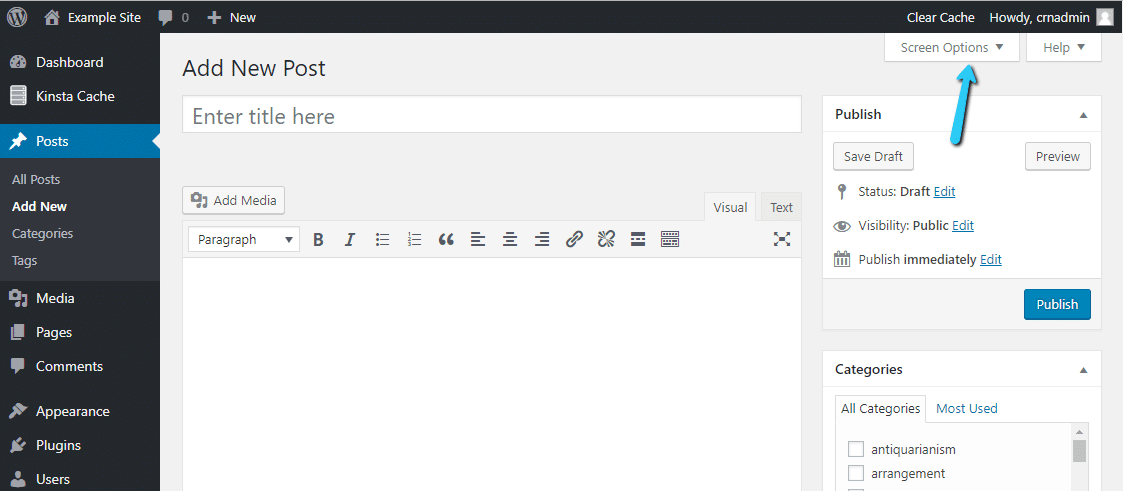
To add an excerpt, open your post editor and find the “Excerpt” box. Enter a concise summary of your post there. If the box isn’t visible, enable it under “Screen Options” at the top. Excerpts improve user experience and SEO by providing clear summaries.
Why Use Post Excerpts In WordPress?
Post excerpts enhance user experience by providing quick previews of content. They improve blog aesthetics and help readers find relevant information faster. Excerpts also support SEO by summarizing content for search engines. This can improve click-through rates and engagement on your site.
Can Excerpts Improve Seo In WordPress?
Yes, excerpts can improve SEO by offering concise summaries of your content. Search engines value clear, relevant snippets that help users quickly understand the topic. Well-crafted excerpts can increase click-through rates and keep visitors engaged, boosting your site’s overall SEO performance.
Conclusion
Post excerpts in WordPress enhance readability and user engagement. They summarize content, attracting readers to explore full articles. Easy to create and customize, excerpts boost SEO. Search engines love concise previews. Readers appreciate quick insights before diving deeper. Excerpts can improve navigation across your site.
They simplify the browsing experience for visitors. Engaging summaries encourage clicks and longer visits. Always craft clear, informative excerpts. Keep them relevant to your audience’s interests. Quality excerpts lead to better site performance. Start using excerpts to make your WordPress site more effective.
Happy blogging!


