
Are you navigating the world of WordPress and finding yourself puzzled by terms like “outbound link”? You’re not alone.
Understanding outbound links can significantly impact your website’s SEO and user experience. These links are more than just connections to other websites; they are powerful tools that can help enhance your content’s credibility and authority. Imagine having the ability to guide your readers to valuable resources while simultaneously boosting your own site’s reputation.
Intrigued? Keep reading to discover how mastering outbound links in WordPress can transform your website into a trusted source of information, making your content not only engaging but also highly relevant in the eyes of both your audience and search engines.
Understanding Outbound Links
Outbound links are links to other websites. They help users find new information. These links are important for SEO. They show search engines your site is helpful. Websites with good outbound links rank better. It’s like giving directions to a helpful place.
Use outbound links wisely. Link to trusted sites. Make sure the sites are related to your content. They should add value to your page. Always check links are working. Broken links can harm your site’s reputation. Keep users happy with useful links.
Outbound links can boost your site’s credibility. They show you care about sharing knowledge. Readers appreciate good links. They might stay longer if they find what they need. This can help your site grow.
Importance Of Outbound Links
Outbound links are links to other websites. They are important for SEO. They help search engines understand your site. They show the web of connections between pages. This builds your site’s credibility. Search engines trust you more. Your site can rank higher.
These links provide extra information for readers. They improve the reader’s experience on your site. Readers stay longer and learn more. This can lead to more visits in the future. It can also help you connect with other sites. They may link back to you.
Always use outbound links wisely. Link to reliable and relevant sources. This maintains trust and quality on your site. Ensure the links open in a new tab. This keeps users on your page longer.
How To Add Outbound Links In WordPress
Add outbound links easily with the WordPress Editor. Highlight the text you want to link. Then, click the link icon. Paste the URL in the box. Make sure the URL is correct. Click “Apply” to save the link. Your text now has an outbound link.
Plugins can help add outbound links. Install a plugin like Yoast SEO. Go to the plugin settings. Choose the option to add links. Follow the steps in the plugin. This method is quick and easy. It helps manage links better.
Adding links with HTML is simple. Open the text editor in WordPress. Write your text and use the tag. Example: Link Text. Replace “http://example.com” with your URL. Replace “Link Text” with your words. This method gives more control.

Credit: linkwhisper.com
Best Practices For Outbound Links
Choose links that are relevant to your content. Ensure they add value to your readers. This helps users learn more. It also boosts your page’s quality. Keep links related to your topic. Readers will appreciate useful information.
Link to trusted and authoritative websites. This builds trust with your readers. They feel confident in your content. Check the site’s reputation before linking. Ensure it is well-known and reliable. Trusted links improve your own credibility.
Maintain a good balance of links. Use both internal and external links. This keeps your site organized. It also helps with SEO. Avoid too many outbound links. They can distract readers. Keep it simple and helpful.
Seo Impact Of Outbound Links
Outbound links can boost your site’s trust. They show that your content is well-researched. Linking to good sources adds value. It makes your content more reliable. Search engines notice this and may rank your site better.
Links to other sites help users learn more. They find extra info without leaving your site. This helps them understand topics better. Users like easy access to good information. It keeps them interested. Happy users stay longer on your site.
Credit: wpflow.com
Common Mistakes With Outbound Links
Too many links can confuse readers. Pages with too many links may look messy. This can make it hard to find important info. Readers might leave the page if it is too crowded. Keep links to important sources only. Choose links that add value. This helps keep pages clean.
Links to bad sites can hurt your page. Low-quality sites may have wrong info. Such links can make readers doubt your page. Trust is important for a good page. Always check the quality of sites you link. Pick sites with good info and a clean look. High-quality links help build trust.
Monitoring Outbound Links
Outbound links in WordPress direct users from your site to other websites. Monitoring these links helps ensure they lead to reputable sources. This practice enhances user experience and boosts your site’s credibility.
Tools And Plugins
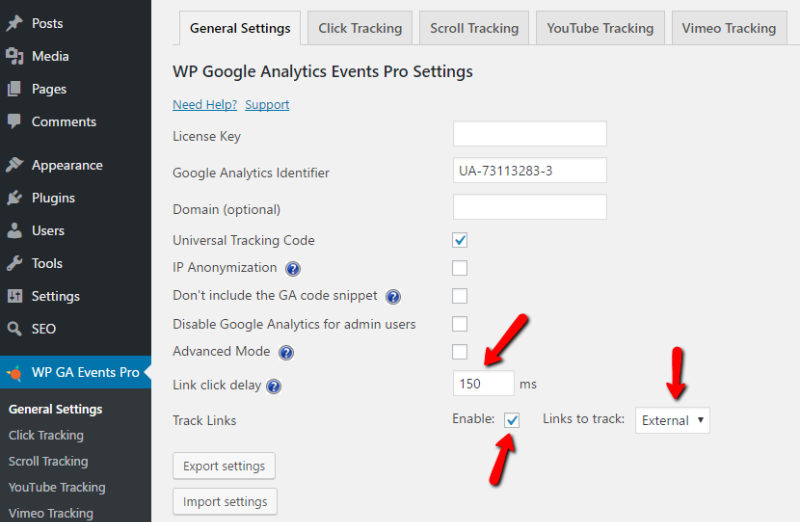
WordPress offers several tools to track outbound links. These tools help monitor traffic. Google Analytics is a popular choice. It offers detailed insights. Another tool is MonsterInsights. This plugin connects with Google Analytics. It shows link clicks on your site. Pretty Links can also be useful. It tracks link performance easily. These tools help understand user behavior. Monitoring is vital for content strategy. Choose plugins that fit your needs. They make tracking simple and effective.
Regular Audits
Regular audits are crucial. They ensure links are working. Broken links can harm your site. Check links often. Use tools for audits. Broken Link Checker is a good choice. It finds broken links quickly. Fixing them improves site health. Audits keep links fresh. They help maintain user trust. Make audits part of your routine. Keep your site reliable and clean.

Credit: www.wptasty.com
Frequently Asked Questions
What Is An Outbound Link In WordPress?
An outbound link in WordPress is a hyperlink that directs users to a different website. These links help in providing additional information, improving SEO, and increasing credibility. Outbound links are easily added to WordPress posts or pages via the editor by highlighting text and inserting a URL.
How Do Outbound Links Affect Seo?
Outbound links can positively impact SEO by improving website authority and relevance. They show search engines your site’s connection to valuable external resources. By linking to reputable sources, you enhance the credibility of your content, potentially boosting search rankings.
Can Outbound Links Increase Website Traffic?
Yes, outbound links can increase website traffic indirectly. When you link to authoritative sites, you gain trust and visibility. Users may return to your site for reliable information, enhancing engagement. Collaborations and link exchanges with other sites can also attract more visitors.
How To Add Outbound Links In WordPress?
To add outbound links in WordPress, edit your post or page. Highlight the text you want linked, click the ‘Insert/edit link’ button, and enter the URL. Ensure the URL is correct and related to your content for optimal reader experience and SEO benefits.
Conclusion
Outbound links in WordPress are important for your site. They guide visitors to relevant content, enhancing their experience. Search engines like Google also appreciate these links. Outbound links can boost your website’s credibility. They show you value sharing quality information.
Adding them is simple in WordPress. Just ensure the links are relevant and trustworthy. This helps maintain your site’s integrity. Regularly review your outbound links. Make sure they remain active and useful. With thoughtful use, outbound links strengthen your website’s value and authority.


