
Imagine having a powerful tool at your fingertips that keeps your audience engaged and consistently brings them back to your WordPress site. You might have heard of RSS, but what exactly is “My RSS” in WordPress, and why should you care?
As someone who wants to maximize their online presence, understanding this feature is crucial. This article will demystify the concept of “My RSS” and reveal how it can be a game-changer for your content strategy. By the end, you’ll see how easy it is to keep your readers hooked, streamline your content distribution, and enhance your site’s visibility.
Ready to unlock the potential of “My RSS” in WordPress? Let’s dive in.
Rss Basics
RSS stands for Really Simple Syndication. It is a way to get updates from your favorite websites. Think of it like a special news feed. This feed tells you when new content is posted. You don’t need to check each site. You get all updates in one place.
RSS feeds save time. You get the latest news fast. People use it to follow blogs, news sites, and more. It is a tool for staying informed. No more missing important updates. It keeps all your favorite content together. Easy and simple.
Websites create RSS feeds with their new posts. You use an RSS reader to subscribe to these feeds. The reader collects updates from all your feeds. It shows them in one easy-to-read place. Just like magic, but real.

Credit: www.youtube.com
WordPress And Rss
Discover your RSS feed in WordPress effortlessly. It helps users follow your website updates easily. Use the feed URL to share your site’s content.
Built-in Rss Features
WordPress comes with automatic RSS feeds for your site. These feeds allow users to see your updates without visiting your site. RSS stands for Really Simple Syndication. It’s a way to share content quickly and easily. WordPress makes it easy to use RSS feeds. You don’t need to do anything special to enable them. They are built-in and ready to use. This means visitors can follow your posts in their feed readers. It helps them stay updated with your latest content.
Default Rss Feeds In WordPress
Every WordPress site has default RSS feeds. These feeds include posts, comments, and categories. Each type has its own unique feed link. You can find these feeds in your site’s URLs. For posts, use /feed at the end of your site’s URL. For comments, use /comments/feed. Each category has a feed too. Add /category/categoryname/feed to your URL. These feeds make it easy for users to follow specific content. They can choose what they want to see in their feed readers.
Customizing Rss Feeds
Plugins make RSS feeds better. They add extra features. Some plugins change feed layout. Others add custom content. Plugins are easy to use. Just install and activate. Choose plugins that fit your needs.
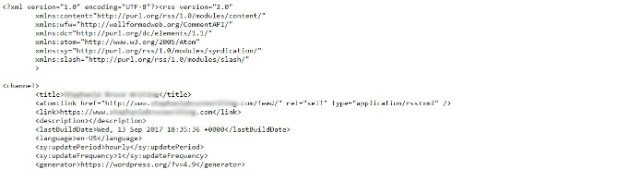
RSS templates control how feeds look. Modify these templates to change appearance. You need to know HTML and CSS. Use them to tweak styles. Add headers or footers. Make feeds match your site design.
Custom content makes feeds unique. Add images, links, or extra text. Use the functions.php file. Insert code snippets. Be careful when editing. Wrong code can break your site. Test changes before saving.
Credit: wpengine.com
Benefits Of Using Rss In WordPress
RSS helps share content with many people. This tool makes content go far. Readers can see your posts quickly. They get updates right away. Sharing is easy with RSS. No need for extra work. Content goes to many places. More people see it.
Users love getting fresh content. RSS gives them updates fast. They don’t miss your posts. Users stay interested. They come back often. This makes your site popular. More visits mean happy readers. Engaged users talk about your site. They share with friends.
RSS helps SEO by spreading links. Search engines see these links. Your site’s rank can improve. More links mean better visibility. Search engines like fresh content. RSS feeds deliver new posts fast. This helps with indexing. Your site becomes more discoverable.
Troubleshooting Rss Issues
Understanding “What is My RSS in WordPress” can help solve RSS feed problems. RSS feeds allow users to subscribe to site updates. Troubleshooting involves checking feed URLs, plugins, and themes to ensure proper functionality.
Common Rss Errors
RSS errors can confuse users. Feed not loading is a common issue. This can happen due to incorrect URL. Sometimes, the server is down. Other times, the feed might not update. An error might show as 404 not found. It is important to check the source URL. Ensure it matches the one in WordPress.
Fixing Feed Validation Problems
Feeds might fail validation. This happens due to broken tags. Tags must close properly. Missing titles can cause trouble too. Check for empty fields. These break the feed. Use a feed validator online. It finds errors quickly. Fix errors by editing feed settings. Proper validation keeps feeds running smoothly.
Advanced Rss Tips
RSS feeds can be connected to social media. This helps in sharing content easily. You can set up automatic posts. This keeps your followers updated. Social media tools can assist. They link your blog to platforms. This saves time and effort.
Automation is key. It lets RSS feeds share content automatically. You don’t have to do it manually. Some tools help in scheduling posts. They post your content at the right time. This ensures your audience sees your updates.
Analytics help you understand how your RSS feeds perform. They show which posts are popular. You can see how many people read your feeds. Use analytics to improve your content. Make your blog better by tracking these numbers.
Credit: 10web.io
Frequently Asked Questions
How Do I Find My Rss Feed In WordPress?
To locate your RSS feed in WordPress, simply append `/feed` to your site’s URL. For example, `yourwebsite. com/feed`. This URL provides the standard RSS feed format. You can also access specific category feeds by adding `/category/categoryname/feed` to your URL.
Can I Customize My Rss Feed In WordPress?
Yes, WordPress allows RSS feed customization through plugins. Plugins like WP RSS Aggregator offer advanced feed management options. You can adjust feed content, style, and update frequency. Customization helps optimize feed presentation and enhance audience engagement.
Why Is Rss Important For WordPress Sites?
RSS is crucial for content distribution and audience growth. It allows users to subscribe and receive updates easily. RSS enhances site visibility, increases traffic, and fosters reader loyalty by delivering timely content directly to subscribers.
How Do Rss Feeds Benefit Seo?
RSS feeds improve SEO by increasing content visibility and accessibility. They facilitate content indexing by search engines, enhancing discoverability. Regular updates through RSS attract search engine crawlers, boosting site rankings and organic traffic.
Conclusion
Understanding RSS in WordPress makes content sharing easier. RSS feeds help readers stay updated. They deliver fresh content straight to users. This boosts engagement on your site. Setting up RSS in WordPress is straightforward. It enhances your website’s reach. Users get timely updates without visiting your site.
This convenience encourages regular visits. Start utilizing RSS today. It’s a simple way to enhance user experience. Keep your audience informed. Engage them with relevant content. Make your WordPress site more interactive. RSS is a valuable tool. Embrace it for better content delivery.


