
Imagine this: your website is a digital masterpiece. You’ve poured time and creativity into crafting beautiful images, engaging content, and seamless navigation.
But there’s a hitch—it’s slow. Visitors click away before they even see your hard work. Frustrating, right? This is where lazy loading comes in, especially if you’re using WordPress. But what is lazy loading in WordPress? And how can it transform your website’s performance?
When you learn about lazy loading, you’ll discover how it can drastically speed up your site by loading images and content only when they’re needed. This means faster load times, happier visitors, and better search engine rankings. Imagine keeping your audience engaged and on your site longer, all while boosting your SEO. Intrigued? Let’s dive deeper into how lazy loading can work wonders for your WordPress site.
Lazy Loading Basics
Lazy loading is a way to speed up websites. It helps by loading images and videos only when needed. This means they load as you scroll down. This can make the page feel faster. It also saves data and bandwidth. This is great for users on slow connections. Lazy loading helps make the website more efficient. It is helpful for both users and website owners.
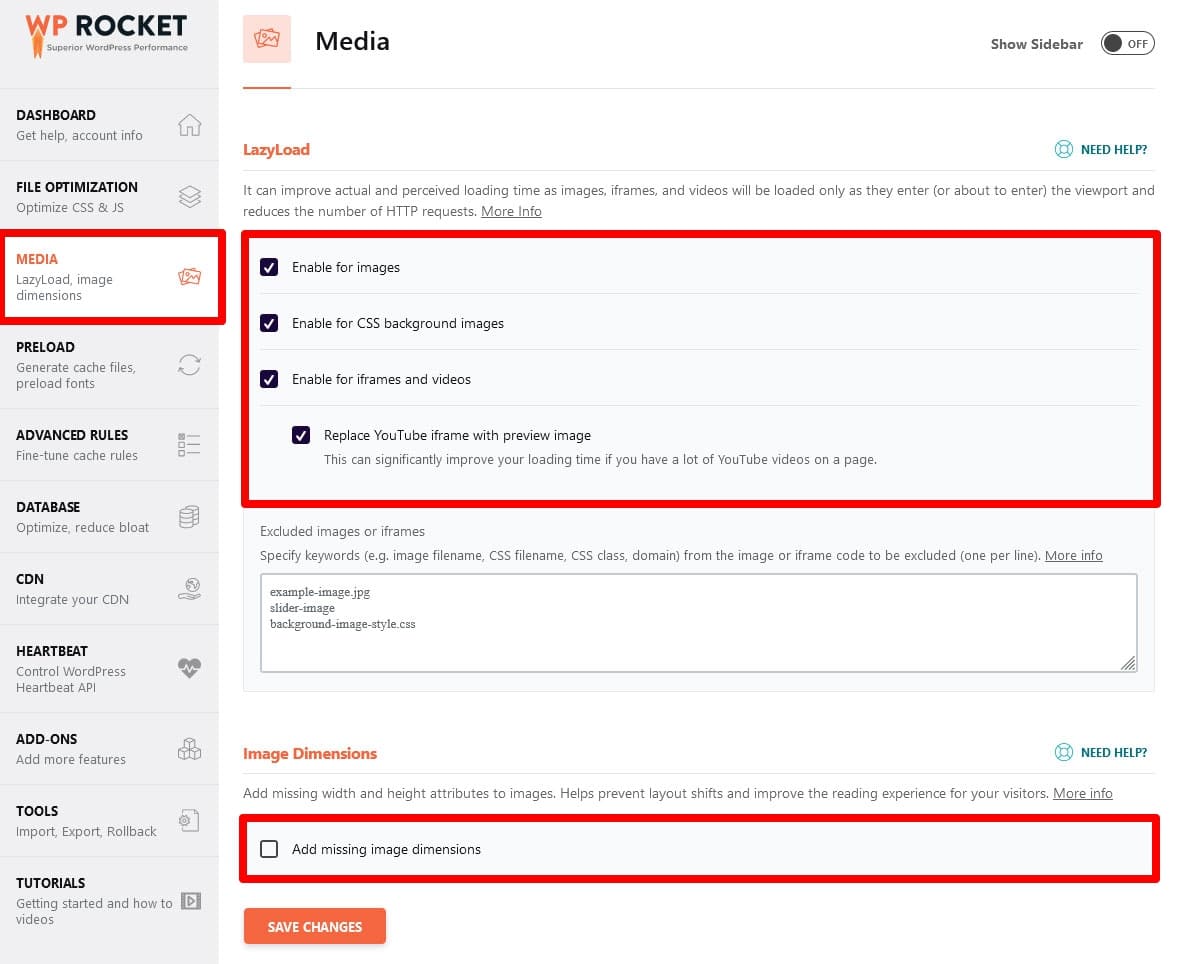
Lazy loading works with a simple process. First, only important parts of the page load. Then, other elements like images wait. These elements load when they come into view. This is done using JavaScript. It checks when you scroll. When an image is near, it loads it. This way, the page feels quick and smooth. It makes browsing a better experience for everyone.
Credit: wp-rocket.me
Benefits For WordPress Sites
Lazy loading helps pages load faster. Images and videos wait until needed. This means faster access to content. Faster pages make users happy. Search engines like speed too.
Users enjoy smooth browsing. No waiting for heavy images. Content appears quickly. This keeps users engaged. Happy users stay longer on sites. More time spent means better site interaction.
Lazy loading saves data. Only needed files load. This reduces bandwidth use. Good for mobile users. Saves data costs. A great choice for limited data plans.
Implementation Techniques
Native WordPress Features make lazy loading easy. WordPress has built-in support for images. This means images load slowly as you scroll. This saves bandwidth and improves speed. No extra work is needed. Just update to the latest WordPress version. Lazy loading is automatic. This feature is part of WordPress’s core since version 5.5. Users enjoy faster page load times.
Plugins and Tools offer more choices. Some plugins have extra options. They can help with lazy loading for videos and iframes. Plugins like Lazy Load by WP Rocket are popular. They are easy to install and use. Many plugins are free. Some have premium features. These tools enhance user experience. Lazy loading improves SEO and site performance. Users see content quicker. Plugins make lazy loading flexible and customizable.
Common Challenges
Lazy loading in WordPress can lead to challenges like delayed image appearance, affecting user experience. Troubleshooting script conflicts is often necessary. Understanding browser compatibility is also crucial for effective lazy loading implementation.
Compatibility Issues
Lazy loading can sometimes cause compatibility issues with certain plugins. Some plugins may not work well with lazy loading. This can lead to images not showing up. Themes can also clash with lazy loading. Older themes might not support it. This can break the website layout. Always check if your theme supports lazy loading. Updates can fix some compatibility problems.
Troubleshooting Tips
Troubleshooting lazy loading issues is important. Start by disabling conflicting plugins. Test your website after each change. This helps find the problem. Ensure your WordPress and themes are up-to-date. Updates often fix bugs. Use a staging site to test changes safely. If images still don’t load, check your internet connection. A slow connection can cause problems. Seek help from forums if issues persist. Experts can provide solutions.
Best Practices
Lazy loading helps images load faster. Images only load when they are visible. This saves time and data. High-quality images can slow your site. Optimize images to make them smaller. Use tools like TinyPNG or JPEGmini. Smaller images load quickly. Make sure your site is fast for users. Speed is important for SEO. Users don’t like slow sites. Keep your site fast with lazy loading.
Show important content first. Text and buttons should appear quickly. Make sure users see what they need. Lazy loading helps. Only load less important parts later. This keeps users happy. They get what they need right away. Speed is the key. Fast sites keep users on the page. Google likes fast sites too. SEO improves with quick loading times. Always prioritize content users want first.

Credit: flothemes.com
Case Studies
Lazy loading in WordPress speeds up site performance by loading images only when they are visible on the screen. This technique helps reduce initial loading time, improving user experience and search engine rankings. Implementing lazy loading is a straightforward process using plugins or built-in WordPress features.
Successful Implementations
Lazy loading in WordPress has boosted page speed for many sites. Images load only when users scroll down. This saves bandwidth and improves user experience. Many popular websites have used lazy loading. Their pages now load faster. Visitors stay longer and bounce rates are lower. The site’s performance has improved greatly. Site owners are happy with these results.
Lessons Learned
Implementing lazy loading taught valuable lessons. Optimization is crucial for site speed. Not all images need to load at once. Loading images on demand helps reduce load times. Some plugins work better than others. Choosing the right plugin is important. Testing changes before going live is necessary. This prevents issues and ensures functionality. Regular updates keep plugins working smoothly.
Future Of Lazy Loading
Lazy loading is becoming more popular. It makes websites load faster. New tools help lazy loading work better. These tools are smart. They know when to load pictures. They save internet data. This helps people with slow internet. Lazy loading is good for phones. Phones have small screens. Lazy loading makes pages fit better.
More websites will use lazy loading. It will be normal soon. People will expect fast sites. Slow sites lose visitors. Lazy loading is easy to add. It helps website owners. They get more visitors. Experts say lazy loading will grow. New trends will come. Lazy loading will change with trends. It will stay important.
Credit: wordpress.org
Frequently Asked Questions
What Is Lazy Loading In WordPress?
Lazy loading in WordPress delays loading of non-essential resources. Images and videos load only when visible to users. This improves page speed and reduces server load. It’s beneficial for sites with lots of media content. Implementing lazy loading enhances user experience by speeding up page access.
How Does Lazy Loading Boost Performance?
Lazy loading boosts performance by minimizing initial page load times. It loads media content only when needed. This reduces bandwidth usage and server requests. Faster load times improve user experience and SEO rankings. It’s especially useful for media-heavy websites, ensuring quicker access and smoother interactions.
Is Lazy Loading Good For Seo?
Yes, lazy loading positively impacts SEO. Faster page load speeds lead to better user experience. Search engines favor websites that load quickly and efficiently. Lazy loading reduces bounce rates and increases engagement. This can improve search rankings, making your WordPress site more discoverable.
How To Enable Lazy Loading In WordPress?
Enable lazy loading in WordPress using plugins or themes with built-in support. Popular plugins like WP Rocket and Autoptimize offer easy setup. Some themes include lazy loading features by default. Regularly update plugins and themes to ensure compatibility. This enhances site performance and user experience.
Conclusion
Lazy loading enhances WordPress site speed and user experience. It delays loading images until needed. This reduces initial page load time. Users see content quicker. Bandwidth consumption decreases, saving resources. Implementing lazy loading is simple with plugins. This technique boosts SEO by improving site performance.
Visitors stay longer on fast-loading sites. Engaging users becomes easier. It’s a smart strategy for optimizing WordPress. Consider adopting lazy loading for better site performance. Enhance your site’s efficiency and user satisfaction effortlessly.


