
Have you ever wondered what makes your WordPress site more interactive and visually appealing? If so, you’re likely encountering the magic of jQuery.
Understanding jQuery in the context of WordPress can transform the way you manage and enhance your website. Imagine being able to create dynamic web pages that not only look professional but also engage your visitors in ways that keep them coming back for more.
This isn’t just about making things look good; it’s about creating an experience that resonates with your audience. By diving into the world of jQuery and WordPress, you open up a realm of possibilities to elevate your site’s functionality and user experience. Ready to uncover how this combination can work wonders for your online presence? Let’s get started.

Credit: make.wordpress.org
Jquery In WordPress
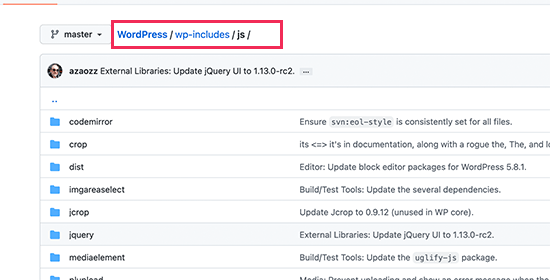
JQuery is a JavaScript library. It helps make websites interactive. Many websites use it. WordPress includes JQuery by default. This means you can use it easily. JQuery makes tasks simple. Like creating slideshows or hiding text.
Developers love JQuery. It saves time. It makes code cleaner. You write less code with JQuery. This is why it is popular. Many WordPress themes and plugins use it. Understanding JQuery can help you improve your website. It’s a useful tool for web design.
Credit: www.wpbeginner.com
Role Of Jquery In Web Development
JQuery is a tool used to make websites work better. It helps developers create websites that look good. It makes interactive elements like sliders and menus. It is easy to use with WordPress. Many websites use it for animations. It is also used to fetch data without reloading pages. This makes websites fast and smooth. It works well with HTML and CSS. It helps make websites responsive. JQuery is a library that is very popular.
Developers like it because it is simple and powerful. It saves time when writing code. It is free to use. Many people share their JQuery code online. This helps new developers learn. It is a key part of many web development projects.
Integrating Jquery With WordPress
Adding JQuery to WordPress themes is easy. You can enqueue it in the functions.php file. Use the wp_enqueue_script function. This ensures JQuery loads correctly. It helps avoid conflicts with other scripts. Always check if JQuery is already loaded. WordPress often has it by default.
Plugins need JQuery too. Use the same wp_enqueue_script function. Place this in your plugin’s main file. It keeps your code organized. It also ensures JQuery is available for your plugin. Make sure to register your script first. This practice avoids errors in your plugin. Remember, loading JQuery this way is best practice.
Benefits Of Using Jquery In WordPress
JQuery makes websites feel smooth and fast. It helps in creating beautiful slideshows and pop-up forms. Users enjoy interactive features. They stay longer on the site. This can lead to more page views. It also keeps the site looking modern and fresh.
JQuery makes it easy to change things on a webpage. It helps in adding or removing elements quickly. Developers can change styles and content without much code. This means less work for programmers. It is like a magic tool for web pages. Everything becomes simple and clean.
Common Jquery Functions In WordPress
JQuery helps make things move on your site. Fading in and fading out are common. They make elements appear or disappear smoothly. Slide up and slide down move elements. These effects are easy to apply. You can use them on menus and images. Animation adds life to a webpage. Kids love seeing things move!
Event handling makes websites interactive. Events are actions like clicking a button. JQuery can react to these actions. It listens for clicks, hovers, and key presses. This makes websites fun and engaging. You can show or hide things with a click. This is useful for quizzes and games. It’s like magic for the web!
Jquery Alternatives For WordPress
Vanilla JavaScript is plain and simple. No extra libraries. Developers love it because it’s fast. It works well with WordPress. Easy to learn. Easy to use. Many tutorials online. It can do everything jQuery does. Sometimes even better. Vanilla JavaScript saves time. Saves resources. Websites load faster. Users are happy. Developers are happy.
React is a library for building user interfaces. Popular among developers. It is easy to learn. Creates interactive elements. Vue is another library. It is flexible and simple. Great for beginners. Both work well with WordPress. They are modern. They are powerful. Easy to integrate. Many guides available. Support is strong. Developers choose them for dynamic sites.
Troubleshooting Jquery Issues
Start by checking your browser’s console for errors. These errors can show where the problem is. Try using console.log() to print messages to the console. This helps track what the code does. Make sure your JQuery library is loaded before other scripts. If scripts load in the wrong order, it can cause issues.
Use a tool like Firebug or Chrome Developer Tools. These tools let you inspect and debug your code easily. Sometimes, plugins can conflict with JQuery. Deactivate them one by one to see which one causes the issue. Check for any typos in your code. A small mistake can stop everything from working.
JQuery might not work the same in all browsers. Test your site in different browsers. Old browsers may not support the latest JQuery features. Use polyfills to fix this. These are code snippets that add missing features to older browsers.
WordPress themes and plugins might use different JQuery versions. This can cause conflicts. Use the noConflict() method to fix these. It lets you use multiple JQuery versions on the same page. Always update your JQuery version to stay compatible with new web standards.
Credit: www.coding-dude.com
Best Practices For Using Jquery
JQuery can sometimes clash with other scripts. This can break your site. Using the noConflict method helps prevent this. It lets you use different libraries together. It’s like having peace between scripts. Always check for duplicate scripts. Remove any that are not needed. This keeps things simple and clean.
JQuery should be fast. Use the latest version. It’s usually quicker and safer. Load scripts at the bottom of your page. This makes the page load faster. Only use features you need. Extra features slow things down. Minify scripts to make them smaller. Smaller scripts load quicker. Test your site often. Make sure everything works well.
Frequently Asked Questions
What Is Jquery In WordPress?
JQuery is a fast, small, and feature-rich JavaScript library. In WordPress, it simplifies complex tasks like DOM manipulation, event handling, and animations. It’s included by default in WordPress, allowing developers to create interactive and dynamic web elements easily, enhancing user experience without extensive coding.
How Does Jquery Improve WordPress Websites?
JQuery improves WordPress sites by enabling dynamic content and interactive features. It simplifies JavaScript code and enhances user experience. Developers can easily implement animations, AJAX functionality, and responsive elements. This leads to more engaging and visually appealing websites, ultimately improving user interaction and satisfaction.
Is Jquery Necessary For WordPress Themes?
While not mandatory, jQuery is highly beneficial for WordPress themes. It allows for advanced features like sliders and carousels. Using jQuery enhances functionality without complex coding. Many themes rely on jQuery for improved interactivity and aesthetics, making it a valuable tool for developers and designers.
Can Jquery Conflict With WordPress Plugins?
JQuery conflicts can occur if plugins use different versions. WordPress includes jQuery by default, ensuring compatibility. However, using outdated or conflicting scripts can lead to issues. Always check plugin compatibility and update versions regularly to prevent conflicts and ensure smooth functionality across your website.
Conclusion
JQuery WordPress simplifies web development for many users. It offers a streamlined way to handle scripts and enhance site interactivity. By using jQuery, developers can create dynamic websites without complex coding. It’s a valuable tool for improving user experience. Users find it adaptable and efficient for various projects.
With basic knowledge, anyone can start using jQuery in WordPress. This blend of tools opens up new possibilities for site customization. Embrace jQuery WordPress for a smoother development process. It supports creativity and functionality in web design. Start exploring its potential today.


