
Ever wondered what’s happening behind the scenes of your WordPress site? You’re not alone.
If you’ve ever been curious about what makes your WordPress website tick, understanding the role of MySQL databases is a great place to start. MySQL is the powerhouse that stores and organizes all your website’s content, from blog posts to user comments.
But it does so much more than just storing data. Imagine your website as a busy library; MySQL is the librarian who knows exactly where each book is and how to retrieve it in seconds. This introduction will unlock the secrets of your WordPress site’s functionality, helping you gain a deeper understanding of how it all works. By the end of this article, you’ll have the insights you need to take your website management skills to the next level. Ready to discover the hidden workings of your WordPress site? Let’s dive in!
WordPress And Mysql Relationship
WordPress uses MySQL to store data. This data includes posts, pages, and comments. Users can also store settings and plugin data. MySQL is a database management system. It helps keep all information organized. WordPress and MySQL work together. This makes your website run smoothly.
MySQL is like a big file cabinet. It holds all your website’s important files. Each file has its own drawer. This makes finding information quick. WordPress sends requests to MySQL. MySQL then finds the needed data. This teamwork keeps your site fast and efficient.
Core Database Structure
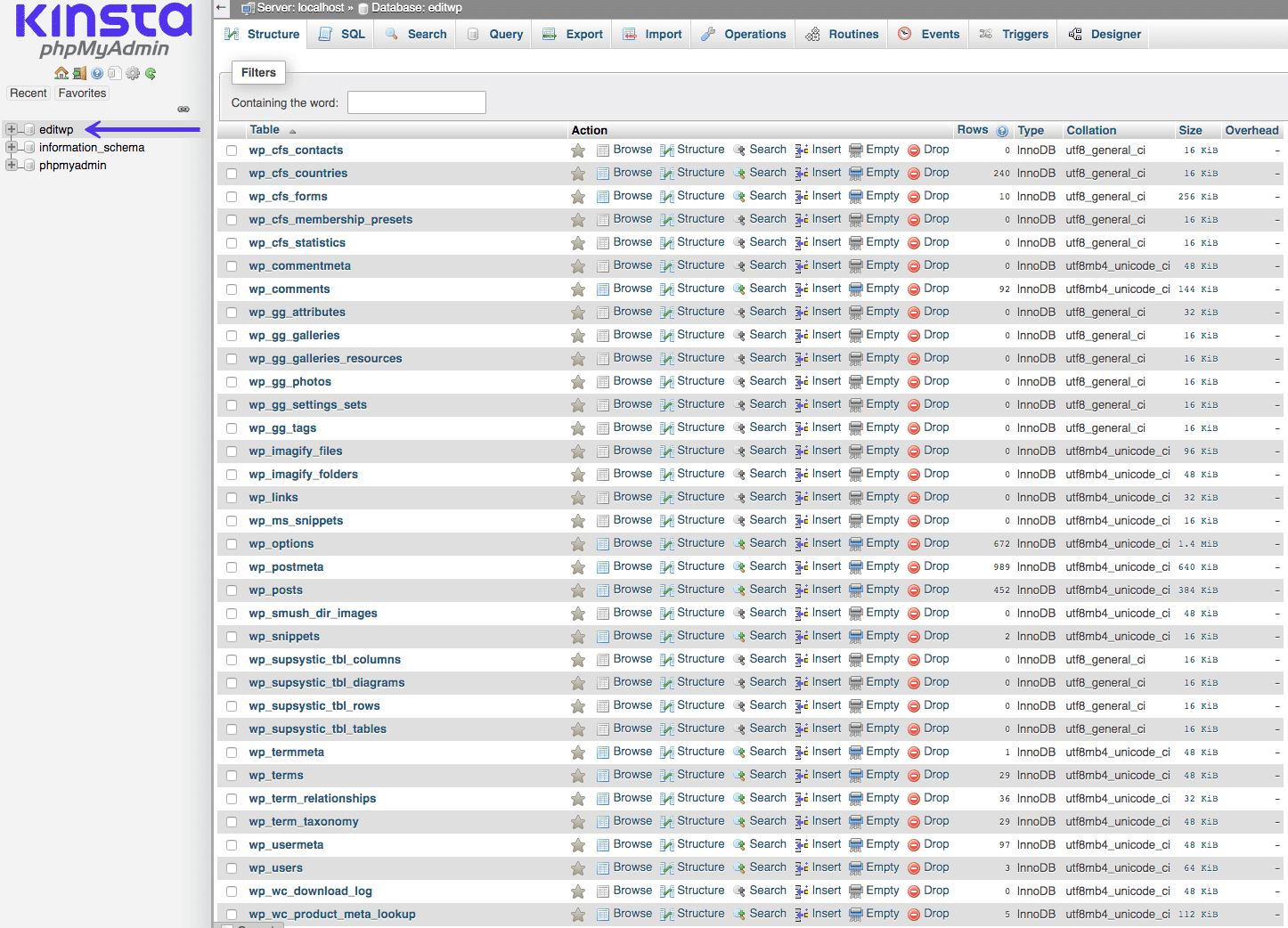
WordPress uses a MySQL database to store all its data. The default database structure has several tables. These tables hold different types of information. The wp_posts table stores all the blog posts and pages. The wp_users table has user information like names and emails. Comments go into the wp_comments table. Each table serves a specific purpose.
WordPress uses a prefix for its tables. This prefix is wp_ by default. It helps in identifying tables easily. You can change the prefix during installation. Changing it adds an extra layer of security. It makes it harder for bad people to guess table names. Always remember your chosen prefix. It’s important for accessing your data.
Key Tables Explained
The Posts Table keeps all the blog posts. It stores the content, title, and date of each post. The table is like a library. Each row is a book. Each book has information. This helps WordPress show posts on your site.
The Users Table holds user data. It includes usernames, passwords, and emails. Every user has a row. The table is secure. It keeps user information safe. This helps manage who can access the site.
The Options Table contains site settings. These settings help customize your site. It stores things like site name and theme. This table is crucial. It helps WordPress remember your settings.
The Comments Table stores user comments. It includes comment text, author, and date. This makes interacting with users easy. Comments add life to the site. They make the site more engaging.
The Terms and Taxonomies Table organizes content. It helps group posts under categories. This table helps users find content. It keeps everything in order. This makes the site user-friendly.
Credit: melapress.com
Custom Tables And Plugins
Plugins add extra features to your WordPress site. They make sites more flexible and powerful. Many plugins store data in MySQL. This helps in keeping everything organized. With plugins, you can easily add new functions. This way, your site becomes more useful.
Custom tables store unique data that WordPress cannot. They let you keep special info. This info is not in the default tables. You create these tables in MySQL. Using them helps in organizing data better. This makes your site run smoother. It is also easier to manage big data.
Database Optimization
MySQL Database in WordPress stores all website data, including posts, pages, and user information. It organizes this data for easy access and management, ensuring smooth website performance. Proper database optimization can enhance loading speed and improve user experience.
Indexing Strategies
Indexing makes searches faster in a database. It helps find data quickly. Important fields should have indexes. This speeds up the query process. Use unique indexes for fields with unique data. This avoids duplicates. Choose correct index types for each field. This can improve performance. Regularly check and update indexes. This keeps the database running smoothly.
Regular Maintenance
Maintenance is key for a healthy database. Backup data regularly to prevent loss. Clean old and unused data. This frees up space. Check for errors often. Correct them quickly. Update your database software. This keeps it secure and efficient. Perform checks on data integrity. This ensures data is accurate. Regular care helps avoid big problems.
Security Practices
Protecting access to your MySQL database is vital. Use strong, unique passwords for each user. Enable SSL encryption to secure data during transmission. Limit access to only necessary users. Regularly update your database software. Set up firewalls to block unauthorized access. Monitor login attempts for suspicious activity. Change default settings to enhance security. Keep your database backed up regularly. Use role-based permissions to control access levels. Avoid using the root user for day-to-day tasks.
Backing up data is crucial. Schedule regular backups to protect against data loss. Store backups in a secure location away from the main server. Use automated tools for reliable backup processes. Test backups to ensure they restore correctly. Keep multiple copies in different places. Use incremental backups to save space and time. Encrypt backup files for extra safety. Review your backup strategy often. Document procedures for quick recovery.
Troubleshooting Common Issues
Sometimes, the website cannot connect to the database. The reason might be wrong login details. Always check your username and password. Another issue could be the server not working. Ensure the server is running. If the website is still not connecting, the problem might be with the database host. Check if the host name is correct. These steps help solve connection issues.
Sometimes, tables in the database get corrupted. This can stop the website from working. First, use the repair command in MySQL. This command can fix many problems. Sometimes, the table is too damaged. Then, you might need to restore a backup. Always keep backups safe and updated. Corrupted tables can cause big issues. So, fixing them fast is very important.
Credit: kinsta.com

Credit: developer.wordpress.org
Frequently Asked Questions
What Is Stored In Mysql For WordPress?
WordPress stores posts, pages, user data, comments, and site settings in MySQL. It organizes content and metadata in tables. Plugins and themes can also add additional tables to store their specific data. MySQL enables efficient data retrieval and management, ensuring WordPress runs smoothly and displays dynamic content.
How Does WordPress Use Mysql Databases?
WordPress uses MySQL databases to store and retrieve data. When you create or update content, WordPress writes data to MySQL tables. During page load, it reads from these tables to display content. This process allows dynamic site interactions, like comments and user logins, enhancing WordPress functionality.
Can I Customize Mysql In WordPress?
Yes, you can customize MySQL in WordPress by creating custom tables or modifying existing ones. Plugins may also add tables for their data. Be cautious, as improper changes can affect site functionality. Always backup your database before making significant changes to ensure data safety.
How Secure Is Mysql For WordPress?
MySQL is generally secure for WordPress when properly configured. Use strong passwords and secure hosting environments. Regularly update WordPress, themes, and plugins to prevent vulnerabilities. Employ security plugins and regularly back up your database to protect against data loss or unauthorized access.
Conclusion
Exploring MySQL database in WordPress simplifies your site management. It stores essential data. Posts, pages, user info. All organized efficiently. Understanding this structure boosts your website’s performance. Makes troubleshooting easier. Customizing features becomes straightforward. With this knowledge, you can optimize your site.
Ensure smooth operations. Enhance user experience. Dive deeper as needed. The basics are now clear. Your WordPress journey continues. Always keep learning. This foundation is vital for success.


