
Imagine having complete control over your website’s hosting environment. No more relying on third-party services or dealing with frustrating downtime.
This is the promise of in-house web hosting. It’s not just a technical term; it’s an opportunity for you to take the reins of your online presence. By hosting your website yourself, you can tailor every aspect to perfectly suit your needs.
But what exactly does in-house web hosting entail, and is it the right choice for you? As you delve deeper, you’ll discover how this approach can offer unparalleled flexibility, security, and customization. Whether you’re a tech enthusiast or a business owner looking for more control, understanding the ins and outs of in-house web hosting can be a game-changer. Let’s explore the benefits, challenges, and steps to make it happen. Are you ready to unlock the potential of your web hosting? Keep reading to find out how it can transform your digital landscape.
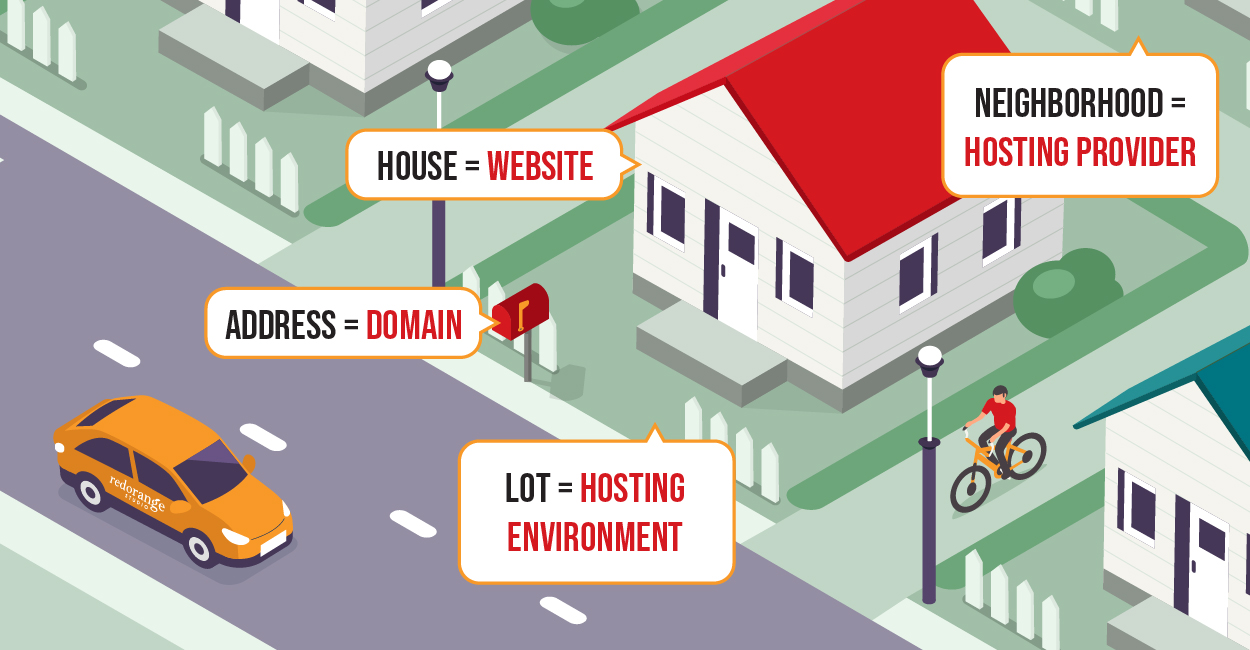
Credit: redorangedesign.com
Benefits Of In-house Web Hosting
In-house web hosting gives full control over the server. You can customize settings as needed. This means you can choose your own software and hardware. Changes happen fast. No waiting for a service provider. It offers a flexible environment for growth.
Security is a top priority. In-house hosting provides enhanced security. You can install your preferred security measures. This includes firewalls and antivirus programs. You have direct control over who accesses your data. This keeps sensitive information safe and protected.
Initial setup costs might be high. But it can save money in the long run. Monthly fees from hosting companies add up. Owning your server can be cheaper over time. You avoid unexpected charges. Plus, you can plan your budget better.

Credit: fginteractive.com
Technical Requirements
Strong computers are needed for hosting. They need good processors and lots of memory. Hard drives must have plenty of space. These are key for storing data. A cooling system is also crucial. It keeps devices from getting too hot.
Operating systems like Linux or Windows are vital. They help run the server. Web server software is needed too. Apache and Nginx are popular choices. Security tools protect the data. They stop hackers from getting in.
A strong internet connection is essential. It ensures fast loading times. Routers and switches manage the network traffic. They keep data flowing smoothly. A firewall adds extra security. It blocks unwanted access.
Challenges And Considerations
Maintaining servers can be hard. Regular updates are needed. Software needs to be checked. Bugs must be fixed quickly. Security is vital. Hackers can find ways in. A team must handle this. Backup plans are necessary. Data can be lost. Keeping systems running is a big job. It takes time. It takes effort. It takes skill.
Growing websites need more space. Traffic can increase fast. Servers must handle this load. Upgrades are often needed. More hardware might be required. Costs can rise. Planning is key. Predicting future needs is tricky. Misjudging can lead to problems. Unplanned downtime is bad for business.
Resources must be shared wisely. Bandwidth is limited. Too many users can slow sites. Storage must be managed. Not enough space can stop growth. Staff must be trained. They need skills to handle issues. Budgeting is important. Money must cover all needs. Careful planning is crucial.

Credit: dorik.com
Steps To Implement In-house Hosting
Planning is the first step. You need a clear strategy for hosting. Decide on your goals and budget. Think about your team and their skills. Write down your needs. Make a list of software and hardware requirements. Discuss with your team for more ideas.
Start with a strong network. Buy good servers and routers. Set them up in a safe place. Make sure you have a backup system. Install the necessary software. Check the power supply and cooling systems.
Keep an eye on your servers. Use tools for monitoring. Ensure your systems run smoothly. Fix any issues quickly. Update your software regularly. Make sure you have a security plan. Train your team to handle problems.
Comparing In-house And Third-party Hosting
In-house hosting gives you full control over server settings. It can offer better speed and customization. Third-party hosting often has shared resources. This might cause slower performance at peak times. In-house hosting can handle traffic spikes better. With third-party hosting, you rely on their maintenance and updates.
In-house hosting needs upfront investment. You buy servers and pay for their upkeep. Third-party hosting usually has monthly fees. It can be cheaper at first. Over time, in-house hosting can save money if managed well. Third-party hosting includes support costs. In-house hosting might need expert staff.
In-house hosting offers custom security settings. You control firewalls and access. Third-party hosting provides standard security features. In-house hosting needs constant monitoring. You must handle threats yourself. Third-party hosting has built-in security measures. They manage updates and patches.
Future Of In-house Hosting
The future of in-house hosting is bright. New technologies make servers faster. Computers are smarter now. Artificial Intelligence helps in managing data better. Automation tools reduce human work. This makes hosting more efficient.
In-house hosting is growing. Many companies now prefer control over their data. They want better security. Cloud computing is popular, yet in-house hosting has its place. Companies need both for balance.
New tools will make hosting easier. Better hardware will improve performance. Energy-efficient servers will save power. In-house hosting will become more eco-friendly. This will help the environment.
Frequently Asked Questions
What Are The Disadvantages Of In-house Hosting?
In-house hosting involves high costs for hardware, maintenance, and IT staff. It risks downtime without expert support. Scalability can be challenging, limiting growth. Security threats demand constant vigilance and expertise. Upgrades require significant time and investment. Limited resources may impact performance and efficiency compared to cloud solutions.
What Are The 3 Types Of Web Hosting?
The three types of web hosting are shared hosting, VPS hosting, and dedicated hosting. Shared hosting is cost-effective and ideal for beginners. VPS hosting offers more resources and flexibility. Dedicated hosting provides complete control and is suitable for high-traffic websites.
What Is The Difference Between In-house Hosting And Cloud Hosting?
In-house hosting uses local servers managed by your team. Cloud hosting relies on remote servers, managed by third-party providers. In-house hosting offers more control and security, while cloud hosting provides scalability and flexibility. Businesses choose based on their specific needs and resources.
What Does Hosted In-house Mean?
Hosted in-house means storing and managing data on servers located within a company’s premises. This offers enhanced control, security, and customization options. Organizations can directly oversee their IT infrastructure, ensuring quicker response to issues and tailored solutions. It’s ideal for businesses with specific security or compliance needs.
Conclusion
In-house web hosting offers control and flexibility. You manage your own servers. This means you decide security measures and software updates. It can be costlier than shared hosting. But, it provides more reliability. Businesses needing specific configurations benefit most. It’s ideal for those with technical expertise.
In-house hosting requires dedicated IT staff. It’s a serious investment, but for some, a worthy one. Assess your needs carefully before deciding. Consider your budget and technical skills. In-house hosting might be the right fit for you. Choose wisely for your website’s success.


