
Ever wondered how to make your WordPress content pop and grab attention? One simple, yet powerful tool lies right under your fingertips: the H2 tag.
When used effectively, H2 headers are not just about making your content look organized. They play a crucial role in enhancing the readability of your posts and boosting your SEO performance. Imagine having the power to guide your readers smoothly through your ideas while keeping search engines happy.
Sounds like a win-win, right? Stick around to uncover how mastering H2 in WordPress can transform the way your audience engages with your content. Let’s dive in and unlock the secret to making your posts shine!
Credit: www.wpbeginner.com
Role Of H2 In Content Structure
H2 tags play a big role in making content clear. They are like chapter titles in a book. They help readers know what is coming next. Using H2 tags well can make any page easy to follow. Each section should have its own H2. This makes the text less messy.
Importance For Seo
H2 tags are very important for SEO. Search engines use them to understand content better. They tell the search engine what each part of the page is about. This helps the page show up in the right searches. Using the right words in H2 tags can help improve rankings.
Enhancing Readability
H2 tags make content easier to read. They break up long text into smaller parts. Readers can find the information they need quickly. Clear H2 tags keep readers on the page longer. This helps both the reader and the website.
How To Use H2 In WordPress
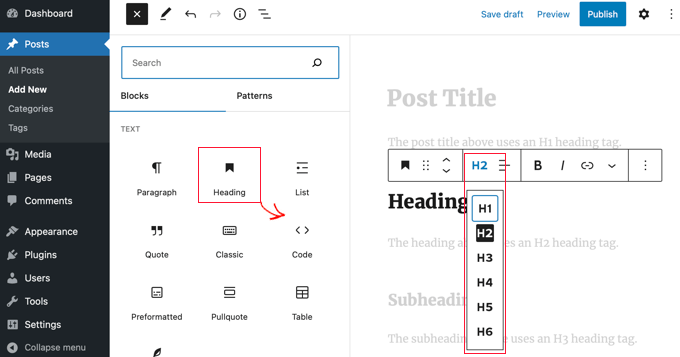
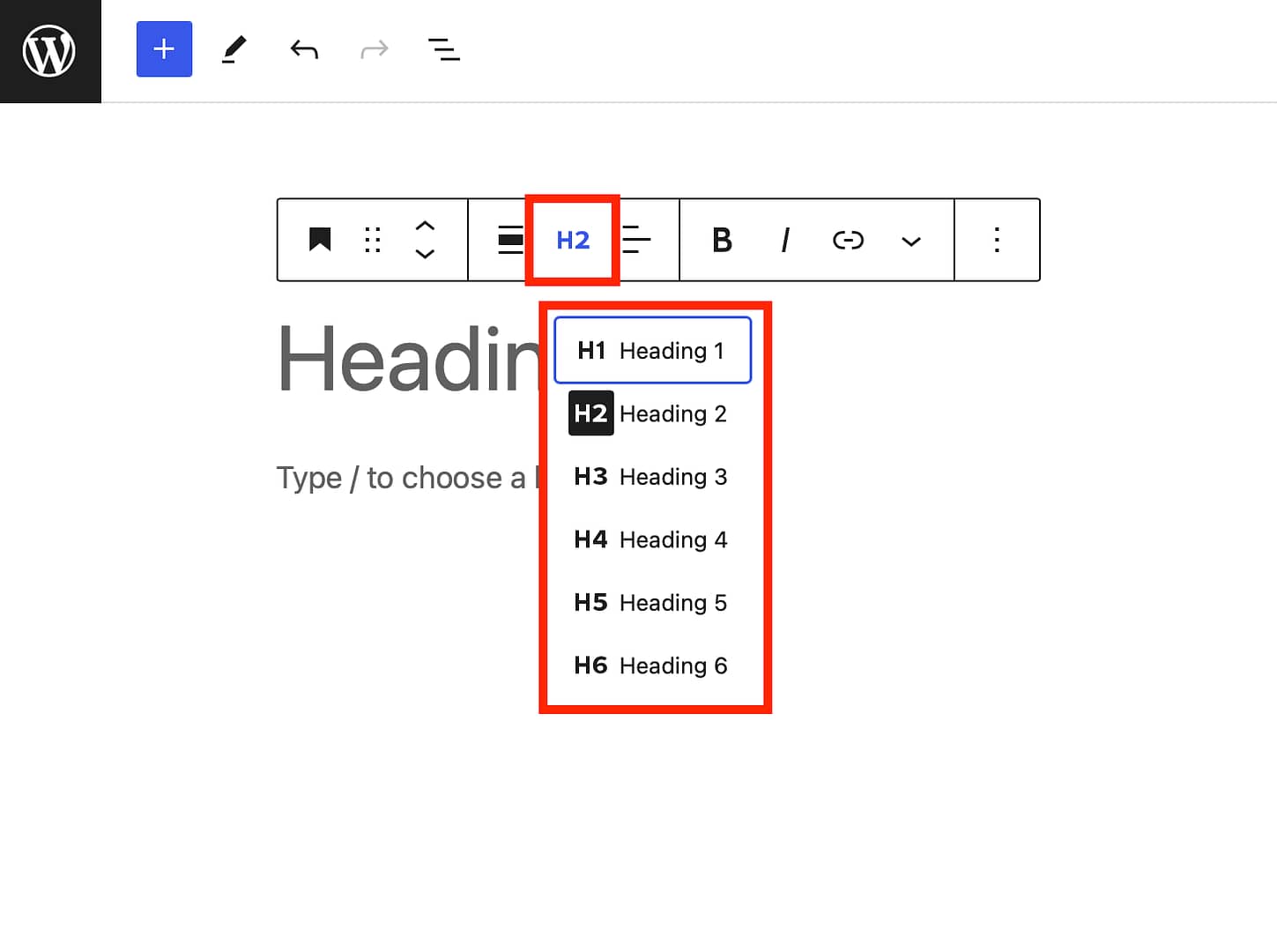
Open WordPress dashboard. Locate the post or page you want. Click ‘Edit’ to enter the editor. Look for the toolbar above the text area. This toolbar lets you format your content. You’ll see options like Bold, Italics, and Headings. Choose ‘Paragraph’ dropdown. Select ‘Heading 2’ for your text.
Type your text in the editor. Highlight it using your mouse. Go to the toolbar. Find the ‘Paragraph’ dropdown. Click it. Pick ‘Heading 2’ from the list. Your text will become a heading. Headings help organize content. They make reading easier.
Change H2 styles with CSS. Go to WordPress dashboard. Find ‘Appearance’ then ‘Customize’. Click ‘Additional CSS’. Type your CSS code. Example: h2 { color: blue; }. Save changes to see updates. Custom styles make your site unique. Users will enjoy browsing.
Best Practices For H2 Usage
Keyword placement is very important in H2 tags. Place keywords naturally. Keywords should fit well in the sentence. Never force keywords into the text. This helps search engines understand your content better.
Maintaining consistency is key in using H2 tags. Use similar styles and formats for all H2s. This makes your content easy to read. Consistency helps users and search engines.
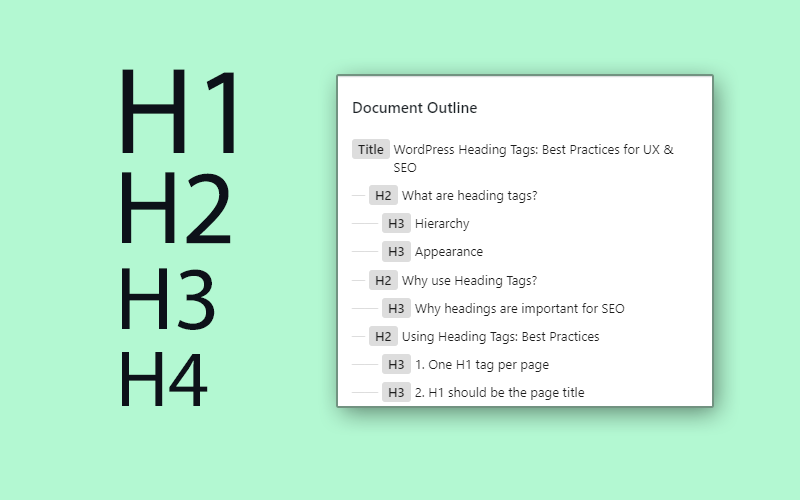
Balancing with other headings is essential. Use H2s along with H1, H3, and others. Do not overuse H2s. Mix and match different headings. This creates a neat structure. A balanced heading structure guides readers.
Credit: themeisle.com
Common Mistakes With H2
Many people use too many H2 tags on their pages. This can make the content look messy. Each H2 tag should have a purpose. Use it to introduce new ideas. Not every sentence needs an H2. Too many can confuse readers. It can also confuse search engines. Keep it simple and clear.
Using H2 tags without a plan is a mistake. They should follow a logical order. Start with H1, then H2, followed by H3. This helps readers understand the content. It also helps search engines. A clear structure is important for good SEO. Make sure to use H2 tags wisely.
Tools For Optimizing H2
Understanding H2 in WordPress is crucial for content structure. H2 tags help organize sections, improving readability and SEO. Tools like Yoast and SEMrush guide optimal usage, enhancing site performance.
Seo Plugins
SEO plugins help improve website rankings. They guide you with tips and tricks. These tools suggest better headings. They ensure your content is easy to read. They help choose keywords. Your site gets noticed more. Popular plugins include Yoast SEO and All in One SEO. They offer advice on heading tags. They help with meta descriptions. They help you understand what search engines like. They also help with link building.
Content Analysis Tools
Content analysis tools check your content’s quality. They make sure the text is clear. They highlight important points. These tools suggest changes. They guide you to make better content. They provide feedback. Your writing becomes sharper. Grammarly and Hemingway Editor are popular choices. They help you spot mistakes. They help with sentence structure. They ensure your writing is easy to read.
Credit: www.buildthatwebsite.com
Frequently Asked Questions
What Does H2 Mean In WordPress?
In WordPress, H2 refers to a heading tag used in HTML to format text. It’s the second level of headings in terms of hierarchy and importance. Using H2 tags helps structure content, making it easier for readers to understand. It also aids in SEO by signaling content hierarchy to search engines.
How To Add H2 Tags In WordPress?
To add H2 tags in WordPress, you can use the built-in editor. Highlight the text you want to format and select “Heading 2” from the formatting options. This process is straightforward and enhances both the readability and SEO value of your content by clearly defining sections.
Are H2 Tags Important For Seo?
Yes, H2 tags are vital for SEO as they help organize content. Search engines use them to understand the structure and importance of information. Proper use of H2 tags can improve your site’s search engine ranking and make your content more accessible to readers.
Can H2 Affect Website Accessibility?
H2 tags significantly impact website accessibility. They provide structure, making it easier for screen readers to navigate content. Users with disabilities rely on these tags to understand webpage content better. Properly using H2 tags ensures your website is inclusive and accessible to all users.
Conclusion
H2 tags in WordPress play a vital role in content structure. They help organize your content and improve readability. Search engines also use them to understand your content better. Using H2 tags enhances user experience and SEO. They guide readers through your content smoothly.
Remember, clear headings lead to better engagement. Keep your headings relevant and concise. This makes your blog more accessible and enjoyable. So, next time you write, consider your H2 headings carefully. They can make a significant difference in your blog’s performance.


