
Are you ready to unlock the full potential of your WordPress site? If you’re looking to customize and enhance your website, you’ve likely heard whispers about the mysterious functions.php file.
But what exactly is functions. php in WordPress, and why should you care? Think of it as the secret ingredient that can transform your site from ordinary to extraordinary. By understanding and utilizing this powerful tool, you can tailor your website’s features to meet your specific needs.
Whether you’re a seasoned developer or just dipping your toes into the world of WordPress, functions. php has something to offer you. Dive in to discover how you can take control of your website’s functionality and elevate your online presence. Curious to learn more? Keep reading to unravel the secrets of functions. php and see how it can work wonders for your WordPress site.
Role Of Functions.php In WordPress
The functions.php file is like a toolbox for your website. It holds special codes that add features. These features make your WordPress site better. It helps control the site’s behavior. Think of it as the brain of your theme.
Inside this file, you can add different functions. These functions can change how your site looks. They can also change how it works. You can add new menus, styles, and more.
It is important to know that changes here affect the whole site. Use it carefully. Always make a backup before editing. This way, your site stays safe.
Default Features And Capabilities
Functions.php is a file in WordPress themes. It gives themes extra features. This file lets you add or change theme behavior. You can write custom code inside it. This code helps in adding features like widgets and menus.
Functions.php can also change default settings. You can add new post types or taxonomies. It allows adding shortcodes for easy content display. Scripts and stylesheets can be added to themes using this file.
Sometimes functions.php needs careful handling. Wrong code can break your site. Always backup before making changes. Functions.php is like a toolbox for your website. It makes the website unique and tailored.
Customizing Themes With Functions.php
The functions.php file is like a toolbox. It helps to add custom code to a WordPress theme. This file allows you to add new features. You can also modify existing ones. Want to add a new widget? Or maybe a custom menu? Functions.php makes it easy. It is a simple way to make your theme unique. But be careful. Adding too much code can slow down your site. Always test your changes.
Functions.php can also change default settings. You might not like some default features. This file helps you change them. For example, you can remove default widgets. Or you can change the size of thumbnails. The possibilities are endless. Use this file to make your website better. But remember, always back up your site first. Mistakes can happen, so it’s good to be safe.
Common Modifications And Enhancements
Enqueueing is about loading scripts and styles in WordPress. It keeps your site fast and smooth. You add scripts with wp_enqueue_script(). For styles, use wp_enqueue_style(). This makes sure scripts load correctly. It also avoids conflicts. Always use these functions in the functions.php file.
Widget areas make your site more flexible. They are spaces where you add features. Use register_sidebar() to create new areas. This function lets you add widgets anywhere. You can add them in headers, footers, or sidebars. It’s easy and quick.
Make your login page unique. Use the functions.php file to change it. You can add a custom logo. Use login_head() for styles. Change the logo URL with login_headerurl. This makes the login page match your brand. Simple changes make a big difference.
Best Practices For Editing Functions.php
Child themes help keep your changes safe. They protect original files. Create a child theme before editing. This way, updates won’t erase your work. Child themes are easy to make. They use a simple folder structure. You can find guides online to help.
Backing up files is very important. Always save a copy of functions.php. Use plugins or manual methods. Backups prevent loss. Mistakes can happen anytime. With backups, you can restore quickly. Never skip this step. It saves time and effort.
Test changes on a local server first. This keeps your website safe. Local servers are easy to set up. Use them for experimenting. If something breaks, your live site stays safe. Testing helps catch errors early. It ensures smooth updates later.

Credit: jetpack.com
Troubleshooting Common Issues
Syntax errors can break your WordPress site. They often occur due to incorrect code. These errors usually show a parse error message. To fix this, locate the error line. Use a text editor to open the functions.php file. Look for missing brackets or semicolons. Correct any mistakes. Save your changes. Reload your WordPress site to check.
Sometimes, restoring the default functions.php file is needed. First, access your website through FTP. Backup your current functions.php file. Download a fresh copy of WordPress. Extract the default functions.php file. Upload it to your theme’s folder. Replace the faulty file. This action can fix many issues. Ensure your site works fine afterward.
Alternative Methods To Functions.php
Functions. php in WordPress is a vital file for theme customization. Alternatives include creating a custom plugin or using the Code Snippets plugin. These methods offer safer ways to add code without risking theme updates.
Creating Site-specific Plugins
Create a site-specific plugin to keep custom code safe. This keeps your code during theme changes. Site-specific plugins are easy to make. Create a folder with a .php file. Add your custom code inside this file. Use simple names for easy memory. Activate the plugin from your WordPress dashboard. This keeps your site running smoothly.
Using Custom Snippets
Custom snippets let you add code without changing the main files. Tools like Code Snippets plugin make it easy. Add small pieces of code to your site. Each snippet can be turned on or off. This helps in testing new features. Snippets are saved in the database. This means they stay safe during updates. Use snippets for small, repeated tasks. Keep your site working well.

Credit: kinsta.com
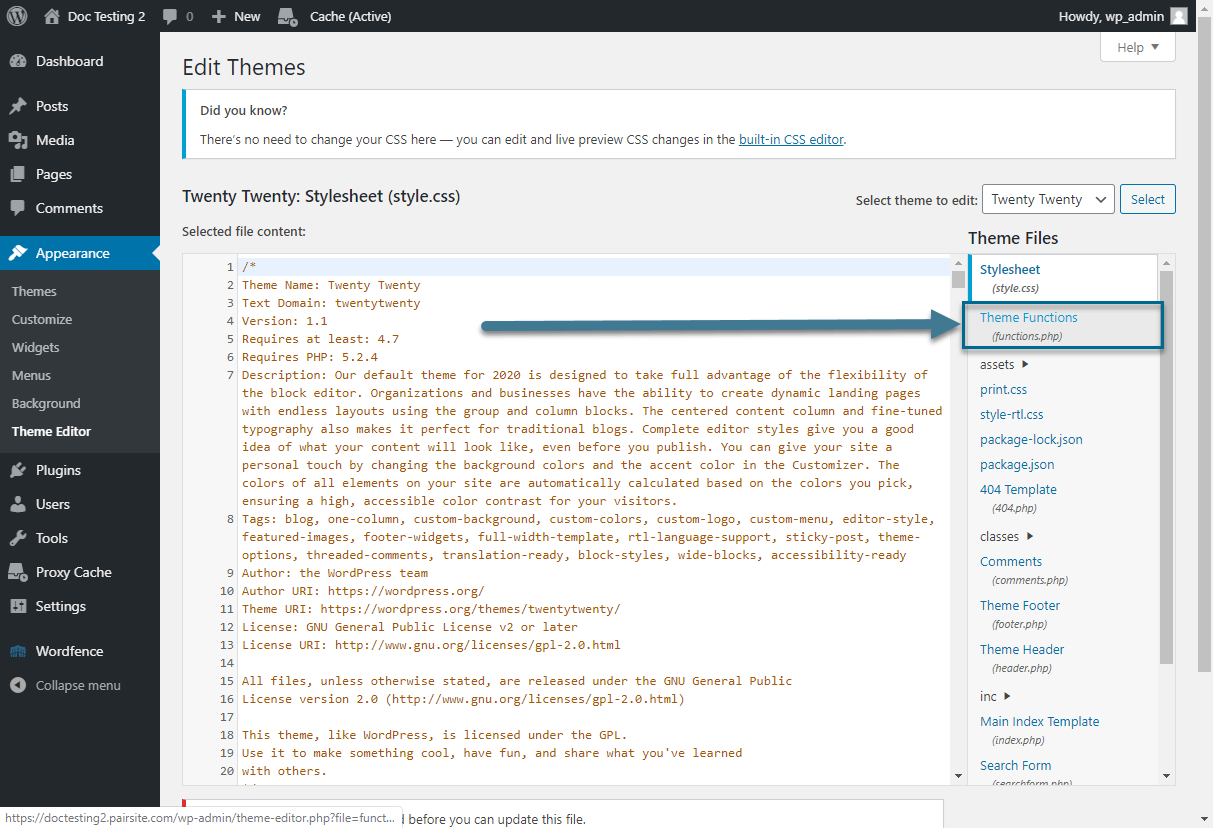
Credit: www.pair.com
Frequently Asked Questions
What Is Functions.php In WordPress?
Functions. php is a WordPress theme file that allows you to add custom functions and features. It acts like a plugin, enabling code snippets for various functionalities. It helps modify themes without altering core files, making it essential for WordPress customization.
How Does Functions.php Affect WordPress Themes?
Functions. php affects WordPress themes by adding custom code snippets to enhance theme functionality. It allows theme developers and users to implement features like widgets, menus, and shortcodes. By modifying functions. php, you can tailor a theme’s behavior without directly changing core files.
Can Functions.php Cause WordPress Errors?
Yes, incorrect code in functions. php can cause WordPress errors. Errors may lead to the site crashing or displaying a “white screen of death. ” It’s crucial to test code thoroughly and backup your site before modifying functions. php to ensure stability and performance.
How To Edit Functions.php Safely?
To edit functions. php safely, use a child theme or a code snippet plugin. These methods prevent direct changes to the parent theme file. Always backup your site and test changes on a local environment to avoid potential site issues or crashes.
Conclusion
Understanding functions. php in WordPress is crucial for customizing themes. It allows you to add features without altering core files. This file acts like a plugin and enhances site functionality. Use it carefully to avoid errors. Always back up your site before making changes.
Learning this can make your site more efficient. Explore functions. php to get more control over your WordPress site. Practice regularly to become comfortable with coding. It’s a valuable skill for managing your website. With time, you’ll gain confidence in using functions.
php effectively. Happy coding!


