
Have you ever visited a website and been immediately captivated by its homepage? That’s the magic of front page posting.
If you’re using WordPress and want your site to stand out, mastering front page posting is crucial. It’s your chance to make a memorable first impression, showcase your best content, and guide your visitors exactly where you want them to go.
Curious about how you can achieve this and why it matters? Stick with us, and you’ll discover the secrets to harnessing the power of front page posting in WordPress. Whether you’re a beginner or looking to refine your skills, this guide will equip you with everything you need to make your website shine.
Credit: sites.muscogee.k12.ga.us
Front Page Posting Basics
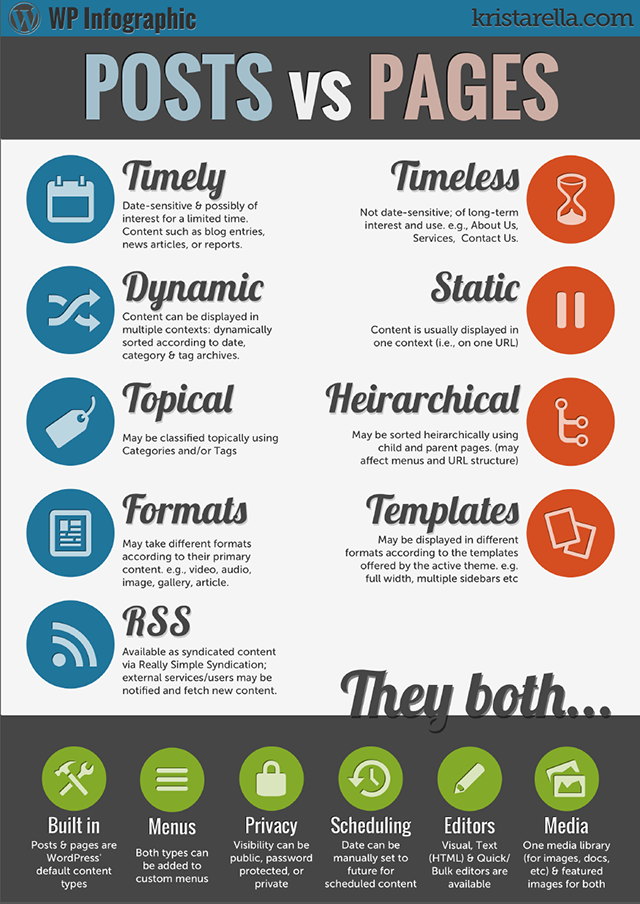
The front page in WordPress is the first thing visitors see. It can be a static page or show your latest posts. For many, a static front page is like a welcome mat. Others prefer showing the newest blog posts. This keeps the site fresh and engaging. You can change this setting in your WordPress dashboard. Go to Settings and then Reading. Choose the option you like best. You can also choose which page is your front page. Make sure it looks good and fits your site’s theme. Keep it simple and clear. This helps visitors find what they need. Remember, first impressions matter.
Setting A Static Front Page
WordPress allows you to set a static front page. This means the first page stays the same. It won’t change with new posts. This is useful for business sites. They need a consistent homepage. To set this up, go to your WordPress dashboard.
Find “Settings” and click “Reading”. You will see an option. It says “Your homepage displays”. Choose “A static page”. Now, select a page from the list. This will be your front page. Remember to save your changes.
Static pages show important info. Like services or contact details. They help visitors find key details quickly. A static front page can improve user experience. It makes navigation easy.
Dynamic Front Page Options
WordPress offers many choices for your website’s front page. You can set a static front page or show your latest posts. A static page looks the same all the time. It is great for business websites or portfolios. You can also use a page you created. This gives a unique look.
Many themes support a custom front page. You can add widgets, images, and videos. This option makes your site more engaging. Visitors will stay longer. They see what you offer right away.
The WordPress Customizer helps you change front page settings easily. No coding is needed. Just a few clicks and your page is ready. With these tools, your site looks great and works well.

Credit: wpscholar.com
Choosing A Front Page Style
A static front page shows the same content every time. It is like a welcome mat. It can tell visitors about your site. A dynamic front page changes often. It shows your latest posts. It is like a news page. Both styles have their own benefits.
The impact on user experience is different. A static page is good for businesses. It can make your site look neat. A dynamic page keeps content fresh. It can bring visitors back. Think about your goal. Choose what fits best.
Configuring Front Page Settings
Accessing WordPress Settings is easy. First, log into your WordPress dashboard. Look for the Settings menu. Click on Reading. This opens the front page settings. You can change how your site looks here. The front page is the first thing people see. Choose wisely for a great impression.
Selecting a Page for Display is simple. You have two choices. Display your latest posts or a static page. A static page remains the same. Latest posts show new content. To choose, go to the Reading settings. Select A static page option. Pick a page from the dropdown menu. You can create a new page if needed. Save changes to update your site.

Credit: learn.wordpress.org
Customizing Front Page Content
Page builders help make your front page look unique. They are easy to use. Just drag and drop items. Choose from many layouts. Add text, pictures, and buttons. No coding needed. You can change colors and fonts. Everything is customizable. Create a design you love. Make your site stand out. Page builders are perfect for beginners. They save time too. Many themes support them. Popular ones include Elementor and Beaver Builder. Make edits quickly. Preview changes instantly. Enjoy the creative process.
Widgets add special features to your front page. They are small tools. Place them where needed. Add a calendar or social media links. Plugins offer extra functions. They expand what your site can do. Choose from thousands available. Add contact forms or photo galleries. Widgets and plugins are easy to install. No coding required. They improve user experience. Keep your site dynamic. Ensure they match your theme. Update them regularly. Make your site interactive and fun. Visitors will love it.
Seo Considerations
WordPress is a great tool for SEO. It helps your site get noticed. Use keywords wisely in titles and descriptions. This makes your site easier to find. Write clear and simple content. This keeps visitors on your page. They enjoy reading and will stay longer.
A good-looking site attracts visitors. But it should work well too. Pretty sites must be easy to use. Make sure buttons and links are visible. People should find what they need quickly. Balance is key. A site should look nice and function smoothly. This keeps visitors happy and engaged.
Common Mistakes To Avoid
Many make mistakes on the front page. One mistake is using too many elements. It can make the page look messy. Another mistake is not updating content. Visitors may think the site is old. Using too many colors can confuse the eyes. Simple colors work best.
Some forget to add important links. Links help users find more info. Large images can slow the page. Small images load faster. Not checking for spelling mistakes can make the site look unprofessional. Always proofread your content. If you follow these tips, your page will look better.
Tips For Effective Front Page Posting
Catchy images grab attention. Bright colors work well. Use simple words to tell stories. Stories make things interesting. Short sentences keep readers focused. Ask questions to engage visitors. Questions make people think.
Important details should be clear. Use bold for key points. Headlines should be easy to read. Make them short. Use lists to show facts. Lists are easy to follow.
Keep pages clean. Avoid clutter. Clutter confuses visitors. Use white space wisely. White space helps focus. Make navigation simple. Easy navigation helps visitors find things.
Highlight important news. Important news catches eyes. Use big fonts for headlines. Big fonts stand out. Images should match topics. Match images with content.
Tables organize data well. Tables show info clearly. Use simple words in tables. Simple words are easy to understand. Bullet points show lists. Lists are easy to read. Make links visible. Visible links help navigation.
Updates keep content fresh. Fresh content attracts visitors. Regular updates show activity. Feedback improves pages. Feedback helps understand visitors. Use comments for interaction. Interaction builds community.
Frequently Asked Questions
What Is Front Page Posting In WordPress?
Front page posting in WordPress involves displaying content directly on your site’s homepage. This can be a static page or a dynamic list of recent posts. It allows visitors to see featured content immediately upon visiting your site, enhancing user engagement and providing easy access to important information or updates.
How Do I Set The Front Page In WordPress?
To set the front page in WordPress, navigate to Settings > Reading. Choose either a static page or latest posts for your homepage display. Select the page you want as your front page. Save your changes. This setting helps control what visitors see when they first arrive on your site.
Can I Customize WordPress Front Page Layout?
Yes, you can customize the WordPress front page layout. Use page builders or your theme’s customization options to adjust layout, design, and content. Plugins like Elementor offer drag-and-drop tools for easy customization. Tailoring your front page can enhance aesthetics and improve user experience.
Why Use A Static Front Page In WordPress?
Using a static front page in WordPress provides a consistent, professional look. It helps highlight specific content or messages. Static pages are ideal for showcasing key information or branding. They offer control over design and content, ensuring visitors see the most relevant information immediately.
Conclusion
Front page posting in WordPress boosts your site’s first impression. It provides flexibility in displaying content. Users can easily navigate and find important information. This feature helps in organizing posts effectively. It enhances the overall user experience on your site.
WordPress offers simple tools for managing front page content. Beginners can set up a front page without hassle. Regular updates keep your site fresh and engaging. A well-designed front page attracts more visitors. It also improves your site’s visibility in search engines.
Experiment with layouts to find what suits your audience best.


