
Imagine you’re navigating through a sea of content online. What catches your eye and keeps you engaged?
It’s often the little things that make a big difference. One such tool is the Floating Social Bar in WordPress. If you’re looking to boost your website’s visibility and encourage more interaction, understanding this tool is essential. You might wonder what makes the Floating Social Bar so special.
The answer is simple: it’s a sleek, efficient way to keep your social media buttons front and center, without overwhelming your content. As you scroll down a page, these buttons remain visible, subtly urging your visitors to share your amazing content with their networks. In a digital landscape crowded with distractions, the Floating Social Bar ensures your share options are always within reach, helping to increase your social media presence and drive more traffic back to your site. Curious to know how it works and how it can transform your online strategy? Let’s dive deeper into the benefits and setup process of this handy WordPress feature.
Floating Social Bar Basics
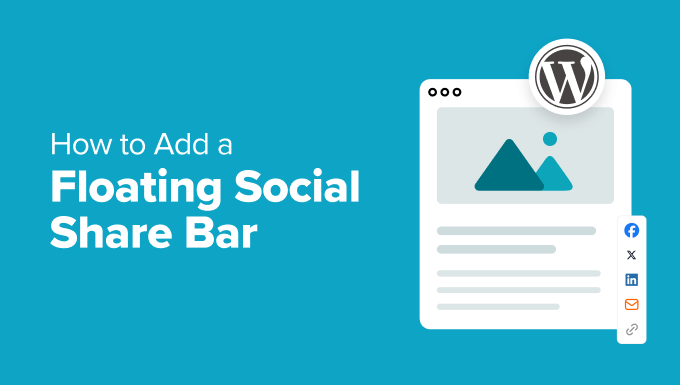
Floating Social Bar is a special tool for websites. It lets users share content easily. This bar sticks to the screen as users scroll. It helps share your content on social media. Popular platforms like Facebook and Twitter are included. This can increase your website’s reach.
The bar is easy to install in WordPress. It does not slow down your site. It offers only the most important social sharing options. Visitors are more likely to use it because it’s always visible. This can lead to more shares and visits to your site. Good for growing audience.
Credit: www.wpbeginner.com
Benefits Of Using Floating Social Bar
The Floating Social Bar stays on screen. It moves as you scroll. This means users can share anytime. No need to scroll back up. Sharing becomes easy and quick.
It can boost engagement on your site. More shares mean more visitors. Your content gets seen by more people. This can lead to more followers.
Setting it up is simple. Many find it user-friendly. It does not slow your site. Fast loading keeps users happy. They stay longer and interact more.
Installation Process
First, go to your WordPress dashboard. Find the “Plugins” menu on the left side. Click on “Add New.” In the search bar, type “Floating Social Bar.” You will see the plugin in the results.
Click on the “Install Now” button next to the plugin name. Wait for a few seconds. After installation, click on the “Activate” button. The plugin is now active.
Go to the plugin settings. Choose the social media icons you want. Drag and drop them into the order you prefer. Save your settings. Your social bar will now appear on your site.
Customization Options
Floating Social Bar in WordPress offers users customization options to enhance social sharing. Choose which social networks to display. Adjust settings easily to fit the website’s style.
Design Adjustments
Change the look of your floating social bar easily. Adjust the colors to match your site. Choose from many different icon styles. You can also change the size of the icons. Make them big or small. Align the bar to the top or bottom of the page. Customize it to fit your website’s style.
Platform Selection
Choose which social media platforms to show on the bar. Add popular sites like Facebook, Twitter, or Instagram. Include LinkedIn for professional shares. Pick platforms your audience uses. Only show those that matter to your readers. This keeps the bar clean and relevant.
Best Practices
Floating Social Bar in WordPress enhances user interaction by displaying social sharing buttons in a fixed position. This tool ensures easy access to share content, boosting visibility and engagement on various platforms. Customizable options allow for seamless integration with any website design.
Placement Tips
Position the floating social bar where it is easy to see. Many people put it at the top of the page. Some choose to place it on the side. Make sure it does not cover important content. Avoid putting it in the footer. Users often miss it there. Test different spots to find the best one. Check how it looks on mobile devices. Ensure it does not block text or images. Keep it simple and neat. Users like a clean design. Use colors that match your website’s theme. This helps it blend well.
Performance Optimization
Optimize the floating social bar for speed. Slow bars annoy users. Use lightweight plugins. Heavy plugins can slow your site. Update regularly for better performance. Check the loading time often. Use tools to measure speed. Compress images to save space. This helps in faster loading. Remove unnecessary scripts. They clutter the code. Minimize server requests. This improves speed. Focus on user experience. Fast sites make users happy.
Credit: optinmonster.com
Common Issues And Fixes
The Floating Social Bar may not show up. Check your plugin settings. Ensure it’s activated. Also, check if it’s installed correctly. Sometimes, themes conflict with the plugin. Try switching to a default theme. This can resolve conflicts.
Another issue is slow loading speed. Too many plugins can slow down your site. Disable unused plugins. This improves speed. Ensure your server is fast. A slow server affects performance.
Sometimes, the social buttons don’t display correctly. Check your theme’s style settings. Ensure they don’t override the plugin’s styles. You might need to add custom CSS. This can fix display issues.
If the bar doesn’t update, clear your cache. Cached data can cause outdated content. Refresh your browser. Ensure your plugin is up to date. Updates fix bugs and improve features.
Alternatives To Floating Social Bar
Many plugins can replace the Floating Social Bar. One popular choice is Social Warfare. It is easy to use and has many features. Another option is Monarch. It offers beautiful designs and is very flexible. AddToAny is also a good choice. It’s simple and works well on many sites.
Shareaholic provides extra tools like analytics. It helps you track shares. Jetpack offers social sharing and many other tools. It’s often used on WordPress sites. Each plugin has unique features. Choose the one that fits your needs best.
Impact On User Engagement
Floating Social Bar grabs attention. It stays visible while scrolling. Users can share quickly. More shares mean more views. It boosts blog reach. People love easy sharing options. They click more often. User engagement increases. Readers find content easily shareable. This leads to better interaction. Floating bars keep social links handy. Visitors don’t have to search. This improves their experience. Quick sharing makes them happy. Happy users return often. They engage more with content. Website traffic grows steadily. More engagement means more success.

Credit: www.youtube.com
Frequently Asked Questions
What Is Floating Social Bar?
The Floating Social Bar is a plugin for WordPress. It enables you to add social media sharing buttons to your site. This bar remains visible as users scroll through the page, encouraging more shares. It helps increase engagement and visibility on social platforms.
How To Install Floating Social Bar?
To install Floating Social Bar, navigate to your WordPress dashboard. Click on “Plugins” and “Add New. ” Search for “Floating Social Bar” and click “Install Now. ” Once installed, activate the plugin. Customize the settings to display your preferred social media buttons.
Why Use Floating Social Bar?
Using Floating Social Bar boosts social media engagement. It keeps sharing buttons visible as users scroll. This feature encourages more shares and increases content visibility. It’s lightweight and won’t slow down your site, making it a user-friendly option.
Can Floating Social Bar Slow My Site?
No, Floating Social Bar is designed to be lightweight. It won’t slow down your website. It loads social scripts only when needed, optimizing performance. This ensures your site remains fast while providing social sharing features.
Conclusion
Floating Social Bar boosts your website’s social engagement. Easy to use. Enhances sharing. Visitors share content smoothly, increasing visibility. It keeps social media icons handy. No more scrolling to find them. Simple setup even for beginners. Your site stays fast and efficient.
No complicated plugins needed. Just a straightforward tool. Perfect for bloggers and small businesses. Connects your audience easily. They engage more. You benefit from a wider reach. Try it on your WordPress site today. See the difference in interaction and traffic.
A small change can make a big impact.


