
Ever found yourself wishing there was an easier way to keep your WordPress site updated with fresh content? Enter Feed WordPress, a handy tool that could be the answer to your content management woes.
If you’re tired of the endless cycle of manually updating your blog and want to streamline your workflow, Feed WordPress might just be what you need. Imagine having a system that automatically fetches and publishes content from other sources, keeping your site alive with minimal effort.
Intrigued? You’re about to uncover how Feed WordPress can revolutionize the way you manage content, making your life a whole lot easier. Dive in and discover the secrets to effortless content curation and enhance your site’s dynamism today.
Credit: www.wpzoom.com
Feed WordPress Overview
Feed WordPress is a plugin for WordPress websites. It helps you bring content from other sites. This tool is like a news aggregator. You can gather articles or posts from different places. It uses RSS feeds to do this. RSS feeds show updates from sites. You don’t need to visit each site. Feed WordPress does the work for you. It’s a way to keep your site fresh with new content. People use it to share news or blogs.
This plugin is simple to set up. Even beginners can use it. It makes your site look active and up-to-date. You can choose what content to show. Only show what your readers like. It saves time and effort. No need to write everything yourself. Just select good sources. Let Feed WordPress handle the rest.
Installation Process
First, log in to your WordPress dashboard. Then, go to the Plugins section. Click on “Add New” to find new plugins. In the search bar, type “Feed WordPress”. You will see the plugin appear. Click on “Install Now”. Wait for the installation to complete.
Once installed, click on “Activate” to start using it. You should see a new option in your dashboard. This means the plugin is ready. Now, you can start adding feeds. It’s a simple process, even for beginners. Enjoy creating a great site with Feed WordPress.
Setting Up Feeds
RSS feeds bring new content to your site. Adding RSS feeds to WordPress is easy. Go to the Feed WordPress plugin. Click on “Add a New Feed.” Enter the RSS URL you want. Press “Save Changes” to update.
Tailor feed settings to your needs. Choose how often feeds update. Decide how much content shows. Select the categories for your feed. Adjust settings for images. Ensure feeds look good on your site. Save changes after customizing.

Credit: tagshop.ai
Content Aggregation
Feed WordPress helps you import content from different sources. You can bring articles, blog posts, and news. It collects them in one place. This process is called content aggregation. You get fresh content without much effort. It saves time for bloggers. It also keeps your website updated.
Feed WordPress lets you manage sources easily. Add new sources for more variety. Remove old ones if needed. You decide what to show on your site. It helps keep your website organized. You can choose trusted sources only. Your readers get high-quality information.
Customization Options
Choose a theme that fits your blog style. Many themes are available for free. Some themes have premium features. Themes change how your blog looks. Select templates for different pages. Templates help organize information. Make your blog unique with custom themes.
Use advanced settings for special features. Set up widgets for extra functions. Customize the menu for easy navigation. Add plugins to improve your blog. Plugins add new tools and options. Configure settings for better performance. Adjust SEO settings to help people find your blog.
Seo Considerations
Feeds bring fresh content to websites. This keeps visitors engaged. Ensure content is relevant to your audience. Use keywords wisely. Keywords help search engines find your site. Avoid stuffing too many keywords. This can hurt your SEO. Balance is key. Write natural content. Make it easy to read. Use short paragraphs. Organize content clearly. Good structure helps users stay longer. More time on your site can improve your ranking.
Duplicate content confuses search engines. They can’t decide which page to rank. Ensure uniqueness in your feed. Use tools to check for duplicates. Rewrite similar content. This gives each page its own value. Original content attracts more visitors. It boosts your site’s reputation. Keep checking content regularly. This maintains your site’s SEO health.
Common Issues
Feed WordPress can have some common errors. These can stop your feed from working. Sometimes, feeds do not update. This might be because of caching issues. Clearing the cache can help. Other times, the feed URL is wrong. Double-check the URL you entered. It must be correct.
Feeds may show the wrong content. This happens if the source changes. Check the source site for updates. Sometimes, WordPress settings can cause trouble. Look at your feed settings. Make sure they are set up correctly.
If you see error messages, read them carefully. They often tell you what is wrong. Search online for the error message. Many people share solutions for these problems. Remember, fixing feeds takes time and patience.
Best Practices
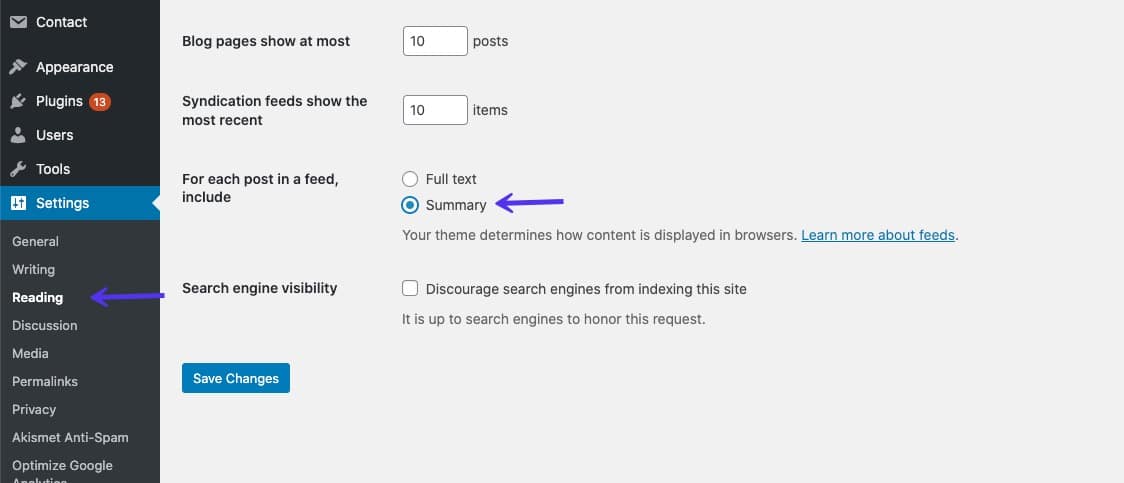
Keeping your WordPress feed updated is very important. Regular updates ensure that your site runs smoothly. Updates fix bugs and improve security. Make a habit of checking for updates weekly. This helps avoid any issues.
Always use trusted sources for updates. Quality sources ensure that you get the right information. They help you stay safe from malware and other threats. Reliable sources provide accurate data. They guide you well in managing updates.
Credit: kinsta.com
Frequently Asked Questions
How Does Feed WordPress Work?
Feed WordPress operates by aggregating content from various RSS feeds into your WordPress site. It acts as a syndication tool, allowing you to curate and display external content. This plugin can be useful for bloggers who want to share articles from other sites directly onto their own platform.
Is Feed WordPress Free To Use?
Yes, Feed WordPress is free to use and available through the WordPress plugin directory. You can download and install it without any cost. While free, it offers various functionalities to enhance your site’s content aggregation and syndication capabilities effectively.
Can Feed WordPress Be Customized?
Feed WordPress offers customization options to suit your needs. You can select specific feeds to aggregate, set update intervals, and modify display settings. These features allow you to tailor the plugin to better match your site’s design and content strategy.
What Are The Benefits Of Using Feed WordPress?
Using Feed WordPress can enhance your site’s content diversity and engagement. It allows you to aggregate interesting articles automatically. This can save time and provide your audience with fresh content regularly, boosting your site’s overall appeal and traffic.
Conclusion
Feed WordPress offers a simple way to manage content. It helps gather and organize feeds efficiently. Users can easily set it up with minimal technical skills. This tool saves time by automating content updates. It also supports multiple feeds, enhancing website variety.
With its user-friendly interface, anyone can navigate it with ease. Feed WordPress proves useful for bloggers and site owners alike. It keeps content fresh and engaging. By integrating feeds, it boosts site relevance. Feed WordPress remains a valuable asset for content management.


