
Ever scrolled through a blog and noticed a captivating image that instantly grabs your attention? That’s the power of a featured image in WordPress.
It’s the visual hook that reels you in before you even read a single word. Featured images aren’t just decorative; they’re essential in setting the tone and enhancing the appeal of your content. But what exactly is a featured image, and why should you care about it?
You’ll discover how featured images can transform your WordPress site, making your content more engaging and shareable. Whether you’re a blogger, a business owner, or someone looking to spruce up your website, understanding the role of featured images can give you a competitive edge. Dive in to learn how you can use them to not only catch the eye of your audience but also to boost your site’s performance and SEO. Stay with us to unlock the secrets of making your WordPress posts visually irresistible!
Featured Image Basics
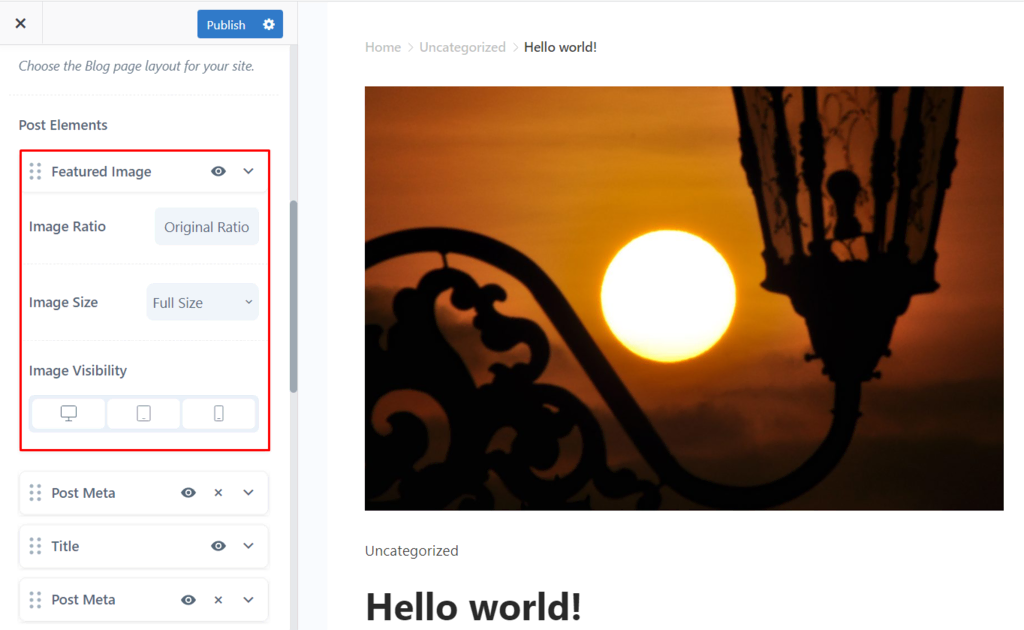
A featured image is a key part of a WordPress post. It is the main image for your post or page. This image shows up on the top of the page. It also appears on social media when shared. The featured image helps make your post look good.
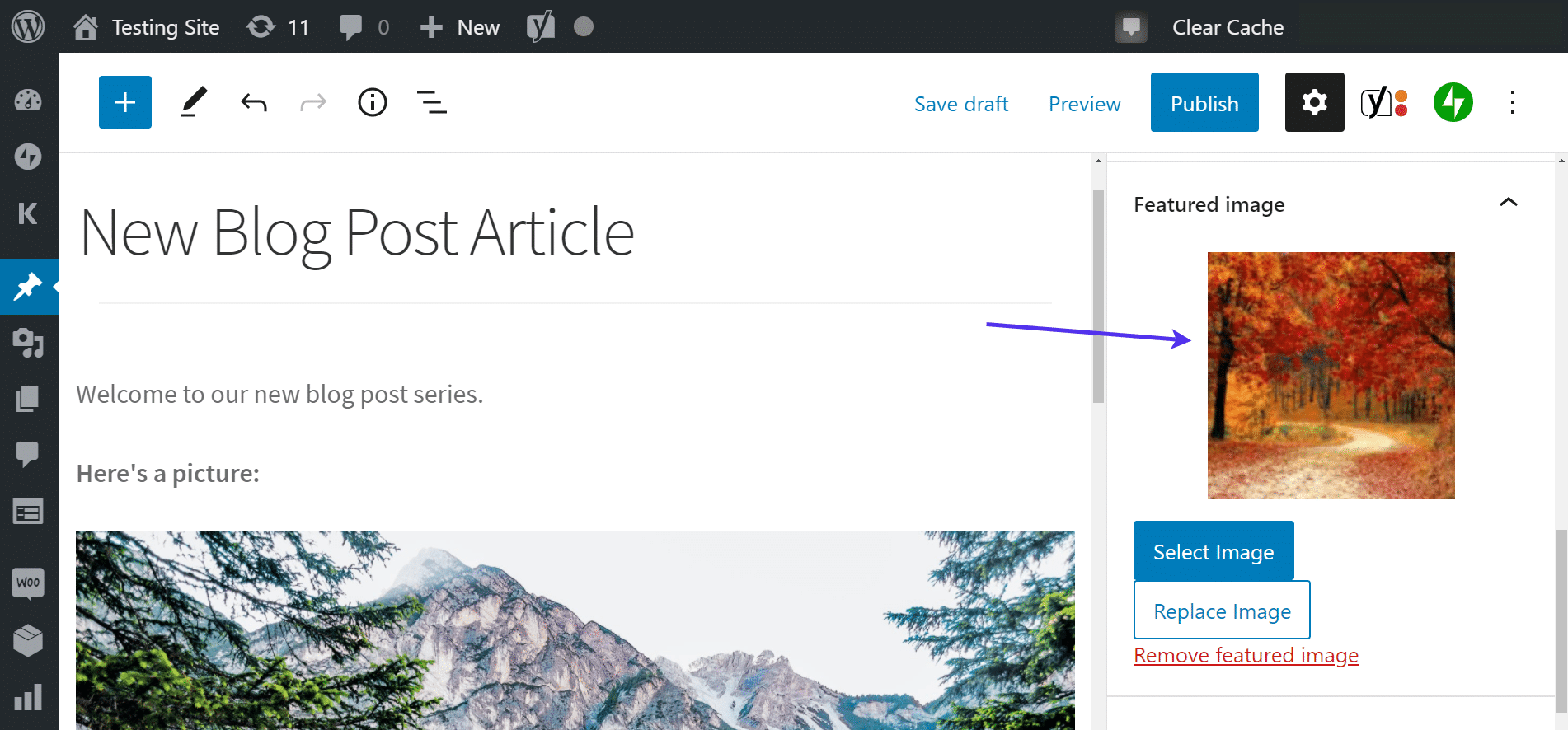
To set a featured image, go to the post editor. Look for the “Featured Image” box on the right side. Click “Set Featured Image.” You can upload a new image or pick from the media library. Once done, click “Set Featured Image.” Your image is now set. A good featured image should be clear and related to the post. It catches the reader’s eye. It sets the tone for your content.
Credit: www.hostinger.com
Importance Of Featured Images
Featured images make blogs look attractive. They grab the reader’s attention quickly. A blog with a picture is more likely to be clicked. Images can tell a story without words. They make posts stand out. Every blog needs a clear and interesting photo. It helps with branding and identity. Readers remember images more than text.
Good images boost social media shares. They help with SEO. Blogs with images rank higher. Search engines like pages with pictures. Thumbnail images are important on listing pages. They make posts noticeable. Ensure images are relevant to the content. This way, readers understand the topic better.
Setting Featured Images
First, click on the featured image option in your WordPress post. Select “Set Featured Image”. A new window will open for uploading. Choose an image from your computer or the media library. Drag and drop works too. Once uploaded, click “Set Featured Image”. The image will now appear in the preview. It’s a simple process.
Images should be the right size. Too big, and your site may slow down. Too small, and they look blurry. A common size is 1200×628 pixels. This size fits many themes. Check your theme for specific size needs. Resize images using photo editors. Online tools can help too. Always keep file size below 100KB if possible. Smaller files load faster and improve user experience.
Optimizing Featured Images
Featured images are key in capturing attention. They represent your post visually. To optimize them, choose high-quality images. Make sure they relate to the content. Use descriptive alt text. This helps search engines understand the image.
Seo Best Practices
Always name your image files properly. Avoid using random names. Use relevant keywords in the file name. This boosts your SEO. Compress your images to reduce file size. Smaller files load faster. Faster loading improves user experience.
Improving Page Load Speed
Fast loading is crucial. Large images slow down pages. Use image compression tools. These tools shrink file size without losing quality. Consider lazy loading for images. Lazy loading only loads images when visible. This speeds up initial page load.
Common Issues And Solutions
Featured images in WordPress often face issues like incorrect sizing or failure to display. Solutions include adjusting image dimensions and checking theme compatibility. Regular updates and optimization can prevent these problems, ensuring images enhance your website’s visual appeal effectively.
Troubleshooting Display Problems
Featured images may not display correctly sometimes. This is a common issue. Check your theme settings. Some themes have specific image size requirements. Ensure the image fits those sizes. Clear your cache regularly. Cached data can cause display problems. Update your theme and plugins. Outdated versions might have bugs. Always use high-resolution images. Low-quality images can appear blurry.
Fixing Image Upload Errors
Errors can occur during image uploads. Check your file size first. Large files often fail to upload. Reduce the size if needed. Ensure your file format is supported. WordPress supports JPEG, PNG, and GIF. Check your server settings. The server might limit file uploads. Increase the limit if necessary. Update your browser. Sometimes, browsers cause upload errors.
Credit: kinsta.com
Featured Image Plugins
Many WordPress users love using plugins to manage featured images. These tools help you easily add and customize pictures. Some plugins are very popular for this task. Featured Image from URL is one choice. It lets you use external images. Another option is Quick Featured Images. It helps set images for multiple posts quickly. Envira Gallery is also widely used. It creates beautiful image galleries. Each plugin has unique features. Choose the one that fits your needs best.
Plugins add extra features to your WordPress site. They can improve how featured images work. Drag and dropautomatic resizing. This helps keep images neat. Others allow bulk editing. This saves time when managing many images. Some plugins offer custom templates for images. This makes your posts look great. Explore different plugins to find the best one for you.
Tips For Effective Featured Images
Pick images that catch the eye. Bright colors work well. Faces in images grab attention. Use high-quality images. Blurry images look bad. Keep the image relevant to your post. It should match the topic. Unique images stand out. Avoid using common pictures. They can make your post look dull. Custom images add a personal touch.
Use the same style for all images. Consistency makes your blog look neat. Stick to a color theme. This helps your brand stand out. Use the same size for all images. This keeps your blog tidy. Consistent fonts in images look good. It helps readers follow along. Always check for quality. Poor images can harm your blog’s look.
Credit: kinsta.com
Frequently Asked Questions
What Is A Featured Image In WordPress?
A featured image in WordPress is the primary image associated with a post or page. It visually represents the content, appearing on the blog’s homepage, archives, or social media shares. Setting a featured image can enhance reader engagement and improve the visual appeal of your website.
How To Set A Featured Image In WordPress?
To set a featured image, go to your WordPress post or page editor. On the right-hand side, locate the “Featured Image” box. Click “Set Featured Image,” upload or select an image from your media library, and save. Ensure the image aligns with your content’s theme.
Why Are Featured Images Important In WordPress?
Featured images are vital for capturing audience attention and enhancing user experience. They provide a visual cue about the content, improve click-through rates, and support branding consistency. Additionally, they play a significant role in social media sharing and search engine visibility.
Can I Use Any Image As A Featured Image?
While you can technically use any image, it’s best to choose one relevant to your content. Ensure the image is high-quality, aligns with your website’s aesthetics, and complies with copyright laws. Using appropriate images can improve user engagement and SEO performance.
Conclusion
A featured image plays a vital role in WordPress posts. It grabs readers’ attention instantly. This image sets the tone for your content. It enhances the visual appeal of your blog. A well-chosen image can boost engagement. Make sure your image reflects the post’s theme.
Keep it relevant and high-quality. This image is not just decoration. It is a powerful tool for storytelling. Use it wisely to complement your writing. Remember, a picture speaks louder than words. So, select your featured image thoughtfully. It can make your blog stand out.


