
Have you ever wondered how your WordPress site effortlessly connects users from around the globe to your content? The magic lies in DNS configuration.
If you’ve ever been puzzled by terms like “DNS records” or “domain mapping,” you’re not alone. Understanding DNS configuration might sound complex, but grasping it is crucial for your site’s performance and reliability. Imagine the frustration of a potential visitor being unable to access your site due to a misconfiguration.
You don’t want that, right? Get ready to dive into the essentials of DNS configuration in WordPress. By the end of this article, you’ll have the confidence and knowledge to ensure your site runs smoothly and efficiently. Keep reading to unlock the secrets that can enhance your site’s accessibility and speed.
Credit: wordpress.com
Basics Of Dns
DNS stands for Domain Name System. It helps computers find websites. Think of it like a phone book for the internet. When someone types a website name, DNS turns it into numbers. These numbers are called IP addresses. Computers use IP addresses to talk to each other.
Without DNS, finding websites would be hard. People would have to remember long numbers. Thanks to DNS, people just remember names. DNS is really important for internet browsing. It makes finding information fast and easy.
Credit: docs.bitnami.com
Dns Configuration In WordPress
DNS helps in directing visitors to the right website. It converts domain names to IP addresses. This makes the site easy to access. Correct DNS settings ensure your WordPress site loads fast. They also make it more secure. Without proper DNS, users may face errors. This is bad for your site traffic. SEO ranking may drop too. So, DNS setup is very important.
| Record Type | Description |
|---|---|
| A Record | Links domain to IP address. |
| CNAME Record | Aliases one domain to another. |
| MX Record | Directs emails to mail servers. |
| TXT Record | Provides text notes for domains. |
Setting Up Dns In WordPress
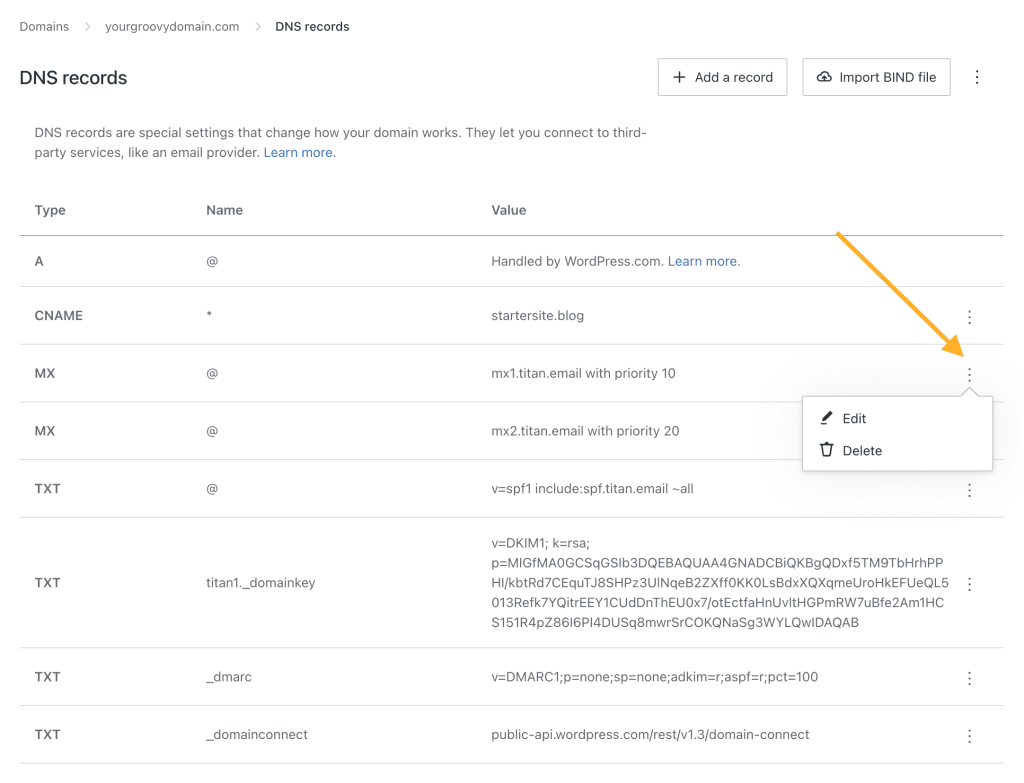
First, log into your domain provider’s site. Find the domain settings section. Look for a tab named “DNS settings” or something similar. This is where you can make changes. It’s important to be careful. A small mistake can cause big problems. Double-check every entry you make. Always save changes after editing. If unsure, ask for help. It’s better to be safe than sorry.
To update DNS, locate the DNS records list. You might see records like A, CNAME, and MX. Each serves a different purpose. For WordPress, focus on A and CNAME records. Update them to point to your hosting server. Check each entry for accuracy. Wrong entries can break your site. After updating, save your changes. Wait for the records to propagate. This might take a few hours. Patience is key here.
Troubleshooting Dns Issues
Many websites face DNS problems. Slow loading and server errors are frequent. Sometimes, the website is not found. Incorrect DNS settings cause these issues. Changes in DNS records might take time to update.
Another problem is expired domain names. If the domain is not renewed, the site disappears. DNS misconfigurations can also lead to problems. Ensure your DNS settings match your hosting provider. Always check for typos in DNS records.
Several tools can help diagnose DNS issues. Ping checks if your website is reachable. Traceroute shows the path your data takes. DNS lookup tools reveal DNS records. Online DNS tools provide detailed information.
Use WHOIS to check domain status. It shows if your domain is active. Online DNS checkers can identify configuration errors. These tools help identify and fix DNS problems easily.
Best Practices For Dns Management
DNS security is very important for WordPress sites. Hackers often target DNS systems. Always use strong passwords. Enable two-factor authentication. This adds an extra layer of protection. Regularly update your DNS software. New updates fix security holes. Use DNSSEC to protect data. It helps verify data is correct. Keep your DNS records private. Share them only with trusted people.
Monitoring your DNS is crucial. It helps spot problems early. Use monitoring tools for tracking. These tools watch for changes. Look out for unusual activity. Check your DNS records often. Make sure they are accurate. Update them when needed. Regular checks prevent downtime. They also improve site performance. Write down changes you make. This helps remember past updates. Regular reviews keep your DNS healthy.
Advanced Dns Features
Configuring DNS in WordPress involves setting up domain names to direct visitors to your website. It ensures your domain name points to the correct web server. Proper configuration enhances website accessibility and performance.
Dnssec Implementation
DNSSEC adds an extra layer of security. It helps protect websites from attacks. This feature verifies the authenticity of DNS responses. Without DNSSEC, attackers can redirect visitors. They can send them to malicious sites. Activating DNSSEC in WordPress can be done easily. Many hosting providers offer support for it. Always check if your provider supports DNSSEC. Enabling it ensures a safer browsing experience. Users feel more secure visiting your site. Protect your website and your visitors.
Load Balancing With Dns
Load balancing helps distribute traffic. It makes websites run smoothly. DNS can help with load balancing. By spreading the traffic, it avoids server overload. Websites become faster and more reliable. Multiple servers handle user requests. This setup reduces downtime. It also improves user experience. Many WordPress sites benefit from this. Implementing DNS-based load balancing is not hard. Hosting providers often offer this feature. Ensure your site can handle many visitors.

Credit: wordpress.com
Frequently Asked Questions
How Do I Configure Dns In WordPress?
To configure DNS in WordPress, access your domain registrar’s dashboard. Locate the DNS settings and update the nameservers to point to your WordPress hosting provider. This enables your domain to connect to your WordPress site efficiently, ensuring proper functionality and accessibility.
Why Is Dns Important For WordPress Sites?
DNS is crucial for WordPress sites as it translates domain names into IP addresses. This allows browsers to locate and load your site correctly. Proper DNS configuration ensures faster loading times and better user experience, enhancing your site’s performance and reliability.
Can Dns Affect WordPress Site Speed?
Yes, DNS can impact WordPress site speed. Efficient DNS configuration reduces lookup time, speeding up site loading. Poor DNS settings can lead to delays, affecting user experience. Optimize DNS settings for faster access and improved performance of your WordPress site.
What Are Common Dns Errors In WordPress?
Common DNS errors in WordPress include incorrect nameserver settings and expired domain registration. These can cause site downtime or inaccessible content. Regularly check DNS settings and renew domain registration to prevent these issues, ensuring your WordPress site remains online and functional.
Conclusion
Mastering DNS configuration in WordPress is essential for website success. It ensures your site runs smoothly and reaches your audience efficiently. Understanding DNS settings helps in managing domain names and server connections. Regularly check and update your DNS settings for optimal performance.
This knowledge empowers you to handle potential issues with ease. Keep exploring and learning more about WordPress and DNS. This will enhance your skills and boost your site’s functionality. Stay informed and proactive, ensuring your website remains reliable and accessible.
Enjoy managing your WordPress site with newfound confidence.


