
Have you ever wondered what powers your WordPress website behind the scenes? It’s more than just themes and plugins; it’s the database that holds all your precious content.
The database name in WordPress is a crucial element that acts like a backstage hero, ensuring your website runs smoothly. But what exactly is this database name, and why should you care about it? Imagine trying to find a book in a library without any catalog.
Chaos, right? Your WordPress database name serves a similar purpose, organizing and managing your site’s data efficiently. By understanding what a database name is and how it functions, you can gain more control over your website’s performance and security. Stay with us as we unravel the mysteries of the WordPress database name. You’ll discover how it impacts your site, why it’s important, and how you can manage it for optimal performance. Trust us, this knowledge is a game-changer for anyone serious about their WordPress site. So, are you ready to take your WordPress skills to the next level? Let’s dive in!
Credit: www.wpdownloadmanager.com
Database Name In WordPress
The database name in WordPress is very important. It helps your website find the right data. Imagine it like a special label. This label tells WordPress where to look. Without it, your site cannot work properly. A wrong name means errors. Your site might not load. So, it must match exactly. Every letter matters.
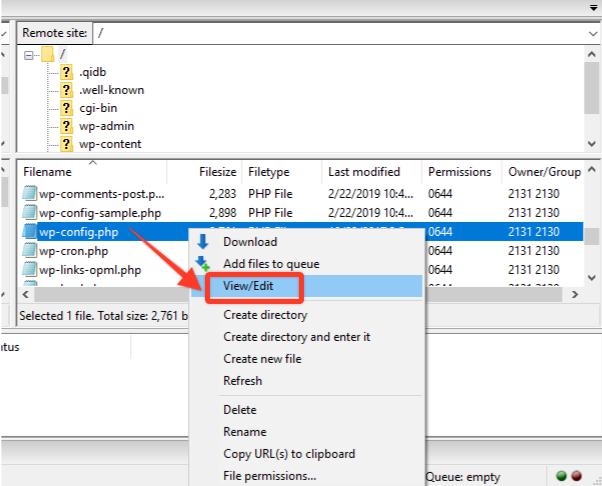
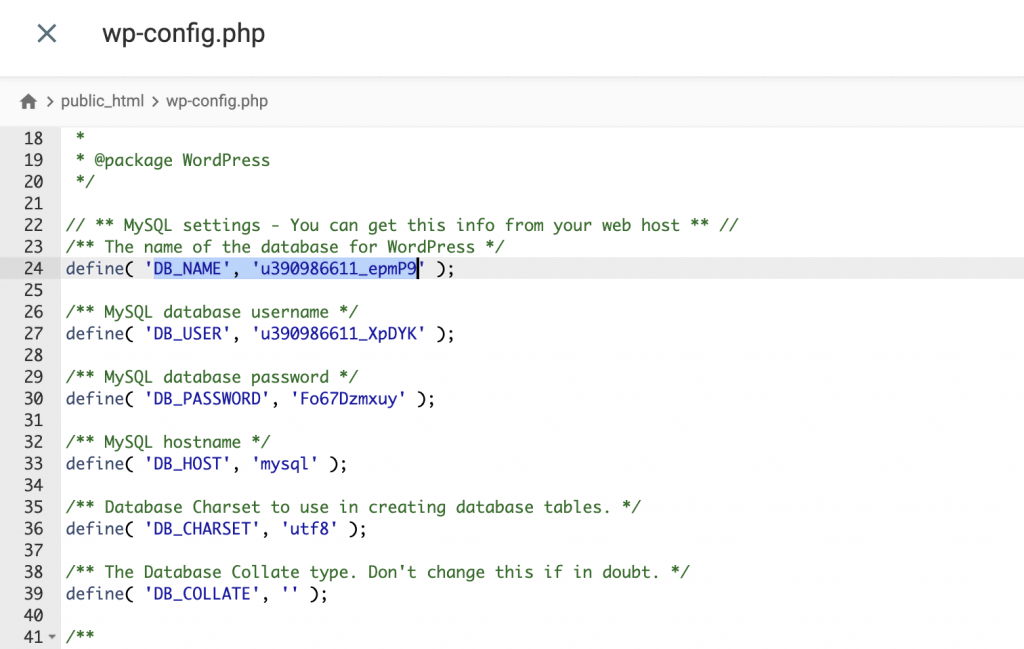
You can find this name in the wp-config.php file. This file is inside your WordPress folder. Open it with care. Look for the line that says define('DB_NAME', 'your_database_name');. The part inside quotes is your database name. It’s very important to keep it safe. Don’t share it with others.
Role Of The Database
A WordPress database stores all the site’s data. This includes posts, pages, and comments. Users find data quickly because of this database. It is a collection of tables. Tables hold different types of data. For example, one table holds user information. Another table stores post details. Database names identify these collections. Each site has its own database name. The name helps in managing data. It keeps data organized. Changing the database name is risky. It can break your site if done wrong. Always back up before making changes. This ensures data safety.
Locating The Database Name
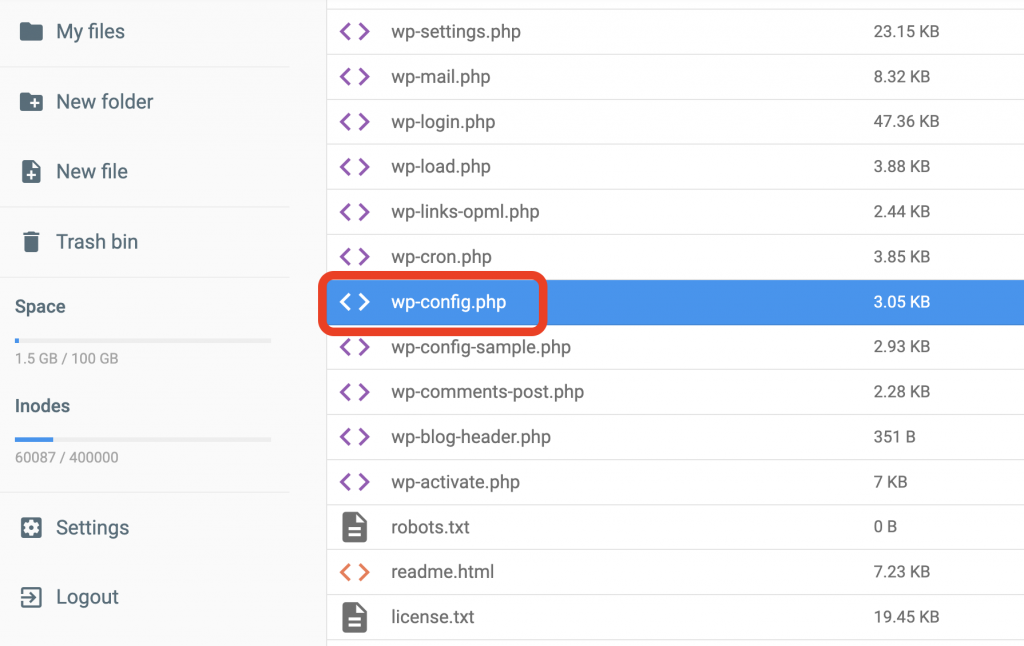
The file wp-config.php holds key settings for WordPress. It’s located in the main folder. This folder is where WordPress is installed. Use a file manager or FTP tool to find it. Open the file carefully. Inside, you will see many settings. Look for the line that says DB_NAME. This line shows the database name. Do not change anything else in the file. Changes can break your website.
The database name is crucial. It helps WordPress connect to your site’s database. The name is found next to DB_NAME in wp-config.php. It will look like this: define('DB_NAME', 'your_database_name');. The text between the quotes is the database name. Write it down or remember it. This name is important for backups and troubleshooting.
Credit: www.hostinger.com
Importance Of Correct Database Naming
Choosing the right database name helps a website run fast. A clear name makes it easy to find files. This means the site loads quickly. Fast-loading sites make visitors happy. They stay longer and explore more pages. Fast sites also rank better on search engines. This brings more visitors.
A good database name keeps hackers away. Use a unique and strong name. It makes it hard for bad people to guess. Always avoid using common names. Common names are easy for hackers to find. This keeps your data safe and secure. Protecting data is very important for all sites.
Changing The Database Name
The wp-config.php file holds the database name. This file is crucial for WordPress. Open it with a text editor. Find the line define('DB_NAME', 'your_database_name'). Change ‘your_database_name’ to your new name. Save the file. Make sure you spell the name correctly.
Access your database through phpMyAdmin. Find your old database name. Select it. Click the Operations tab. Enter the new name in the box. Click ‘Rename’. Check for errors. If successful, your database name has changed. This is an important step. Keep a backup of your database. It helps in case of mistakes.
Common Issues And Troubleshooting
Identifying the database name in WordPress can be tricky. Often, it’s stored in the wp-config. php file. Troubleshooting involves checking this file for the correct database name entry.
Database Connection Errors
WordPress users often face database connection errors. This means your website can’t talk to the database. Many reasons can cause this error. Wrong login details are a common cause. Check your database username and password. Make sure they match your hosting account.
Recovery Steps
Start by checking your wp-config.php file. This file holds important settings. Find the lines for DB_NAME, DB_USER, and DB_PASSWORD. Ensure these are correct. If the error persists, contact your hosting provider. They can help you fix the issue. Sometimes, your database server might be down. They can check this for you. Keep your software updated to avoid future errors.
Best Practices For Database Management
Backing up your database keeps your data safe. Use tools that automate backups. This way, you won’t forget. Save backups on different devices. Use cloud storage for extra safety. Check your backups often. Make sure they work. A broken backup is useless. Keep backup copies for some months. This helps if something goes wrong. Regular backups protect your work. They save you from data loss.
Keeping your database secure is important. Use strong passwords. Change passwords often. Don’t share them with others. Update your software regularly. This fixes bugs and improves security. Use plugins that increase database security. They add extra layers of protection. Limit access to your database. Only trusted people should have access. Monitor your database for unusual activity. Act quickly if you see anything strange. Security keeps your data safe.
Credit: www.hostinger.com
Frequently Asked Questions
What Is The Database Name In WordPress?
The database name in WordPress is the identifier for your website’s database. It’s specified in the wp-config. php file. This name is crucial for WordPress to connect and manage data. To find it, look in your hosting control panel or the configuration file.
How To Find My WordPress Database Name?
To find your WordPress database name, access the wp-config. php file in your site’s root directory. Open the file and locate the line that starts with `define(‘DB_NAME’, ‘your_database_name’);`. The value in quotes is your database name.
Why Is The Database Name Important In WordPress?
The database name is crucial in WordPress as it identifies where your site’s data is stored. It’s essential for connecting WordPress to the correct database. Without it, WordPress can’t access or manage your site’s data, leading to errors.
Can I Change My WordPress Database Name?
Yes, you can change your WordPress database name, but it’s risky. You must update the wp-config. php file and rename the database in your hosting control panel. Ensure you back up your data before making changes to avoid data loss.
Conclusion
Understanding the database name in WordPress is crucial. It keeps your site organized and functional. This name identifies where your site’s data lives. A unique database name prevents conflicts and ensures smooth operation. Always check your database name before making changes.
This avoids errors and protects your site’s data. A clear database name makes troubleshooting easier. You gain better control over your site. Remember, a well-managed database means a reliable website. Keep your WordPress site safe by knowing your database name well.
Simple steps lead to better site management. Stay informed and maintain your site’s health.


