
Are you looking to simplify your website management and enhance your WordPress experience? Discovering the magic of cPanel WordPress might be just what you need.
Imagine having a powerful tool at your fingertips that makes managing your WordPress site as easy as pie. No more wrestling with complicated technical issues or feeling overwhelmed by the backend chaos. With cPanel, you can streamline your tasks, secure your site, and focus on what truly matters—creating amazing content and engaging with your audience.
By the end of this article, you’ll not only understand what cPanel WordPress is but also why it’s a game-changer for anyone serious about their online presence. Stick around to unlock the secrets that could transform your website management forever.
Credit: www.fixrunner.com
Cpanel Basics
Cpanel is a tool for website management. It has many features. You can manage files easily. It also helps with email setup. You can create and manage databases. Security is a big part of Cpanel. It has tools to keep your site safe. You can also use it to install software. This includes WordPress. Backups are simple with Cpanel. It makes sure your data is safe. Managing domains is another key feature. You can add new domains quickly. You can also set up subdomains. With Cpanel, you have control over your website.
The Cpanel interface is easy to use. It has a simple design. The main page shows many icons. Each icon has a different task. These icons help with website tasks. You can see file icons, email icons, and more. Everything is in one place. You can find what you need quickly. The layout is clear. This makes it easy for new users. Navigation is simple. You can switch between tasks fast. The interface helps you work better. It saves time and effort.
WordPress Essentials
Cpanel WordPress simplifies website management. It offers a user-friendly interface for installing WordPress. This tool helps manage files, databases, and email accounts easily.
Core Features
WordPress is a popular tool for creating websites. It offers many features that make website building easy. Users can create posts and pages with a simple editor. Themes let users change the look of their site. Plugins add extra features like contact forms. Users can manage comments and keep discussions active. Media support allows users to upload images and videos. It helps sites look lively. WordPress also has a dashboard. This dashboard helps users control site settings. Security updates keep websites safe from threats. WordPress is user-friendly and accessible for beginners. It is flexible for advanced users too.
Benefits For Users
WordPress is simple to use. Users do not need to code. It has many themes. Users can change their site’s look easily. WordPress is free to start. Users can save money. SEO tools help sites rank better in searches. Community support is strong. Users can find help easily. WordPress is great for blogs and business sites. It is trusted by millions worldwide.
Installing WordPress Via Cpanel
Begin by logging into your Cpanel account. Next, locate the File Manager. This tool helps manage your website files. Check if you have a database ready. If not, create one. Use the MySQL Databases option. Remember the username and password. These are important for later steps. Ensure your domain is pointing to your hosting. This ensures the website loads correctly. Make sure you have the latest WordPress package. Download it from the official website.
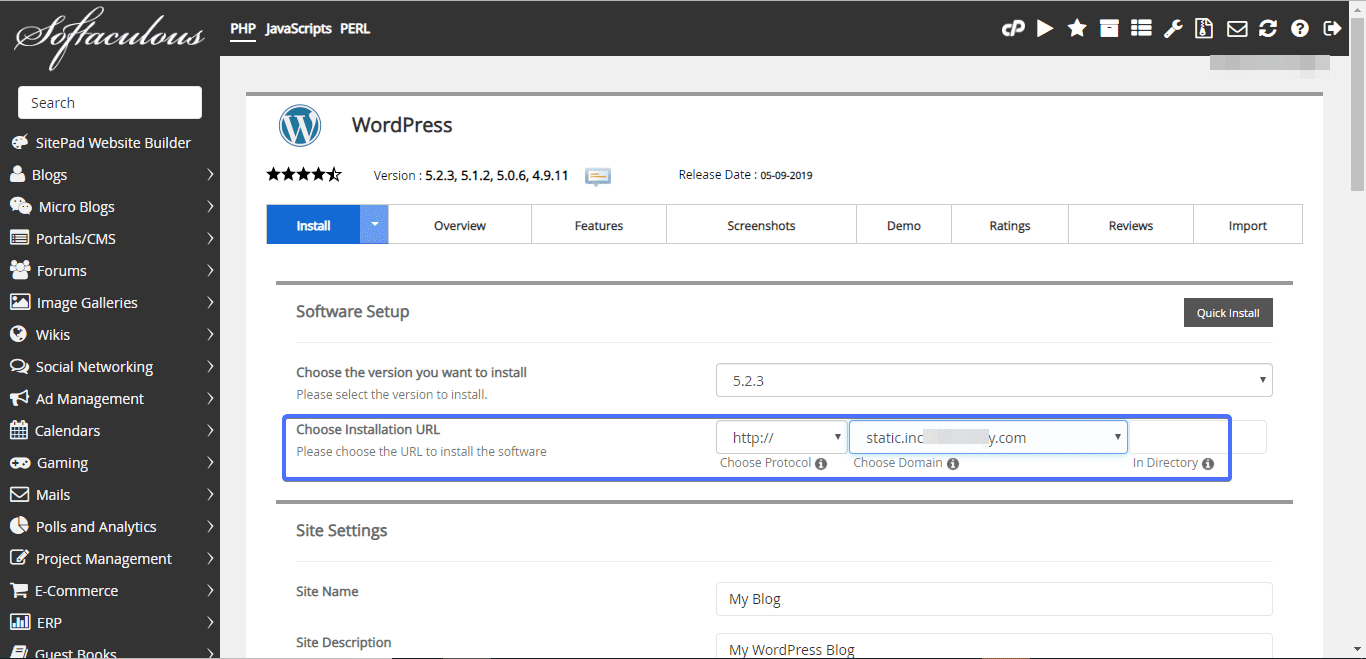
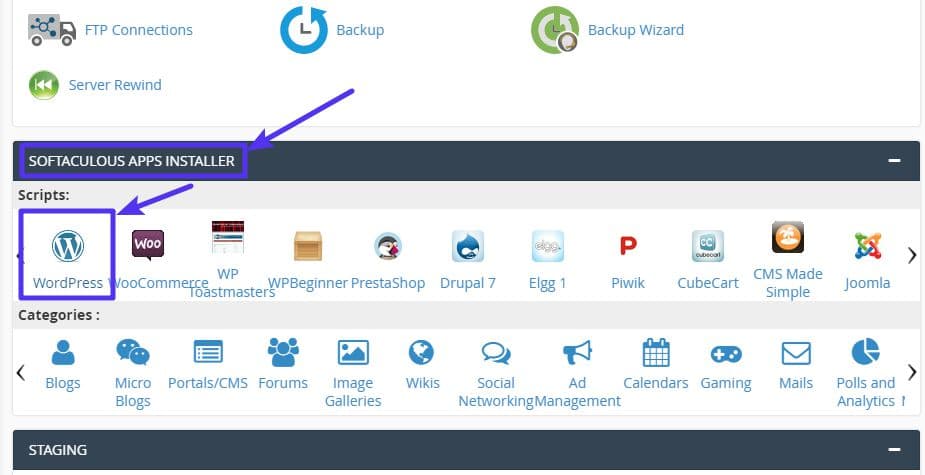
Open the Cpanel Dashboard. Look for the Softaculous Apps Installer. Choose WordPress from the list. Click on Install Now. Fill in the details like site name and description. Select your domain from the dropdown. Enter the database details you created earlier. Choose a strong admin password. This keeps your site secure. Click install and wait. Your WordPress will be ready soon. Check your email for confirmation.
Credit: kinsta.com
Managing WordPress With Cpanel
Cpanel helps keep your WordPress database organized. You can easily find tools to make changes. Use phpMyAdmin to view tables. This tool helps to edit or delete data. It also allows making backups. Backups keep your data safe. You can import or export databases. This helps when moving your website. Keeping your database clean improves speed.
Managing files with Cpanel is simple. The File Manager tool is very helpful. It lets you upload and download files. You can also create new folders. This makes finding files easy. Files can be edited directly. You don’t need extra software. Permissions can be changed with a few clicks. This controls who can see your files. Keeping files organized helps your site run well.
Security Measures
Strong passwords are vital to keep your site safe. Change them often. Use a mix of letters, numbers, and symbols. Avoid using easy words or patterns. Two-factor authentication adds extra security. It requires a code sent to your phone. This way, even if someone knows your password, they can’t get in. Regular backups are necessary. They help you recover if things go wrong. Store backups in a safe place away from your main site.
Updates fix bugs and improve security. Keep plugins and themes updated. This prevents hackers from exploiting old code. Monitoring tools watch your site for threats. They alert you if something suspicious happens. Check logs often to see what actions are taken on your site. Disable unused plugins to reduce risks. They might have vulnerabilities if left outdated.
Troubleshooting Common Issues
Errors can make websites act strange. Common errors are 404, 500, or database errors. Check the error message first. It tells what went wrong. 404 error means a page is missing. 500 error means server trouble. Database errors mean connection issues. Correct the error by following guides. Guides show step-by-step solutions. Always keep your site updated. Updates fix bugs and errors.
Backing up saves copies of your site. Restoring helps bring back lost data. Backup regularly to avoid losing information. Scheduled backups are best. Use tools like cPanel for backups. Restoration brings back deleted files. Follow steps to restore. Check if files are correct after restoring. Backups keep your site safe from data loss. They protect against errors and crashes.
Enhancing Performance
Cpanel WordPress simplifies website management with a user-friendly interface. It enhances performance by streamlining tasks like plugin installation and updates. This tool makes managing WordPress sites efficient, saving time and reducing technical challenges.
Optimization Techniques
Boosting your website’s speed is important. Start by compressing images. Large images slow down your site. Use tools to make them smaller. Choose lightweight themes. These load faster. Also, limit plugins. Too many plugins can drag your site down. Monitor your site’s performance regularly. Tools can help you track speed.
Caching And Speed Enhancements
Caching helps make websites faster. It stores data for future use. When a user visits again, cached data loads quickly. This saves time. Use caching plugins for WordPress. These are easy to install and use. Also, enable browser caching. It reduces loading time for repeat visitors. Always test your site speed after changes. Make sure to keep it fast.

Credit: www.interserver.net
Exploring Advanced Features
Cpanel WordPress offers tools for managing your website. Users can easily install themes and plugins. It simplifies tasks like backups and updates, enhancing website performance.
Custom Scripts
Cpanel for WordPress allows users to add custom scripts. These scripts can enhance website functionality. Users can automate tasks or add unique features. This tool helps in managing server-side scripts. Users can create scripts for data processing and database management. It’s important to test scripts before using them live. Mistakes can cause website issues.
Integrating Plugins And Themes
Plugins and themes change how your site looks and works. Cpanel makes it easy to add them. Users can find thousands of plugins online. Themes provide different designs for sites. Use Cpanel to upload and install these files. Always check compatibility with your WordPress version. Some plugins might not work with older versions. Regular updates keep everything running smoothly.
Frequently Asked Questions
What Is Cpanel In WordPress?
CPanel is a web hosting control panel. It simplifies managing WordPress sites. It offers tools for site management, backups, and security. Users can easily install WordPress, manage databases, and configure email accounts. It’s user-friendly and ideal for beginners.
How Do I Install WordPress Using Cpanel?
To install WordPress, use the cPanel’s Softaculous App Installer. Access cPanel, find Softaculous, and select WordPress. Follow the on-screen instructions to complete the installation. It’s quick and requires minimal technical knowledge.
Is Cpanel Necessary For WordPress Management?
CPanel isn’t essential but highly beneficial. It simplifies tasks like backups and email setup. It also provides easy access to security features. For beginners, cPanel makes WordPress management straightforward and efficient.
Can I Use Cpanel On Any Hosting?
CPanel is widely available but not on all hosting services. Many hosts offer cPanel as a standard feature. Always check with your hosting provider to confirm cPanel availability before purchasing a plan.
Conclusion
Cpanel WordPress offers a simple way to manage your website. It provides essential tools for hosting and website control. Setting up WordPress with Cpanel is straightforward. This makes it a popular choice for beginners. You can easily install themes and plugins.
Cpanel also helps with security and backups. Managing databases becomes hassle-free. Overall, Cpanel WordPress is a user-friendly solution. Perfect for those new to website creation. It simplifies tasks and saves time. A great option for personal and business sites. Explore its features and enjoy easier website management.


