
Are you new to WordPress and hearing a lot about child themes? Or maybe you’re an experienced user looking to tweak your website without the fear of losing changes during updates.
Whatever your level of expertise, understanding child themes can be a game-changer for your site management. Imagine having the power to customize your website safely, without the risk of losing your hard work. Sounds great, right? You’ll discover what a child theme is, why it’s crucial for your WordPress site, and how it can offer the flexibility you’ve been searching for.
Let’s dive into the world of child themes and unlock the potential to personalize your website while keeping it secure and up-to-date.
Basics Of Child Themes
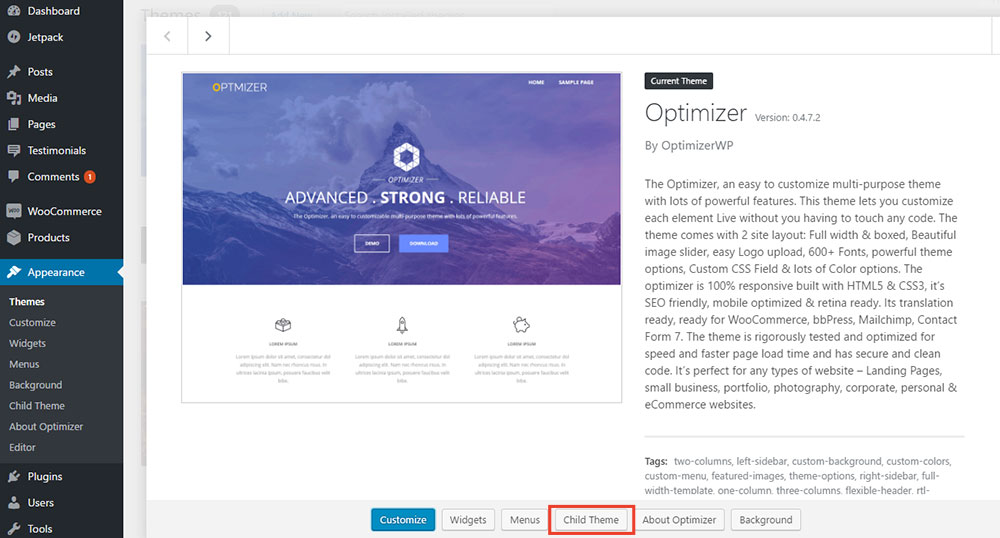
A child theme is a special theme in WordPress. It uses the main theme, known as the parent theme. This special theme lets you change designs. You can change the style without changing the parent theme. If you update the parent theme, your changes stay safe. Changes in the child theme stay separate.
Making a child theme is easy. You need a new folder. Inside, create two files: style.css and functions.php. These files tell WordPress to use the parent theme. They also add your changes.
Credit: optimizerwp.com
Benefits Of Using A Child Theme
Child themes keep changes safe. Parent theme updates won’t change your work. This means your hard work stays as it is. No worries about losing custom changes. Updating the parent theme is easy. Your site’s design remains intact. A child theme is like a safety net for your website.
Customize with freedom using child themes. Make your site unique. You can change style, layout, and functions. All without touching the parent theme. This helps keep the original theme features. You get to try new ideas. Flexibility without risk.
Parent themes have great features. A child theme lets you keep them. You enjoy new features with updates. At the same time, you can add personal touches. This balance makes your site both modern and unique. It’s the best of both worlds.
Creating A Child Theme
A child theme in WordPress allows you to modify a parent theme without losing changes during updates. It acts like a separate layer, ensuring your customizations remain intact. Ideal for preserving design tweaks and functional enhancements while maintaining the core features of the original theme.
Folder Structure
A child theme needs its own folder. This folder is kept in the wp-content/themes directory. The folder name should be simple and easy. It must not have spaces. Inside the folder, you need some essential files. These files will help the child theme work well.
Essential Files
Two key files are important. First, the style.css file. This file holds the CSS styles for the child theme. It must have a special header at the top. Second, the functions.php file. This file contains PHP code. It helps in adding features to the child theme.
Enqueuing Stylesheets
Stylesheets need proper enqueuing. Use functions.php to enqueue them. This makes the child theme load CSS correctly. You must use the wp_enqueue_style function. This ensures styles are added in the right order. Parent theme styles should load first. Then, child theme styles follow.
Credit: www.wpbeginner.com
Activating A Child Theme
A child theme is like a helper. It protects your changes. You can update the main theme. Your changes stay safe. Child themes are easy to use. They need a parent theme to work. Parent themes give them power.
First, make sure the parent theme is installed. Next, download the child theme. Go to your WordPress dashboard. Click on “Appearance”. Choose “Themes”. Select your child theme. Click “Activate”. Your site uses the child theme now.
They make customizing easy. Your site looks unique. Updates are safe. You don’t lose any changes. Child themes help developers. They can try new things. Mistakes are easy to fix. Parents are not harmed.
Customizing A Child Theme
Use CSS changes to alter your site’s look. Add new styles in the child theme’s style.css file. This will keep your design safe during updates. Make sure your changes are clear and easy to read. Always test your changes on different devices.
Template files let you change the site structure. Copy files from the parent theme to the child theme. Edit these files without affecting the parent theme. This helps keep your customizations safe. You can change headers, footers, and more.
Functions add new features to your site. Write them in the functions.php file of the child theme. These functions help enhance your site. You can add widgets, menus, or special styles. Keep functions simple and useful.
Common Mistakes To Avoid
Creating a child theme in WordPress helps preserve customizations during updates. Avoid forgetting to activate the child theme after creation, which leads to loss of changes. Ensure correct CSS file linkage to prevent styling issues.
Directly Editing Parent Theme
Changing the parent theme can be risky. Updates will erase changes. It’s better to create a child theme. A child theme keeps your edits safe. It uses the parent theme’s features. So, no need to change the main files. Always use a child theme for edits.
Incorrect Function Priority
Using the wrong function priority causes errors. Functions might not work as you want. Each function should have the right order. Check the priority number. It tells WordPress when to run the function. Always set the correct priority.
Improper File Path Structure
Files in the wrong place won’t work. File paths are important. They show where files are. Always check the path. Make sure files are where they belong. Follow the theme’s structure. This way, everything works right.
Best Practices
Child themes in WordPress allow for customization without altering the original theme files. They ensure safety during updates and offer flexibility in design. Ideal for beginners and experts, child themes provide a structured approach to theme modifications.
Regular Testing
Testing helps keep the child theme stable. Errors can break the site. Check for broken links and images often. Testing after updates is vital. This ensures all changes work well. Backup the site before big changes. This saves work if things go wrong.
Documenting Changes
Writing down changes helps track what was done. It keeps a record for future use. Share notes with team members. This helps everyone stay informed. Use simple language to note what was changed and why. This makes it easier to fix issues later.
Staying Updated With Parent Theme
Parent themes get updates often. These updates improve security and add new features. Stay informed about these updates. Update the child theme to match changes in the parent. This keeps the site safe and working well. Avoid ignoring updates for too long.

Credit: meancreative.com
Frequently Asked Questions
What Is A Child Theme In WordPress?
A child theme in WordPress is a sub-theme that inherits functionality from a parent theme. It allows you to modify and customize your website without altering the parent theme’s files. This ensures that updates to the parent theme won’t overwrite your customizations, maintaining the integrity of your site.
Why Use A Child Theme In WordPress?
Using a child theme in WordPress is beneficial for customization. It protects your changes from being overwritten during updates. This approach allows for flexibility and safe experimentation. By using a child theme, you can enhance your website’s design and functionality without risk to the original theme.
How To Create A Child Theme In WordPress?
To create a child theme, you need a new folder in the themes directory. Add a style. css file with the required header information. Include an import of the parent theme’s stylesheet. Optionally, add a functions. php file to enqueue styles and scripts.
Activate your child theme in the WordPress dashboard.
Can I Use A Child Theme With Any Theme?
Yes, you can use a child theme with any WordPress theme. It’s a universal solution for customizing themes. Ensure the parent theme is well-coded and supported. This compatibility allows you to personalize your website while retaining the parent theme’s core functionality and updates.
Conclusion
Child themes in WordPress offer flexibility and customization. They ensure your site remains unique without altering the main theme. This approach is perfect for those who want control over design. Easy to set up, child themes save time during updates.
They protect your original theme from unwanted changes. If you’re starting with WordPress, consider using a child theme. It’s a simple way to enhance your website. Remember, practice makes perfect. Experiment with different styles. Enjoy the journey of learning and building your site.


