
Imagine you’re navigating through your WordPress site, and everything is running smoothly—pages load in a flash, and your visitors are having a seamless experience. Sounds perfect, right?
But what if that’s not always the case? You might have heard about the term “cache level” in WordPress, but what does it really mean for you and your site? Understanding this concept could be the key to transforming your website’s performance and keeping your audience engaged.
We’ll demystify the concept of cache levels in WordPress, empowering you with the knowledge to optimize your site like a pro. Keep reading to discover how mastering cache levels can enhance your website’s speed, improve user experience, and even boost your SEO rankings. Your journey to a faster, more efficient WordPress site starts here.
Cache Basics
Caching makes websites load faster. It saves parts of a website for later. Visitors see pages quickly. Servers work less. This saves time and resources. Caching is important for a smooth user experience. It helps websites handle more traffic. This means more people can visit your site at the same time.
There are different types of cache. Browser cache saves parts of a site in the user’s browser. This helps pages load quickly on repeat visits. Server cache stores data on the server. It helps reduce load times. Object cache saves database queries. This makes data retrieval faster. Page cache saves entire web pages. This speeds up the loading process. Each type of cache has its own role. Together, they keep websites running smoothly.
WordPress Caching Mechanisms
Object caching helps store data for later use. It saves database queries and reduces load time. This makes your site run faster. Popular plugins like Redis and Memcached help with object caching. They keep data in memory for fast access. This means less waiting for users. A faster site means happy visitors.
Page caching saves entire web pages. This helps with speed. When visitors return, they see saved pages. No need to load everything again. Tools like WP Super Cache help with this. Page caching makes sites quick and smooth. This improves user experience and saves server resources.
Browser caching stores files on the user’s computer. It saves images and scripts. When users revisit, files are already there. This boosts speed and saves bandwidth. Browsers like Chrome and Firefox use this type of caching. Users see quicker loading times. Browser caching helps keep the internet speedy.
Popular Caching Plugins
WP Super Cache is a widely used plugin. It makes your site faster by storing data. This plugin creates static HTML files. These files are served to visitors. It reduces load time. WP Super Cache is easy to use. Many websites trust it.
W3 Total Cache improves site speed and performance. It helps with SEO. This plugin supports content delivery networks. It also minimizes files. W3 Total Cache is popular among developers. They use it for complex sites.
LiteSpeed Cache is another powerful tool. It offers server-level caching. This plugin boosts speed significantly. LiteSpeed Cache is perfect for busy sites. It works well with many WordPress themes. Users find it efficient.

Credit: docs.wp-rocket.me
Server-side Caching
Opcode caching stores the compiled PHP code. This helps the server run faster. PHP scripts do not need to be compiled again. It saves time and resources.
Database caching reduces database load. It stores frequent queries in memory. This makes data retrieval fast. Users see content quicker. Less database load helps the server.
CDNs store content in many locations. This means users get content fast. CDNs are like many mini-servers. They help websites load quickly. Users far from the main server get content easily.
Cache Configuration Tips
Fast websites are happy websites. Keep your cache settings right. Choose a good plugin to manage cache. Plugins like WP Super Cache work well. Set expiry time for cached files. Short times keep your site fresh. Long times reduce server load. Choose wisely.
Cache sometimes holds old data. Clear it regularly for fresh content. Use your plugin to clear cache. Look for a button that says “Clear Cache”. Click it once a week. This keeps your site updated and fresh. Users will get new information.
Preloading cache is smart. It loads pages before users visit. This makes pages faster for users. Go to settings in your plugin. Find “Cache Preload”. Enable it. Set a schedule for preloading. Choose times when traffic is low. This boosts speed without slowing down your site.
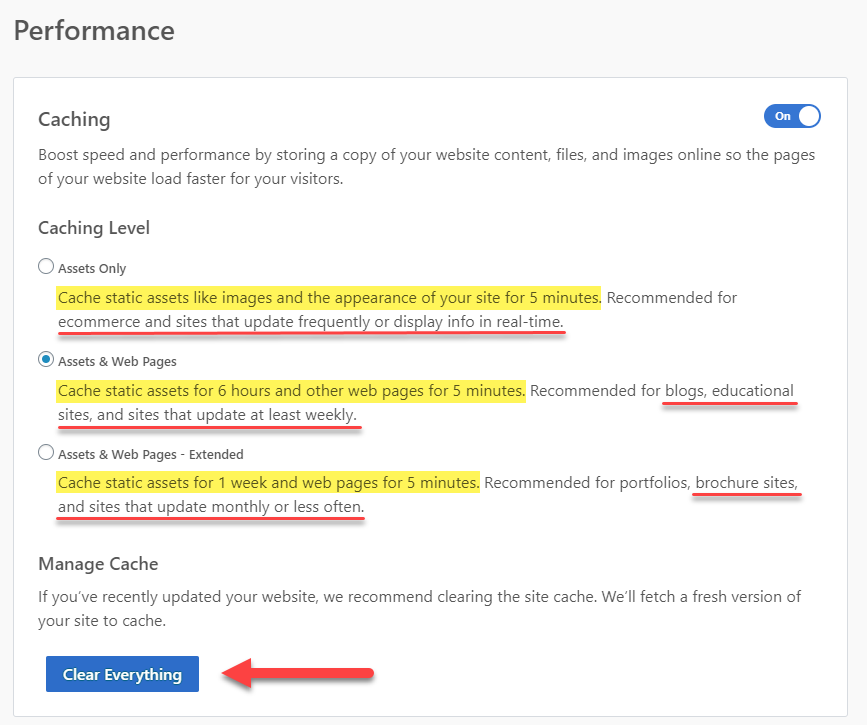
Credit: www.bluehost.com
Troubleshooting Cache Issues
Websites sometimes do not load new content. This is a common cache problem. Clearing the cache can help. Old files might stay in the cache. This can cause pages to look outdated. Visitors might see old versions instead of new updates.
Plugins can cause cache conflicts. They might not work well together. Identify which plugins create issues. Deactivate them one by one. Check the website after each change. This helps find the problem plugin. Themes can also cause conflicts.
Use tools to debug cache. These tools find cache problems. They show which files are cached. Browser developer tools are useful. They help check cache status. Some plugins have built-in debugging. They show what is cached and what is not.
Benefits Of Effective Caching
Caching makes sites load faster. A quicker site means happy visitors. They don’t like waiting for pages. Speed keeps them on your site. It helps them find things quickly. Faster sites rank better on search engines. This brings more visitors. Everyone likes a speedy website.
Visitors enjoy smooth browsing. Good caching provides this. Pages open without delay. Users find what they want easily. This keeps them returning. A happy visitor shares good experiences. This helps your website grow. Happy users make websites popular.
Caching reduces strain on servers. Less work means servers last longer. They handle more visitors at once. This saves resources and money. Server downtime reduces. Websites stay online longer. Fewer problems make your site reliable. Reliable sites attract more people.
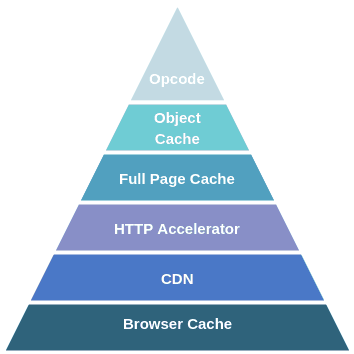
Credit: wpspeedmatters.com
Frequently Asked Questions
What Is Cache Level In WordPress?
Cache level in WordPress refers to storing data temporarily for faster access. It improves site performance by reducing server load and speeding up page load times. There are different cache levels, like browser, server, and object caching, each optimizing various aspects of your WordPress site.
Why Is Caching Important For WordPress Sites?
Caching is crucial for WordPress sites because it enhances speed and efficiency. Faster loading pages improve user experience and can boost SEO rankings. By reducing server load, caching helps handle higher traffic volumes, ensuring your site remains accessible even during peak times.
How Does Cache Affect Website Performance?
Cache positively affects website performance by reducing data retrieval time. It stores frequently accessed information, minimizing the need for repeated database requests. This leads to quicker page loads, improved user experience, and better search engine rankings due to enhanced site speed.
Can Caching Cause Issues In WordPress?
Yes, caching can sometimes cause issues in WordPress. Cached data might not update immediately, leading to outdated content display. Misconfigured cache plugins can also conflict with site functionality. Regularly clearing cache and using reliable plugins can mitigate these problems.
Conclusion
Cache levels in WordPress boost performance. Faster sites mean happier visitors. Smooth browsing keeps users engaged longer. Understanding cache improves site speed and user experience. Easy plugins make caching simple. Pick the right one for your needs. Test cache settings for optimal results.
Regular updates ensure efficiency. Monitor site speed after changes. Keep learning about WordPress caching. Stay ahead in site management. Enhance your website’s performance today. With these insights, you can achieve better speed and reliability. Optimize your WordPress site with effective caching strategies.
Your users will appreciate the faster load times.


