
Have you ever updated your WordPress site, only to find out that something went wrong? If so, you’re not alone.
The online world can be unpredictable, and making changes directly on your live website can lead to unexpected problems. This is where a WordPress staging site becomes your secret weapon. Imagine having a safe space where you can test all your changes without any risk.
Sounds reassuring, right? We’ll uncover what a WordPress staging site is and how it can save you from digital disasters. Stick around, because understanding this could transform the way you manage your website forever.
Purpose Of A Staging Site
A staging site is like a practice area. It helps you test changes safely. You can make updates without risk. This way, your main site stays safe. Mistakes on staging won’t harm your live website.
Developers use staging sites for troubleshooting. They can find and fix bugs here. This ensures the main site works well. It is a helpful tool for testing new features. You can check plugins and themes here.
Using a staging site keeps your main website secure. It protects it from errors. This approach ensures a smooth user experience. Users will not see problems. Your website looks professional and polished.
Credit: www.wpzoom.com
Benefits Of Using A Staging Site
A staging site provides a safe place to test changes. You can experiment with new themes or plugins. This prevents issues on the live site. Mistakes can be fixed before they go public. This ensures user experience stays smooth. Testing in a controlled space is wise.
Errors can be costly. A staging site helps prevent them. You can catch bugs early. This saves time and stress. Fix problems before they reach users. It keeps your site professional. Happy users return often.
Teams work better with a staging site. Everyone sees changes before they go live. Feedback can be shared easily. This improves ideas and solutions. Collaboration leads to better results. Projects finish faster and smoother. Communication is key in teamwork.
Setting Up A Staging Site
Finding the right tools is important. Many tools help make a staging site. Some tools are easy to use. Others need more skill. Look for tools that are trusted by many users. Some popular choices are WP Stagecoach and Duplicator. They help create a site copy fast. Always check reviews before choosing.
Start by creating a copy of your website. This is called a duplicate. Use plugins to help with this. Plugins like Duplicator make it simple. Follow steps to make sure everything is copied. Do not forget any important files. This way, your staging site looks the same. Always double-check your work.
Syncing changes means updating your main site. After testing on the staging site, apply changes. Be careful while syncing. Use tools like WP Migrate to help. They make syncing easier. Always back up your site first. This keeps everything safe. Mistakes can happen. Backups protect your hard work.
Credit: www.elegantthemes.com
Common Features Of Staging Sites
Staging sites often have version control to track changes. This helps in managing different versions of your website. Users can see what changes were made. They can also revert to old versions if needed.
Only certain users can access a staging site. This feature is called User Access Management. It keeps the site safe and secure. Unauthorized users are blocked. This ensures only trusted people make changes.
Staging sites have backup and restore options. This keeps your data safe. If something goes wrong, you can restore the site to a previous state. Backups prevent data loss. They are very important for website safety.
Best Practices For Staging Sites
Staging sites need regular updates. Keep plugins and themes updated. This ensures security and smooth operation. Avoid delays in updates to prevent issues. Regular checks help maintain stability. Updated sites reflect the latest features and fixes. It’s crucial for optimal performance.
Testing is essential before deployment. It helps find bugs and errors. Fix issues in the staging site first. Test every change thoroughly. This prevents problems in the live site. Always test new features and updates. Ensure everything works as expected.
Performance monitoring is vital for staging sites. Keep an eye on speed and loading times. Identify slow areas and improve them. Use tools to check performance regularly. Fast sites offer better user experience. Quick response times keep visitors happy. Monitoring helps maintain a smooth site.
Challenges And Solutions
Large databases can slow down staging sites. They need more resources. Optimizing data and using efficient queries is key. This helps in managing large volumes of data. Using database partitions can also help. It organizes data and improves access times.
Minimizing downtime is crucial for businesses. Staging sites allow testing before changes go live. This reduces the risk of errors. Frequent backups can prevent data loss. Scheduled updates help keep the site active.
Security is vital for staging sites. They must be protected from threats. Using strong passwords and firewalls is important. Regular security audits ensure safety. Limit access to authorized users only. This keeps the site secure.
Popular Staging Plugins And Services
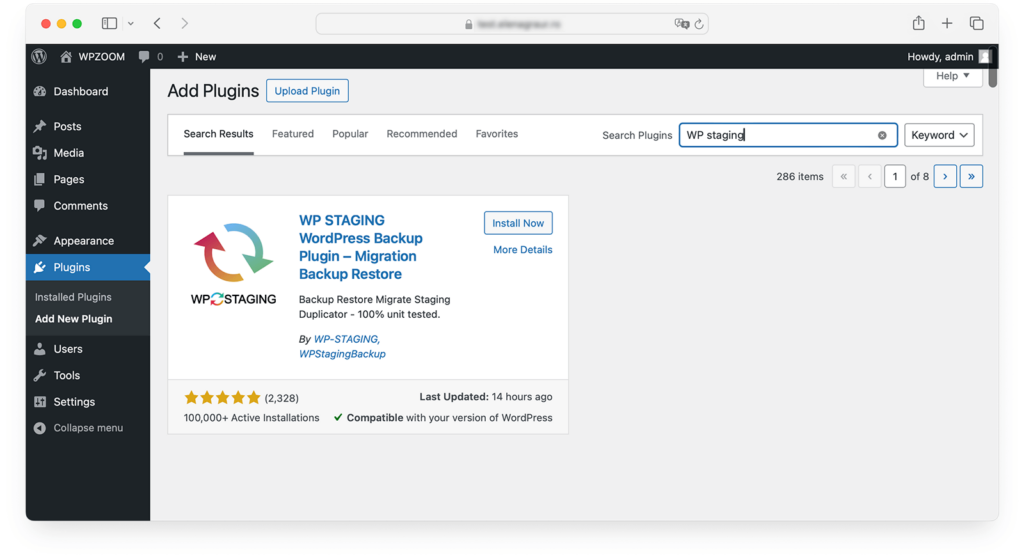
Some plugins are made just for WordPress. They help create a staging site easily. One popular plugin is WP Staging. It lets users clone their site with one click. Duplicator is another tool. It helps move or backup sites. These plugins keep your work safe. So, no need to worry about breaking your site.
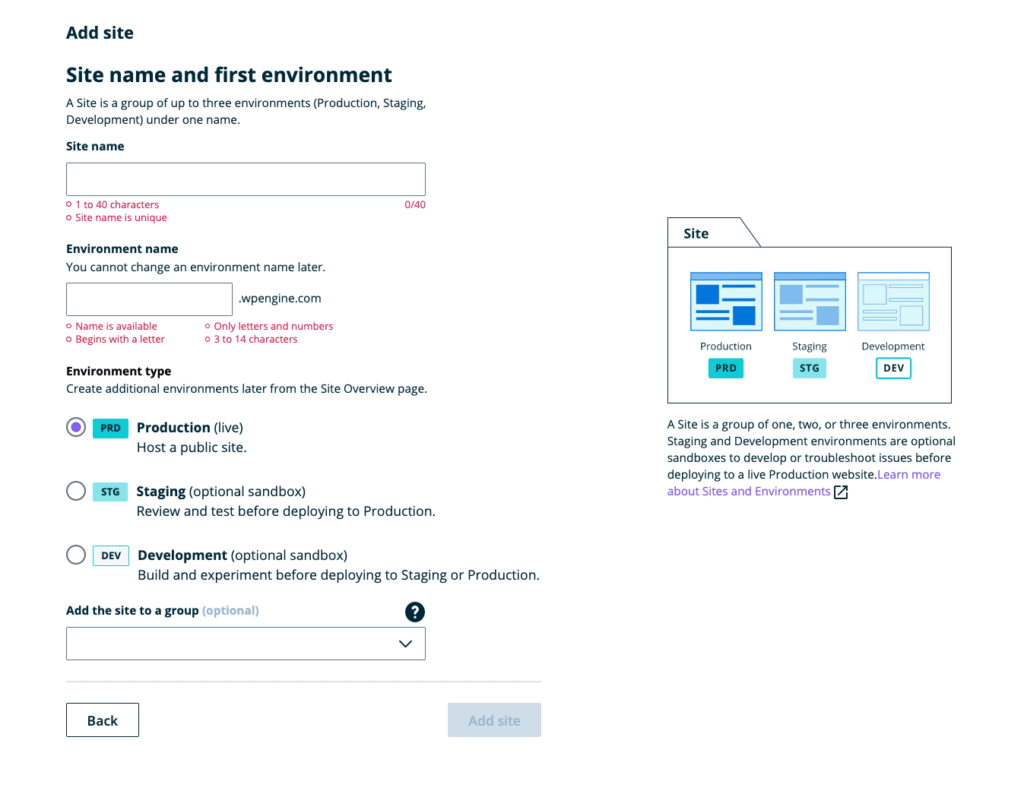
Third-party services offer more features. SiteGround provides a staging tool. It is very simple to use. Bluehost also has a staging option. These services handle technical parts. So, you can focus on your website. They ensure your site stays secure and up-to-date.
Credit: wpengine.com
Evaluating When To Use A Staging Site
Frequent updates need a staging site. It helps test changes safely. Updates can break your live site. A staging site prevents this. Regular updates make a staging site essential.
Complex updates can cause issues. They need testing before going live. Staging sites allow you to test complex updates. This ensures nothing breaks. It keeps your site running smoothly.
Teams work together on websites. Many hands can change things fast. A staging site helps teams test changes. Everyone can see the updates before they go live. This makes teamwork easier.
Frequently Asked Questions
What Is A WordPress Staging Site?
A WordPress staging site is a test environment. It lets you safely make changes before going live. It’s essential for testing updates, themes, and plugins. This ensures your live site remains unaffected by potential issues. It provides a safe space for troubleshooting and experimentation.
Why Use A WordPress Staging Site?
Using a staging site prevents disruptions on your live website. It allows you to test changes in a secure space. This helps in identifying issues before they affect your visitors. It ensures smoother updates and reduces downtime risks. Overall, it boosts site reliability and user experience.
How To Set Up A WordPress Staging Site?
Setting up a staging site is simple with plugins. Popular options include WP Staging and Duplicator. Hosting providers often offer one-click staging features. Choose a method that suits your technical comfort. Ensure to back up your live site before setting up a staging environment.
Is A Staging Site Necessary For Small Blogs?
Yes, a staging site is beneficial for all site sizes. It helps in safely testing updates and changes. Even small blogs can face issues from broken plugins or themes. A staging site prevents these from affecting the live site. It ensures your blog remains accessible and functional.
Conclusion
A WordPress staging site offers a safe testing ground. Changes are made without affecting the live site. It’s crucial for avoiding errors. You can try new features and plugins risk-free. This boosts confidence in updates. Visitors won’t experience downtime or glitches.
Setting up a staging site is simple with plugins. Backup your site first to ensure safety. Regular testing on a staging site keeps your website reliable. It’s a smart practice for smooth operations. Embrace it for better site management and peace of mind.
Happy blogging!


