
Have you ever found yourself tangled in the web of WordPress roles and permissions, wondering what sets a Super Admin apart from the rest? Imagine having the ultimate power to control multiple sites in a WordPress network with ease and confidence.
As you dive deeper into this article, you’ll discover how being a Super Admin can enhance your ability to manage WordPress multisite networks, streamline processes, and unlock a suite of exclusive capabilities. Understanding the role of a Super Admin is crucial if you’re looking to elevate your WordPress management skills.
This unique position allows you to oversee multiple sites, granting you control over network settings, themes, and plugins that regular admins can’t access. By the end of this read, you’ll have a clear grasp of why this powerful role is essential for anyone managing a WordPress network. Get ready to unlock the secrets of the Super Admin and transform the way you handle WordPress!
Role And Responsibilities
Super Admins control the entire network. They adjust network settings. This includes setting up new sites. They also manage the site address. Super Admins ensure security. They update network software. Super Admins keep everything running smoothly.
Super Admins handle users on the network. They add new users. They can remove users too. Super Admins manage site access. They can allow or block users. Super Admins keep track of user activity. They monitor site usage.
Super Admins control plugins and themes. They activate plugins. They deactivate plugins too. Super Admins choose network themes. They can change themes anytime. Super Admins ensure all themes work well. They update plugins regularly.
Benefits Of Being A Super Admin
Enhanced control is key for a Super Admin. They can manage all sites. This means they have access to all user accounts. They can change settings for every site. They can add or remove plugins. This power allows them to keep things in order.
Streamlined operations make work easier. Super Admins can do tasks faster. They can handle updates for all sites at once. This saves time and effort. With fewer steps, they can focus on important things.
Improved security management is a big deal. Super Admins can monitor all sites. They can spot security risks quickly. They can fix issues before they become big problems. This keeps all sites safe and sound.
Challenges Faced By Super Admins
Super Admins deal with many technical issues daily. Servers can crash at any time. Sometimes, plugins stop working. This can cause big problems. They need to act fast. Fixing bugs is also part of their job. All this needs technical skills. Not every problem is easy to solve. Troubleshooting takes time. Super Admins must stay calm and focused.
Managing many sites is tricky. Each site needs care and attention. Super Admins must make updates. They ensure all sites run smoothly. Missing one update can cause trouble. It’s a balancing act. Prioritizing tasks is key. Without it, things can get messy. Every site is important. None can be ignored.
Users expect a smooth experience. Super Admins must meet this. They check for broken links. They test site speed. Consistency matters. A slow site drives users away. They ensure all sites look similar. This helps in user trust. A good experience keeps users happy.

Credit: kinsta.com
Tools And Plugins For Super Admins
Super Admins use network management plugins for easy site control. These plugins help manage many sites from one place. WordPress Multisite is a popular choice. It lets you handle multiple websites easily. ManageWP is another tool. It offers backups, updates, and reports for sites. Easy to use and keeps sites running smoothly.
Security is key for Super Admins. Security plugins protect sites from hackers. Wordfence is a trusted plugin. It offers firewalls and scans for threats. Sucuri Security also helps. It provides malware removal and security checks. These plugins keep sites safe and secure.
Fast sites make users happy. Performance tools help speed up websites. WP Rocket is a top tool. It improves loading times with caching. Smush is another useful tool. It compresses images to load sites faster. Both tools help keep sites fast and efficient.
Best Practices For Super Admins
Backups keep your data safe. Create backups often. Use plugins for easy backups. Check backup files for errors. Store backups in safe places. Cloud storage is a good option. Test backups to make sure they work. Never skip backup checks.
Site speed matters. Check load times regularly. Use tools like Google PageSpeed. Identify slow pages. Optimize images and scripts. Track site uptime. Downtime affects users. Use uptime monitoring services. Look for errors in site logs. Fix them quickly.
WordPress changes often. Follow blogs and forums. Read about new features. Join community events. Learn from experts. Update themes and plugins. New updates improve security. Watch for security alerts. Protect your site from threats.

Credit: help.seravo.com
Common Mistakes To Avoid
Ignoring security can lead to serious problems. Hackers can break in and cause damage. Always use strong passwords for your admin account. Update WordPress regularly to fix any security holes. Install plugins that guard against threats. A secure site keeps your data safe.
Giving too much access can be risky. Only trusted users should get admin rights. Set clear limits on what users can do. This helps prevent accidental changes or deletions. It’s crucial to protect the site’s core settings.
Sites need regular checks to work well. Updates improve features and fix bugs. Clean up old files and unused plugins. Check links to ensure they work. A tidy site runs faster and smoother. Maintenance keeps your site in top shape.
Credit: drawne.com
Frequently Asked Questions
What Is A Super Admin In WordPress?
A Super Admin in WordPress has the highest level of control. They manage the entire network of sites. This role is crucial for multisite networks. Super Admins can install themes, plugins, and manage site settings. They also handle user permissions across the network.
How To Become A WordPress Super Admin?
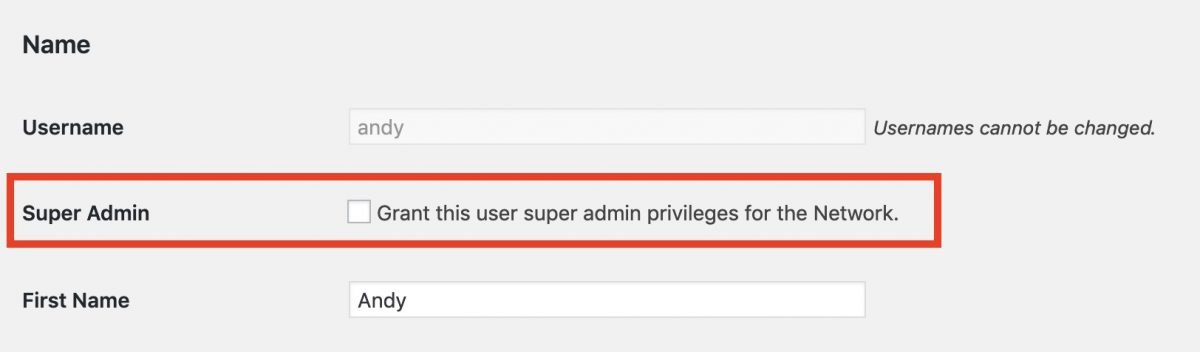
To become a Super Admin, you need network access. Only existing Super Admins can grant this role. It’s typically assigned during the multisite setup. You can also manually assign it via database or code. This role is crucial for managing complex networks.
What Are The Responsibilities Of A Super Admin?
A Super Admin manages the entire WordPress network. They install themes and plugins, manage users, and control site settings. They also ensure network security and efficiency. Their role is crucial for maintaining site integrity and performance.
Can Super Admins Control All WordPress Sites?
Yes, Super Admins can control all sites within a network. They have access to all site settings and user permissions. This role allows them to manage themes, plugins, and security. It ensures consistent operation across the network.
Conclusion
Understanding the role of a Super Admin is crucial. It enhances WordPress management. Super Admins handle multiple sites effortlessly. They control user access and settings. This role ensures smooth operation across networks. Mastering Super Admin tasks boosts efficiency. It simplifies complex management tasks.
Knowing Super Admin features can save time. It streamlines processes for better results. A clear grasp of this role aids in site management. Explore WordPress capabilities and make informed decisions. Utilize Super Admin tools effectively. Enhance your WordPress experience today by understanding this key role.


