
Imagine visiting a beautifully designed website, and as you hover over a menu item, a list of related topics appears. This is a submenu in WordPress, a tool that can transform your website navigation into a seamless experience for your visitors.
Whether you’re a seasoned developer or just starting out, understanding submenus can significantly enhance your site’s usability and user engagement. Why should you care? Submenus are like the secret sauce that can make or break your website’s navigation. They allow you to organize your content hierarchically, making it easier for your audience to find what they’re looking for.
As you delve into the world of WordPress submenus, you’ll discover how they can help you keep your visitors engaged, reduce bounce rates, and ultimately drive more traffic to your site. Are you ready to explore how submenus can elevate your WordPress site? Let’s dive in and uncover the potential they hold for your website’s success!
Understanding Submenus
A submenu is a list under a main menu. It helps to organize content. Users find information easily. Submenus make sites look clean and tidy. They improve navigation. This helps visitors spend more time on a site. Site owners use them to show important pages.
Submenus are used in many ways. They can show product categories in stores. They help users explore services on business sites. They organize blog topics. Submenus guide visitors to pages like “About Us” or “Contact”. They make it simple to reach different sections of a site.
Credit: www.inmotionhosting.com
Creating Submenus In WordPress
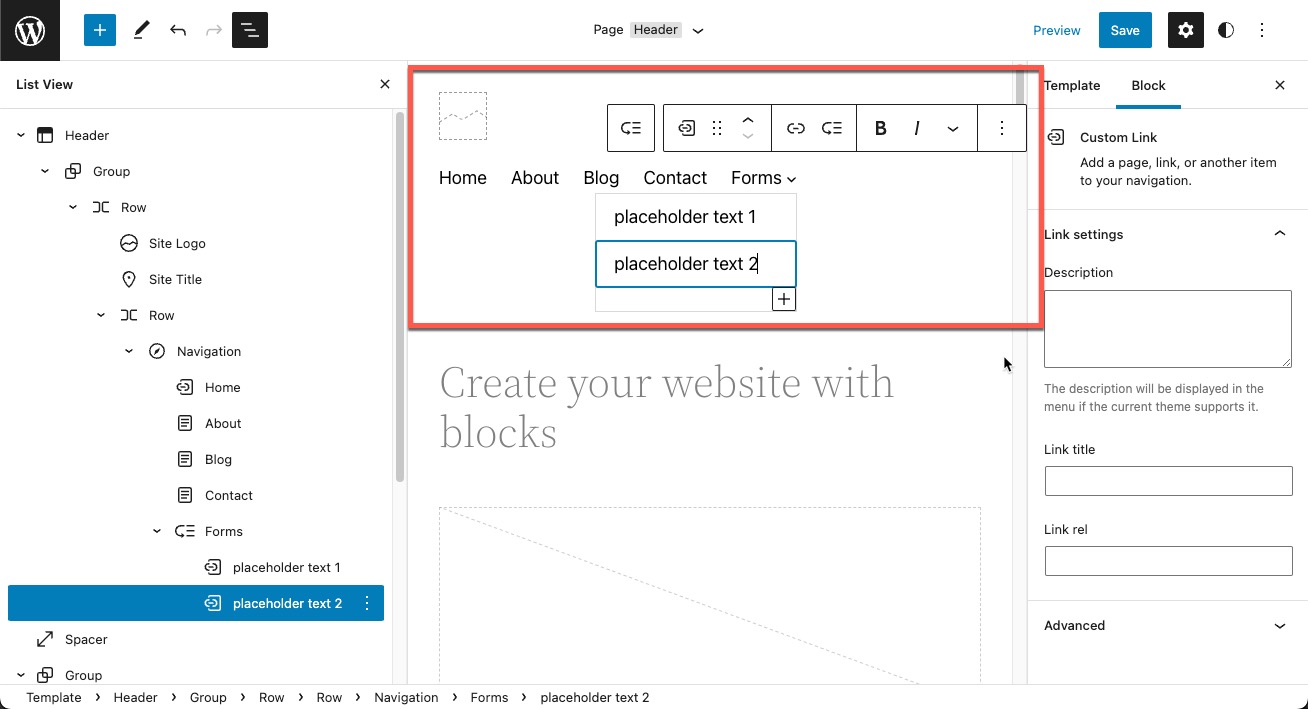
First, go to your WordPress dashboard. Find the Appearance tab and click on it. Next, select Menus from the list. You will now see the Menu Editor. This is where you can create and edit menus. Look at the list of menus on the side. Choose the one you want to edit. You can add items to it. Make sure to save your changes.
To add items, first find the Pages section. Check the pages you want in your submenu. Then, click Add to Menu. Your selected pages will appear on the list. Drag them under the main item. Move them a bit to the right. This creates a submenu. Don’t forget to save your menu changes. Now, your submenu is ready.
Customizing Submenus
A submenu in WordPress is a secondary menu that appears under a main menu item. Customizing submenus allows better site navigation by organizing related pages or categories. It enhances user experience by making the website layout more intuitive and accessible.
Styling Options
Submenus can be styled in many ways. Colors, fonts, and sizes can change. The style should match the main menu. This makes the site look better. Use your theme’s settings for easy changes. Many themes offer custom styling options. Change background color or text color. Make sure the submenu is easy to read. This helps visitors find information quickly. Choose styles that are clear and simple.
Using Custom Code
Custom code gives more control. CSS can change the look of submenus. Use HTML to add special features. Code can make submenus interactive. This is great for advanced users. Beginners can learn from tutorials. Be careful with code changes. Mistakes can break the site. Always back up before changing code. This keeps data safe. Custom code allows unique designs. Submenus become more personal and fit your style.

Credit: shellcreeper.com
Submenus And User Experience
Submenus make sites easy to explore. They help users find important info fast. Simple menus guide users through pages. Clear labels show where links lead. Organized menus improve site flow. Users feel happy when they can navigate easily.
Too many links confuse users. Fewer links make menus clean. Simple design helps users find what they need. Grouping related items keeps menus tidy. Users enjoy sites that look good. Messy menus make users leave.
Common Issues And Troubleshooting
A submenu in WordPress is a drop-down list under a main menu item. It helps organize and display related pages or links. Common issues include misalignment or non-functioning links, often fixed by checking menu settings or theme compatibility.
Submenu Not Appearing
Submenus can vanish due to various reasons. Check if the menu items are correctly set. Sometimes, a theme might not support submenus. It’s good to verify the theme settings. Plugins can also affect submenu visibility. Disable plugins one by one to see if they cause problems. Cache issues can hide updates. Clear the cache to see changes. Ensure the screen options are set correctly. Sometimes, a menu might be too long. This can cause display issues. Shorten the menu items if needed.
Responsive Design Challenges
Responsive design can confuse submenu behavior. On smaller screens, submenus may not show properly. Check if the CSS rules allow submenus on all devices. Use media queries to adjust settings for different screens. Ensure the touch gestures are working. Submenus should be easy to click on mobile devices. Sometimes, menus overlap or hide content. Adjust the layout to prevent this. Test the design on various screen sizes. This ensures everything looks good everywhere.

Credit: docs.themeisle.com
Best Practices For Submenus
Submenus should be easy to use. Start with the most important options. Avoid too many choices in a submenu. This keeps it clean and easy to follow. Use clear words that make sense to everyone. Users should find what they need quickly. This makes them happy and keeps them on your site.
Submenus must work well on all devices. This includes phones, tablets, and computers. Check if the submenu is easy to click or tap. Make sure it does not hide important parts of your website. Try it on different screens. This helps you see any problems. Fix these issues for a smooth experience. It helps keep your visitors coming back.
Frequently Asked Questions
What Is A Submenu In WordPress?
A submenu in WordPress is a secondary level of navigation. It appears under a main menu item. Submenus help organize content and improve user experience. They make it easier for visitors to find information. WordPress allows you to create submenus easily in the menu settings.
How Do I Create A Submenu In WordPress?
To create a submenu, go to the WordPress dashboard. Navigate to Appearance > Menus. Drag and drop a menu item slightly to the right under another item. This creates a submenu. Save the menu to apply changes. Submenus enhance site navigation and organization.
Why Use Submenus In WordPress?
Submenus improve website navigation and structure. They help visitors find content quickly and easily. Submenus organize related pages under a main category. This enhances user experience and reduces bounce rates. They are essential for large websites with many pages.
Can Submenus Affect Website Seo?
Submenus can positively impact SEO by improving user experience. They create a logical site structure, which search engines favor. Organized navigation helps search engines index pages effectively. Properly labeled submenus can enhance keyword relevance. This boosts visibility and search rankings.
Conclusion
Submenus in WordPress make navigating sites easier for visitors. They help organize content efficiently, providing a clear path to information. Users find what they need quickly, enhancing the overall user experience. Easy navigation keeps visitors engaged longer. This means better interaction with your website.
Submenus also allow for a structured design. They maintain an orderly appearance, which is visually appealing. Implementing submenus is simple, even for beginners. WordPress tools make the process straightforward. Explore your options and experiment. Your website can benefit from this feature.
Keep your site neat and user-friendly. Engage your audience effectively.


