
Have you ever wondered how to effectively display your blog posts on your WordPress website? Understanding what a “Posts Page” is in WordPress could be the key to transforming your site into a dynamic and engaging platform for your readers.
Imagine having a virtual magazine where all your latest updates, news, and stories are beautifully showcased in one place. This isn’t just a dream—it’s a reality you can create with the Posts Page. Navigating the world of WordPress can sometimes feel overwhelming, especially with its myriad of options and settings.
You might find yourself asking, “What exactly is a Posts Page, and why should I care? ” Well, this page is crucial for organizing and presenting your content in a way that captivates and retains your audience. By the end of this article, you’ll not only understand its importance but also learn how to harness its potential to enhance your website’s appeal. Get ready to unlock the secrets to a more engaging and user-friendly site!
WordPress Basics
WordPress is a tool for making websites. It is free and open-source. Many people use it to build blogs and sites. A posts page is part of WordPress. It shows your blog posts. You can set a page as your posts page. This page lists your latest posts. It’s helpful for bloggers. You can choose any page for this. WordPress makes this easy.
WordPress is easy to use. It has many themes. You can change how your site looks. Plugins add features to your site. They are like small apps. WordPress is secure and updated often. It supports many languages. You can use WordPress on your phone. It’s flexible and powerful. Many big sites use WordPress. It helps you share your content.
Posts Page Concept
A Posts Page is where blog posts appear. It shows new posts first. The page is part of WordPress. It is not the homepage. It is usually a separate page. Posts are shown in order. The latest post is first. Readers find new content easily. The page updates with each new post. It keeps the blog fresh. The page is central in a blog site.
The Posts Page is key for managing posts. It organizes content. It displays posts in order. It ensures readers see recent posts first. This helps keep readers engaged. The page allows for easy updates. It saves time for bloggers. It is simple to manage. The page is essential for a dynamic blog. It helps maintain content flow.
Setting Up A Posts Page
First, open your WordPress dashboard. Click on Pages in the menu. Then, click Add New. Give your new page a name. Something simple like “Blog”. Now, click the Publish button. Your new page is ready.
Go to Settings in the WordPress dashboard. Click on Reading. Look for the section called “Your homepage displays”. Here, choose A static page. Now, set the Posts page to your new page. Don’t forget to click Save Changes. Your posts will now show on this page.
Customizing The Posts Page
Theme Options can help change the look of your Posts Page. Many themes offer settings to adjust layout and colors. You can choose a different font or add a background image. This makes your page look unique. Some themes let you show or hide certain elements. Like the date or author name. This adds a personal touch to your blog. It’s fun to try different styles and see what works best.
Using Plugins For Customization
Plugins offer many ways to customize your Posts Page. Some plugins let you add new features. For example, a plugin might let you create a grid layout. Others can help you display posts in a slider. Plugins are easy to install and use. They can change how your page looks and works. This can make your website more interesting and fun to visit.
Difference Between Posts And Pages
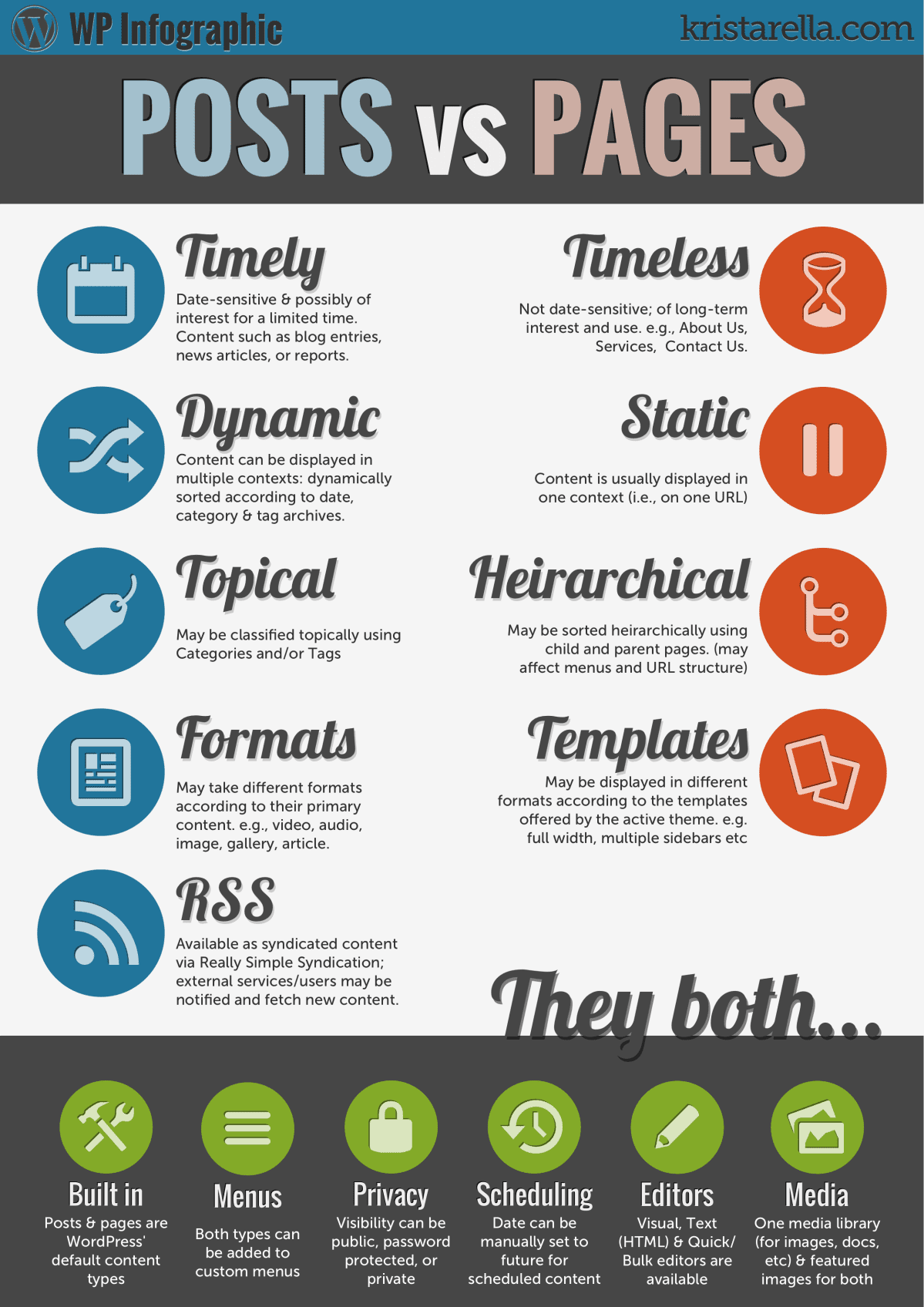
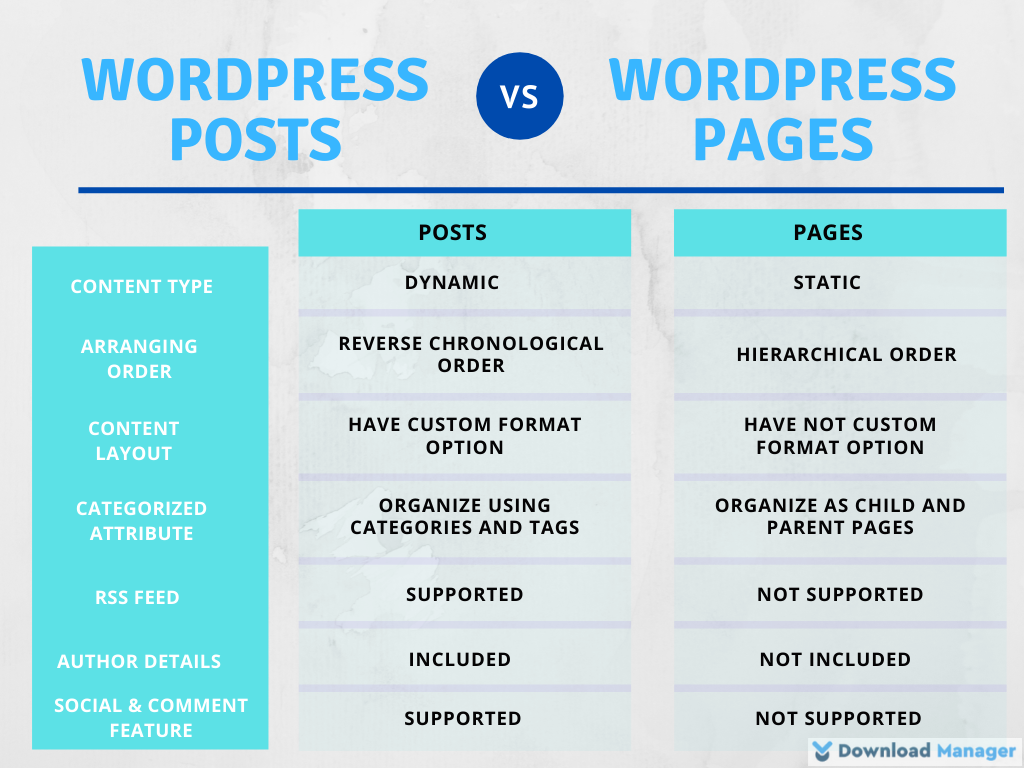
Posts are dynamic. They change often. New posts push old posts down. People use posts for news, updates, or stories. Posts can have categories and tags. This helps users find them. Posts show up in the site’s blog. Users can comment on posts. This makes posts interactive.
Pages are static. They stay the same. Pages are used for important information. Like contact details or about us. Pages do not have categories or tags. They do not show up in the blog. Users cannot comment on pages. Pages are timeless. They do not change often. They give a site structure.
Credit: www.elegantthemes.com
Benefits Of Using A Posts Page
Posts pages help keep content organized. All posts stay in one place. This makes it easy to find them. You can sort by date or category. This saves time for readers. Easy to find content makes sites better. Good organization keeps readers happy.
Users enjoy browsing well-structured sites. Posts pages improve this. Better user experience leads to happy visitors. Happy visitors return often. They may share your site too. Simple navigation helps users. Keep it neat for a smooth visit.
Common Issues And Solutions
A page might not show posts correctly. Check your theme settings first. Sometimes, themes have special settings for posts. Ensure the correct page is set as your Posts Page. This can be done in the settings menu. If the page still looks wrong, try changing the theme. Some themes may not support all features. Clear your browser cache to see updates. This helps fix display problems. Plugins can also cause issues. Deactivate them one by one. See if the page displays correctly after each step.
Sometimes, posts may not load due to permalink issues. Check if permalinks are set correctly. Go to the settings and click on permalinks. Choose a structure that suits your site. After changing, save settings to update links. This will refresh the site’s link structure. If links still break, try resetting permalinks. Go back to the settings page. Set permalinks to default, then save. Revert to your preferred structure and save again. This often solves the problem.
Best Practices For Posts Page
A well-optimized posts page helps your site rank higher. Use keywords that match what people search for. Place them in the title, URL, and first paragraph. Keep sentences short and simple. This helps readers and search engines. Use meta descriptions to explain each post. Make sure every image has an alt tag. This helps search engines understand your images. Internal linking is key. Connect your posts to each other. It keeps readers on your site longer.
Many people use phones to read blogs. Your posts page must look good on small screens. Choose a responsive theme. It changes the layout to fit any screen. Test your page on different devices. Make sure text is easy to read. Buttons should be easy to tap. Images should resize automatically. This keeps readers happy. Fast loading is essential. Compress images to make the page load faster. Use mobile-friendly plugins. They help improve user experience.
Faqs On WordPress Posts Page
A Posts Page shows all blog posts. It lists articles in order. Newest comes first. This page is different from a homepage. The homepage can be static. Posts Page changes with new posts.
Go to Settings in WordPress. Click on Reading. Choose a page for posts. Save changes.
WordPress allows only one Posts Page. You can create categories. Each category can have its own page. But only one main Posts Page exists.
It helps organize content. Readers find posts easily. It shows recent updates. Makes navigation simple.
Credit: www.wpdownloadmanager.com

Credit: samomblogs.co.za
Frequently Asked Questions
What Is A Posts Page In WordPress?
A posts page in WordPress is a designated page that displays your blog posts. It serves as a central hub where all your latest posts appear in reverse chronological order. By default, WordPress displays your latest posts on the homepage, but you can set a separate page for them.
How Do I Set A Posts Page In WordPress?
To set a posts page, go to your WordPress dashboard. Navigate to Settings > Reading. Choose a static page for your homepage and select another page for posts. Save your changes to update the display settings.
Can I Customize My Posts Page Layout?
Yes, you can customize the posts page layout using themes and plugins. Many WordPress themes offer customization options that allow you to adjust the appearance of your posts page. You can also use page builders for more design flexibility.
Why Use A Separate Posts Page In WordPress?
Using a separate posts page helps organize your content better. It allows you to have a static homepage while maintaining a dedicated section for your blog. This setup improves user experience and site navigation.
Conclusion
Understanding the Posts Page in WordPress is crucial. It organizes your blog content seamlessly. This feature helps users find new articles easily. A well-structured Posts Page enhances user experience. It boosts engagement and readability. You can manage posts effectively with this tool.
Adjust settings to fit your blog’s needs. Keep your content fresh and organized. Always update your Posts Page for better navigation. Your blog becomes more accessible and user-friendly. Readers appreciate a well-organized layout. A clear structure keeps them coming back.
Make the most of your WordPress Posts Page today.


