
Have you ever been excited to update your WordPress site, only to be met with a baffling “parse error”? You’re not alone!
Many WordPress users encounter this issue, and it can be frustrating, especially if you’re not a coding whiz. But don’t worry—understanding what a parse error is and how to fix it can be simpler than you might think. By the end of this article, you’ll not only know what causes these pesky errors, but also how to prevent them from happening in the future.
Let’s unravel the mystery behind parse errors together and get your WordPress site back on track, so you can focus on what truly matters: sharing your content with the world!
Credit: rankmath.com
Parse Error Basics
A parse error in WordPress is a coding mistake. It stops the site from working. These errors happen when there are syntax errors in the code. For example, missing punctuation or wrong coding. They can occur after updates or changes to plugins. Sometimes, adding new themes can cause them. Beginners make these mistakes often. They might miss a semicolon or bracket. Other times, the error comes from incorrect file editing.
A parse error usually shows a blank screen. This is called the “White Screen of Death.” You might see a specific error message too. The message often mentions the file name with the error. It also shows the line number. Websites might load partially. Some parts may appear broken. Users can’t access the dashboard. It’s frustrating. Visitors see error messages instead of your content.
Identifying Parse Errors
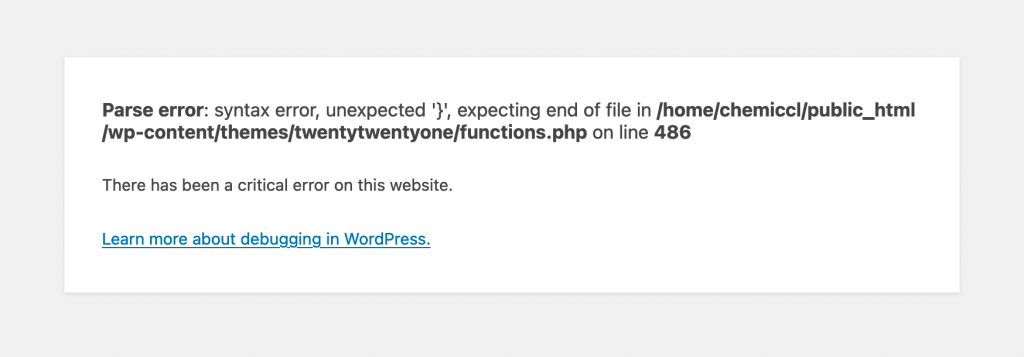
Parse errors in WordPress are common. They can confuse users. These errors show up as error messages. The message often points to a file and line number. This helps find where the problem is. Sometimes the message mentions unexpected symbols. These symbols can be a comma or bracket. They show where the code stops working.
Understanding error messages is key. They tell what went wrong. The message shows the type of error. It also shows the file name and line number. The error message might say unexpected end. This means something is missing in the code. It could be a bracket or a semicolon.
Finding the error spot is important. Check the code line mentioned in the error message. Look for missing or extra symbols. These symbols often cause the problem. Also, check the previous lines. Errors can start before the line mentioned. Fixing one symbol can solve the issue.
Common Parse Error Scenarios
Code mistakes can cause parse errors. These are often simple errors. A missing semicolon or bracket can break the code. WordPress cannot understand the code then. The page won’t load correctly. Always check for these small mistakes. They are easy to miss.
Extra characters in code can cause problems. A misplaced comma or bracket can confuse the system. WordPress needs clean and correct code. Extra characters can mess it up. Check your code carefully. Look for anything that seems out of place.
Credit: chemicloud.com
Solutions To Fix Parse Errors
A parse error in WordPress occurs when the PHP code has a mistake. This error stops scripts from running. To fix it, check your code for missing or extra characters. Use a code editor to spot errors and correct them.
Editing Code Correctly
Parse errors happen when code is wrong. Check for missing semi-colons or brackets. Use proper syntax for functions. Follow coding rules carefully. Every line must be correct. Double-check code after edits. Small mistakes lead to big problems.
Keep code neat. Use spaces and tabs. Easy to read code helps find errors. Compare your code with examples. Fix errors quickly with careful edits.
Using Debugging Tools
Debugging tools help find parse errors fast. Use tools like PHP Debugger. They show where the error is. Look for red marks or warnings. These tools save time and reduce errors. Use them regularly.
Some tools suggest fixes. Try them, but check their suggestions. Debugging tools make coding easier. They help learn coding rules. Use them to improve your skills.
Preventing Future Errors
Write clear and simple code. Use comments to explain tricky parts. Test your code often to find mistakes early. Make sure your code is clean and easy to read.
Follow coding standards to avoid errors. Use a consistent style. This helps you and others understand the code.
Code reviews catch mistakes before they cause problems. Have another person check your code. This finds errors you missed.
Be open to feedback. Learn from others. Improve your coding skills over time. Reviews also help you share knowledge with your team.

Credit: www.greengeeks.com
Helpful Tips
Always make a backup before changing code. This keeps your data safe. If you make a mistake, you can easily restore your site. Use a reliable plugin for backing up. It will help you save time.
Check if the backup is complete. Sometimes, files might be missing. A complete backup means you can relax. No worries about losing important data.
Many online resources can help fix parse errors. Forums and blogs are useful. Experts share their solutions there. You can learn from their experiences. Read guides step by step. They explain things simply.
Sometimes, videos show how to solve problems. Watching can make it easier to understand. You can pause and rewind if needed. This helps you follow instructions carefully.
Frequently Asked Questions
What Causes A Parse Error In WordPress?
A parse error in WordPress is usually caused by a syntax error in the code. This can occur due to missing punctuation, incorrect code structure, or improper file editing. Commonly, it happens when custom code is added or a plugin/theme is modified without proper knowledge.
How Do I Fix A WordPress Parse Error?
To fix a parse error, first, identify the file and line number causing the issue. Correct any syntax mistakes like missing semicolons or parentheses. If unsure, restore the file from a backup or seek help from a developer. Always double-check any code changes.
Can A Plugin Cause A Parse Error?
Yes, a poorly coded or incompatible plugin can cause a parse error in WordPress. When a plugin adds or modifies code incorrectly, it leads to syntax errors. Always ensure plugins are updated and compatible with your WordPress version to avoid such issues.
Is A Parse Error Harmful To My Website?
A parse error can prevent your website from functioning properly, making it inaccessible to visitors. It’s crucial to resolve the error quickly to restore normal operation. While not usually harmful to data, it can impact user experience and SEO rankings if not addressed promptly.
Conclusion
Fixing a parse error in WordPress can be straightforward. Follow simple steps and resolve issues quickly. Start by checking for syntax errors in your code. Correct any mistakes you find. Sometimes, a missing semicolon or bracket can cause problems. Use a reliable code editor to review your files.
Update plugins and themes regularly for smooth performance. Always backup your site before making changes. A parse error can feel daunting, but solutions are within reach. Learn and apply these tips to maintain a healthy WordPress site. Keep your site running smoothly without stress.


