
Are you struggling to keep your WordPress posts organized and easy to read? Ever wondered how to make your content more engaging without overwhelming your readers?
A page break might be just the tool you need. It’s a simple yet effective feature that can transform the way your audience interacts with your content. Imagine your readers eagerly flipping through your posts, captivated by the neatly divided sections.
When you use a page break correctly, you enhance readability and keep your readers hooked from start to finish. Curious to learn more about how this tiny tweak can make a big difference in your WordPress experience? Let’s dive in and explore the world of page breaks!
Credit: www.elegantthemes.com
Page Break Basics
Page breaks divide a long post into several pages. This keeps content organized and easy to read. Readers can focus on one section at a time. This method also helps in faster loading times. Long pages may load slowly. But small pages load quicker. This is good for both users and SEO.
Blogs with step-by-step guides often use page breaks. Each step is on a new page. This makes it easy to follow. Photo galleries also use page breaks. Each page shows a few pictures. Readers can view photos without scrolling too much. Serialized stories benefit from page breaks too. Each part of the story gets its own page. This keeps readers engaged.
Benefits For Readability
Page breaks make reading easier. They divide long texts into parts. Readers feel less tired. Text is easier to follow. Big blocks of text can be scary. Short sections invite readers to continue. This keeps readers on the page longer. They can find what they want faster. This makes them happy.
Enhancing User Experience
Users enjoy smooth reading. Clear breaks make this possible. Each page feels neat. It’s like turning a book’s pages. This keeps readers engaged. They won’t get lost in the text. Page breaks guide them. They know where a section ends. This helps in understanding content better.
Improving Content Navigation
Page breaks act as signposts. They guide readers through content. Readers can jump to topics easily. No more endless scrolling. Each section is its own space. This helps in finding information quickly. Readers can skip what they don’t need. Easy navigation makes them return.
Implementing Page Breaks
WordPress makes it easy to add page breaks. First, open your post or page. Click where you want the break. Then, insert the Page Break block. This splits the content into pages. Preview the changes to see the effect. If satisfied, publish your post. Page breaks help in managing long content. They improve the reader’s experience. Make sure to test the page breaks on different devices. This ensures everything looks good.
Some plugins make page breaks easier. Page Break for Posts is a popular choice. Another is Advanced Page Breaks. These plugins offer extra features. They also provide settings to customize breaks. Some plugins offer support for page numbering. This is useful for multi-page posts. Always check plugin reviews and ratings. This ensures you choose the best one for your needs.
Design Considerations
Page breaks in WordPress help organize long content. They make reading easier by dividing text into sections. This improves user experience and page navigation.
Choosing The Right Break Points
Page breaks help organize content. They make reading easy. Break points should be logical. Think about the flow of the text. Is it easy to follow? Does it make sense? Break at natural pauses. Use headings to guide the reader. Breaks should not interrupt ideas.
Balancing Aesthetics And Functionality
Balance is key in design. Page breaks must look good. They should also function well. Never sacrifice clarity for beauty. Readers need to understand your content. The layout should be smooth. Avoid clutter on the page. Keep it simple and clean. Aesthetic appeal draws attention. Functionality keeps it there.
Seo Implications
Understanding page breaks in WordPress is crucial for SEO. They allow dividing long content into multiple pages, enhancing readability. Proper use can improve user experience and reduce bounce rates, positively impacting search engine rankings.
Impact On Search Rankings
Page breaks can affect search rankings. They divide content into multiple pages. This can lead to indexing issues. Search engines may not crawl all pages. Important content might be missed. This can lower your site’s visibility.
Use page breaks wisely. Ensure that each page has valuable content. Avoid breaking content in the middle of a sentence. This can confuse readers and search engines. Each page should stand alone with its own keywords.
Best Practices
Keep content clear and simple. Use page breaks for logical sections. Make sure every section is important. Add navigation links between pages. This helps readers move easily. It also helps search engines crawl your site.
Use descriptive titles for each page. This helps search engines understand the content. Avoid using too many page breaks. Only use them when necessary. This keeps your site user-friendly.
Credit: wordpress.com
Troubleshooting Common Issues
A page break in WordPress helps split content into multiple pages. It enhances readability by dividing long posts. This feature is useful for organizing lengthy articles efficiently.
Error Prevention
Page breaks are useful for organizing content. Sometimes they don’t work right. Plugins can cause problems. Make sure all plugins are updated. Themes might not support page breaks. Check if your theme is compatible. Coding errors can also be an issue. Review your HTML code. Use a tool to check for errors.
Fixing Display Problems
Text might overlap after a page break. This is a common display problem. Check your CSS settings. Ensure they are correct. Browser issues may also affect display. Clear your browser’s cache. Responsive design can be a challenge. Test on different devices. Make sure everything looks good.
Case Studies
Large websites use page breaks to improve readability. They make long articles more user-friendly. Readers find it easier to focus. Shorter pages load faster. This helps users with slow internet.
News sites often use them. They divide stories into parts. This keeps readers engaged. It increases time spent on the site. More time means more ad revenue.
Page breaks should be used wisely. Too many can be annoying. Users might leave the site. Use them where they make sense. Think about user experience. Good design matters.
Test different formats. See what works best. Gather user feedback. Improve based on this feedback. Happy users come back. Happy users share content. That’s good for your site.

Credit: shellcreeper.com
Frequently Asked Questions
How Do You Add A Page Break In WordPress?
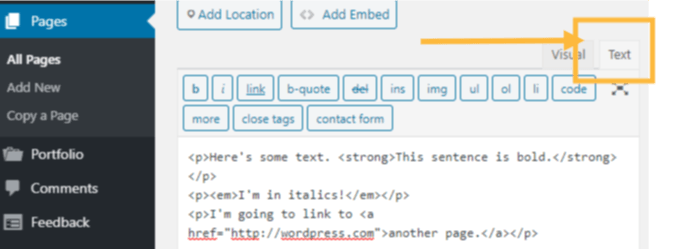
To add a page break in WordPress, use the


