

Have you ever wondered how your favorite websites find their way to your screen so quickly? Behind the scenes, something called a Host Record Domain plays a crucial role in making that happen.
If you’re curious about what it is and why it matters for your online experience, you’re in the right place. Understanding this simple yet powerful concept can help you take control of your website, improve your online presence, and even solve common internet mysteries.
Keep reading, and you’ll discover everything you need to know about Host Record Domains—clear, easy, and useful for you.
Credit: royalhost.net
Host Record Basics
Understanding host records is key to managing websites and domains. These records help direct internet traffic to the right place. Each host record contains important details for website connections. This section explains the basics of host records.
What Is A Host Record
A host record is a DNS entry that links a domain name to an IP address. It tells the internet where to find a website or service. Without host records, browsers cannot load websites by name.
Role In Dns
Host records play a vital role in the Domain Name System (DNS). DNS translates domain names into IP addresses. Host records provide the exact IP addresses needed for this process. They ensure users reach the correct server when typing a domain.
Types Of Host Records
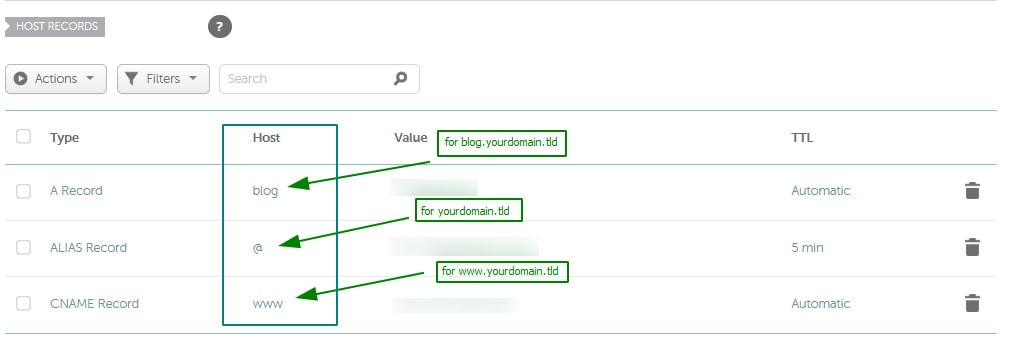
Several types of host records exist, each serving a unique purpose. The most common is the A record, which maps a domain to an IPv4 address. The AAAA record links to an IPv6 address. Other types include CNAME, which points one domain to another, and MX records for email routing.
How Host Records Work
Host records play a key role in directing internet traffic. They help browsers find the right website or service by linking domain names to specific IP addresses. Understanding how host records work helps explain how websites load and services connect online.
Mapping Domain Names To Ip Addresses
Host records act like an address book for the internet. Each domain name, such as example.com, matches an IP address. This IP address points to the exact server hosting the website. Without this match, browsers would not know where to send your request.
Interaction With Dns Servers
DNS servers store and manage host records. When you enter a domain name, your device asks a DNS server for the matching IP address. The DNS server looks up the host record and returns the IP address. This process allows browsers to connect to the correct server quickly.
Ttl And Its Impact
TTL means Time To Live. It tells DNS servers how long to keep a host record cached. A short TTL means updates show faster but cause more DNS lookups. A long TTL reduces lookups but delays changes from spreading. TTL balances speed and update timing.
Common Host Record Types
Host records are essential for directing internet traffic. They tell browsers where to find websites and services. Different types of host records serve different functions. Understanding common host record types helps manage domains effectively.
A Records
A Records link a domain name to an IPv4 address. IPv4 addresses look like four numbers separated by dots. This record tells browsers the exact server to reach. It is the most common type of host record.
Aaaa Records
AAAA Records connect a domain name to an IPv6 address. IPv6 addresses are longer and include letters and numbers. They support more devices than IPv4. This record helps newer networks find the right server.
Cname Records
CNAME Records point a domain to another domain name. They do not link directly to an IP address. This allows multiple domain names to share the same server. It simplifies managing several domains or subdomains.

Credit: help.ecatholic.com
Creating And Managing Host Records
Creating and managing host records is essential for directing internet traffic to the right servers. Host records link domain names to IP addresses, making websites and services accessible. Proper management ensures your domain works smoothly and users find your site without issues.
Understanding how to set up and adjust these records helps maintain your online presence. It also prevents downtime and connection errors. Let’s explore key steps to handle host records effectively.
Using Dns Management Tools
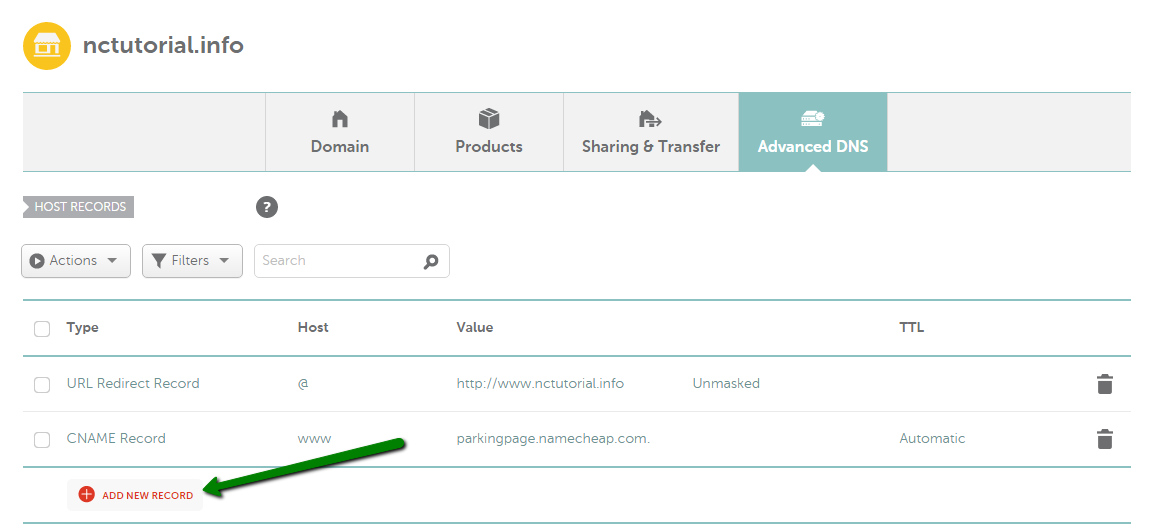
DNS management tools simplify the process of creating and editing host records. Most domain registrars offer user-friendly dashboards. These tools let you add new records or modify existing ones easily.
You enter the host name and assign the correct IP address. Some interfaces also allow setting record types like A, AAAA, or CNAME. Changes usually take effect within minutes or hours.
Best Practices For Configuration
Always double-check the IP address before saving a host record. Incorrect entries can lead to website downtime. Use short and clear host names to avoid confusion.
Keep backup copies of your DNS settings. Update records only during low-traffic times to reduce impact. Remove outdated records promptly to keep your DNS clean and efficient.
Troubleshooting Host Record Issues
Common problems include wrong IP addresses and propagation delays. Use tools like ping and nslookup to verify records. Check for typos in the host name or IP address.
Clear your browser cache or flush DNS on your device if changes don’t appear. Contact your domain provider if issues persist. Proper troubleshooting saves time and avoids service interruptions.
Advanced Dns Concepts
Advanced DNS concepts help improve how the internet works. These ideas make websites faster, safer, and more reliable. Understanding them gives you a clearer view of how host records function in complex setups.
Load Balancing With Host Records
Load balancing spreads user traffic across several servers. Host records play a key role here. Multiple IP addresses can be linked to one domain name. This way, the DNS sends users to different servers. It helps avoid overload and keeps websites running smoothly.
Dns Security Considerations
Security is critical in DNS management. Host records can be targeted by attackers. DNS spoofing tricks users into visiting fake sites. Using DNSSEC helps protect host records. It adds a layer of trust and verification. Secure DNS setups reduce risks of cyber threats.
Dynamic Dns And Host Records
Dynamic DNS allows host records to change automatically. It suits devices with changing IP addresses. This keeps domain names updated without manual work. Home networks and small businesses often use this. Dynamic DNS keeps connections stable and accessible.
Real-world Applications
Host records in domain name systems link names to specific IP addresses. These records help computers find websites and services online. Understanding their real-world uses shows their importance in daily internet activities.
Setting Up Websites
Host records connect a website’s name to its server. This lets users type a simple name instead of an IP address. Without these records, websites would be hard to access.
For example, a host record points www.example.com to the server’s IP. This makes the website load quickly and correctly for visitors.
Email Server Configuration
Email systems use host records to route messages. They tell the internet where to deliver emails for a domain. This ensures emails reach the right server without delay.
Proper host records stop emails from getting lost or marked as spam. They improve email reliability for businesses and individuals.
Custom Subdomains
Host records create subdomains like blog.example.com or shop.example.com. Each subdomain can lead to different servers or services. This helps organize content and services under one domain.
Custom subdomains make websites more user-friendly and easier to navigate. They also support specific functions like online stores or support pages.
Credit: www.namecheap.com
Frequently Asked Questions
What Is A Host Record In Domain Settings?
A host record links a domain name to an IP address. It directs internet traffic to the correct server. This record is essential for website accessibility and email routing.
How Does A Host Record Affect Website Performance?
Host records ensure users reach your website quickly. Proper configuration reduces load times and prevents errors. Incorrect settings can cause downtime or slow access.
Can I Create Multiple Host Records For One Domain?
Yes, you can create multiple host records. They allow different services like websites and emails to run on one domain. Each record points to a specific IP address.
What Types Of Host Records Exist In Dns?
Common host records include A, AAAA, CNAME, and MX. Each serves a different purpose, like pointing to IPv4 or IPv6 addresses, or handling emails. Proper use improves domain functionality.
Conclusion
A host record domain links a website name to an IP address. It helps browsers find the right server quickly. Without host records, websites would be hard to access. This system keeps the internet organized and easy to use. Understanding host records makes managing websites simpler.
Now you know why they matter for every online presence. Keep this info handy for your web projects. It’s a small detail with a big impact.


