
Have you ever wondered how to showcase a series of stunning images on your WordPress site? A gallery post might be exactly what you need.
It’s not just a collection of pictures; it’s a way to tell a story, express creativity, or highlight your work in a visually engaging manner. By the end of this article, you’ll know exactly what a gallery post in WordPress is and how it can transform your website’s visual appeal.
You’ll discover the secrets to captivate your audience, keep them scrolling, and boost your site’s engagement. Ready to unlock the potential of your WordPress gallery posts? Let’s dive in and explore the magic behind this powerful feature.

Credit: wordpress.com
Gallery Post Basics
A Gallery Post in WordPress shows many photos in one place. It helps users share their art or events. This post type is great for photographers or artists. Gallery Posts make it easy to show what you love. You can add captions to explain each photo. People enjoy seeing stories through images. This post type is simple to use and organize.
Gallery Posts look great. They make websites attractive and fun to visit. Photos can be arranged in rows or columns. This makes it easy to browse. Good design helps visitors stay longer. Bright and clear images catch the eye. Visual appeal is key for engaging visitors. A well-organized gallery is pleasing to see. It shows creativity and skill.
Creating A Gallery Post
Selecting Images for a gallery post can be fun. Choose images that tell a story. Every picture should have a purpose. Think of colors and themes. Good images make your post look nice. Arrange images in a way that pleases the eyes. People like neat galleries. Choose high-quality images for better views. Big pictures look better. Small pictures can lose details.
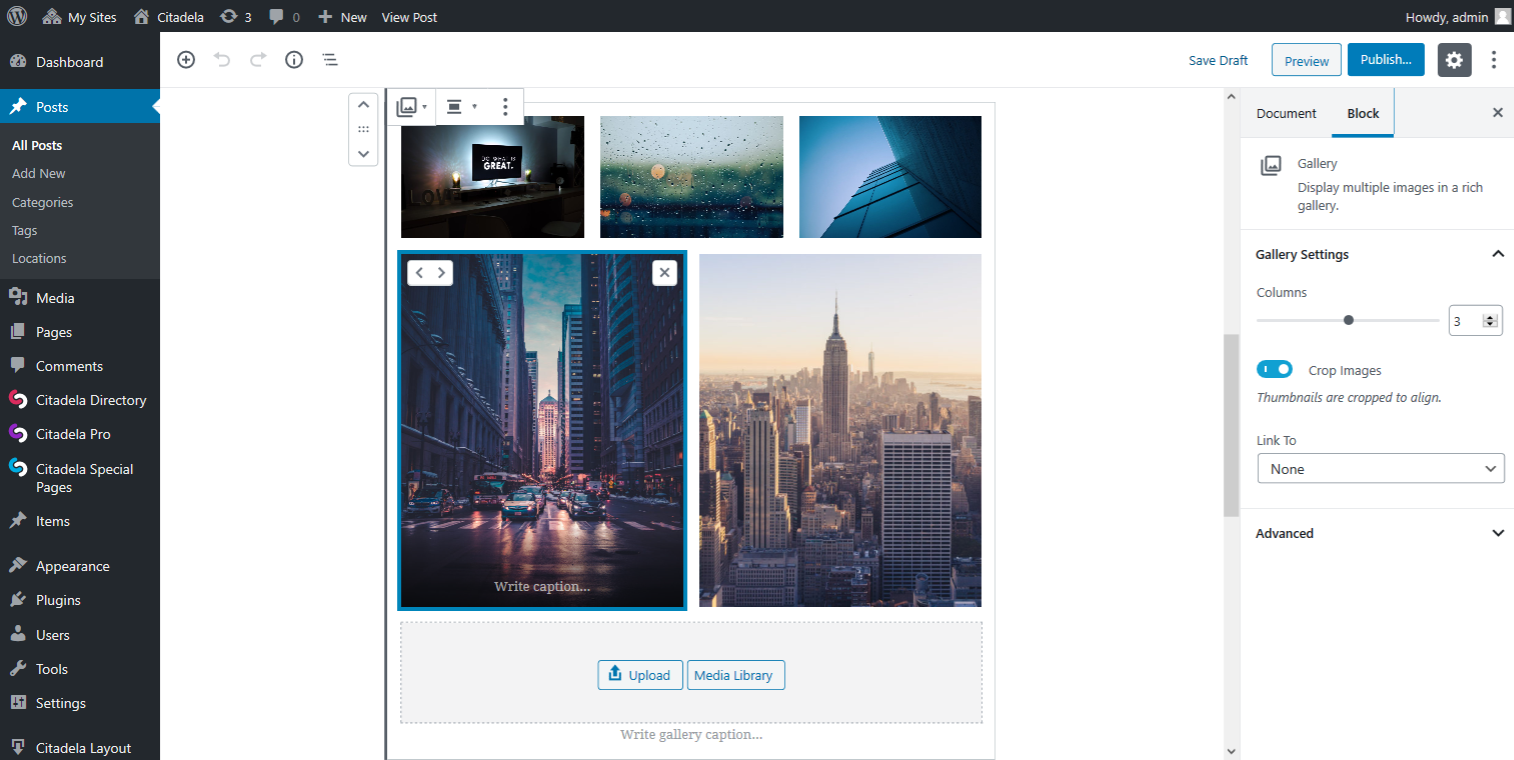
Using the WordPress Editor is easy. Click on ‘Add Media’ to start. Select images from your library. Drag and drop to arrange. Use captions for each image. Captions make images interesting. Preview your post before publishing. Make sure everything looks good. The editor helps you add text. Add some information about each image. This makes your gallery engaging.
Customization Options
Gallery posts in WordPress allow users to display multiple images in a single post. Customization options include choosing layout styles, adjusting image sizes, and adding captions. These features make it easy to create visually appealing posts.
Layout Choices
Gallery posts in WordPress offer many layout choices. You can pick a grid or a list. Grids show many pictures at once. Lists show one picture below another. Some layouts are simple. Others are more fun. Choose what looks best for your blog.
Captions And Descriptions
Add captions to tell more about a picture. Captions are short. Descriptions give more details. They explain the picture better. Both help readers understand. Use simple words. Keep it clear and fun. Readers will enjoy the story behind the pictures.
Enhancing User Experience
Gallery posts make websites fun and engaging. They let users explore pictures and videos. Users click on images to see them bigger. This keeps them interested. Adding slideshows and lightboxes makes it even better. These features help users enjoy content more. They feel like part of the website. Interaction keeps them coming back.
Many people use phones to browse the web. So, galleries must work well on mobile. Images should load fast on small screens. They should fit the screen size. This makes it easy for users to view. Mobile-friendly galleries improve user experience. They make sure visitors stay longer. A happy user is a returning user.
Seo And Performance
Optimizing images is crucial for your site’s performance. Large images can slow down your site. This affects both users and search engines. Use tools to compress images. Smaller files load faster. Ensure your images are clear. Blurry images can confuse visitors. Use the right format. JPEGs are great for photos. PNGs work well for graphics.
Loading speed is vital for user experience. Fast sites keep visitors happy. Slow sites drive them away. Use a content delivery network (CDN). This helps your site load quickly everywhere. Minimize plugins. Too many can slow your site. Keep your WordPress updated. Updates fix bugs and improve speed. Choose a fast theme. Some themes are heavy and slow.
Credit: www.greengeeks.com
Common Challenges
Creating a gallery post in WordPress can be tricky. Users often face issues with image alignment and layout customization. Understanding the tools available can simplify the process and enhance visual appeal.
Troubleshooting Display Issues
Gallery posts might not show images right. This can confuse visitors. One reason is theme compatibility problems. Themes may not support galleries well. Another issue is with image sizes. Small images may look blurry. Large ones can load slowly. It’s important to check plugin settings. Some plugins have options to fix display issues. Always update themes and plugins. This helps solve many problems. Clear the cache too. This can refresh the gallery display. Lastly, check for broken links. These can stop images from showing.
Handling Large Image Files
Large images can slow down your site. This affects loading time. Use image optimization tools. They make files smaller without losing quality. Always choose the right file type. JPEG is good for photos. PNG works for graphics. Limit the number of images in a gallery. Too many can cause slowdowns. Consider using lazy loading. This loads images only when needed. It helps the page load faster. Keep your site’s speed fast for better performance.
Plugins And Tools
A Gallery Post in WordPress allows users to display multiple images in one post. It offers an easy way to showcase photos in a visually appealing layout. Users can manage and organize images effortlessly with various plugins and tools available.
Popular Gallery Plugins
Many plugins help create beautiful galleries. Envira Gallery is a favorite. It is easy to use and fast. NextGEN Gallery is also popular. It offers many design options. FooGallery lets you create stunning galleries quickly. Each plugin has its unique features. Choose the best one for your needs.
Integrating Third-party Tools
Third-party tools can enhance your galleries. Some tools work with social media. They help share galleries online. Instagram Feed lets you show photos from Instagram on your site. Flickr Album Gallery connects with Flickr. This displays your Flickr photos easily. Integration is often simple and user-friendly.
Credit: www.ait-themes.club
Frequently Asked Questions
What Is A Gallery Post In WordPress?
A gallery post in WordPress is a format designed to showcase multiple images. It allows users to create visually appealing collections of photos within a single post. This format is perfect for photographers, artists, and bloggers who want to display images creatively and efficiently on their WordPress site.
How Do I Create A Gallery Post?
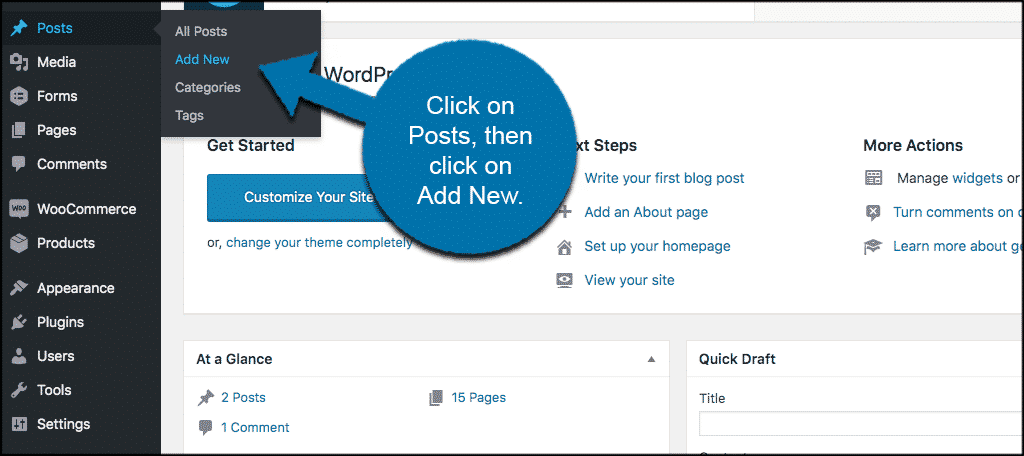
To create a gallery post, start by logging into your WordPress dashboard. Add a new post and select the gallery format. Upload your images, arrange them, and customize the layout. Preview the gallery before publishing to ensure it looks just right.
WordPress makes it easy to create visually stunning galleries.
What Are The Benefits Of Gallery Posts?
Gallery posts enhance visual storytelling by displaying multiple images together. They improve user engagement and provide an organized way to showcase photos. Galleries can attract more visitors and keep them browsing longer. This format is ideal for photography blogs, portfolios, and any content that relies on images.
Can I Customize Gallery Layouts?
Yes, WordPress allows customization of gallery layouts. You can adjust columns, image sizes, and spacing. Use plugins for advanced features like lightboxes and sliders. Tailor the gallery to match your site’s design and style. This flexibility helps create unique and engaging presentations of your images.
Conclusion
Gallery posts in WordPress offer a dynamic way to showcase images. They make your content visually appealing and engaging. Users can enjoy a richer browsing experience with well-organized photos. Creating a gallery post is simple and enhances your site’s appeal.
It helps in improving user interaction and retention. Your website looks professional and interesting. This feature is valuable for bloggers, photographers, and businesses alike. Explore gallery posts to elevate your WordPress site. A perfect choice for image-heavy content. Start creating today and see the difference!


