
Imagine you have a blank canvas. Now, picture being able to paint anything you want on it, customizing every detail to suit your vision.
That’s what custom fields in WordPress offer you. They are like the secret sauce that turns a basic blog into a dynamic, personalized platform that truly reflects your style and needs. Ever wondered how some websites display unique information tailored specifically to their content type?
Or how they manage to maintain a uniform look while showcasing diverse data? The magic lies in custom fields. They allow you to attach additional metadata to your posts and pages, giving you the flexibility to enrich your content beyond the standard options. If you’re keen to elevate your WordPress site to new heights of customization, understanding custom fields is the key. Dive in with us as we explore what custom fields are, why they matter, and how they can transform your website into a more engaging and functional digital space. Your WordPress experience is about to become a whole lot more exciting!
Custom Fields Basics
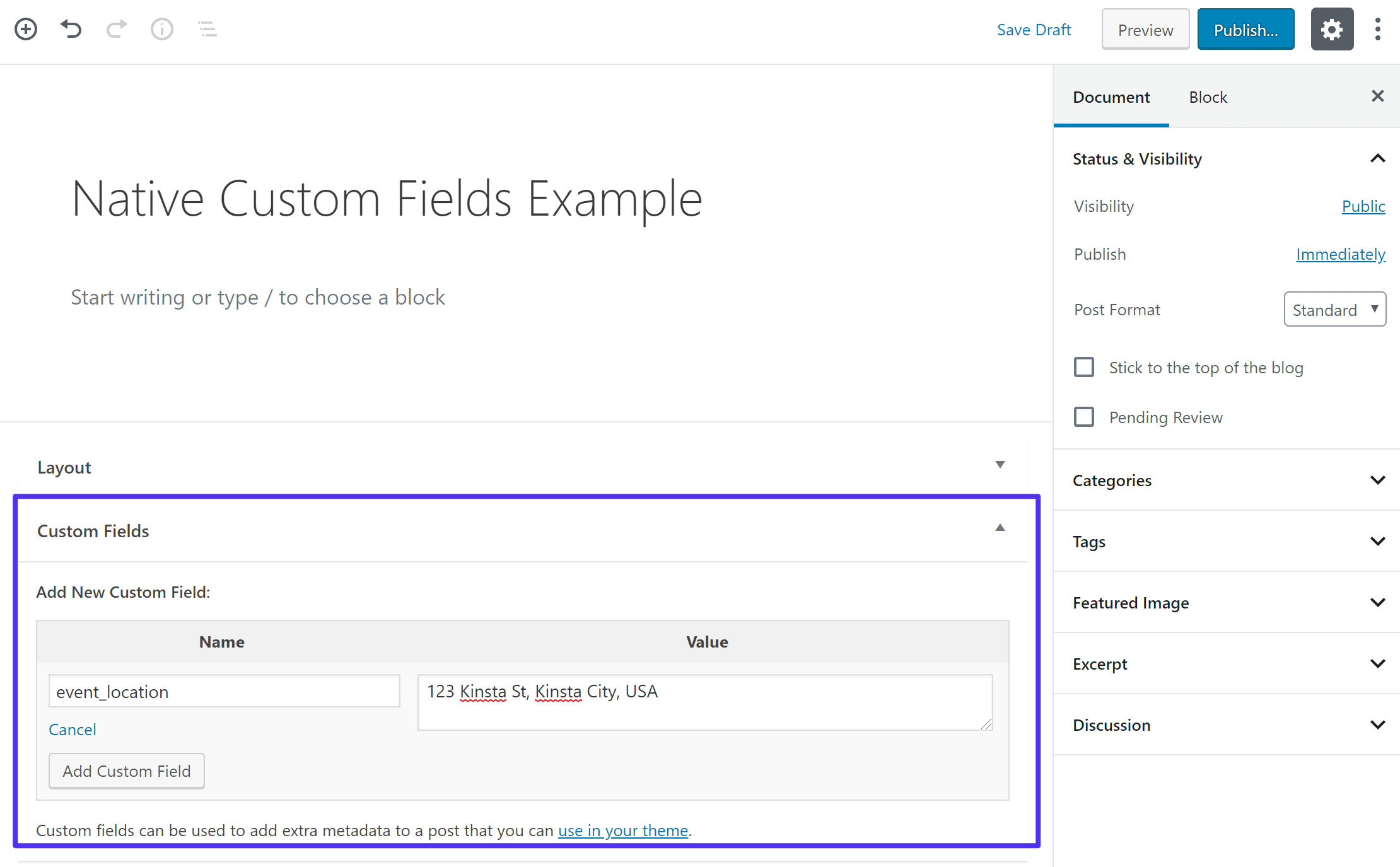
Custom fields let you add extra information to posts. This information can be anything. Text, numbers, links. They are flexible. This makes your website unique. Custom fields are part of WordPress settings. Many people use them. They can show author names, dates, or special messages. Adding custom fields is easy. You can do it from the post editor. They are hidden until you add them. Once added, they appear below your post. Use them to make your content rich and informative.
Credit: kinsta.com
Importance Of Custom Fields
Custom fields hold extra information about your posts. They help in personalizing content on your website. This makes your site unique and more relevant. Using custom fields, you can add special data to posts. For instance, you might add author names or publication dates. This gives readers extra details without cluttering the main content. Custom fields allow better organization of information. They also improve user experience by displaying data that users care about. They are easy to use and can be found in the post editor.
Custom fields can be used in many ways. They are flexible and adapt to different needs. Some websites use them for ratings or product details. Others might use them for location or contact info. This flexibility makes them a vital tool for WordPress users.
How To Add Custom Fields
Custom fields in WordPress allow users to add extra information to posts and pages. These fields help customize content beyond the default settings. Users can create personalized data points, enhancing the site’s functionality and appearance.
Using The WordPress Editor
Custom fields are extra bits of information. These help your posts or pages. First, open your post in the editor. Look for the settings on the right. Find the “Custom Fields” option. Click to enable it. Now, you can add a new field. Give it a name and value. Save your changes.
With A Plugin
Plugins make adding custom fields easy. First, go to your WordPress dashboard. Click on “Plugins” and then “Add New”. Search for “Advanced Custom Fields”. Install and activate the plugin. Go to the plugin settings. Create a new field group. Add fields to this group. Choose where they appear. Save your settings. Your custom fields are ready to use!
Custom Fields In Themes
Custom fields add extra information to posts or pages. Think of them as small boxes for special data. Themes use them to change how content looks. Imagine adding a color choice or a rating to a post. This makes a post unique. Custom fields let themes do more. They allow flexibility in design. Sometimes themes show extra details like author names. These details come from custom fields. They add personal touches to a website. Every theme may use custom fields differently. This makes each theme special.
Custom fields are useful for advanced users. They let you add specific data. They help make content dynamic. For example, a recipe blog might use fields for ingredients. This makes reading easy. Themes can display this data creatively. Custom fields make websites more interactive. They offer new ways to present content. They make websites feel alive.
Managing Custom Field Data
Custom fields let you store extra information in WordPress. This data can be anything. For example, a rating or a special note. Many themes use custom fields to make websites unique. You can add fields using plugins or coding. Plugins make it easy for beginners. Coding needs some skills.
To see and manage custom fields, go to your post editor. Look for the custom field box. You might need to click options to see it. Some fields show up on the website. Others stay hidden for special use. Always check how each field works. Fields can affect your site’s look. Too many fields might slow down your site.
Common Use Cases
Custom fields in WordPress add extra info to posts. They help tell more about each post. Authors can add details like author name, publication date, or location. This helps readers understand posts better. They also allow for organizing posts. Users find related posts easily. These fields make blogs more informative. They enhance the post’s value.
Enhancing Post Metadata
Post metadata includes tags and categories. Custom fields can add more metadata. This helps in sorting posts. Readers find what they need faster. Metadata makes the post clearer. It adds depth to the content. It tells readers more about the post. Custom fields enrich metadata greatly.
Creating Custom Post Types
WordPress lets users make custom post types. These are unique content forms. They differ from regular posts. Users can create pages for products, events, or reviews. Custom fields add to these types. They make them more detailed. They provide extra info. Custom post types become more useful with custom fields.
Custom Fields And Seo
Custom fields are useful in WordPress. They help store extra information. This information can be about your posts or pages. Using custom fields can improve your SEO. How? They allow you to add specific details. These details can be keywords. Keywords make your content more visible.
Search engines love relevant content. Custom fields can help you provide this. Add custom fields with important information. This makes your content unique. Unique content attracts more visitors. More visitors can improve your site’s ranking. Better ranking means more people find your site.
Using custom fields is easy. You can add them in your WordPress editor. Choose what information to include. Make sure it’s relevant to your topic. This helps search engines understand your content better.

Credit: wordpress.org
Troubleshooting Common Issues
Custom fields can act oddly sometimes. Missing fields is a common problem. Check if fields are enabled in the screen options. Fields not saving is another issue. Ensure you have the right permissions. Some plugins may conflict with custom fields. Deactivating plugins can solve this. If fields appear blank, review theme compatibility. Themes might hide or remove fields. Updating themes or plugins can help. Database errors may arise. Always back up before changes. Seek help from forums for complex issues. It’s wise to consult an expert if needed.

Credit: css-tricks.com
Frequently Asked Questions
What Are Custom Fields In WordPress?
Custom fields in WordPress allow users to add extra metadata to posts and pages. They enable personalized content management by storing additional information, like author details or product specifications. This feature enhances content flexibility and customization, making WordPress more powerful for specific needs.
How Do You Use Custom Fields In WordPress?
To use custom fields, first enable them in the WordPress editor screen options. Then, add a new field under the post editor. Enter a name and value to store specific data. Custom fields can be utilized by themes and plugins to display this data creatively.
Can Custom Fields Improve Seo?
Yes, custom fields can improve SEO by adding structured data. They enable better content organization and enhanced search engine understanding. By storing metadata like keywords or product details, custom fields make content more relevant and accessible, potentially improving search rankings.
Are Plugins Necessary For Custom Fields?
Plugins are not necessary but can enhance custom field functionality. WordPress has built-in support for custom fields, but plugins offer advanced features. They simplify the process, providing additional options for managing and displaying custom metadata effectively.
Conclusion
Custom fields enhance WordPress functionality. They offer flexible content management. Users can add specific data. This helps personalize sites easily. Custom fields simplify data organization. They provide control over post details. Think of them as extra spaces for data. Easy to use and understand.
They make WordPress more versatile. Useful for both beginners and experts. Custom fields improve the user experience. They are powerful tools for content creators. Try using them to boost your site’s appeal. You’ll find them helpful and efficient. Explore their potential and enhance your site today.


