
Have you ever wondered how WordPress websites achieve their unique styles? The secret lies in something called a CSS class.
Understanding CSS classes can transform how you design and customize your site. Imagine having the power to effortlessly change colors, fonts, and layouts, creating a website that truly reflects your vision. This isn’t just about making things look good; it’s about crafting an experience that captivates your audience.
By mastering CSS classes, you unlock the potential to make your WordPress site stand out from the crowd. Ready to discover how this simple tool can elevate your web design skills? Let’s dive in and explore the world of CSS classes in WordPress.
Credit: www.megamenu.com
Basics Of Css Classes
A CSS class is a way to style web elements. It helps in giving a unique style to different parts of a website. In WordPress, you can add CSS classes to your content. This makes it look better.
CSS classes start with a dot (.) followed by the class name. Example: .myClassName. You can use the same class on many elements. This keeps styles consistent.
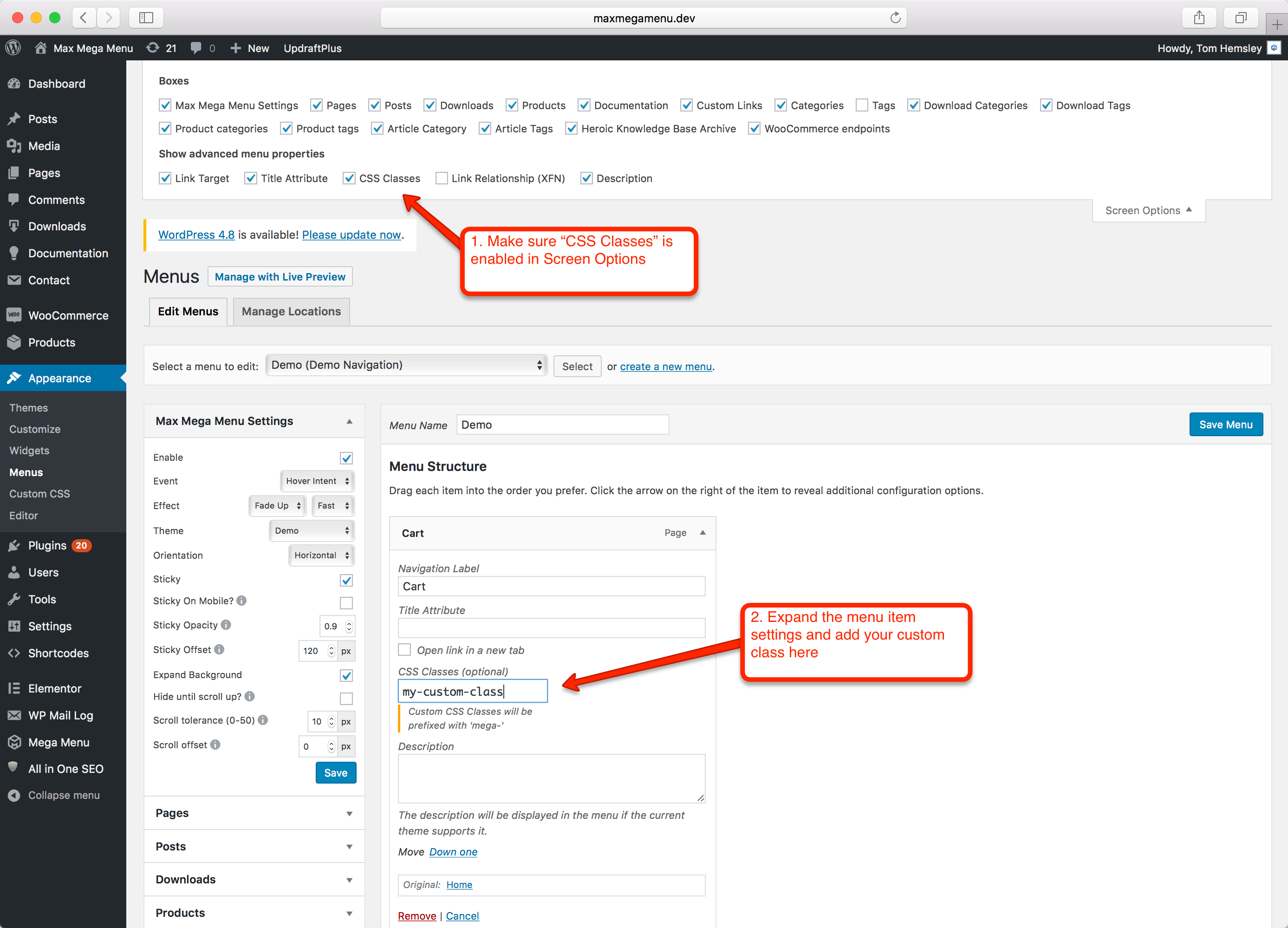
To use a CSS class, add the class name to the element. This can be done in the WordPress editor. Look for the “Additional CSS Class” field. Add your class name there. This will apply the style to your element.
Role Of Css Classes In WordPress
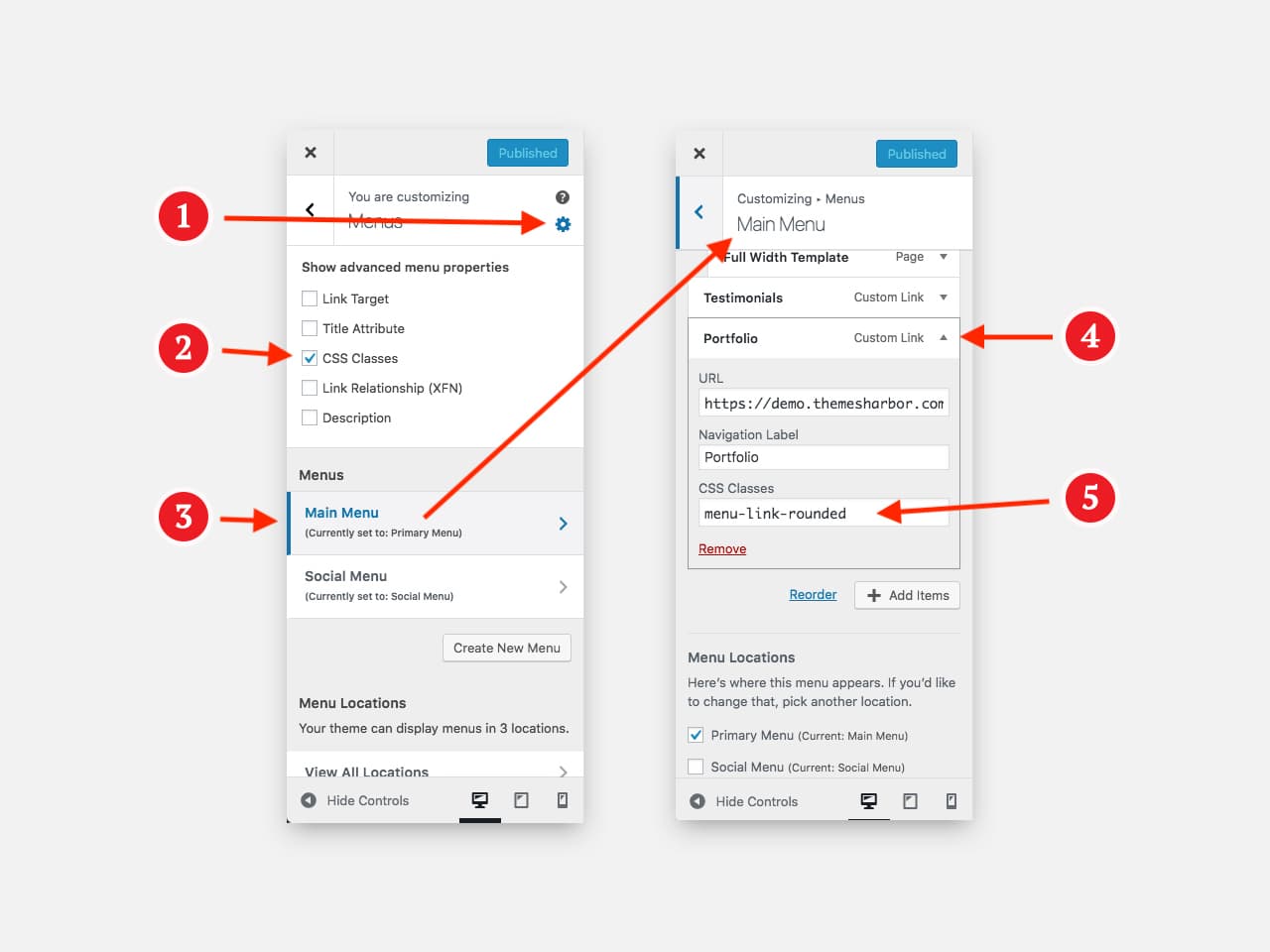
CSS classes help change the look of your WordPress site. They let you apply styles to different parts of your website. Use them to make text bold or change its color. CSS classes can also help in making buttons look different. This makes your site more attractive and easy to use. You can find CSS classes in your WordPress theme files. They are often in files that end with “.css”. You can also add your own classes in the WordPress Customizer. Learning how to use them can be fun and helpful. It makes your website stand out.
Creating Custom Css Classes
CSS classes help change how your website looks. They let you style parts of your webpage. Custom CSS classes give you control. You can make a text bold or change colors. It’s simple with WordPress. First, go to your theme editor. Next, find the style.css file. You add your class there. Name your class with a dot like this: .myClass. Inside the curly braces, put your styles. Change font size, color, or background. Use your class in HTML by adding class="myClass". Your webpage updates with new styles. Make your site unique with CSS. It’s fun and easy!
Credit: themesharbor.com
Applying Css Classes To WordPress Elements
CSS classes change how WordPress elements look. They make your site unique. Use classes to style text, images, and buttons. First, find the element you want to change. Then, give it a class name. This name connects with your CSS code. Write the CSS code to describe the style.
Bold text grabs attention. Different font colors make reading fun. Larger buttons are easier to click. Background colors add flair to pages. A page can have many classes. Each class can do different things. Keep class names simple and clear.
Remember, CSS classes are powerful tools. They help make WordPress sites better. Easy to understand. Easy to use. Makes your site shine.
Using Css Classes For Styling
CSS classes help to make websites look better. They change the style of text, buttons, and pictures. With classes, you can use colors, sizes, and fonts. These styles make your site unique. For example, a class can make text bold or change its color. This helps users focus on important information. Classes are written in the CSS file. You use them by adding the class name to HTML elements. This way, many elements can share the same style. Classes save time and make changes easy.
Common Issues With Css Classes
CSS classes can sometimes be tricky. One common issue is typos in the class name. Even a small mistake can cause styles to not apply. Another problem is using the same class name in different parts of the site. This can lead to unexpected styles. Sometimes, styles do not apply because of specificity issues. Other styles might override your class. Always check the order of stylesheets. This affects how classes work. Some users might forget to link the stylesheet. Without it, classes will not work. It is important to refresh the browser. This ensures changes are visible. Finally, remember to clear the browser cache. Old styles might still show if not cleared.
Best Practices For Css Classes In WordPress
Using CSS classes helps in styling web pages. Always name classes clearly. This makes them easy to understand. For example, use .header for your site header. Avoid long names. Short names are better.
Keep your CSS organized. Group similar styles together. This helps in finding them later. Use comments to explain tricky parts.
Classes should be reusable. This saves time. You can use the same class in different places. This keeps your code clean.
Use responsive design. Make sure your classes work on all devices. Test on phones and tablets.
Remember, simple is best. Avoid too many classes. This makes your site load faster. A fast site is a good site.
Credit: presscustomizr.com
Frequently Asked Questions
What Is A Css Class In WordPress?
A CSS class in WordPress is a selector used to apply styles to specific elements. It’s defined in your theme’s stylesheet. By adding a class to HTML elements, you can customize their appearance. This allows for consistent styling across your site without altering the HTML structure.
How Do I Add A Css Class In WordPress?
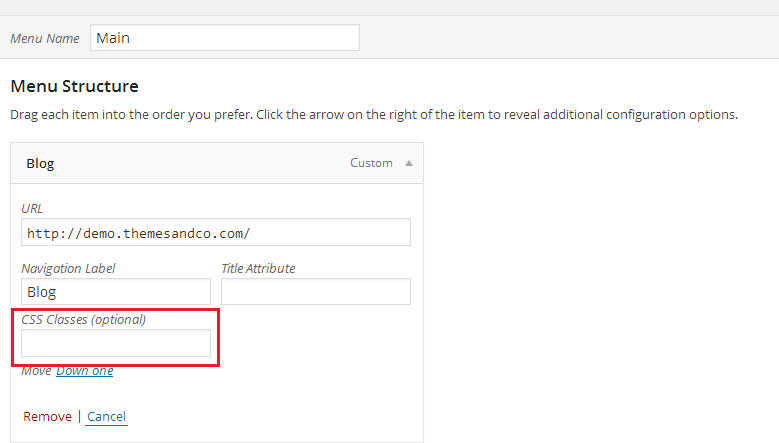
To add a CSS class, edit the HTML element or use WordPress’s editor. In the editor, select the block, then open “Advanced” settings. Enter your desired class name in the “Additional CSS Class” field. This makes it easy to apply custom styles to specific elements.
Can I Use Multiple Css Classes In WordPress?
Yes, you can use multiple CSS classes on a single element. Simply separate class names with a space. This allows you to combine styles and create complex designs. WordPress supports this practice, making it flexible for developers and designers.
Why Use Css Classes In WordPress?
CSS classes help maintain a consistent design across your WordPress site. They allow for easy styling updates without changing HTML. This separation of concerns makes your site more maintainable. It also improves loading times and enhances user experience.
Conclusion
Understanding CSS classes in WordPress enhances your website design skills. They allow you to style elements consistently and efficiently. By applying CSS classes, you maintain a uniform look across your site. This consistency improves user experience. CSS classes make updates easier, saving you time.
Start experimenting with them on your WordPress site today. Practice makes perfect. As you continue learning, your site will look more professional. Remember, simple changes can make a big difference. Keep exploring and improving your web design skills. Your website’s appearance will thank you.
Happy designing!


