
Are you curious about the mysterious “Follow” button on WordPress? You’re not alone.
Many bloggers and readers wonder what happens when they click this seemingly simple button. Does it enhance your blog’s reach? Can it help you connect with your audience more effectively? Understanding this feature could be the game-changer for your WordPress experience.
Imagine boosting your blog’s engagement and keeping your readers updated with just one click. Intrigued? Stick around as we dive into the ins and outs of the WordPress Follow button and discover how it can transform your blogging journey. Your next big step in mastering WordPress is just ahead.
WordPress Follow Button Basics
The WordPress Follow Button helps visitors stay updated. It lets them follow your blog easily. Followers get emails when you post new content.
Visitors click the button to follow. They receive updates in their inbox. This keeps them engaged with your blog.
- Easy way to get more followers.
- Boosts reader engagement.
- Helps build a loyal audience.
Adding the button is simple. Use the WordPress dashboard. Find the widget section. Add the Follow Button to your sidebar or footer.

Credit: wordpress.com
How To Add The Follow Button
Adding a Follow Button in WordPress is easy. First, log into your dashboard. Go to the Appearance section. Click on Widgets. Find the Follow Button widget. Drag it to the widget area you want. This could be your sidebar or footer.
Customize the button. Add a title if you want. You can also write a short message. It tells visitors why they should follow. Don’t forget to save your changes. Now, your site visitors can easily follow your updates.
Customization Options
The WordPress follow button is simple to customize. You can change its color to match your website’s theme. Adjust the button size to make it more visible. Select a style that fits your site’s look. Add custom text to the button. This helps visitors know what happens when they click. Include an icon to make it more attractive. Customize the placement of the button. Place it where users can see it easily.
Choose different animation effects for the button. Make it eye-catching. Set specific actions for when someone clicks it. You can show a message or redirect them. Choose the option that suits your needs best. Use these features to enhance user engagement. Keep your website neat and organized. The button helps build your audience. It encourages people to follow your site.
Benefits For Site Owners
The WordPress Follow Button helps site owners grow their audience. It allows visitors to subscribe to your content with just one click. This means more people will see your new posts. Site owners can connect with readers easily. It helps in building a community around your website. The button is simple to add to your site. It does not require any technical skills. When readers follow you, they get updates about your site. This keeps them engaged with your content. The follow button can be customized to fit your site’s design. This makes it look more attractive. It is a useful tool for anyone who wants to increase their audience.
Enhancing Reader Engagement
The WordPress Follow Button is a simple tool. It lets readers stay updated. Once clicked, users get notifications. New posts appear in their feed. This keeps them engaged with your content.
It builds a loyal audience. Followers return for fresh updates. They don’t miss any important content. This button boosts interaction. Readers feel connected to your blog.
Adding a Follow Button is easy. It enhances the user experience. Readers appreciate the simplicity. They can easily engage with your blog. More followers mean more visibility. It’s a win-win for bloggers!
Notifications And Updates
The WordPress follow button keeps you updated. New posts come to your inbox. You get email alerts right away. No more checking the site again. This button helps you stay connected. You don’t miss any important updates. It’s like a news feed for your email.
Following a blog is easy. Just click the button. Then, enter your email. That’s it! Now, you’re all set to receive updates. You’ll know when new posts are live. It’s a simple way to stay informed. With this, you save time and effort.
Integration With Social Media
The WordPress Follow Button connects your site with social media. It helps visitors follow your blog easily. Users can click the button to get updates from your site. This feature is simple and quick to set up. It works with platforms like Facebook, Twitter, and more. This makes your content reach a wider audience.
Social media integration boosts engagement. It encourages people to share your posts. This leads to more traffic on your site. The button acts as a bridge between your blog and social media. It keeps your audience informed about new content.
Adding the follow button is a smart way to grow your audience. It enhances user experience by making updates easily accessible. This feature is a helpful tool for bloggers and site owners alike.
Troubleshooting Common Issues
Sometimes the WordPress Follow Button does not work right. Check if the button is placed on the right spot. This is important for it to show up. Ensure that your site theme supports it. Not all themes allow it to work. Update your theme if it’s old. Older themes can cause problems.
Make sure plugins are not conflicting. Some plugins might stop it from working. Disable them one by one to see the issue. If the button is still not working, check your internet settings. Ad blockers can sometimes hide it. Turning them off might help.
Always keep WordPress updated. Updates fix many bugs and issues. Also, clear your browser cache. It helps to see changes. If none of this works, ask for help. The WordPress community is always there to assist you.
Best Practices For Use
The WordPress Follow Button helps readers stay updated. They receive notifications about new posts. This button is a simple tool. It encourages engagement with your content. Readers can easily follow your blog.
Put the button in a visible place. Sidebars or footers work well. Make it easy for visitors to find it. A clear placement boosts follow rates.
The button should match your blog’s design. Keep it simple and attractive. Use colors that stand out but are not too bright. This makes the button inviting to click.
Invite readers to use the Follow Button. Explain its benefits. Tell them they’ll get updates on your content. This can help build a loyal audience.
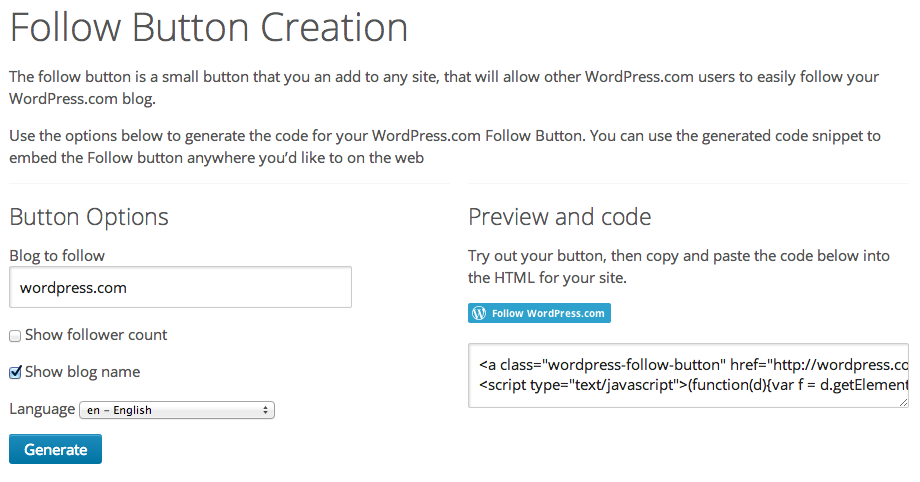
Credit: wordpress.com
Credit: kubiobuilder.com
Frequently Asked Questions
What Is The WordPress Follow Button?
The WordPress Follow Button allows users to subscribe to your blog updates. When clicked, followers receive email notifications about new posts. It’s a simple tool to increase your blog’s audience and engagement. Adding this button encourages more readers to stay connected with your content.
How To Add A Follow Button In WordPress?
Adding a Follow Button in WordPress is easy. Go to your dashboard, navigate to “Appearance,” then “Widgets. ” Find the “Follow Blog” widget and drag it to your desired sidebar or footer area. Customize its settings and save changes. Now, visitors can easily follow your blog.
Why Use A WordPress Follow Button?
Using a WordPress Follow Button boosts your site’s engagement. It helps build a loyal audience by notifying followers of new posts. This increases your content’s reach and visibility. It’s an effective way to keep readers connected and encourage repeat visits to your blog.
Can I Customize The Follow Button?
Yes, you can customize the WordPress Follow Button. You can change its appearance and placement to match your site’s design. Some themes and plugins offer additional customization options. This flexibility ensures the button complements your site’s aesthetic while enhancing user experience.
Conclusion
The WordPress follow button is simple yet effective. It connects your readers quickly. Followers receive updates directly. They stay informed about your latest posts. This builds a loyal audience. Engagement increases naturally. Your content finds its way to new eyes.
It’s easy to add to your site. No coding skills needed. Just a few clicks and you’re set. This tool enhances your blog’s reach. Use it to grow your community. Keep your followers updated and engaged. Ideal for bloggers seeking steady growth.
Start today and watch your audience expand.


