
Have you ever wondered what it means to have a WordPress post set to private? Imagine having the power to control exactly who sees your content.
In a world where sharing is often the default, keeping some things under wraps can feel refreshing. Whether you’re a blogger wanting to share with a select few or a business ensuring privacy for sensitive information, understanding the ins and outs of private posts is key.
Picture this: your content, tucked away safely, accessible only to those you choose. It’s like having a secret club, and you’re the gatekeeper. Curious about how it works and how you can harness this feature? Keep reading to unlock the potential of private posts on WordPress and see how they can transform your content strategy.
Credit: www.greengeeks.com
Private Post Basics
Private posts are hidden from the public eye. Only users with permission can see them. This means they are safe from unwanted views. You control who sees your content. It’s ideal for personal thoughts or team updates.
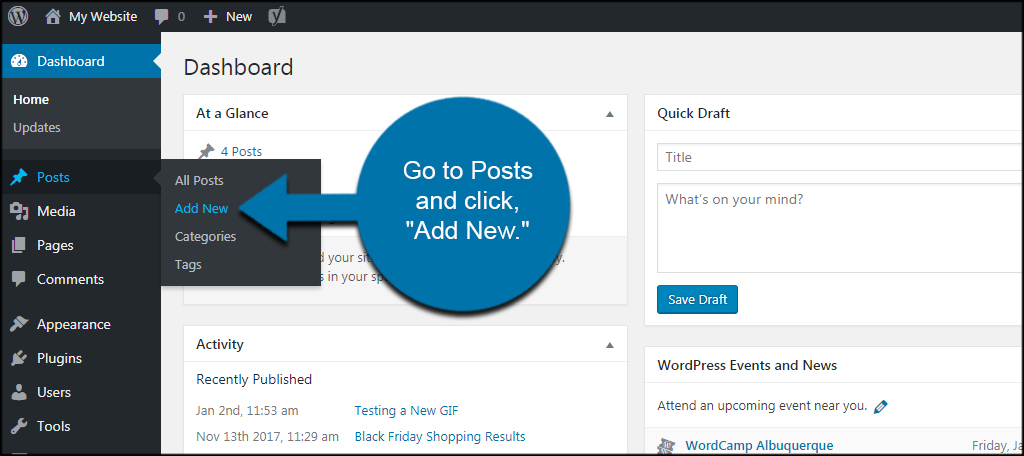
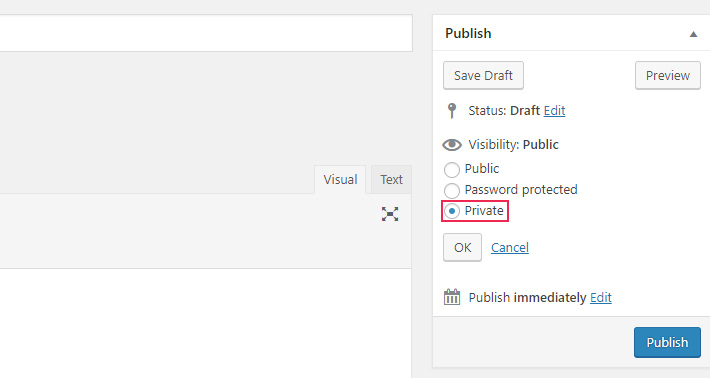
Setting a post to private is simple. Go to the post settings. Choose “Private” in the visibility options. Now, only you or selected users can view it. This feature ensures privacy and security.
Remember, private posts do not appear in search results. Visitors won’t find them on your site. They stay hidden unless shared directly. This is great for sensitive information or special projects. Use this feature wisely.
Setting A Post To Private
Setting a WordPress post to private keeps it hidden from the public. Only users with permission can see it. This is handy for drafts or personal notes. You may also use it for exclusive content. It protects your work from unauthorized views.
To make a post private, go to your post settings. Choose the visibility option. Select private. This action will lock the post from public eyes. Only logged-in users with access can view it.
Benefits Of Private Posts
Private posts keep your content hidden from the public eye. Only you and selected users can see it. This helps in maintaining privacy and security. You can control who reads your words. This is useful for drafts or personal notes. Bloggers can share ideas only with friends or team. No need to worry about unwanted comments. Private posts ensure your thoughts stay safe.
Teachers can use private posts for student projects. Businesses can share updates within their team. It helps in collaboration without the world knowing. Protect sensitive info with private posts. Keep your secrets secure and well-guarded.
Limitations Of Private Posts
Private posts in WordPress are not visible to everyone. Only certain users can see them. This means fewer people will read your post. It might not reach your full audience. Search engines do not index private posts. This limits their reach even more. Your post will not appear in search results. Comments are also hidden. Others cannot interact with your content. This limits user engagement. Sharing private posts is difficult. You must change the settings to share them. This process takes time and effort.
User roles control access to private posts. Administrators and editors can see them. Contributors and subscribers cannot. You must assign roles carefully. Mistakes might limit access. Managing private posts requires attention. You must remember who can see them. Forgetting might cause confusion. Keep track of your settings. This ensures your post is seen by the right people.
Who Can View Private Posts
Private posts in WordPress are hidden from most users. Only people with certain permissions can see them. Administrators and Editors usually have access. They can manage and edit these posts. Authors can see their own private posts. They cannot view others’ private posts. Regular visitors to your site cannot see private posts.
Private posts are useful for sharing with a small group. Family, friends, or team members might view them. They are not visible to search engines. This means they will not appear in search results. Keep your sensitive content safe by using private posts. Only trusted people can view them. This ensures privacy and security.
If you want more control, consider using plugins. Plugins can help manage visibility. They can add extra layers of protection. Remember, private posts keep information safe. They are not meant for public view. Only those you trust can see them.
Managing Private Content
Private posts are hidden from public view. Only authorized users can see them. This helps keep sensitive information safe. It is useful for personal notes or team updates. Choose who can see your private posts. Manage access through your WordPress dashboard.
To make a post private, use the visibility settings. It is easy to change from public to private. Find this option while editing your post. Only users with permission can view private posts. This keeps your content secure.
Private posts offer control over who sees your content. They provide privacy for certain information. Useful for sharing updates with a small group. Keeps your website organized and safe. Helps in managing confidential data.
Privacy Settings And Seo
WordPress lets you make posts private. This means only certain people can see them. Private posts are not seen by everyone. They do not show up in search results. This is important for privacy. It keeps your content safe from the public. Only users you choose can read it. This can affect your SEO. Search engines cannot find these posts. This is because they are hidden. So, they do not improve your site’s ranking.
Use private posts for sensitive information. This keeps it safe. But remember, private content does not help with SEO. If you need better SEO, consider keeping posts public. Public posts are seen by many. They help your site grow. Choose wisely to meet your goals.
Credit: www.imperva.com
Alternatives To Private Posts
Drafts can be a great choice. They save your work but don’t show it to others. You can edit drafts before publishing. It’s safe and easy.
Use password-protected posts for privacy. Only people with the password can read them. This keeps your post private from the public. It’s a good way to share with select readers.
Consider using categories and tags. They help organize your posts. This way, only specific people can find them. It’s a smart way to manage content.
Using private forums is another option. Share your posts there for a close group. It’s like sharing secrets with friends.
All these methods give you control over who sees your posts. Choose what works best for you.
Credit: qodeinteractive.com
Frequently Asked Questions
What Is A Private WordPress Post?
A private WordPress post is only accessible to site administrators and editors. It remains hidden from the public and search engines. This feature is used to share sensitive information or draft content. It ensures that only authorized users with the right permissions can view and manage the post.
How To Make A WordPress Post Private?
To make a WordPress post private, access the post editor. Locate the “Visibility” setting in the publish section. Select “Private” and update or publish the post. This action restricts access, ensuring only authorized users can view it. It’s a straightforward way to control content access.
Who Can View Private WordPress Posts?
Only users with administrator or editor roles can view private WordPress posts. These roles have permissions to access restricted content. Regular visitors and search engines cannot see private posts. This ensures sensitive information is protected and accessible only to trusted users within the WordPress site.
Why Use Private WordPress Posts?
Private WordPress posts are ideal for sharing sensitive information. They help in drafting content without public access. They are useful for internal communications, exclusive content, or team collaborations. This feature enhances privacy and control over who can view specific posts on your website.
Conclusion
Making WordPress posts private offers unique benefits. You control who sees your content. Protect sensitive information easily. Perfect for personal journals or exclusive member content. It adds an extra layer of security. Users enjoy peace of mind. Adjust settings with just a few clicks.
It’s simple and effective. Great for teams sharing updates too. Understanding privacy settings enhances your WordPress experience. Keep content tailored and secure. Enjoy the flexibility it provides. It’s a helpful tool for many users. Try it and see the difference.
Keep your content private when needed.


