
Have you ever wondered what a child page is in WordPress and why it might matter to your website? If you’re navigating the world of WordPress, understanding the concept of child pages could be the key to unlocking a more organized and user-friendly site.
Picture your website as a well-structured library. The main sections are your parent pages, and the specific topics within them are your child pages. They help keep everything in order, making it easier for visitors to find what they need.
By mastering the art of child pages, you can enhance your site’s SEO, improve navigation, and create a seamless experience for your audience. Imagine the satisfaction of knowing your website is not just a random collection of pages but a cohesive unit where each page serves a purpose. Dive into this article to discover how child pages can transform your WordPress site into a streamlined, efficient powerhouse. You’re just a few scrolls away from elevating your web presence.
Definition Of A Child Page
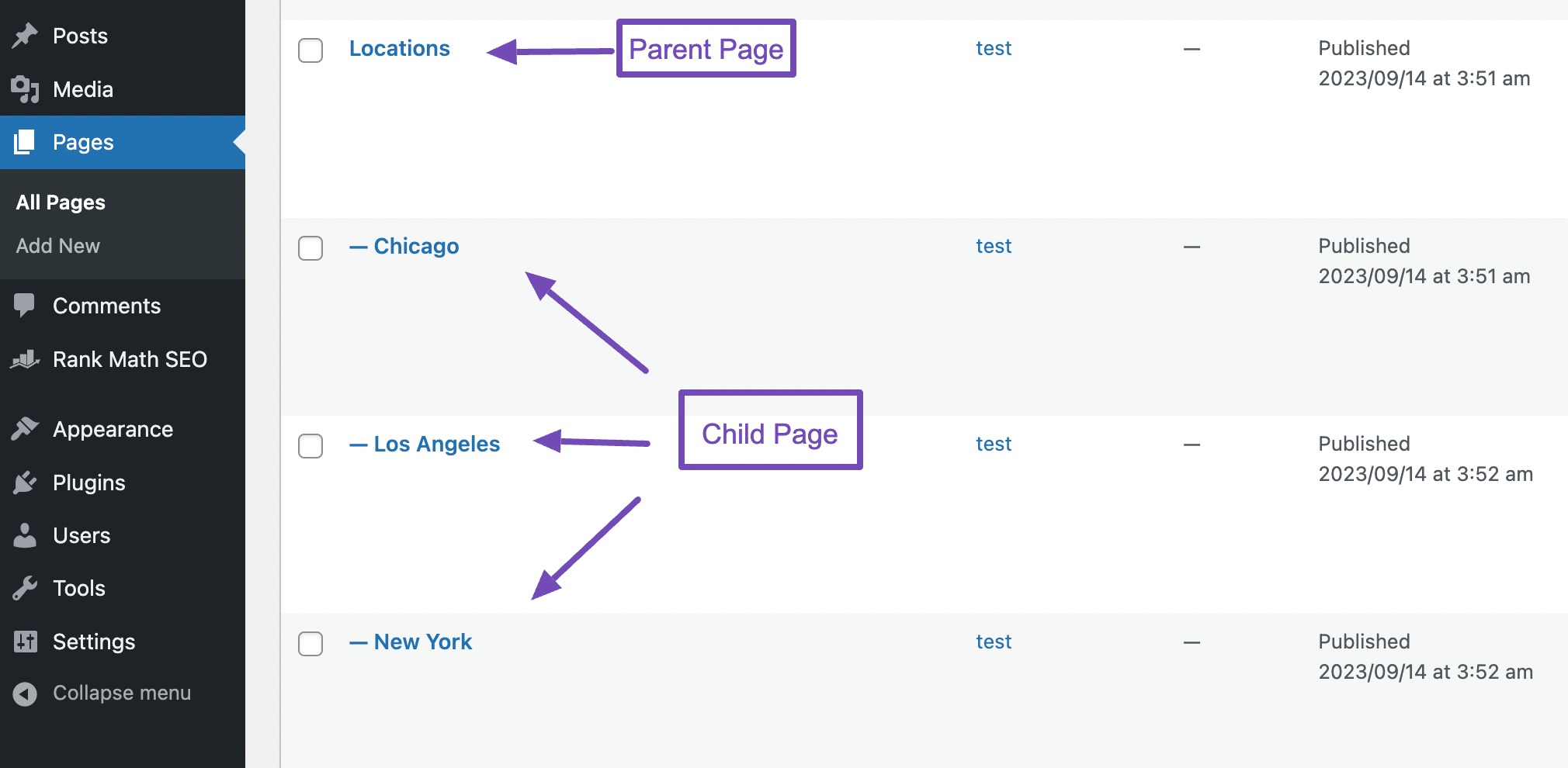
A child page is a subpage of another main page. It helps keep your website organized. Parents and child pages form a hierarchy. This structure makes navigation easy. Visitors find related content quickly. Child pages are like folders in a computer. Each page contains specific information. They belong to a parent page. Creating child pages is simple. In WordPress, you select a parent for the child page. This way, pages are linked together.
Child pages improve SEO. They help search engines understand your site. This boosts your site’s visibility. Users enjoy a better experience. Content is grouped logically. Child pages are useful for websites with lots of content. They create a neat and tidy site structure.
Credit: rankmath.com
Parent And Child Page Relationship
A child page is part of a bigger page. The bigger page is called a parent page. Think of a parent page like a book. Each child page is like a chapter in the book.
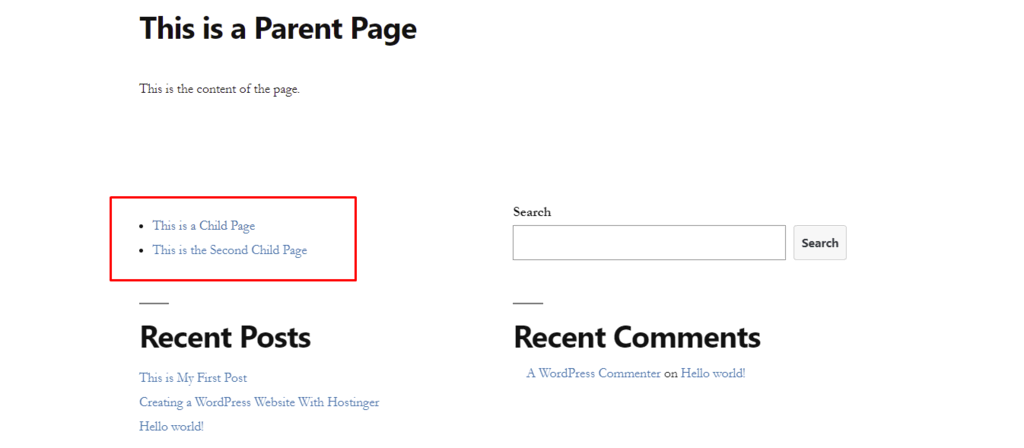
Child pages help keep your website neat. They make it easy to find information. A parent page can have many child pages. This helps group similar topics together. This way, visitors can find what they need faster.
In WordPress, creating child pages is simple. You can choose a parent page when making a new page. This sets up the parent-child link. This link is important for website organization.
Creating Child Pages
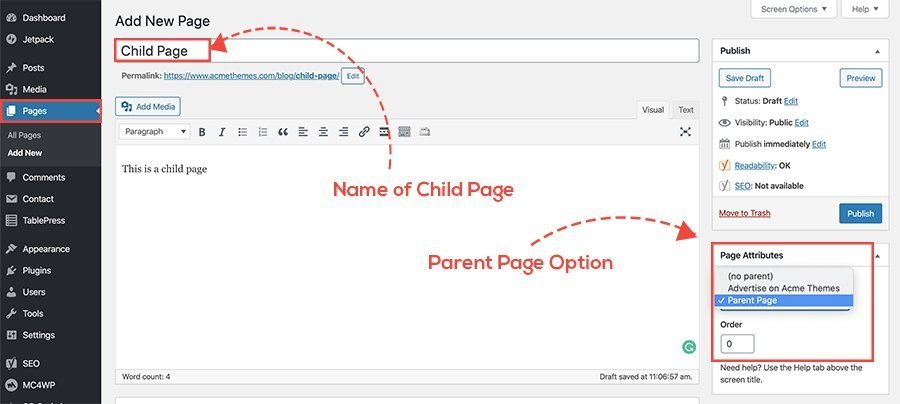
Start by logging into your WordPress dashboard. Locate the Pages section on the left. Click on Add New to create a new page. Enter the title and content for your child page. Look for the Page Attributes box on the right side. Select a parent page from the dropdown menu. This makes the new page a child page.
Click Publish to save your changes. You can edit the child page anytime. Check the parent-child relationship in the page list. Use the Hierarchy view to see connections. Child pages help organize your content. They also make navigation easier for users.
Do not forget to assign a parent page. Skipping this step creates standalone pages. Avoid using complex page titles. Simple titles are best for child pages. Do not overload child pages with information. Keep the content clear and concise. Avoid creating too many child pages under one parent. This can confuse users. Always check for broken links. Broken links lead to frustration.
Benefits Of Using Child Pages
Child pages help keep your site tidy. Each page has a clear place. This makes it easy to find. You can group pages that belong together. This gives your site a neat look. Visitors will enjoy this order.
Navigating becomes a breeze with child pages. Users won’t get lost. They can jump from page to page easily. This improves their experience. They find what they need fast. Happy users mean more visits.
Search engines like organized sites. Child pages can boost your SEO. They create a clear path for search engines. This helps your site rank better. More people will see your site. More visitors mean more success.
Use Cases For Child Pages
E-commerce sites often use child pages for different product categories. Each category can have its own page. This helps in organizing products neatly. Customers find items faster this way. For instance, a clothing store might have pages for men, women, and children. Each of these can be a child page. It keeps the main site clean and easy to use.
Educational sites can use child pages for courses or topics. Each subject can be a main page. Lessons or modules can then be child pages. This structure helps students find what they need. Teachers can update content easily too. It makes the learning process smooth and organized.
Portfolio websites can showcase projects using child pages. Each project or work can have its own page. Artists or designers can show details of each project. This makes it easy for clients to view work samples. It keeps the portfolio neat and professional. Thus, impresses potential clients.
Managing Child Pages
Child pages are linked to a parent page. These pages can be changed. Always make sure the content is up-to-date. Keep information clear and easy to read. Use simple words. Highlight important parts. It helps readers understand better. Remember, changes on a child page don’t change the parent page. Each page is separate. But they are still connected. Editing is easy in WordPress. Just click and type. Save your work often. Don’t forget to preview before publishing.
Child pages can be moved. Change their place in the menu. This helps organize your site. A clear structure is important. It makes the site easy to use. Use the drag and drop feature in WordPress. This helps arrange pages. Make sure all pages fit well. Check the parent page. It should guide the child pages. Good hierarchy makes navigation simple. Visitors will find information faster. This keeps them happy and engaged.
Plugins And Tools For Child Pages
Child pages in WordPress are like subcategories under a main page. They help organize content hierarchically, making navigation smoother. Plugins and tools assist in managing these pages efficiently, ensuring a seamless user experience.
Recommended Plugins
Child pages need special plugins. These plugins help organize content. They make it easy to manage pages. Some plugins are very popular. They have many downloads. They get good reviews. Yoast SEO is one such plugin. It helps with SEO. It makes pages easier to find. Page Builder by SiteOrigin is another plugin. It helps design pages. It is user-friendly. Many people like it. Advanced Custom Fields is also useful. It adds custom fields. This helps with organizing. Each plugin offers different features. Choose the right one for your needs.
Customization Tips
Making child pages unique is important. Customize them to fit your website. Use different styles. Change colors and fonts. This makes pages look nice. Add images and videos. They make pages interesting. Widgets can add extra features. They improve functionality. Test your pages. Make sure they work well. Ask friends for feedback. Update plugins often. This keeps pages safe. Always backup your site. This prevents data loss. Keep your pages fresh. Add new content regularly.
Credit: www.acmethemes.com
Troubleshooting Common Issues
Pages may not show correctly due to conflicting themes or plugins. Try switching to a default theme. This can help identify theme issues. Deactivate plugins one by one. See if the page appears normally. Clear your browser cache. Sometimes old data causes display errors. Check your internet connection. A slow connection might not load pages well.
Use the WordPress debug mode to find errors. This tool gives clues about what is wrong. If problems continue, contact your host for help. They can check server issues.
Broken links make pages hard to use. They can confuse visitors. Use a plugin to find broken links. This tool scans your site quickly. Fix broken links by editing the URL. Make sure it points to the correct page. Regularly check for broken links. This keeps your site healthy.
If links remain broken, check site settings. Ensure permalinks are set correctly. Sometimes settings change and break links. Contact your host if settings seem right but links stay broken.
Credit: www.hostinger.com
Frequently Asked Questions
What Is A Child Page In WordPress?
A child page in WordPress is a sub-page nested under a parent page. It helps organize content hierarchically, making it easier to navigate. Child pages are beneficial for structuring related topics, enhancing user experience, and improving SEO by creating a logical site structure.
How To Create A Child Page In WordPress?
To create a child page, go to your WordPress dashboard and add a new page. In the page attributes section, select a parent page. This will nest the new page under the chosen parent, establishing a hierarchy in your site’s structure.
Why Use Child Pages For WordPress Sites?
Child pages improve content organization by grouping related pages under a main topic. This enhances user navigation and boosts SEO by creating a clear site hierarchy. They are ideal for sites with complex content needing structured navigation.
Do Child Pages Affect WordPress Seo?
Yes, child pages positively impact SEO by creating a logical hierarchy. They help search engines understand site structure, improving indexation. This can lead to better rankings and increased visibility for related content on your website.
Conclusion
Understanding child pages in WordPress helps organize your content better. They create a clear hierarchy, making navigation easy for users. Child pages also improve your site’s SEO by structuring your content logically. This can lead to better search engine visibility.
Using child pages, you can manage your website’s growth efficiently. It’s essential for creating a user-friendly experience. Remember, a well-structured site keeps visitors engaged. It encourages them to explore more. So, start organizing your pages today. Make your WordPress site easy to navigate.
Your visitors will appreciate it. And it can benefit your website’s success.


