
Have you ever found yourself lost in the maze of a website, clicking through page after page, unsure of how you got there? Breadcrumbs in WordPress might be the solution you’ve been looking for.
These tiny navigational aids not only guide you effortlessly through a site but also enhance your user experience, making your online journey smooth and intuitive. Imagine knowing exactly where you are on a website and being able to retrace your steps with ease.
Sounds liberating, right? By the end of this article, you’ll discover how implementing breadcrumbs can transform your site navigation and boost your visitor engagement. Let’s unravel the mystery of WordPress breadcrumbs and see how they can benefit you and your website.

Credit: blog.hubspot.com
Breadcrumb Concept
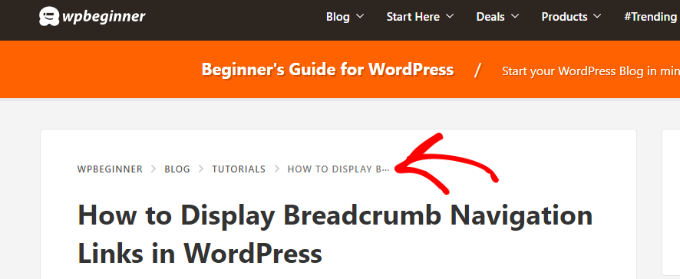
Breadcrumbs show your path on a website. They help you find your way. Think of them as a trail. You follow it to see where you are. Websites use breadcrumbs to make navigation easy. They usually appear at the top of a page.
Each part of a breadcrumb is a link. You can click to go back. It saves time and effort. You won’t need to use the back button. This helps users feel in control. Breadcrumbs are important for both users and search engines. They help you and improve your experience.
Importance In Seo
Breadcrumbs help users know where they are on a site. Search engines like Google love this. They use breadcrumbs to understand your site’s structure. This helps in ranking your pages better. It’s great for user experience too. Visitors find it easy to move around. They don’t get lost. This keeps them on your site longer. And that is good for your site’s SEO.
Breadcrumbs also reduce your site’s bounce rate. Bounce rate means people leaving your site quickly. With breadcrumbs, they might stay longer. This is a positive signal to search engines. It tells them your site is useful. So, using breadcrumbs can make your site more visible on search engines.
Types Of Breadcrumbs
Hierarchy-based breadcrumbs show the path from the homepage. They help users see their location. For example, Home > Category > Subcategory > Current Page. This type keeps the site organized. It’s easy for users to go back. They understand the site’s structure better.
Attribute-based breadcrumbs are often used in online shops. They show product attributes like Color or Size. For instance, Home > Clothing > Red > Large. Shoppers find products faster. It improves the shopping experience. Clear paths lead to happy customers.
History-based breadcrumbs trace the user’s journey. They display the pages visited before. For example, Home > Page A > Page B > Current Page. This type helps users retrace their steps. It’s like a website map. Useful for finding previously viewed pages.
Implementing In WordPress
Plugins make adding breadcrumbs easy. They do the hard work for you. Yoast SEO is a popular choice. It helps with SEO too. Breadcrumb NavXT is another good plugin. It’s simple and works well. Install the plugin from your WordPress dashboard. Then activate it.
After activation, customize the settings. Choose where you want the breadcrumb to show. It can be at the top or bottom of your page. Some plugins let you change the breadcrumb style. You can pick colors and fonts. This way, it matches your website.
For those who like control, manual coding is an option. It needs some coding knowledge. You add code to your theme files. This method offers more customization. First, you create a function in your functions.php file. Then, call this function where you want the breadcrumb to appear.
Be careful when editing theme files. Always back up your site first. Mistakes can break your site. Manual coding allows for unique breadcrumb styles. But it takes more time and skill.
Popular WordPress Plugins
Breadcrumbs in WordPress help users navigate through a site easily. They show a trail of links to pages visited. Popular plugins enable breadcrumbs, enhancing user experience and SEO.
Yoast Seo
Yoast SEO is a helpful plugin for WordPress. It helps you with search engine optimization. Users find it easy to use. It provides tips to improve your site. You can make your content better with it. It also checks the readability of your posts. Many people use Yoast SEO for their websites.
Breadcrumb Navxt
Breadcrumb NavXT is a plugin for WordPress. It adds breadcrumb trails to your site. Breadcrumbs help users know where they are. They improve user experience. This plugin is very popular. It is easy to set up. It makes navigation simple and clear.
Rank Math
Rank Math is another useful plugin. It helps with SEO tasks. It is free to use. Rank Math offers many features. It helps you optimize your website. Users find it easy to manage. It provides valuable insights. It makes your site better.
Credit: www.wpbeginner.com
Customization Tips
Styling with CSS is a fun way to make breadcrumbs look cool. You can change colors, fonts, and size. Use CSS code to make it happen. Start with simple code like color: blue; to change text color. Try font-size: 14px; to adjust size. Play with background-color for a new look. Add padding for space around text. This gives a neat style. Keep experimenting with different styles. Find what looks best for your site. Always preview changes before saving. This ensures your site looks great.
Integration with Themes can be easy. Many themes support breadcrumb plugins. Check your theme settings first. Some themes have built-in options. Use them if available. If not, plugins can help. Make sure the plugin works with your theme. Test on a demo site first. This avoids any errors. Always back up your site before changes. This keeps your data safe. Proper integration enhances user experience.
Common Mistakes
Understanding breadcrumbs in WordPress is vital. A common mistake is not enabling them for navigation. This can confuse visitors, making it hard for them to trace their path. Ensure breadcrumbs are visible to enhance user experience and improve website navigation.
Overstuffing Keywords
Using too many keywords can confuse users. It makes your site look messy. Search engines may not like this. They might rank your page lower. Keep your content clear and simple. Use keywords naturally. One or two times is often enough. Always focus on making it easy to read. Users come first, not search engines.
Ignoring Mobile Responsiveness
Many people use phones to browse websites. A site must be mobile-friendly. If your site doesn’t look good on phones, visitors may leave. This can hurt your site’s traffic. Ensure your breadcrumbs are easy to click on a phone. They should fit well on small screens. Test your site on different devices. This keeps users happy.
Benefits For User Experience
Breadcrumbs help users find their way on a website. They show a clear path to follow. Users can see where they are and where they have been. This makes navigation easy and fast. People can go back to any page they want. It saves time and effort. Breadcrumbs also make websites look neat and tidy. Visitors like websites that are easy to use. They feel more comfortable and enjoy their time more. So, breadcrumbs improve the user experience a lot. They are small, but they have a big impact.

Credit: blog.hubspot.com
Frequently Asked Questions
What Is A Breadcrumb In WordPress?
A breadcrumb in WordPress is a navigation aid. It helps users understand their location within a site’s hierarchy. Breadcrumbs display a trail, from the homepage to the current page. They enhance user experience and improve site navigation. Breadcrumbs also help search engines understand your site structure better.
Why Use Breadcrumbs In WordPress?
Breadcrumbs improve site navigation and user experience. They show users their location within your site’s hierarchy. This helps users easily navigate back to previous pages. Breadcrumbs also enhance SEO by helping search engines understand your site structure. They are particularly useful for websites with complex structures.
How To Add Breadcrumbs In WordPress?
Adding breadcrumbs in WordPress can be done using plugins. Popular plugins like Yoast SEO offer easy breadcrumb integration. You can also manually add breadcrumbs with code. Themes may also provide built-in breadcrumb support. Choose a method that best suits your site’s needs and technical abilities.
Do Breadcrumbs Affect Seo In WordPress?
Yes, breadcrumbs positively impact SEO in WordPress. They improve site navigation which enhances user experience. Breadcrumbs help search engines understand your site structure better. This can lead to improved indexing and visibility. They also encourage users to explore more pages, potentially increasing engagement and reducing bounce rates.
Conclusion
Breadcrumbs in WordPress enhance website navigation. They guide users smoothly. This improves user experience and helps search engines understand your site structure. Including breadcrumbs on your site makes it more organized. Visitors find what they need faster. This can lead to better engagement.
Search engines may rank your site higher. Breadcrumbs are simple to set up. Their benefits can be significant for both users and SEO. Understanding and using them can boost your site’s efficiency. Every WordPress site can benefit from clear navigation paths.
Implementing breadcrumbs is a smart move.


