
Have you ever wondered what a WordPress subdomain URL looks like and why it matters for your website? Understanding this can be a game-changer for your online presence.
Whether you’re a seasoned blogger or just starting your digital journey, knowing the ins and outs of subdomains can give you a competitive edge. Imagine having a clear, organized way to manage different sections of your site or even launch a new project without affecting your main domain.
Intrigued? Keep reading to uncover how a WordPress subdomain URL can transform the way you manage your website, enhance your SEO strategy, and offer a seamless experience to your visitors. Your website’s potential might just be a subdomain away!

Credit: www.gsplugins.com
Basics Of Subdomains
A subdomain is part of a larger website. It is like a branch. Think of it as a smaller section. It has its own web address. A subdomain URL looks different. It starts with a name. Then a dot. Finally, the main domain name. For example, blog.example.com. Here, blog is the subdomain. Example.com is the main domain. Subdomains help organize content. They make browsing easy. Users find what they want quickly. They also help manage site sections. Like shops or forums. Each with its own address. This keeps things neat and tidy. Subdomains are useful. They are simple to set up. Easy to use. They give websites more options. More control over content.
Structure Of A WordPress Subdomain Url
A WordPress subdomain URL has a unique structure. It starts with the subdomain name. For example, “blog” or “store”. Then, it is followed by a dot. Next is the main domain name like “example”. Another dot comes after the main domain. Finally, the top-level domain appears. This can be “.com”, “.org”, or others.
Here is an example: blog.example.com. Subdomains are parts of the main website. They help organize content. Think of them like folders. Each subdomain can have its own website. But it is still part of the main domain. This makes it easy to find specific content.
Creating Subdomains In WordPress
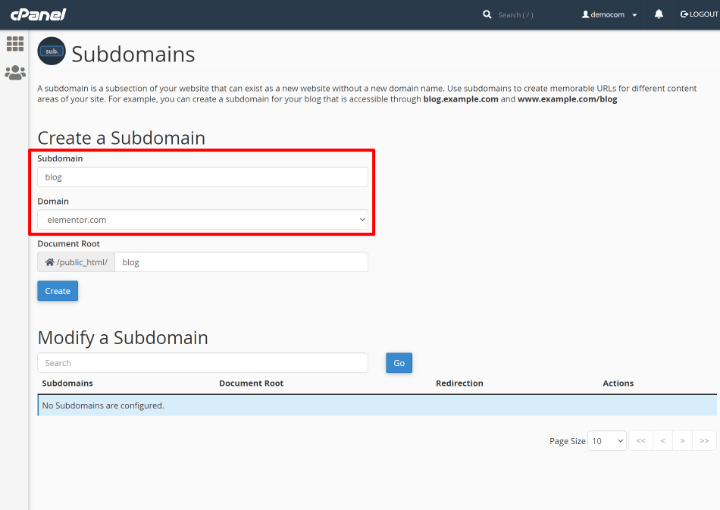
Many hosting providers use cPanel. It helps manage your website easily. To create a subdomain, log into your cPanel account. Look for the Subdomains section. You will find it under the Domains category.
Enter the name you want for your subdomain. For example, “blog” or “store”. Choose the main domain from the drop-down menu. Click Create to finish. Your new subdomain is now ready for use.
Some hosting providers offer a simple dashboard. This dashboard allows creating subdomains directly. Log into your hosting account. Find the Subdomains option. It might be under Domain Management or a similar tab.
Type your desired subdomain name. Select the main domain from the list. Click the Create or Add button. Your subdomain is now set up. You can start using it right away.
Advantages Of Using Subdomains
Subdomains help keep content organized and easy to find. Each subdomain acts like a different website. This can make browsing simpler and more fun. Subdomains can be for blogs, shops, or user accounts. This way, users know where to go for what they need.
Subdomains can bring many SEO benefits. They allow for keyword-rich URLs. This means search engines might find them faster. Subdomains can target specific audiences better. This can improve search rankings. They help in separating main site content from niche topics. This keeps the primary domain focused and clean.
Examples Of WordPress Subdomain Urls
WordPress subdomain URLs help organize a site. They look different than regular URLs. A subdomain URL has a special part before the main domain. Like a folder in a computer. Example: blog.yourwebsite.com. Here, “blog” is the subdomain. It tells users they are on the blog page. Another example is shop.yourwebsite.com. “Shop” is the subdomain. It shows users they are on the shop page. Subdomains make websites neat and easy to navigate.
Subdomains can be useful for different sections. They help divide content clearly. Easy to remember and type. Like kids.yourwebsite.com. This subdomain is for kids’ content. Subdomains are a great way to keep things organized. Users understand where to go. Subdomains are part of the URL structure. They make websites work better.
Common Mistakes With Subdomains
A WordPress subdomain URL often appears as “subdomain. yoursite. com. ” Mistakes include incorrect settings and poor SEO handling. Proper configuration ensures better visibility and user experience.
Misconfigurations
Subdomains can often be tricky. Many people make mistakes with them. One common mistake is misconfiguring DNS settings. This can lead to a broken website. Another issue is not setting proper SSL certificates. A website without SSL can be marked as unsafe. It’s important to ensure that all settings are correct.
Seo Challenges
Subdomains can confuse search engines. This can affect your site’s ranking. Each subdomain is treated as a separate site. This can split your SEO efforts. It might be harder to get traffic this way. Make sure to link subdomains properly. This helps in sharing SEO strength. Always keep subdomains updated. This avoids any content duplication.
Customizing Subdomain Urls
A subdomain URL often looks like blog.example.com. The subdomain part here is “blog”. It helps in organizing content. Each subdomain is unique. It can point to a different section of a site. This makes navigation easy for users. It also helps with search engines. Subdomains are great for specific content.
Url Structure
The typical URL structure is like subdomain.domain.com. The “subdomain” part is customizable. It can represent a brand or feature. Choosing the right subdomain is important. It should be relevant to the content. This helps users understand what to expect. A clear URL structure improves user experience. It also aids in SEO.
Branding Considerations
Subdomains can reflect your brand. Choose words that fit your identity. A strong subdomain boosts recognition. It should be easy to remember. Avoid using long or complex words. The right subdomain tells your brand story. It connects users to your brand.
Security Implications
WordPress subdomain URLs might look like “blog. example. com. ” They carry security implications. Subdomains can be targeted by hackers if not properly secured. It’s important to keep them updated and protected to prevent unauthorized access.
Ssl Certificates
SSL certificates are very important. They keep information safe. They use encryption. This makes it hard for bad people to read. Every subdomain needs its own certificate. One certificate cannot work for all. This helps keep each part safe. It stops others from seeing private data. Always check for a padlock in the URL. This means SSL is active. It makes browsing safer.
Managing Access
Access control is also key. It decides who can see or change things. Only trusted people should have access. Use strong passwords. They must be hard to guess. Change them often. This keeps the subdomain safe. More users should have limited permissions. This reduces the risk. Be careful who you share access with. It keeps the system secure.
Alternatives To Subdomains
A WordPress subdomain URL typically looks like “blog. example. com. ” Alternatives include using subdirectories like “example. com/blog” or separate domains. These options can influence SEO and branding strategies.
Subdirectories
Subdirectories are part of the main site. They are like folders. This makes them easy to find. The URL looks neat. Search engines often prefer them. They keep all content under one roof. This helps with SEO. It is a simple setup.
Separate Domains
Separate domains are different. They need their own space. Each domain has its unique URL. This can be costly. They require separate maintenance. Branding can be harder. But, they offer full control. Good for big projects. Choose wisely.
Credit: elementor.com

Credit: kinsta.com
Frequently Asked Questions
What Is A WordPress Subdomain Url?
A WordPress subdomain URL is a unique web address used to organize and manage content separately. It appears as a prefix to your main domain name, like “blog. yourwebsite. com”. Subdomains are helpful for creating distinct areas of a website, such as blogs, stores, or forums, without needing separate hosting.
How Do I Set Up A Subdomain In WordPress?
Setting up a subdomain in WordPress involves accessing your hosting provider’s control panel. Locate the subdomain section and create a new subdomain by entering your desired prefix. Once created, you can install WordPress on it to manage your content. Ensure DNS settings are correctly configured to point to your server.
Why Use Subdomains In WordPress?
Subdomains in WordPress offer organization and flexibility for managing different site sections. They help in distinguishing content types and improving navigation. Using subdomains can enhance SEO by categorizing information, making it easier for users and search engines to understand your site structure and content.
Are Subdomains Bad For Seo?
Subdomains can be beneficial for SEO when used correctly. They allow for targeted content and specific keyword optimization. However, improper use or excessive subdomains may dilute domain authority. Ensure each subdomain has valuable content and is linked appropriately to maintain SEO benefits and improve site visibility.
Conclusion
Understanding WordPress subdomain URLs is crucial for website management. They help organize content effectively. Subdomains create separate sections within your main domain. For instance, blog. example. com is a subdomain. It’s distinct from example. com. This structure aids in navigation.
Users find content quickly. Search engines appreciate organized sites too. Properly using subdomains boosts SEO. They enhance user experience by simplifying access. Consider your website’s needs. Decide if subdomains suit your goals. Implement them wisely for maximum benefit. Your site will run smoothly and efficiently.
Happy website building!


