
Imagine transforming your website into a powerful tool that seamlessly delivers your message to the world. You’re ready to dive into the world of WordPress.org, a platform renowned for its flexibility and robust features.
But what happens when you download it? Navigating the next steps can feel overwhelming, but fear not! You’re about to discover the practical steps and insider tips to make the most out of your WordPress. org download. This guide will help you unlock its full potential, ensuring your website stands out in the digital landscape.
Ready to take control and create something extraordinary? Keep reading to turn your WordPress dreams into reality.
Credit: solidwp.com
Preparing For Download
WordPress needs basic system features. Ensure your computer has enough memory. Check if your server supports PHP. PHP version should be 7.4 or higher. A MySQL version of 5.6 or higher is required. Make sure your web server is either Apache or NGINX. These steps ensure smooth download and install.
Hosting is crucial for WordPress. Choose reliable hosting providers. Look for support and uptime guarantee. Ensure they offer SSL certificates. SSL keeps your site secure. Check for easy backup options. Backups save data during problems. Selecting the right host helps in managing the site effectively.
Downloading WordPress
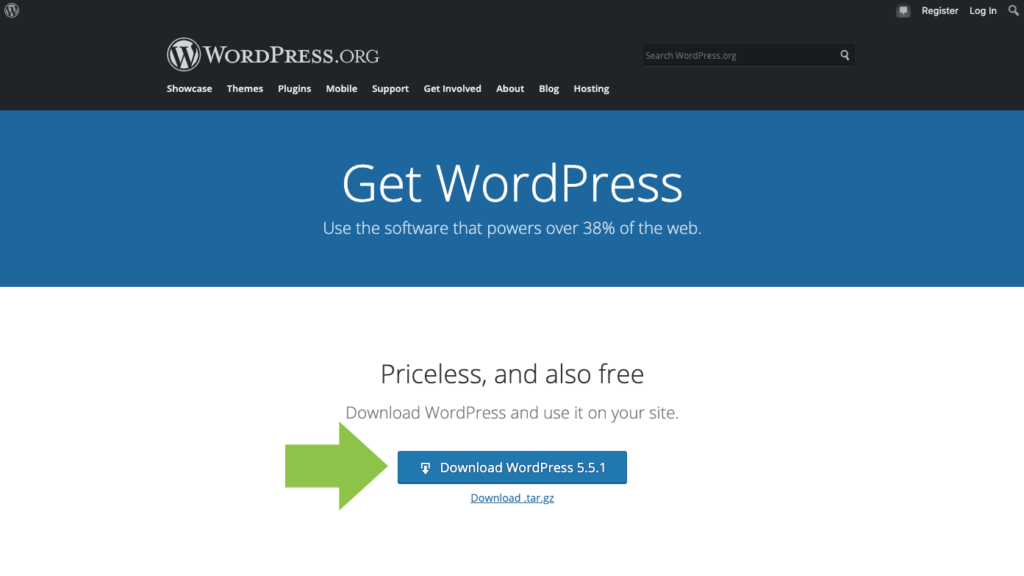
Open your web browser and go to the WordPress.org website. This is where you can find WordPress for free. Make sure you are on the official site to stay safe. Look for the download button on the home page. It is usually easy to find and big. Click it to start the download process.
Always choose the latest version of WordPress. This ensures you get the newest features and security updates. Check the version number before you download. The latest one is usually at the top. Older versions might not have all the security fixes. This is important for keeping your website safe.
Installation Process
First, find the WordPress.zip file in your downloads. Right-click on it. Choose “Extract All” from the menu. You will see new files appear. These are your WordPress files. Keep them in a safe folder. Do not delete them.
Open your FTP client on the computer. Connect it to your server. Look for the “public_html” folder. This is where your site lives. Drag and drop the unpacked WordPress files here. Wait for the upload to finish. It might take some time. Once done, your files are ready on the server.
Database Setup
Start by opening your hosting control panel. Look for the database section. Here, you will create a new database. Choose a simple name. This name should be easy to remember. Next, create a database user. Give this user a strong password. Make sure to write it down somewhere safe. Finally, link the user to the database. Give the user all the needed permissions.
Locate the wp-config-sample.php file in your WordPress folder. Rename it to wp-config.php. Open this file with a text editor. You need to fill in the database details. Enter the database name. Type the username and password you created earlier. Save the file once done. Make sure the changes are correct. This step is important for WordPress to work.
Finalizing Installation
Run the installation script to start. Open your browser. Type your site URL. Add “/wp-admin/install.php” at the end. Press enter. The script will run. It checks your setup. It sets up your database. It prepares your site. This part is fast. It’s easy too. Follow the steps.
Create your admin account next. Choose a username. Pick a strong password. Use a valid email. Write it down. You will need it later. Keep it secret. You are now the site boss. Manage your site here. Add posts, pages, and plugins. Customize your site. Have fun!
Credit: wordpress.org
Post-installation Steps
Find a theme that fits your website style. Look at the design and features. Make sure it is responsive. Check reviews from other users. Download and activate the theme. Your website will look great!
Plugins add features to your site. Start with a security plugin. Protect your site from bad people. Add an SEO plugin. Help more people find your site. Install a backup plugin. Save your data safely. Plugins make your site better!
Troubleshooting Common Issues
Sometimes, installing WordPress can be tricky. Errors pop up. Check if all files downloaded. Make sure the server meets WordPress needs. PHP and MySQL versions matter. Always update them. Permissions on files must be correct. Wrong permissions block install. Use an FTP client. Change file permissions to 755 for folders. Files need 644. Check the wp-config.php file. Is the database name right? Is the username correct? Mistakes here cause errors. Always review and double-check.
Database issues are common. WordPress can’t connect. First, check the wp-config.php file. Ensure database details are correct. The username must match. The password too. If unsure, reset the database password. Use your hosting control panel. Next, confirm the database server name. Is it ‘localhost’ or another name? Ask your host if unsure. The database server can be offline. Contact your web host for support. They can help fix it.

Credit: wordpress.org
Frequently Asked Questions
How Do I Download WordPress From WordPress.org?
To download WordPress from WordPress. org, visit their official website. Click on the “Download WordPress” button. Follow the instructions provided to save the file to your computer. This package includes all necessary files to set up WordPress on your server.
What Should I Do After Downloading WordPress?
After downloading WordPress, you need to upload the files to your web server. Use an FTP client for this process. Then, create a MySQL database and configure the wp-config. php file. Finally, run the installation script by accessing your site URL.
Is WordPress.org Download Free?
Yes, downloading WordPress from WordPress. org is completely free. WordPress is open-source software, allowing anyone to download, use, and modify it. However, hosting and domain registration might incur costs. Always ensure you are downloading from the official WordPress. org website.
Do I Need Coding Skills To Use WordPress?
No, you don’t need coding skills to use WordPress. WordPress is user-friendly with a simple interface. Many themes and plugins are available to enhance functionality without coding. However, basic HTML and CSS knowledge can be helpful for customization.
Conclusion
Downloading WordPress. org opens doors to endless possibilities. Start by exploring its features. Customize your website to suit your needs. Experiment with different themes and plugins. Build your brand with ease. Keep your content fresh and engaging. Regular updates enhance security and functionality.
Utilize community forums for support and ideas. Monitor your site’s performance regularly. Learn SEO basics to boost visibility. Stay consistent with quality content. Grow your audience over time. Success requires patience and dedication. Enjoy your journey with WordPress. org, where creativity meets simplicity.
Your website dreams are now within reach.


