
Are you curious about what it takes to become a WordPress developer? You’re not alone.
With its user-friendly interface and robust features, WordPress powers over 40% of all websites on the internet. If you’ve ever thought about diving into the world of web development, WordPress is an excellent place to start. We’ll break down exactly what you need to embark on your journey as a WordPress developer.
Whether you’re a tech enthusiast eager to learn new skills or someone considering a career shift, understanding the essentials of WordPress development is your first step. We’ll guide you through the must-have skills, tools, and resources to set you on the path to success. By the end of this read, you’ll have a clear roadmap of what it takes to thrive as a WordPress developer. Imagine the satisfaction of creating stunning websites and the freedom to work from anywhere in the world. Stick around, and let’s uncover the secrets to launching your WordPress developer career.
Skills And Knowledge
WordPress developers need to know PHP. It helps in creating themes and plugins. HTML is also important. It builds the structure of web pages. CSS makes pages look nice. JavaScript adds interactive features. These four languages are essential. They make websites work well.
Front-end skills help in designing user-friendly websites. Responsive design is key. It ensures sites look good on all devices. Bootstrap can be useful for layout. Basic graphic design skills help in creating attractive visuals. SEO knowledge improves site visibility. These skills make sites easy to use.
Back-end skills focus on server-side tasks. MySQL is important for database management. It helps store information safely. Understanding APIs is useful. They allow communication between systems. Security knowledge protects data from threats. These skills ensure sites run smoothly.
Essential Tools
Text editors help write code. They make coding easy. IDEs offer more features. They debug code fast. Visual Studio Code is popular. It has many plugins. Sublime Text is lightweight. It runs fast. These tools help you code better.
Version control keeps track of changes. It helps team work. Git is widely used. It’s free and open source. It saves your work. You can go back to old versions. GitHub hosts your code online. Others can see and use it.
Debugging tools find errors. They fix problems. Xdebug works with PHP. It shows where errors are. Chrome DevTools helps debug web pages. It checks performance. These tools save time. They make your code clean.
Key WordPress Concepts
Themes change how your website looks. They control the design and layout. Templates are part of themes. They decide how each page looks. You can switch themes easily. This gives your site a new look. Many themes are free. Some themes need to be bought. Choose a theme that matches your needs.
Plugins add new features to your site. They are like apps for your website. You can add a contact form or a photo gallery. There are many plugins available. Some plugins are free. Others might cost money. Install plugins to make your site more useful.
Hooks let developers add code. They change how WordPress works. Actions run at certain times. They let you add or change features. Hooks and actions are powerful tools. They give more control over the site. Learning them takes time but is very helpful.
Credit: savvy.co.il
Development Environment
A local server is needed to test WordPress sites. Install software like XAMPP or MAMP. These tools create a server on your computer. They help run WordPress easily. Configure the server settings. Make sure it’s ready for WordPress. This setup is key for development.
WordPress needs a database to store data. Use tools like phpMyAdmin to manage it. Create a database for your WordPress site. Keep track of changes in the database. Regular checks ensure everything works well. Back up the database often. This keeps your data safe.
The WordPress CLI makes tasks simple. Install it on your computer. Use it to manage WordPress sites. It helps in updating plugins and themes. Run commands to control WordPress. This tool saves time and effort.
Design And Ux Considerations
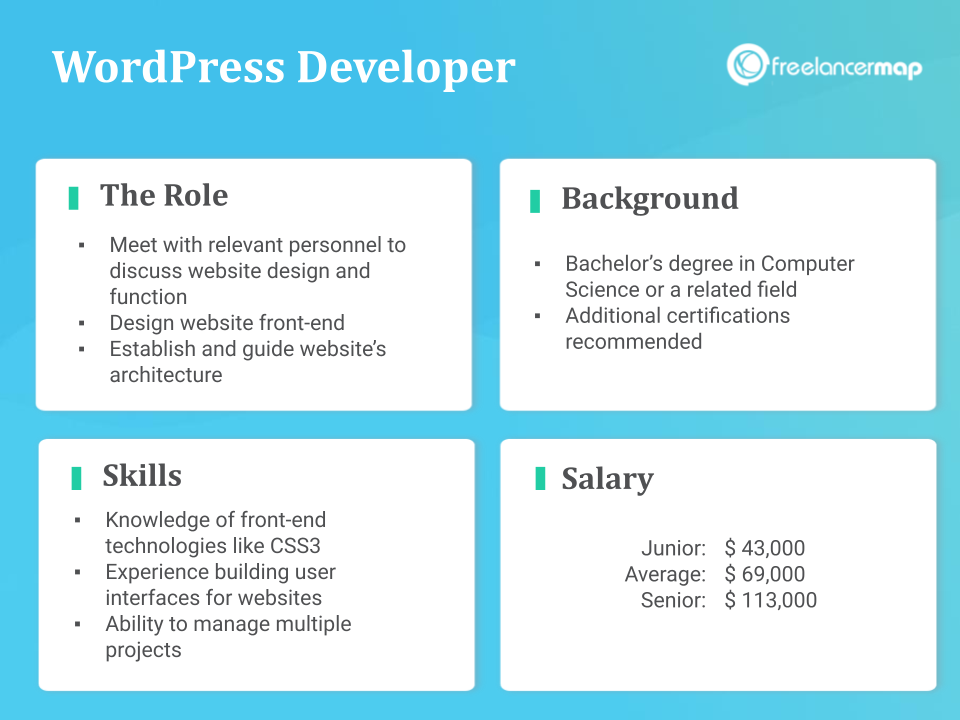
Websites must work well on all devices. Responsive design helps with this. It makes sure the site looks good on phones and computers. This is important. People use many devices. Your site must fit each screen size. Fluid grids help make this happen. They adjust content to fit the screen. Images must also resize. This ensures they do not look strange.
User experience (UX) is about making sites easy to use. The design should guide users naturally. Use simple menus. Keep buttons easy to find. Text must be clear and readable. Navigation should be smooth. Users should not get lost. Offer a search bar for help. It helps users find things fast. A good UX keeps visitors happy.
Accessibility allows everyone to use your site. Even those with disabilities. Use readable fonts. Add alt text for images. This helps screen readers. Include keyboard shortcuts. Some cannot use a mouse. Make sure colors have good contrast. This helps those with poor vision. Follow web accessibility guidelines. This ensures all users enjoy your site.
Credit: www.freelancermap.com
Security Practices
Common vulnerabilities can make websites unsafe. Hackers often look for weak spots. Many sites suffer from SQL injection attacks. Others face cross-site scripting problems. Insecure passwords add to the risk. Keeping sites safe is important for users.
Implementing security measures helps protect data. Use strong passwords for all accounts. Always install security plugins. These tools block many threats. Limit login attempts to prevent hacking. Set up a firewall to guard against attacks. Regularly scan for malware. These steps keep data safe.
Regular updates and maintenance are crucial. Always update WordPress to the latest version. Plugins and themes need updates too. New versions fix security holes. Regular backups are also important. If something goes wrong, you can restore the site. Keeping everything updated prevents many problems.
Testing And Debugging
WordPress developers use many tools for testing. Selenium is a popular choice. It helps check websites. JUnit is another tool. It is used for unit testing. These tools help find errors. They also ensure the website works well. Testing frameworks help make the process easy. They save time for developers.
Bugs are errors in code. Developers use systems to track them. Jira is a common tool. It helps manage bugs. Bugzilla is another system. It keeps track of issues. These systems help find and fix bugs fast. Developers can work better with these tools.
Websites should load fast. This is important for users. Developers use tools to check speed. Google PageSpeed Insights is helpful. It shows how to improve speed. GTmetrix is another tool. It helps optimize performance. These tools make websites faster. A faster site is better for everyone.
Staying Updated
Becoming a WordPress developer requires keeping up with the latest trends and tools. Familiarity with PHP, HTML, CSS, and JavaScript is essential. Regular updates and learning new plugins are crucial for skill enhancement.
WordPress Community And Forums
Joining the WordPress community helps you learn fast. You can ask questions and get answers. Many people share ideas in forums. This is a great way to stay updated. You learn from others’ experiences.
Latest Trends And Updates
WordPress changes a lot. New features come out often. Knowing the latest trends helps you keep your sites fresh. You can read blogs or follow WordPress news. This helps you stay ahead.
Continuous Learning Resources
Learning never stops. Books and online courses are good resources. They teach new skills. Many free tutorials are available. These help you learn new tricks. Always keep exploring.

Credit: cmsminds.com
Frequently Asked Questions
What Skills Are Needed For WordPress Development?
To be a WordPress developer, you need proficiency in PHP, HTML, CSS, and JavaScript. Familiarity with MySQL is crucial for database management. Understanding WordPress themes and plugins is essential. Strong problem-solving skills and attention to detail enhance development efficiency. Staying updated with the latest WordPress trends is beneficial.
How Do I Start Learning WordPress Development?
Start by exploring WordPress’s official documentation and online tutorials. Practice by setting up local environments and building simple themes. Engage in community forums for insights and support. Consider enrolling in online courses to deepen your knowledge. Regular experimentation and learning will build your expertise effectively.
Is Coding Necessary For WordPress Development?
Yes, coding is necessary for WordPress development. Knowledge of PHP, HTML, CSS, and JavaScript is crucial. These languages help customize themes and plugins. While some tasks can be done without coding, advanced customization requires programming skills. Coding empowers developers to create unique and functional WordPress sites.
Can I Use WordPress Without Technical Skills?
Yes, you can use WordPress without technical skills. The platform offers user-friendly interfaces for managing content. Themes and plugins simplify customization without coding. Many hosting providers offer one-click installations. However, technical skills expand possibilities for customization. Beginners can start without coding, but learning basics enhances experience.
Conclusion
Becoming a WordPress developer requires learning and practice. Start with basic HTML and CSS skills. Familiarize yourself with PHP and JavaScript. Explore WordPress themes and plugins. Engage in projects to gain real experience. Join online forums for community support. Stay updated on WordPress trends and updates.
Develop problem-solving skills for debugging issues. Remember, consistency is key. Dedicate time for learning each week. Enjoy the process of creation and improvement. With time, you will grow in confidence. Embrace challenges and use them to learn. Your WordPress journey is unique and rewarding.
Keep moving forward.


