
Imagine being able to control every aspect of your WordPress site with ease. Sounds appealing, right?
Understanding WordPress user roles is your key to unlocking this power. Whether you’re running a personal blog or managing a bustling e-commerce site, knowing who can do what on your website is crucial. It empowers you to enhance security, streamline operations, and foster collaboration.
But what exactly are these user roles, and how do they impact your website’s functionality? In this guide, you’ll discover the ins and outs of WordPress user roles, helping you make informed decisions for a smooth and secure online experience. Ready to dive in and take control? Keep reading to find out how user roles can transform your WordPress journey.
WordPress User Roles Overview
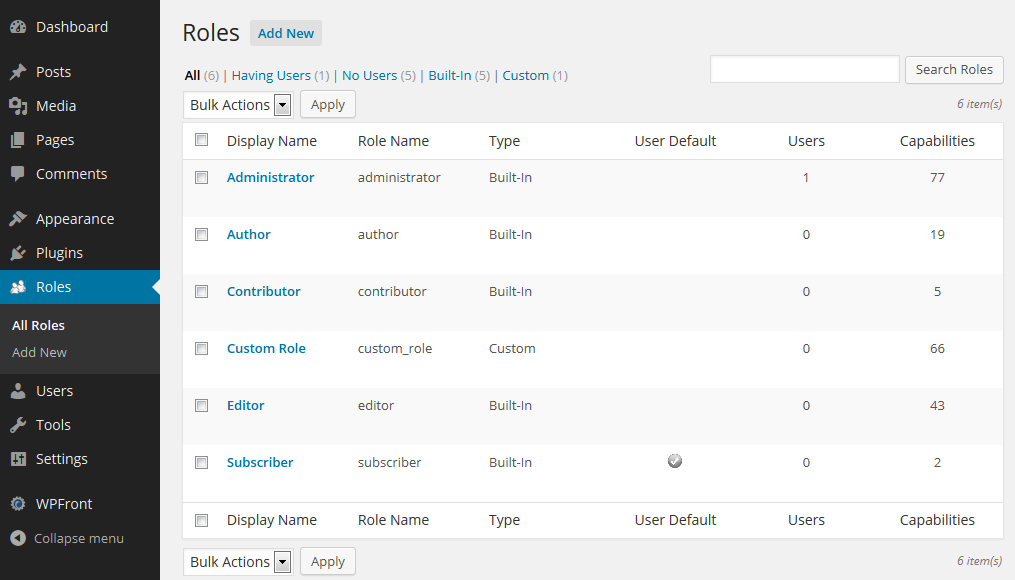
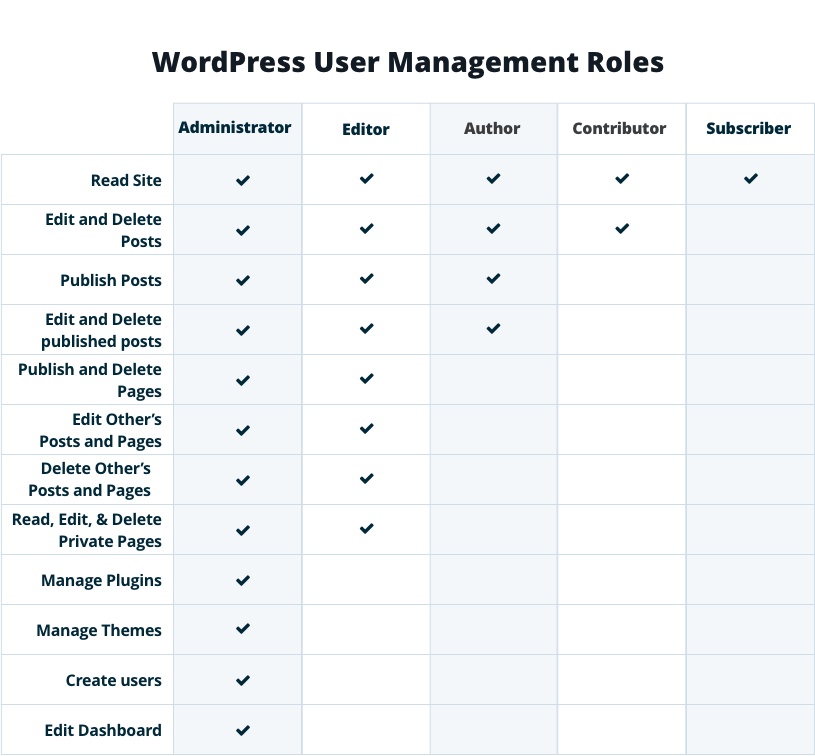
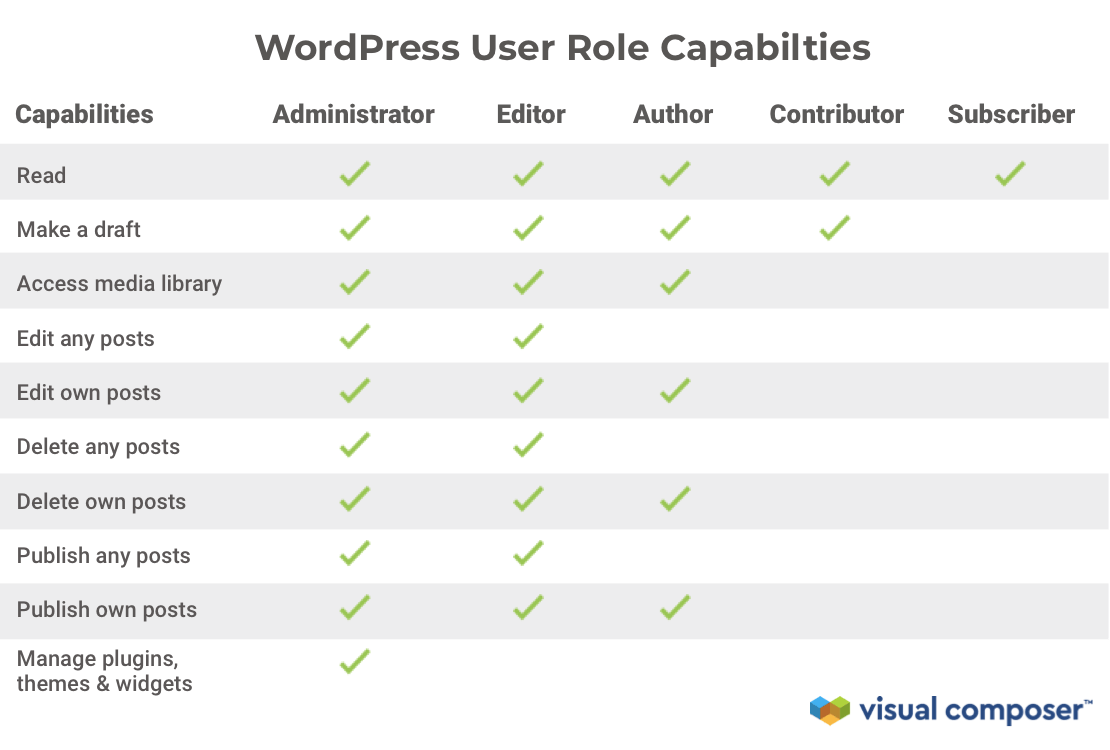
WordPress has different user roles. Each role has its own tasks. Administrator is the top role. They can do everything on the site. Editor can change and manage all posts. They can’t change site settings. Author can write and publish their own posts. They can’t edit others’ posts. Contributor can write posts but need approval to publish. They can’t upload files. Subscriber can only read content. They can’t write or edit posts. Choose roles wisely. Each role has its own power. It helps keep the site safe and tidy.
Credit: wpfront.com
Administrator Role
The administrator role in WordPress provides complete control over the site. It allows users to manage settings, create content, and modify themes. This role ensures seamless site operation, offering extensive permissions to handle all site functions efficiently.
Capabilities And Permissions
The Administrator role has full control over a WordPress site. They can add, edit, and delete posts, pages, and users. They manage themes and plugins. Only one person should have this role. It is the most powerful role. Administrators can change site settings. They can also update the site. They manage user accounts and permissions. They can even delete the site.
Responsibilities And Best Practices
Administrators should keep the site secure. They must update themes and plugins regularly. Backing up the site is important. They ensure content is accurate and engaging. It’s best to limit admin access. Too many admins can cause problems. Admins should follow security practices. They must protect user data. Sharing login info is risky. Only trusted people should be admins. They help keep the site running smoothly.
Editor Role
Editors have strong control over content on a WordPress site. They can edit, delete, and publish posts. This includes posts made by others. They also manage categories and tags to keep content organized. Editors can approve or remove comments from readers. They ensure content is ready for the audience.
Editors work closely with authors and contributors. They help them create better content. Editors give feedback and make changes if needed. They also work with administrators to follow site policies. Good teamwork ensures a smooth running site.
Author Role
Authors can create and publish their own posts. They write stories and articles. They can edit their own posts. No access to others’ posts. Authors add images and links. They manage their content and tags. Authors help make the site interesting.
Authors can’t change site settings. They don’t manage plugins or themes. They need editors for major changes. Authors rely on editors for approval. They can’t delete posts after publishing. Authors depend on admins for technical help.
Contributor Role
Contributors can write and edit their own posts. They cannot publish them. This role is best for those who need to focus on content creation without worrying about publishing rules. Contributors can access the dashboard and write new posts. They can edit their drafts anytime.
After writing, contributors need approval from editors or admins. These roles will review and check the content before publishing. If changes are needed, contributors must edit their draft again. This ensures quality and correctness of the posts. Contributors must wait until their post is approved. Only editors or admins can make it live.
Credit: wpengine.com
Subscriber Role
Subscribers have limited access to the website. They can only manage their own profile. This means they can update their email and password. They can also change their display name. Subscribers cannot edit or publish posts. They have no control over site settings. This role is simple and secure.
Subscribers can engage with content in various ways. They can leave comments on posts. This helps them connect with the community. They can also like posts they enjoy. Sharing articles is another option for subscribers. They can use social media to share content. This increases interaction and visibility. Subscribers can also receive newsletters. This keeps them updated on new content. It’s a great way to stay involved.
Custom User Roles
Admins can make new roles in WordPress. Each role has special powers. Users can have different jobs. Custom roles give unique tasks. This helps manage sites better. Creating roles is easy. Admins use plugins or code. They set permissions and tasks.
Schools use custom roles for teachers and students. Shops use them for staff and customers. Custom roles keep sites safe. Only trusted users get special access. This makes sites run smooth. Benefits include better control. Sites stay organized.
Managing User Roles
Assigning the right role helps in managing a website. Each role has different permissions. Admins have the most power. They can change everything. Authors can write and edit their own posts. Editors can change all posts.
Adjusting permissions is easy. Go to the user settings. Click on the user’s name. Choose the role they need. Make sure they have what they need. Not more, not less. This keeps the website safe.
Security Considerations
Role-Based Access Control is a key security feature in WordPress. It ensures each user has specific permissions. Users only access what they need. This reduces the chances of errors and misuse. Administrators have full control, while editors manage content. Authors write posts, and contributors submit drafts. Subscribers can read posts.
Mitigating Risks involves understanding user roles. Assign roles wisely to prevent data breaches. Regularly update passwords and plugins. Limit the number of administrators. Monitor user activity for suspicious actions. Use plugins to enhance security. Always back up your data. Educate users about safe practices.
Credit: visualcomposer.com
Frequently Asked Questions
What Are The Main WordPress User Roles?
WordPress has six main user roles: Administrator, Editor, Author, Contributor, Subscriber, and Super Admin. Each role has specific capabilities, ranging from full site control to limited content interaction. Understanding these roles helps manage user permissions effectively and ensures a secure WordPress environment.
How Does Administrator Role Differ In WordPress?
The Administrator role has the highest access level in WordPress. Administrators can manage site settings, plugins, themes, and user accounts. They have complete control over the website. This role should be assigned carefully to maintain site security and integrity.
What Can An Editor Do In WordPress?
Editors can manage and publish posts from all users. They can also moderate comments and manage categories. However, they cannot change site settings or install plugins. Editors focus on content management, ensuring the site’s content is accurate and engaging.
Can Contributors Upload Media Files In WordPress?
No, Contributors cannot upload media files. They can write and edit their own posts but cannot publish them. Their posts need approval from an Editor or Administrator. This limitation helps maintain content quality and site security.
Conclusion
Understanding WordPress user roles is essential. It helps manage your site efficiently. Each role has unique permissions and responsibilities. Choose roles based on user needs. This ensures smooth site management and security. Admins control everything, while editors focus on content.
Authors and contributors create content, but with different access levels. Subscribers have limited access, usually just to read content. Proper role assignment can prevent unauthorized access. It also streamlines workflow. With this knowledge, managing your WordPress site becomes easier and more effective.
Keep exploring and learning for the best results.


