
Imagine having the power to transform your basic WordPress website into a dynamic, feature-rich platform with just a few clicks. That’s the magic of WordPress plugins.
If you’re new to WordPress or even if you’ve been using it for a while, understanding plugins can significantly enhance your site’s functionality and appeal. Plugins act like little apps for your website, allowing you to add new features, improve security, and optimize performance without needing to write a single line of code.
But with thousands of plugins available, where do you start, and how do you choose the right ones for your needs? You’ll discover what WordPress plugins are, why they are essential for your website, and how they can help you achieve your online goals effortlessly. Don’t miss out on learning how to unlock the true potential of your website!
Credit: www.wpzoom.com
WordPress Plugins Overview
WordPress plugins are small software tools that add features to your website. They can make your site more interactive and useful. Some plugins help with security and keep your site safe from hackers. Others improve website speed and make it load faster.
You can find plugins for almost everything. Want to add a contact form? There’s a plugin. Need a photo gallery? There’s a plugin for that too. Installing plugins is easy and usually takes just a few clicks.
Plugins are important because they help you do more without coding. With the right plugins, your website can become more powerful and efficient. Just remember to update them regularly to keep everything running smoothly.
Importance Of Plugins
Plugins help add new features to a website. They are like little tools. Each plugin can do a different job. Some make websites fast. Some help with security. This makes a website better.
Many plugins are easy. They do not need coding skills. Anyone can use them. Just click to install. They save time and effort.
Plugins can be free or cheap. They give great value. No need to hire experts. This saves money.
SEO plugins help websites rank better. They make websites search-friendly. This helps more people find the website. More visitors can mean more success.
Types Of Plugins
Free plugins are available at no cost. They offer basic features for your website. Many users start with these plugins. They are easy to install and use. Most free plugins have limited support. Updates might be less frequent. But, they are a great way to begin. You can find many options in the WordPress plugin directory.
Premium plugins come with a price tag. They offer advanced features and better support. Updates are more regular. These plugins often have dedicated support teams. They are ideal for businesses needing custom solutions. Investing in premium plugins can enhance your website’s performance and functionality.
Freemium plugins offer a mix of free and paid features. You can use basic features for free. For advanced options, a fee is needed. This model allows you to try before buying. Many users find this approach useful. Freemium plugins often have extensive documentation. This helps users understand and use them better.
How Plugins Work
Plugins are small tools. They add new features to WordPress sites. Think of them like apps for your phone. Each plugin helps your site do something new. Some plugins improve security. Others help with design. Many plugins are free. Some cost money. They are easy to install. Just click a button. No coding needed. Plugins can be found in the WordPress plugin library. This library is big. Many choices for users. It’s important to choose plugins wisely. Too many plugins can slow down a site. Keep your site running fast. Pick only needed plugins. Always check reviews. Read what other users say. Updates are important. Make sure plugins are up-to-date. This keeps your site safe and working well.
Installation Process
The WordPress Plugin Directory is the easiest way to find plugins. Start by logging into your WordPress dashboard. Click on “Plugins” then “Add New“. Use the search box to find the plugin you need. Once you find it, click “Install Now“. After installation, activate the plugin. Activation makes the plugin ready to use. If you change your mind, you can deactivate it later. The directory is vast, offering many free plugins.
Sometimes plugins are downloaded from other websites. You can upload these plugins manually. First, download the plugin file to your computer. Log into your WordPress dashboard. Go to “Plugins” and click “Add New“. Then, click “Upload Plugin“. Choose the file from your computer. Click “Install Now“. After installation, click “Activate“. Uploaded plugins work like those from the directory. Always ensure the plugin is from a trusted source. Safety first.

Credit: webassets.uncg.edu
Popular Plugins
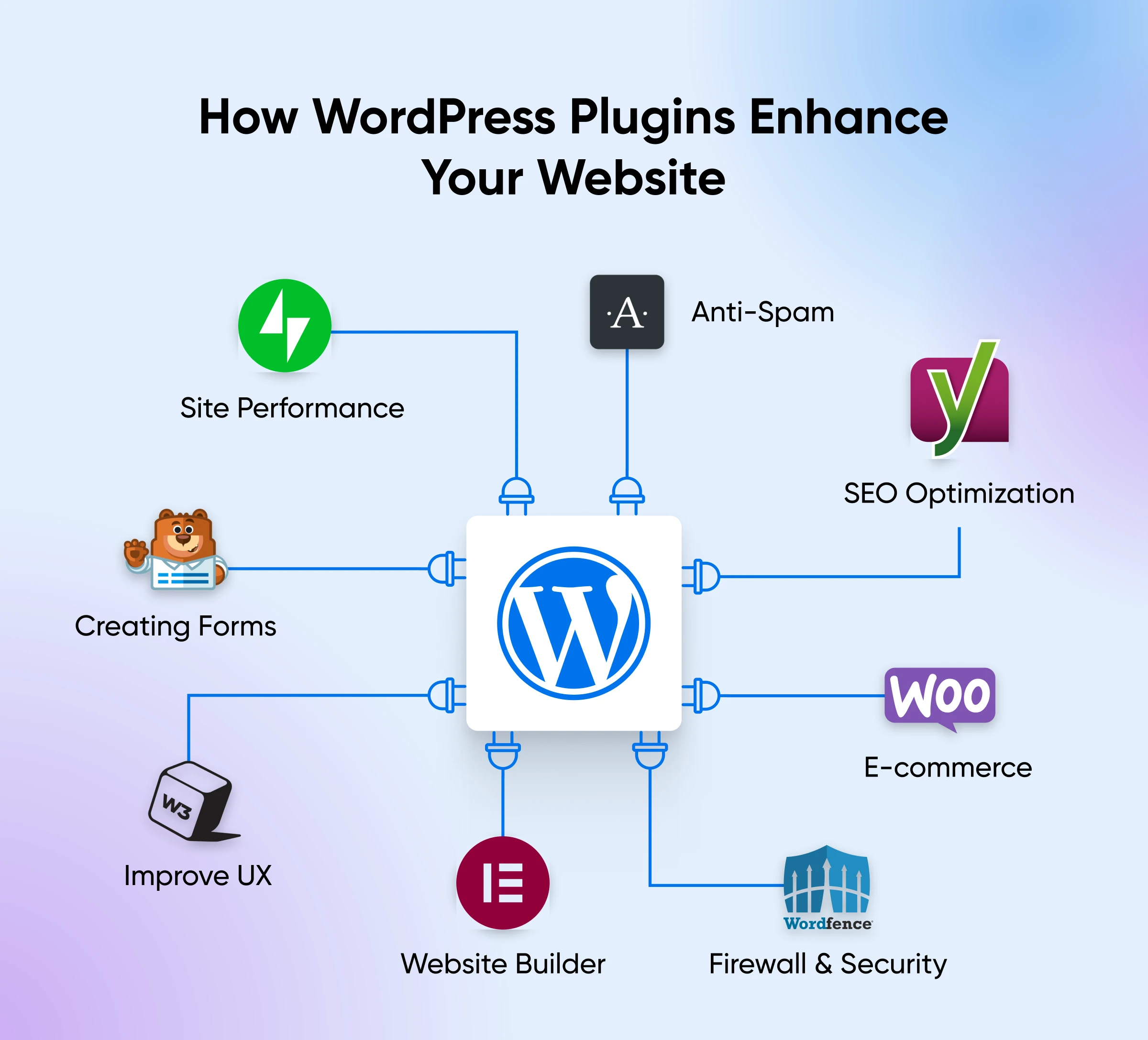
SEO Plugins help websites rank better on search engines. Yoast SEO is a popular choice. It checks your content for readability. It also helps with keyword optimization. All in One SEO is another good option. It offers many features for improving search visibility.
Security Plugins protect your site from hackers and threats. Wordfence is widely used. It offers firewall protection and malware scanning. Sucuri Security provides similar features. It also monitors your site for suspicious activity.
Performance Plugins make your site faster. WP Super Cache speeds up page loading times. It creates static versions of your pages. W3 Total Cache is another option. It improves user experience by reducing load times.
E-commerce Plugins help sell products online. WooCommerce is very popular. It turns your site into an online store. It supports many payment methods. Easy Digital Downloads is great for selling digital goods. It is simple to set up and use.
Evaluating Plugin Quality
Reviews tell the truth about plugins. Users share their experiences. Positive reviews mean plugins work well. Negative reviews mean issues exist. Read many reviews for a clear picture. Reviews help decide if a plugin is good.
Good plugins have strong developer support. Developers fix problems quickly. Support teams answer questions fast. This helps users feel safe using the plugin. Plugins with poor support may cause trouble. Check support options before choosing.
Plugins need regular updates. Updates fix bugs and improve features. A plugin that updates often stays reliable. Old plugins might not work well. Check the update history of a plugin. Frequent updates mean the plugin is cared for.
Credit: www.dreamhost.com
Managing Plugins
Activating and deactivating plugins in WordPress is easy. Go to the plugins section. Find the plugin you want to activate. Click ‘Activate’. The plugin starts working right away. To stop it, click ‘Deactivate’. This does not remove the plugin. It just stops its function. You can activate it again anytime.
Updating and deleting plugins is important. Updates fix bugs and improve features. Check for updates regularly. Go to the plugins section. Click ‘Update’ if available. To delete, first deactivate the plugin. Then click ‘Delete’. This removes it completely. It is good to delete unused plugins. They can slow down your site. Keep your plugins up to date for best performance.
Common Issues And Troubleshooting
Many users face issues with WordPress plugins. Plugins may not always work smoothly. Sometimes, they can cause your website to become slow. This happens if a plugin is not coded well. Another issue is compatibility. Not all plugins work well together. This can lead to problems on your site. Always check for updates. An outdated plugin may not function properly. It can also have security risks.
Errors can occur after a plugin update. This can break your site. It is wise to create a backup before updating. In case of a problem, you can restore your site. You may also see a “white screen of death.” This happens due to plugin conflicts. Deactivate all plugins. Then, activate them one by one to find the faulty one.
Best Practices For Using Plugins
Plugins can be handy tools for your website. They add features without much effort. Always check plugin reviews before installing. Good reviews mean users liked it. Bad reviews can be a warning. Keep plugins updated. Updates fix bugs and improve security. Old plugins may cause problems. Delete plugins you don’t use. They take up space and can slow your site. Use plugins that are popular. They are more reliable. Popular plugins get more support. Avoid using too many plugins. Too many can slow down your site. Try to use only needed plugins. It helps your site run smoother.
Future Of WordPress Plugins
WordPress plugins are tools that help websites work better. They add new features to a site. Developers create plugins for different needs. Security plugins keep sites safe from bad users. SEO plugins help sites appear on search engines. Plugins can make a site faster too.
The future of plugins looks bright. More plugins are being made every day. Artificial Intelligence will be part of new plugins. AI can help websites learn what users want. Mobile plugins will help sites work on phones. E-commerce plugins will make online shopping better.
Updates for plugins are important. They fix problems and add new features. New plugins will need updates often. Old plugins may not work with new WordPress versions. Keeping plugins updated is key for a good site.
Frequently Asked Questions
What Are WordPress Plugins Used For?
WordPress plugins are tools that enhance website functionality. They allow users to add features like contact forms, SEO optimization, and e-commerce capabilities. Plugins simplify complex tasks without coding. They are essential for customizing websites and improving user experience.
How Do I Install A WordPress Plugin?
To install a WordPress plugin, go to your WordPress dashboard. Click on “Plugins” and then “Add New. ” Search for the desired plugin, click “Install Now,” and then activate it. This process is simple and allows you to enhance your site’s functionality quickly.
Are WordPress Plugins Free?
Many WordPress plugins are free and available in the WordPress Plugin Directory. However, some plugins offer premium versions with additional features. These paid versions often provide better support and more advanced functionality. Users can choose based on their budget and website needs.
Can Plugins Slow Down My Website?
Yes, using too many plugins can slow down your website. Each plugin adds code that can increase loading times. To maintain speed, use only necessary plugins and regularly update them. Opt for lightweight and well-coded plugins to minimize performance issues.
Conclusion
WordPress plugins make websites versatile and easy to manage. They offer countless features to enhance your site. From SEO tools to security, plugins cater to various needs. Choosing the right plugins ensures a smooth website experience. Always check reviews and updates before installing.
This helps maintain site performance and security. Exploring plugins can unlock your site’s potential. They are vital for a functional and engaging website. Start with essential plugins that fit your goals. Gradually, expand your collection as your site grows. Remember, too many plugins can slow your site.
Select wisely for the best results.


