
Imagine having a toolbox that could transform your WordPress website into anything you envision. Want to add a contact form, improve your site’s SEO, or even start an online store?
There’s a tool for that, and it’s called a WordPress plugin. These powerful add-ons are like magic wands for your website, offering endless possibilities to enhance functionality and user experience. But with so many options available, where do you start?
You’ll discover what WordPress plugins are and how they can elevate your site to new heights. Whether you’re a seasoned web developer or just starting out, understanding plugins can unlock new potential and save you countless hours of work. Ready to dive in and make the most of your WordPress site? Let’s explore the world of plugins together.
WordPress Plugins Basics
WordPress plugins are tools for websites. They add new features. You can change how your site works. Plugins can be small or big. Some are free; others cost money.
Plugins make websites better. They make them faster or safer. Some plugins help with design. Others help with SEO. You can get plugins for social media. They help connect your site to Facebook or Twitter. Plugins can even help with security. They keep your site safe from hackers. Plugins are like magic tools. They make websites fun and easy.
Credit: www.smashingmagazine.com
How Plugins Work
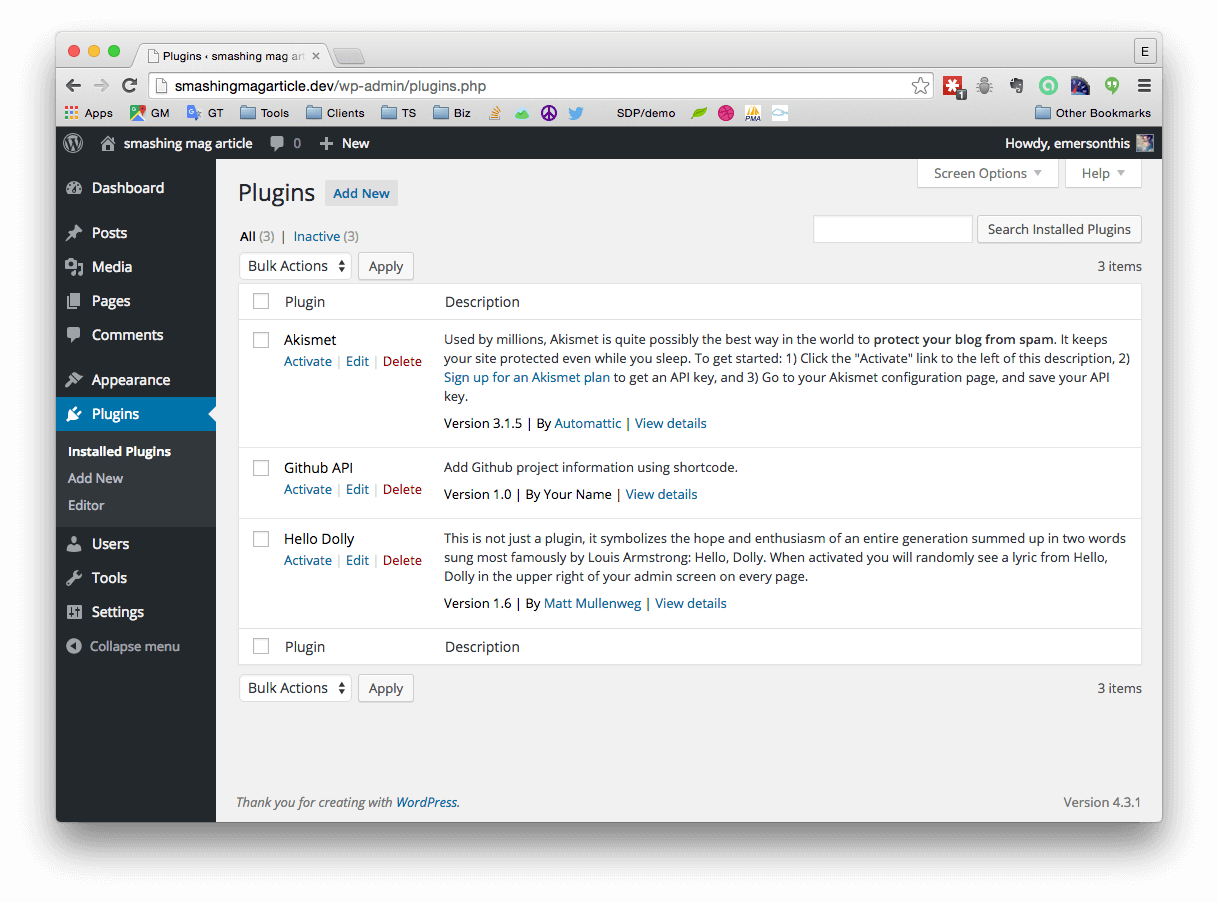
Plugins make your website better. They add new features to your site. First, go to the WordPress dashboard. Click on “Plugins” and then “Add New”. Search for the plugin you want. Click “Install Now”. It is that simple.
After installing, you must activate the plugin. Click “Activate” to turn it on. To stop using it, click “Deactivate”. This process is very easy. It helps keep your site running smoothly. Use only the plugins you need. Too many can slow your site.
Types Of WordPress Plugins
Keeping a site safe is crucial. Security plugins help protect from threats. They block suspicious activities and guard personal data. Some plugins also provide backup options. They ensure data safety during attacks. These plugins are vital for site security.
SEO plugins help improve website visibility. They optimize content for search engines. Users can find your site easily. These plugins offer tools for keyword analysis. They also suggest improvements in writing. This boosts site ranking. SEO plugins are essential for online success.
Online stores need e-commerce plugins. They offer tools for selling products. These plugins manage payment gateways and customer accounts. They also handle shipping and taxes. E-commerce plugins make online selling easy. They are perfect for business growth.
Performance optimization plugins speed up sites. They improve loading times. These plugins compress images and reduce server load. They provide caching solutions too. Fast sites engage users better. Performance plugins are key for user experience.
Design and layout plugins enhance site appearance. They offer customization options. Users can modify themes easily. These plugins include tools for creating menus and widgets. They help in building attractive sites. Design plugins are great for creative expression.
Benefits Of Using Plugins
Plugins offer customization options. You can change the design easily. Add new features with just one click. Make your site look unique. Suit your needs without coding skills. This makes WordPress user-friendly. Choose from thousands of plugins.
Plugins save time and money. No need to hire developers. Install plugins quickly. Many are free or low-cost. Update features as needed. This makes managing a site simple. Get more done in less time. Enjoy a smooth workflow.
Choosing The Right Plugins
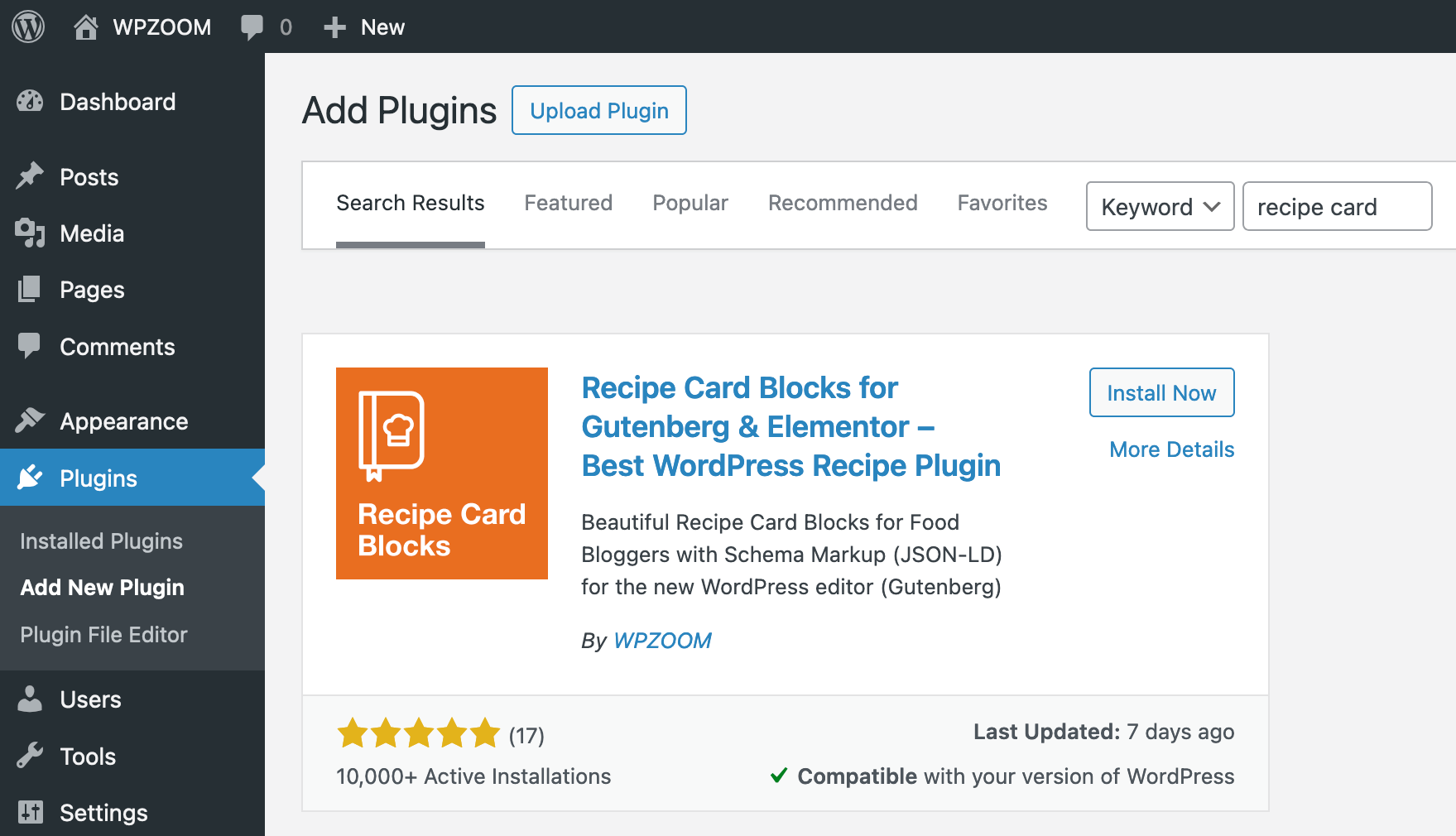
Read reviews before installing a plugin. They can tell you a lot. Good reviews mean the plugin works well. Bad reviews might mean problems. Count how many reviews there are. Many reviews are better. Some users leave detailed comments. Pay attention to these. They share real experiences.
Check compatibility with your WordPress version. This prevents issues. Some plugins need specific versions. Ensure updates are regular. This helps with security. Plugins should work with other plugins. Conflicts can cause errors. Always test after adding new plugins.
Support helps when issues arise. Look for active support. Check forums and support pages. Developers should respond quickly. Quick responses show good support. Some plugins have no support. Avoid these if possible. Good support ensures a smooth experience.
Credit: www.ricksdailytips.com
Managing Plugins Effectively
WordPress plugins are tools that add features to your website. They enhance functionality like SEO, security, and speed. Managing them well ensures your site runs smoothly and efficiently.
Regular Updates
Keeping plugins up to date is very important. Updates fix bugs and improve security. Outdated plugins can make your website vulnerable. Developers often release new features with updates. Always check for updates in your WordPress dashboard. Updating plugins helps keep your site running smoothly and safely.
Monitoring Plugin Performance
Plugins can slow down your website. Check plugin performance regularly. Use tools to monitor site speed. Slow sites can frustrate visitors. Identify plugins that use too much memory. Consider alternatives if a plugin slows your site. Fast websites are better for users and search engines.
Removing Unused Plugins
Too many plugins can clutter your website. Unused plugins take up space and can slow your site. Always remove plugins you don’t need. This keeps your website clean and fast. Unused plugins can also pose security risks. Keeping only necessary plugins is a good practice.
Popular WordPress Plugins
WordPress plugins help your site do more. They add new features easily. Yoast SEO is popular for making your site found on Google. WooCommerce turns your site into a store. Elementor helps design pages with simple drag-and-drop. Akismet blocks unwanted comments and spam. Jetpack offers security and backup options.
Most plugins have user ratings. This helps you pick the best ones. Higher ratings mean users like them. Yoast SEO and WooCommerce have high ratings. Users find them helpful. Always check reviews before adding a plugin. This ensures it fits your needs and works well.
Future Of WordPress Plugins
WordPress plugins are tools that add specific features to a website. They enhance functionality, making it user-friendly. From SEO optimization to social media integration, plugins cater to diverse needs. The future promises more advanced, efficient plugins, further simplifying website management for users.
Emerging Trends
WordPress plugins change often. New features are added all the time. Security is better now. Updates happen more often. Mobile-friendly plugins grow popular. People use phones more for websites. Easy-to-use plugins are in demand. Everyone likes simple tools. AI plugins gain interest. AI helps make websites smarter. SEO plugins are important too. Websites need to rank well on search engines.
Innovations In Plugin Development
Plugin makers try new things. They focus on speed. Fast plugins make sites load quickly. Customizable plugins are a hit. Users change settings to fit needs. Integration with other tools is crucial. Plugins work with social media and email services. Accessibility is improved. Plugins help all users interact with sites. User feedback guides changes. Developers listen to users’ needs.
Credit: www.wpzoom.com
Frequently Asked Questions
What Are WordPress Plugins?
WordPress plugins are add-ons that enhance website functionality. They offer features like SEO optimization, security, and e-commerce capabilities. Plugins can be easily installed and customized. They cater to specific needs without requiring coding skills, making them essential tools for WordPress users looking to improve their site’s performance and user experience.
How Do Plugins Improve WordPress Sites?
Plugins enhance WordPress sites by adding features and functionality. They improve site performance, SEO, and security. Users can customize plugins to meet specific needs. They offer solutions for e-commerce, social media integration, and more. Plugins make site management easier and more efficient, contributing to a better user experience.
Are WordPress Plugins Free?
Many WordPress plugins are free and offer basic features. Some premium plugins require payment for advanced functionalities. Free plugins can be found in the WordPress Plugin Directory. They provide essential features without cost. Premium plugins often offer enhanced options and support, catering to specific needs and professional requirements.
How Do I Install WordPress Plugins?
To install WordPress plugins, navigate to the admin dashboard. Click on “Plugins” then “Add New”. Search for desired plugins and click “Install”. After installation, activate the plugin to use its features. Installation is simple and requires no coding skills, making it accessible to all WordPress users.
Conclusion
WordPress plugins offer endless possibilities for your website. They enhance functionality, making your site more user-friendly and efficient. From SEO tools to security features, plugins cover it all. They simplify complex tasks, saving time and effort. Choose plugins wisely to match your needs.
Quality matters more than quantity. Keep your site updated and secure. Regularly review and update your plugins. This ensures optimal performance and compatibility. Explore the vast plugin library. Tailor your website to suit your goals. Embrace the power of plugins for a better online presence.
Start small, grow smart.


