
Have you ever scrolled through your WordPress media library and stumbled upon images labeled as “unattached”? You’re not alone.
These unattached images can be puzzling, leaving you wondering if they’re serving any purpose or just cluttering up your website. Understanding what unattached images are and how they impact your site is crucial for maintaining a clean and efficient WordPress environment.
By diving into the world of unattached images, you can learn how to optimize your media library, improve site speed, and ensure that your website is running smoothly. This knowledge not only empowers you to keep your site organized but also enhances the user experience for your visitors. Stay with us as we unravel the mystery of unattached images in WordPress and guide you towards a more streamlined digital presence.

Credit: webtrainingwheels.com
Understanding Unattached Images
Unattached images are images in WordPress not linked to any posts or pages. They stay in the media library without a specific use. This can happen after removing a post or page. Such images take up space in the media library. Finding them and deciding their use is important. They may be reused or deleted to save space. Some users find it confusing. They might wonder why these images exist. It is helpful to regularly check the media library. This ensures efficient use of storage.
Credit: www.wpoven.com
Identifying Unattached Images
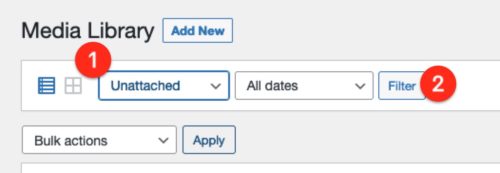
Unattached images in WordPress are not linked to any post or page. They sit in the media library without a home. These images take up space but do not serve a purpose. Finding these images is important to keep your site clean. Check your media library regularly. You can use the filter option for this task.
Look for images labeled as “unattached.” Use plugins to help manage these files. Some tools offer easy ways to locate and delete them. Keeping your media library organized is key. It helps your site run smoothly.
Always be careful when deleting files. Ensure they are truly unused. Mistakes can happen, but backups are your friend. Regular maintenance is important for a healthy website.
Causes Of Unattached Images
Pictures get uploaded to the media library. Yet, they don’t get added to posts. This leaves them unattached. Users forget to insert these images. They upload first but skip the next step. This is common. Files remain in the library. But they don’t link to any post. This can happen often. It’s easy to miss.
Images are sometimes removed from posts. The post loses the attachment. The image stays in the media library. But it’s no longer in the post. This creates unattached images. Users remove images, but forget about attachments. The media library still holds the image. It’s there but not linked to any content. This leads to unattached images.
Impact On Website Performance
Unused images take up precious storage space. Websites need space for many things. Unattached images fill this space. Websites might run out of room. This can slow them down. Slow websites make visitors unhappy. Space is important for website speed. Clean up images to save space. Always check for extra images. Save only what you need. Remove unnecessary files. This keeps your site fast.
Extra images create clutter in the database. Clutter can cause confusion. It makes it hard to find things. A clean database helps a website run smoothly. Clutter slows down searches and updates. Organizing images reduces clutter. Regular clean-ups are important. This keeps the database tidy. Unattached images might be forgotten. Remove these to help the database. Better organization leads to better performance.
Managing Unattached Images
Media Library helps find unattached images. These images are not linked to any post. To view them, go to your library. Use filters to spot unattached files. You can attach them to posts or pages. This keeps your site neat and organized. Regular checks are essential. They help in managing space and content.
Plugins are tools that aid in image control. They offer ways to handle unattached files. Popular plugins include WP-Optimize and Media Cleaner. These plugins streamline the process. They identify unused images swiftly. Plugins save time for users. They ensure your site runs smoothly. Efficient management is key. It boosts site performance.
Best Practices
Unattached images take up space. They can slow down your website. Regular cleaning helps keep things neat. Use tools to find these images. Delete what you do not need. Clean-up should be part of your routine. Weekly or monthly checks are helpful. It keeps your site fast and tidy. Always back up before deleting. This way, you can restore if needed.
Organize your images from the start. Use folders to sort them. Name files clearly. This makes finding them easy. Upload only what you need. It keeps your media library clean. Plan your uploads. This saves time later. Avoid clutter. An organized process makes managing images simple. It helps you stay on top of things.
Credit: webtrainingwheels.com
Frequently Asked Questions
What Are Unattached Images In WordPress?
Unattached images in WordPress are media files not linked to any posts or pages. They are stored in the Media Library but lack an association with content. Managing these images helps maintain a clean and organized library, improving site performance and usability.
How To Find Unattached Images In WordPress?
To find unattached images, navigate to the Media Library in your WordPress dashboard. Use the filter option to select “Unattached. ” This will display all images not linked to any posts or pages, allowing you to manage them effectively.
Why Manage Unattached Images In WordPress?
Managing unattached images is crucial for optimizing website performance and storage. Unused images can clutter your Media Library, making it difficult to find relevant files. By organizing and deleting unattached images, you improve site efficiency and user experience.
Can Unattached Images Affect Website Speed?
Yes, unattached images can affect website speed. They occupy server space and can slow down media management processes. Regularly reviewing and deleting unnecessary unattached images can help maintain optimal site speed and performance, enhancing user experience.
Conclusion
Unattached images in WordPress can clutter your media library. They take up space but don’t add value to your content. Regularly check your library for these images. Delete or attach them to relevant posts. This keeps your site organized and efficient.
Clean media libraries make finding images easier. Plus, it enhances your website’s performance. Better organization leads to faster loading times. Visitors enjoy a smoother browsing experience. Keep your WordPress site tidy. It boosts overall functionality and user satisfaction. Remember, a well-maintained site is key to success.


