
Have you ever wondered how bloggers and website owners connect with each other and share their content across the vast landscape of the internet? If you’re diving into the world of WordPress, you might have come across the term “trackback.”
It sounds technical, but understanding it can unlock new possibilities for your website’s growth and visibility. Imagine being able to notify another blogger or website owner that you’ve mentioned their content, and in return, potentially driving new visitors to your site.
Intrigued? Keep reading to discover how trackbacks work in WordPress and how they can become a powerful tool in your blogging arsenal.
Trackback Basics
Trackbacks in WordPress allow bloggers to notify each other about related content. They create a link between different blog posts. This helps in building connections and sharing audiences across different sites.
Definition Of Trackbacks
Trackbacks are a way to notify authors when someone links to their post. They help create connections between different blogs. Bloggers use trackbacks to show appreciation or add more information. Think of them like digital handshakes.
Purpose And Functionality
Trackbacks serve two main purposes. First, they alert authors about new links. This helps in building communities. Second, they allow readers to follow discussions across blogs. Readers can see all viewpoints on a topic.
To send a trackback, bloggers copy a special link. This link is found in the post they want to reference. They paste it in their own post. WordPress then sends a ping to the original post. This ping informs the author about the new link.
How Trackbacks Work
Trackbacks are like sending a note to another blog. They tell the other blog you have linked to them. This is a way to connect with other writers. It’s like saying, “Hey, I mentioned you!”
You need to copy a special URL from the other blog. Paste it in your post. Then, send it to let them know. This helps build a network of blogs. It can also bring more readers to your site.
When you receive a trackback, it means another blog linked to you. This shows people like your content. It’s a nice way to see who reads your blog.
You can check these trackbacks in your WordPress dashboard. They appear like comments. Make sure to check them often. They help in knowing your blog’s reach. It’s a friendly way to connect with other bloggers.
Trackbacks Vs. Pingbacks
Trackbacks are manual. Pingbacks are automatic. Trackbacks need approval. Pingbacks don’t. Trackbacks show a summary. Pingbacks show only a link. Trackbacks need more work. Pingbacks are easier. Trackbacks are older. Pingbacks are newer.
Trackbacks are more customizable. They can be edited. This allows more control. Pingbacks are simple. They need less time. Trackbacks can be spammy. This is a downside. Pingbacks have less spam. But they might be ignored. Trackbacks need manual work. Pingbacks save time. Trackbacks have better content. Pingbacks have less detail.
Setting Up Trackbacks In WordPress
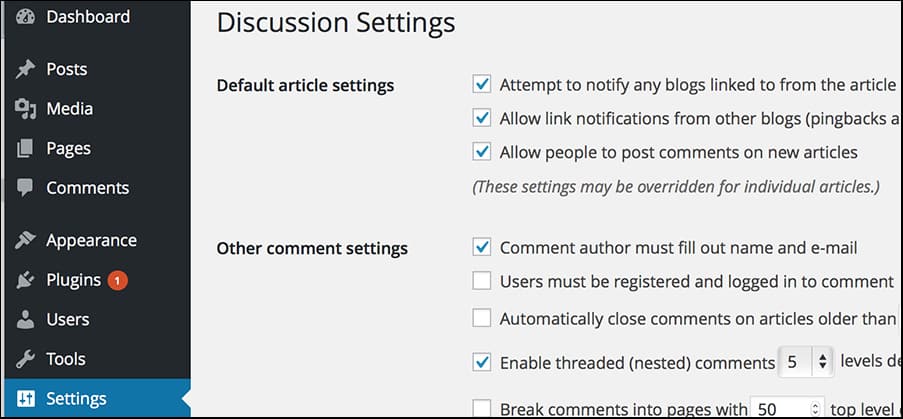
First, go to your WordPress dashboard. Click on Settings, then Discussion. Look for the option that says “Allow link notifications”. Make sure it is checked. This enables trackbacks.
Next, write a new post. In the editor, find the Send Trackbacks section. Enter the URLs you want to notify. These should be related posts or articles.
Sometimes, trackbacks don’t work. One reason could be disabled settings. Ensure all settings are correct. Another issue might be spam filters. Check if trackbacks are marked as spam. This happens often.
If URLs are incorrect, trackbacks fail. Double-check URLs. Use proper formatting. Always test to ensure trackbacks are sent. This prevents future problems.
Benefits Of Using Trackbacks
Trackbacks can make your blog more visible to others. They help share your blog with a wider audience. When someone uses a trackback, it links back to your post. This means more people can find your blog. It’s like getting a free shout-out. More eyes on your content means more readers.
Trackbacks help in making connections with other bloggers. They show that you are part of a bigger community. When you link to others, they may link back. This builds a friendly network of bloggers. Sharing ideas becomes easy. Working together helps everyone grow.
Credit: www.wpbeginner.com
Trackback Challenges
Trackbacks can become a big problem. Many spammers use them. They send fake trackbacks to your site. This clutters your blog with unwanted links. It makes your site look messy and untrustworthy.
Moderation is key. Trackbacks need checking before showing them. This can be time-consuming. But it helps keep your blog clean.
Use tools and plugins to manage trackbacks. These tools filter out bad ones. Always set up manual approval for trackbacks. This way, only good ones get through.
Be cautious with unknown sources. Trustworthy sources should be your priority. This keeps your blog safe and tidy.
Alternatives To Trackbacks
Modern commenting systems make talking on blogs easy. These systems help people share their thoughts. They keep track of all the comments. Some popular systems include Disqus and Jetpack. They let users log in with email or social accounts. This makes commenting quick and simple.
These systems help keep spam away. They also make sure only real comments show up. Users can reply to each other’s comments. They can also like or dislike them. This makes the conversation more fun and engaging.
Social media integration connects blogs with platforms like Facebook and Twitter. This allows readers to comment using their social accounts. It also lets them share blog posts with friends. This helps the blog reach more people.
Bloggers can see how many times their posts are shared. This gives them an idea of the content’s popularity. Social media tools make it easy for readers to engage. They feel more connected to the content.

Credit: www.elegantthemes.com
Future Of Trackbacks
Trackbacks are links from one blog to another. They help bloggers connect. Many use trackbacks to share ideas. Trackbacks improve blog visibility. They bring more readers to a blog. Bloggers use them to build relationships. More blogs are using trackbacks today.
Trackbacks might get smarter soon. They could suggest related posts. Blogs might auto-share updates using trackbacks. Security will improve for trackbacks. They might block spam better. Bloggers might use trackbacks more in the future. This could help blogs grow faster. Technology will make trackbacks easier to use.
Credit: www.greengeeks.com
Frequently Asked Questions
What Is A Trackback In WordPress?
A Trackback in WordPress is a notification system for bloggers. It alerts another blog when you reference their content. This creates a link back, encouraging reciprocal traffic. Trackbacks are useful for building connections and expanding your blog’s reach. They foster community and increase visibility in the blogging world.
How Do Trackbacks Differ From Pingbacks?
Trackbacks and Pingbacks both notify other blogs of references. However, Trackbacks require manual approval, while Pingbacks are automatic. Trackbacks contain a short excerpt of your post, while Pingbacks simply provide a link. Both are tools for building blogging networks, but Pingbacks offer more automation.
Are Trackbacks Still Relevant Today?
Trackbacks have decreased in popularity due to spam issues. Many bloggers now prefer Pingbacks or social media sharing. However, Trackbacks can still be useful for niche communities. They foster engagement and connections if used responsibly. Evaluate your blog’s needs to decide if they’re relevant for you.
How Can I Enable Trackbacks On WordPress?
To enable Trackbacks, go to WordPress Dashboard and select Settings. Under Discussion, check “Allow link notifications from other blogs. ” Save changes to enable Trackbacks for your posts. Remember, enabling Trackbacks can increase spam, so monitor them regularly. Use plugins for better spam management.
Conclusion
Trackbacks can boost your blog’s connectivity. They create links between content. This helps readers explore related posts. They also enhance your site’s visibility. More connections mean better SEO rankings. Remember, trackbacks need moderation. Avoid spam and irrelevant links. Keep your blog clean and trustworthy.
Understanding trackbacks improves your blogging experience. It’s a simple tool with big benefits. Use them wisely for engaging content. Encourage interaction and build a strong network. Embrace trackbacks for a thriving WordPress blog. Your audience will appreciate the effort. Stay connected and grow your community today.


