
Have you ever found yourself lost in the chaos of comment sections on your WordPress site, struggling to follow conversations? If so, you’re not alone.
Navigating through a sea of scattered replies can be frustrating and time-consuming. But what if there was a way to bring order and clarity to these discussions? Welcome to the world of thread comments in WordPress, where meaningful interactions unfold seamlessly.
Imagine transforming your comment section into a vibrant, engaging space where users can easily follow conversations and add their voices. With thread comments, you can achieve just that. They offer a structured and organized way to manage discussions, allowing replies to be nested under the original comment. This not only enhances user experience but also encourages more interaction and engagement. You’ll discover the ins and outs of thread comments on WordPress. You’ll learn how they can improve communication on your site, and why implementing them can be a game changer. Whether you’re a seasoned WordPress user or a beginner, understanding thread comments can elevate your site’s comment section, making it more dynamic and user-friendly. Dive in to find out how you can turn your comment chaos into a coherent conversation hub!
Thread Comments Explained
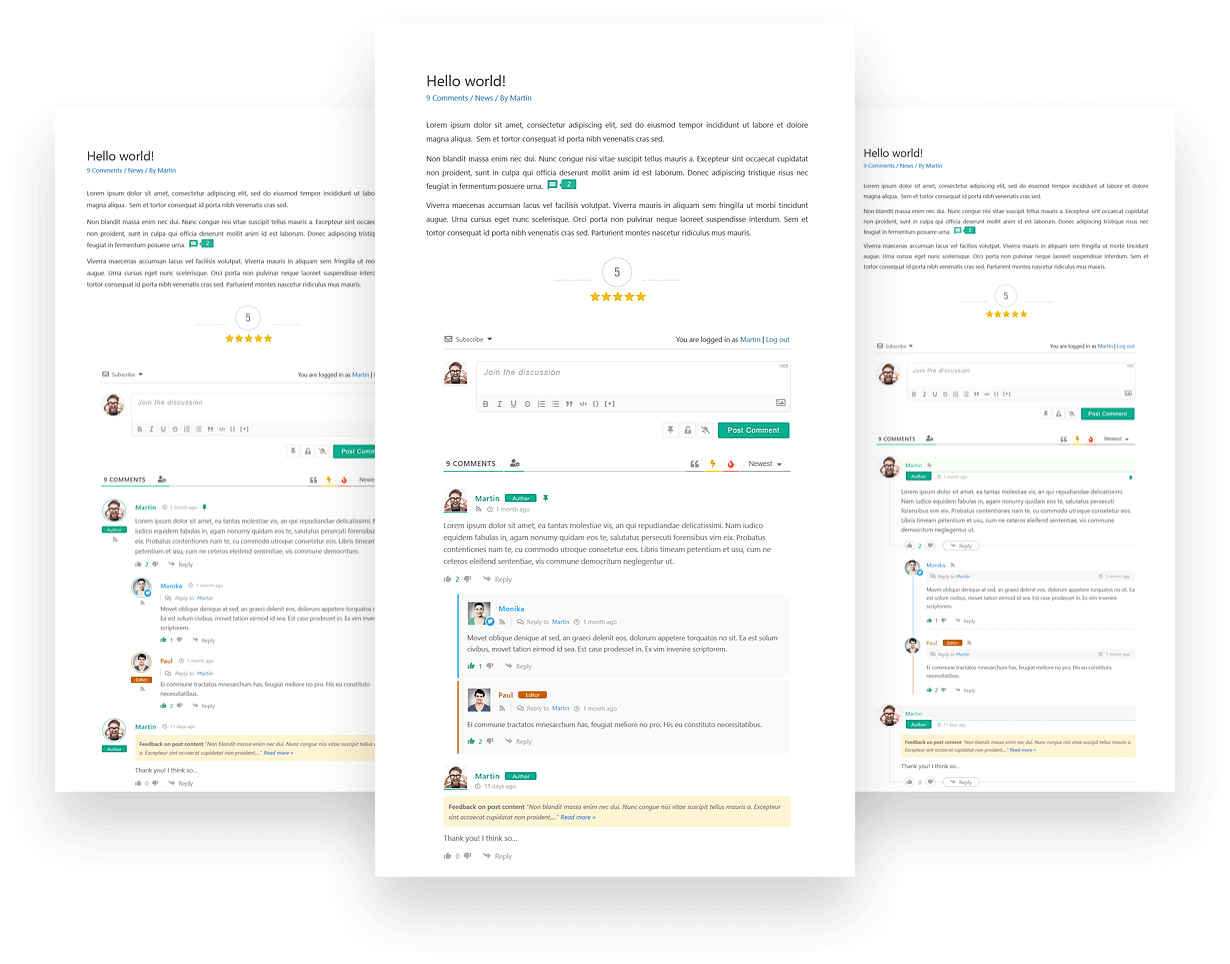
Thread comments help make conversations easy to follow. They allow replies to specific comments. This creates a clear flow of discussion. Users can reply directly to each other. This makes discussions neat and organized. It helps when many people join the chat. Each reply stays connected to the original comment. This keeps the conversation in order.
In WordPress, enabling thread comments is simple. Go to settings. Find the discussion section. Check the box for threaded comments. You can choose how many levels deep the comments can go. This lets you control the conversation’s depth. Thread comments make blogs interactive. Readers can engage more easily.
Benefits Of Thread Comments
Thread comments help people talk in an orderly way. Each comment connects to another. This makes it easy to follow. Readers can join conversations. This keeps the discussion lively.
Comments stay linked. This makes them easy to read. People can see who replied to whom. It feels like a real chat. This helps everyone understand the topic better.
People feel more involved. They share more thoughts. This builds a strong community spirit. Everyone learns from each other. It is fun to be part of.
How To Enable Thread Comments
Thread comments help keep conversations organized. First, go to your WordPress dashboard. Click on “Settings”. Then choose “Discussion”. Look for the “Enable threaded (nested) comments” option. You can select how many levels deep you want. This helps you manage long comment threads. Don’t forget to save the changes.
Not all themes support thread comments. Check if your theme allows it. Go to the theme’s settings or support page. Look for any notes on compatibility. If your theme does not support it, consider changing themes. Or ask a developer for help. Having a compatible theme enhances user interaction.
Customizing Thread Comments
Threaded comments can make your site look neat. They help in organizing discussions. Customize them to fit your site’s style. Use CSS to change fonts and colors. Make each level of comments look unique. You can make comments stand out with borders or background colors. This helps in making discussions clear and easy to follow.
Adding padding or margins can give space between comments. This makes reading easier. Always keep your design simple. This ensures users can read without effort. Remember, a clean look helps users engage more.
Nesting levels decide how deep comments can go. More levels mean deeper conversations. But too many levels can make reading hard. Set a limit to keep it simple. A good number is 3-5 levels. This keeps things organized.
You can change this in your WordPress settings. Choose a number that fits your site’s needs. Adjust as needed. Make sure users can follow discussions easily.
Best Practices For Thread Comments
Thread comments help readers talk to each other. They make the blog more fun. To get more people talking, ask questions. Questions make readers think. Readers love to share their ideas. Always reply to comments. It shows you care. Readers feel happy when you answer. Use simple words in your comments. Everyone can understand them. This keeps the conversation going. Make sure your blog is friendly. People will come back to talk more.
Keep comments clean and safe. Always check them before they show up. This stops bad words from appearing. Set rules for comments. Tell readers what is okay. Remove any mean or rude comments. This keeps the space friendly. Use a tool to help you. Many tools can watch comments for you. They make your work easy. Always thank readers for their comments. This makes them feel special.
Credit: wpdiscuz.com
Common Issues And Solutions
Thread comments might not show correctly. This can confuse readers. First, check your theme settings. Some themes hide comments by default. Enable them in the settings. Next, ensure your plugins are updated. Old plugins can cause display issues. If problems persist, switch to a basic theme. This can help identify if the theme is the issue. Another tip: clear your browser cache. Sometimes, old data causes problems.
Spam comments can flood your blog. They are annoying and can confuse readers. Use a spam filter plugin like Akismet. This helps block unwanted comments. You should also moderate comments manually. This means checking and approving each one. Another tip is to disable comments on old posts. Spammers target these posts often. Lastly, add a CAPTCHA to your comment section. This stops bots from posting spam.
Popular Plugins For Comment Management
WordPress has many plugins for comment management. Some are very popular. Disqus is a favorite. It helps manage comments easily. Jetpack offers great features too. It keeps spam away. wpDiscuz makes comments interactive. It is simple to use.
Good plugins have certain features. Spam protection is vital. It keeps comments clean. Easy setup saves time. Look for plugins with customization options. They allow you to change the look. Also, consider mobile-friendly plugins. Many people use phones to comment.

Credit: xftowp.com

Credit: izooto.com
Frequently Asked Questions
What Are Thread Comments In WordPress?
Thread comments in WordPress allow nested conversations. Users can reply directly under a specific comment. This helps organize discussions and makes them easier to follow. It enhances user engagement and encourages more interactive dialogue on your blog posts. Thread comments are a valuable feature for community building.
How Do Thread Comments Improve User Experience?
Thread comments improve user experience by organizing discussions clearly. They allow users to follow conversations logically and respond directly. This creates a more engaging and interactive environment. Users feel more connected and involved in discussions, enhancing the overall community experience on your WordPress site.
Can I Customize Thread Comments In WordPress?
Yes, you can customize thread comments in WordPress. Themes often offer settings to adjust appearance and functionality. You can control nesting levels and visual styles. Plugins also provide additional customization options. This flexibility helps tailor thread comments to your specific needs and enhances user interaction.
How To Enable Thread Comments On WordPress?
To enable thread comments, go to the WordPress admin dashboard. Navigate to Settings > Discussion. Check the box for “Enable threaded (nested) comments” and choose the depth level. Save changes to activate this feature. This allows visitors to engage in organized discussions on your blog posts.
Conclusion
Thread comments enhance conversations on your WordPress site. They keep discussions organized. Readers can follow topics easily. This feature boosts engagement and interaction. It creates a lively community feel. Users enjoy sharing their thoughts. Thread comments make it easy to reply directly.
This keeps conversations relevant and focused. You maintain control over discussions. Ensure your settings are right. Proper use can enhance visitor experience. This leads to longer site visits. Consider enabling this feature for better interaction. Your WordPress site can become more dynamic.
Give it a try to see the benefits.


