
Are you ready to share your thoughts, expertise, or passion with the world? Creating a blog in WordPress is your ticket to reaching a global audience and making your voice heard.
Whether you’re dreaming of becoming a thought leader, building a personal brand, or simply sharing your hobbies, WordPress offers the perfect platform to get started. But where do you begin? The process might seem daunting, but with the right steps, you can have your blog up and running in no time.
Imagine your ideas flowing seamlessly onto a beautiful, user-friendly site that attracts readers and keeps them coming back for more. Curious about how to make this happen? Stick around as we walk you through the essential steps to create a successful blog in WordPress, and discover how easy it is to turn your blogging dreams into reality.
Choosing The Right Hosting
Selecting a good host is vital for your blog. Hosting is where your blog lives online. A reliable host keeps your blog safe and fast. Many hosts offer different plans. Look for ones with good support and uptime guarantees.
Shared hosting is usually the cheapest. It is good for new blogs. VPS hosting is more powerful but costs more. Check what you need before choosing. Some hosts offer one-click WordPress install. This makes setting up easier. Always read reviews and ask friends for advice. A good host makes blogging smooth and fun.
Credit: www.elegantthemes.com
Registering A Domain Name
A domain name is your blog’s address on the web. Choose a name that is easy to remember. It should also relate to your blog’s topic. Many platforms offer domain name registration. Websites like GoDaddy and Namecheap are popular choices. Prices can vary based on the domain type. Common domains like .com or .net are often more expensive. It’s a good idea to check for special offers. Some providers offer free domain registration with hosting plans. This can save you money. Make sure your chosen name is available. Use search tools on registration sites. This ensures your name isn’t already taken.
Installing WordPress
Start by choosing a web hosting provider. This is where your blog will live. Look for one that supports WordPress. Visit their website and sign up. Follow their instructions to set up your account. You will need a domain name. This is your blog’s address on the internet. Most hosting providers let you buy one. After setting up hosting and domain, find the WordPress installer in your hosting account. Click on it and begin the installation. The installer will guide you through the process. Make sure to take note of your username and password. You will need these to log into your blog. Once WordPress is installed, log in to your blog’s dashboard.
Selecting A Theme
Choosing the right theme is crucial in WordPress blog creation. It sets the tone and look of your site. Themes should reflect your blog’s purpose and be easy to navigate for readers.
Free Vs Paid Themes
Choosing a theme is important. Free themes are easy to find. They cost nothing. Some free themes have limited features. Paid themes offer more. They have better support. Paid themes often look nicer. Free themes are good for beginners. Paid themes can be better for professionals. Think about what you need. Free themes might be enough. Paid themes can give extra benefits. Choose wisely based on your needs. Free themes save money. Paid themes might save time.
Customizing Themes
Themes can be changed. Customizing makes your blog special. You can change colors. You can change fonts. Pictures can be added. Change the layout to fit your style. Make the blog look how you want. Customizing is fun. It shows your personality. Many themes allow easy changes. Some changes need coding. Simple changes are often easy. Changing themes can make them unique. Remember, customization helps your blog stand out.
Configuring Essential Plugins
SEO Plugins help your blog rank better in search engines. Yoast SEO is popular. It guides you on keyword use. It also checks readability. Another choice is All in One SEO Pack. It is user-friendly. Both plugins improve your blog’s visibility.
Security Plugins keep your blog safe from hackers. Wordfence Security is strong. It offers firewall protection. It scans for malware. Sucuri Security is another good choice. It tracks changes in your files. Both plugins protect your data.
Performance Plugins make your blog fast. WP Super Cache speeds up page loading. It stores pages as static files. W3 Total Cache is also useful. It reduces load times. Fast blogs keep readers happy.

Credit: wordpress.org
Creating Core Pages
Crafting core pages for a blog in WordPress involves choosing a theme, adding essential plugins, and creating content. Customize settings to suit your style and ensure the blog is mobile-friendly. Lastly, regularly update your blog to keep it fresh and engaging for readers.
About Page
The About Page tells the world about you. Share your story here. Explain your mission and values. Make it personal and warm. People love reading stories. Use simple words to connect with readers. Keep paragraphs short and clear. Use friendly language. Invite readers to know you better. This page builds trust with visitors. Encourage them to explore more. Make them feel welcome.
Contact Page
The Contact Page helps people reach you. Provide clear information. Include an email address. Add a contact form for easy messages. Share your social media links. Let people know your response time. Keep it simple and straightforward. Make it easy to find. Use a friendly tone. Encourage communication and questions. This page is essential for connection.
Privacy Policy
The Privacy Policy page protects users. Explain what data you collect. Tell them how you use this data. Keep language simple and clear. Assure them their data is safe. Let them know their rights. This page builds trust. Update it regularly. Keep it easy to understand. Help users feel secure. This page is important for legal reasons.
Crafting Engaging Content
Choose a topic you love. Write simple sentences. Make sure the ideas are clear. Use short paragraphs. Readers like easy reading. Start with an interesting fact. Grab their attention. Share personal stories. Make it relatable. Add questions. Make them think. Keep the tone friendly. Avoid big words. Use common words. Check spelling. Always edit before posting.
Add pictures to your post. Make them colorful. Pictures tell a story. Use videos. They explain things fast. Sound clips can be fun. They give a voice. Use charts and graphs. They show numbers well. Keep media relevant. It should match your words. Embed social media posts. They add real stories. Multimedia makes your blog engaging. Readers like variety. They stay longer.
Optimizing For Seo
Starting a blog in WordPress involves several steps. First, select a domain and hosting service. Next, install WordPress and choose a theme. Add essential plugins for functionality. Create engaging content using SEO best practices. Finally, regularly update your blog to keep it fresh and relevant.
Keyword Research
Start by finding the best keywords for your blog. Use tools like Google Keyword Planner. Focus on words people often search. Choose words that match your blog topic. Good keywords help people find your blog. Avoid using too many. This can confuse readers. Keep it simple and clear.
On-page Seo Practices
Use your keywords in the title and headings. This tells search engines what your blog is about. Add keywords in the first 100 words of your blog. This helps improve your blog’s visibility. Use meta tags to describe your content. This is what people see in search results. Keep sentences short. Write in a friendly tone.
Add alt text to images. This helps search engines understand them. Link to other pages in your blog. This keeps readers on your site longer. Use simple words and short sentences. This makes your blog easy to read.
Setting Up Analytics
Analytics help you understand your blog’s performance. Start by creating a Google Analytics account. Visit the Google Analytics website. Click “Start for Free” to begin. Follow the steps to set up your account. You need a Google account to proceed. Once set up, you will get a tracking code. This code is important. It tracks your blog’s visitors.
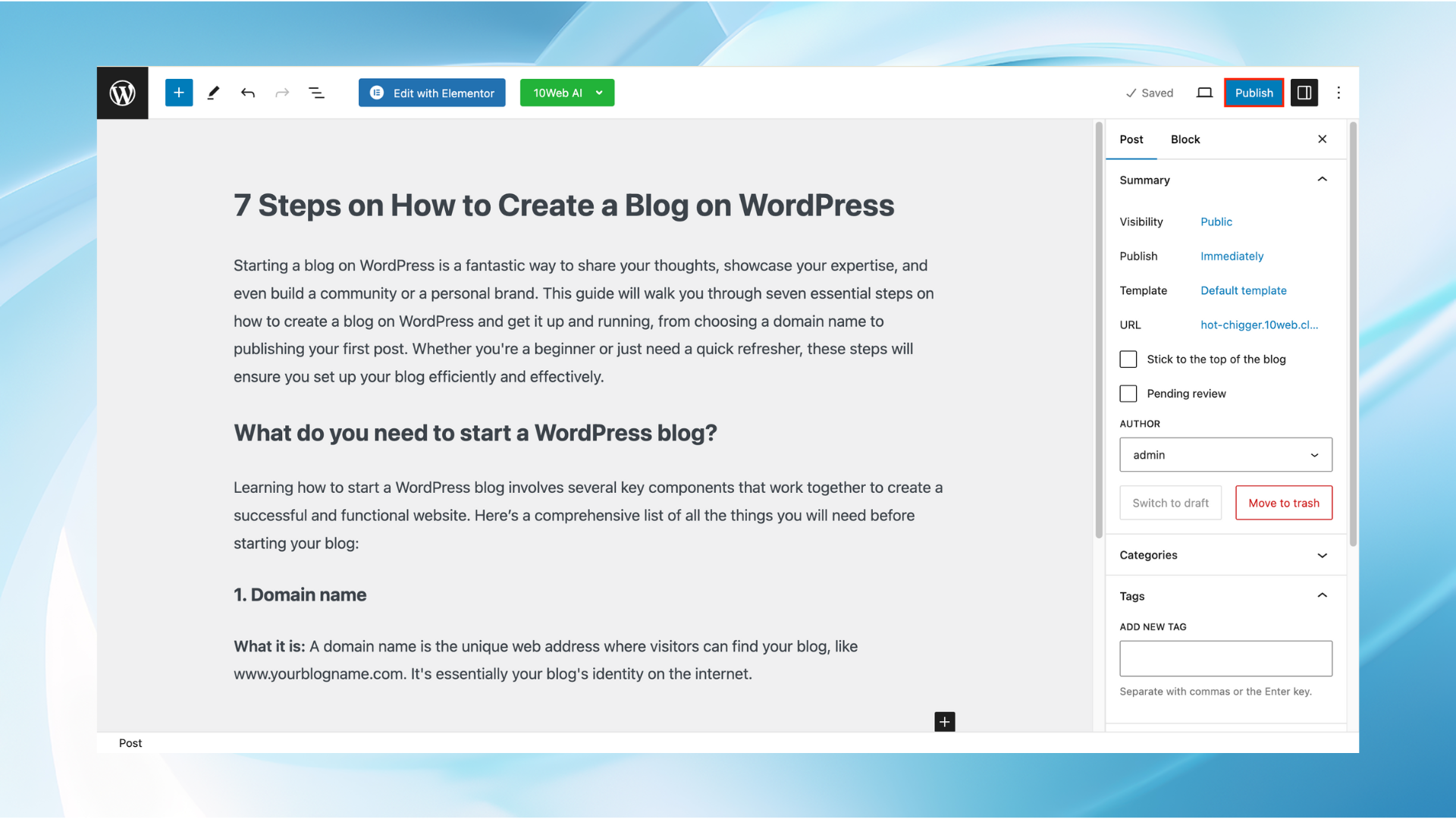
Log in to your WordPress dashboard. Find the “Plugins” section. Click “Add New” to find a plugin. Search for Google Analytics plugins. Choose one you like. Install and activate the plugin. Go to the plugin settings. Enter your tracking code there. Save the changes. Your blog now tracks visitors.
Analytics show how people find your blog. They tell you which posts are popular. Use this data to improve your content. Make your blog better with these insights.
Credit: 10web.io
Promoting Your Blog
Creating a blog on WordPress involves several steps. Start by choosing a domain name and hosting provider. Install WordPress, select a theme, and customize your site. Add essential plugins for functionality and security. Begin crafting quality content to engage your audience and grow your blog.
Social Media Strategies
Share your blog posts on social media. Use Facebook, Twitter, and Instagram. These platforms have many users. Engage with your followers. Ask them questions. Reply to their comments. Create eye-catching posts. Use simple words and clear images. Post regularly to keep your audience interested. Join groups related to your blog topic. Share your blog there. Build connections with other bloggers. They can help spread your content.
Building An Email List
Collect email addresses on your blog. Offer a freebie to visitors. This could be a guide or checklist. Send regular newsletters. Include your latest posts and updates. Make your emails interesting. Use catchy titles. Keep your content short and sweet. Ask readers to share your email with friends. Use a reliable email service provider. They help manage your list. Track your email performance. This shows what readers like.
Frequently Asked Questions
How Do I Start A Blog On WordPress?
To start a blog on WordPress, first, choose a domain name and hosting provider. Install WordPress on your hosting account. Then, select a theme and customize your blog’s appearance. Finally, create and publish your first blog post to begin sharing your content with the world.
What Are The Steps To Install WordPress?
To install WordPress, first, sign up for a hosting plan. Download the latest version of WordPress. Upload the WordPress files to your server. Create a MySQL database and user. Run the WordPress installation script, and follow the on-screen instructions to complete the setup process.
How Do I Choose A WordPress Theme?
To choose a WordPress theme, consider your blog’s niche and target audience. Search for themes in the WordPress theme directory. Look for a responsive design with customizable features. Read reviews and check for regular updates. Preview the theme before activating it on your site.
Can I Customize My WordPress Blog Layout?
Yes, you can customize your WordPress blog layout. Use the WordPress Customizer to change colors, fonts, and layout options. Install plugins for additional customization features. You can also modify your theme’s code if you’re comfortable with HTML, CSS, and PHP.
Always back up your site before making changes.
Conclusion
Creating a blog in WordPress is easier than it seems. Start with choosing a theme that fits your style. Customize it to make your blog unique. Add essential plugins to boost functionality. Write engaging posts that captivate readers. Use keywords for better search engine visibility.
Regular updates keep your blog fresh and relevant. Share your posts on social media to reach more people. Engage with your audience through comments. Stay consistent with your blog schedule. Over time, your WordPress blog will grow. Happy blogging!


